GeForce 9600 GT. Fan speed rises in sleep mode

PeterMinin

New member
Local time
10:34 PM
Messages
22
Location
Moscow
Most time the fan is quiet, but in the Sleep mode it makes much noise. I can tolerate that it makes noise during OS startup, but the Sleep mode is just unusable.
 

My Computer My Computer

At a glance

Windows 7 Professional 64-bitAMD Athlon 7750 Dual-core 2.71 GHz4096 MBnVidia GeForce 9600 GT
Computer Manufacturer/Model Number
Irbis
OS
Windows 7 Professional 64-bit
CPU
AMD Athlon 7750 Dual-core 2.71 GHz
Motherboard
ASRock N68-S
Memory
4096 MB
Graphics Card(s)
nVidia GeForce 9600 GT
Sound Card
Xonar D1
Monitor(s) Displays
Philips 170C
Screen Resolution
1280*1024
Hard Drives
Hitachi 320 GB
Keyboard
Genius
Mouse
A4Tech X6-005D
Internet Speed
4 Mb/s
you can download EVGA precision and control the fanspeed from there. you could also get msi afterburner instead and set up a custom fan profile for when it gets hot.
 

My Computer My Computer

At a glance

windows 7/windows vista 64bitamd 720BE x3 3.6ghzcrucial ddr3 1600mhz 2x2gb ramxfx ati radeon 4870 1gb
Computer Manufacturer/Model Number
home made
OS
windows 7/windows vista 64bit
CPU
amd 720BE x3 3.6ghz
Motherboard
gigabyte ud3p am3
Memory
crucial ddr3 1600mhz 2x2gb ram
Graphics Card(s)
xfx ati radeon 4870 1gb
Monitor(s) Displays
asus 21.5inch 1920X1080
Hard Drives
western digital blue 500gb
western digital scorpio 250gb
PSU
corsair 550watt
Case
cooler master cm690
Cooling
xigmatek s1283 on processor
What brand/model 9600GT is it?
 

My Computer My Computer

At a glance

Windows 7 Ultimate x86-64[email protected] 1066MHz FSB6GB DDR3 1066MHz9300M GS 256MB Dedicated (Speed) + Intel4500M...
Computer Manufacturer/Model Number
Sony Vaio Z46GDU
OS
Windows 7 Ultimate x86-64
CPU
[email protected] 1066MHz FSB
Motherboard
Sony branded
Memory
6GB DDR3 1066MHz
Graphics Card(s)
9300M GS 256MB Dedicated (Speed) + Intel4500MHD (Stamina)
Sound Card
Realtek HD Audio
Monitor(s) Displays
13.1' WXGA
Screen Resolution
1600x900
Hard Drives
320GB 7200RPM w/ 16MB cache
Internet Speed
1MB/s
Frostmourne, it's nVidia GeForce 9600 GT, if that's what you asked for :)
mooneyham, I guess all these programs work in Windows, not during it's sleep, and in Windows everything's fine, so I think that's not what I need. Correct me if I'm wrong.
 

My Computer My Computer

At a glance

Windows 7 Professional 64-bitAMD Athlon 7750 Dual-core 2.71 GHz4096 MBnVidia GeForce 9600 GT
Computer Manufacturer/Model Number
Irbis
OS
Windows 7 Professional 64-bit
CPU
AMD Athlon 7750 Dual-core 2.71 GHz
Motherboard
ASRock N68-S
Memory
4096 MB
Graphics Card(s)
nVidia GeForce 9600 GT
Sound Card
Xonar D1
Monitor(s) Displays
Philips 170C
Screen Resolution
1280*1024
Hard Drives
Hitachi 320 GB
Keyboard
Genius
Mouse
A4Tech X6-005D
Internet Speed
4 Mb/s
If you have x86 use Rivatuner to adjust settings and save to a profile, activate the profile before sleep:

RivaTuner
 

My Computer My Computer

At a glance

Windows 7 Ultimate x86-64[email protected] 1066MHz FSB6GB DDR3 1066MHz9300M GS 256MB Dedicated (Speed) + Intel4500M...
Computer Manufacturer/Model Number
Sony Vaio Z46GDU
OS
Windows 7 Ultimate x86-64
CPU
[email protected] 1066MHz FSB
Motherboard
Sony branded
Memory
6GB DDR3 1066MHz
Graphics Card(s)
9300M GS 256MB Dedicated (Speed) + Intel4500MHD (Stamina)
Sound Card
Realtek HD Audio
Monitor(s) Displays
13.1' WXGA
Screen Resolution
1600x900
Hard Drives
320GB 7200RPM w/ 16MB cache
Internet Speed
1MB/s
No, I have x64. But do you mean that the profile set before sleep will keep being used during the sleep? Then I can try other adjusting solutions.
 

My Computer My Computer

At a glance

Windows 7 Professional 64-bitAMD Athlon 7750 Dual-core 2.71 GHz4096 MBnVidia GeForce 9600 GT
Computer Manufacturer/Model Number
Irbis
OS
Windows 7 Professional 64-bit
CPU
AMD Athlon 7750 Dual-core 2.71 GHz
Motherboard
ASRock N68-S
Memory
4096 MB
Graphics Card(s)
nVidia GeForce 9600 GT
Sound Card
Xonar D1
Monitor(s) Displays
Philips 170C
Screen Resolution
1280*1024
Hard Drives
Hitachi 320 GB
Keyboard
Genius
Mouse
A4Tech X6-005D
Internet Speed
4 Mb/s
There might be issues with x64 - try it and see, the driver might be unsigned in that program. What brand is the card - MSI, HIS, Galaxy, Palit? Did it come with any tools on cd?
 

My Computer My Computer

At a glance

Windows 7 Ultimate x86-64[email protected] 1066MHz FSB6GB DDR3 1066MHz9300M GS 256MB Dedicated (Speed) + Intel4500M...
Computer Manufacturer/Model Number
Sony Vaio Z46GDU
OS
Windows 7 Ultimate x86-64
CPU
[email protected] 1066MHz FSB
Motherboard
Sony branded
Memory
6GB DDR3 1066MHz
Graphics Card(s)
9300M GS 256MB Dedicated (Speed) + Intel4500MHD (Stamina)
Sound Card
Realtek HD Audio
Monitor(s) Displays
13.1' WXGA
Screen Resolution
1600x900
Hard Drives
320GB 7200RPM w/ 16MB cache
Internet Speed
1MB/s
I can't find any brand you mentioned in the specification or anywhere, but maybe XFX is what you want, I don't know...
On the CD there is a driver which Windows refused to accept because it wasn't digitally signed, and no tools (there is a .reg with a manual meant for overclocking, but it isn't much a tool I think).
 

My Computer My Computer

At a glance

Windows 7 Professional 64-bitAMD Athlon 7750 Dual-core 2.71 GHz4096 MBnVidia GeForce 9600 GT
Computer Manufacturer/Model Number
Irbis
OS
Windows 7 Professional 64-bit
CPU
AMD Athlon 7750 Dual-core 2.71 GHz
Motherboard
ASRock N68-S
Memory
4096 MB
Graphics Card(s)
nVidia GeForce 9600 GT
Sound Card
Xonar D1
Monitor(s) Displays
Philips 170C
Screen Resolution
1280*1024
Hard Drives
Hitachi 320 GB
Keyboard
Genius
Mouse
A4Tech X6-005D
Internet Speed
4 Mb/s
Can't install new nvidia 9600gt drivers

I see this is 9600 thread so I wont start a new one just because this..so...
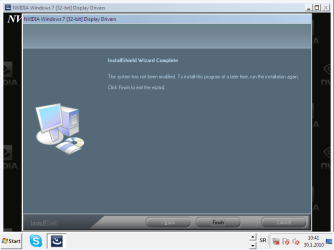
I've downloaded new display drivers form my card but when its close to finish installation it says my system is not bla bla bla and to try later installing them again..
I've tried again and again but same issue all the time
what can I do? thanks
 

My Computer My Computer

At a glance

Windows 7 Ultimate edition x64AMD Athlon 64 x2 Dual Core 4600+ 2.39GHz4GBNvidia Gforce 9600 GT 512
OS
Windows 7 Ultimate edition x64
CPU
AMD Athlon 64 x2 Dual Core 4600+ 2.39GHz
Memory
4GB
Graphics Card(s)
Nvidia Gforce 9600 GT 512
Sound Card
Realtek HD
Monitor(s) Displays
LG 19`
Screen Resolution
1280X1024
Hard Drives
two HDs 300GB
Internet Speed
1Mb
I see this is 9600 thread so I wont start a new one just because this..so...
I've downloaded new display drivers form my card but when its close to finish installation it says my system is not bla bla bla and to try later installing them again..
I've tried again and again but same issue all the time
what can I do? thanks

Install DirectX first, then the newest drivers in safe mode. Make sure you have the right drivers for your system, wheter x86 or x64.
 

My Computer My Computer

At a glance

Windows 7 Ultimate x86-64[email protected] 1066MHz FSB6GB DDR3 1066MHz9300M GS 256MB Dedicated (Speed) + Intel4500M...
Computer Manufacturer/Model Number
Sony Vaio Z46GDU
OS
Windows 7 Ultimate x86-64
CPU
[email protected] 1066MHz FSB
Motherboard
Sony branded
Memory
6GB DDR3 1066MHz
Graphics Card(s)
9300M GS 256MB Dedicated (Speed) + Intel4500MHD (Stamina)
Sound Card
Realtek HD Audio
Monitor(s) Displays
13.1' WXGA
Screen Resolution
1600x900
Hard Drives
320GB 7200RPM w/ 16MB cache
Internet Speed
1MB/s
thanks for your reply.
I already have DirectX 11 on my machine but ok I'll try to install them in safe mode
this is how it ends...all the time
 

Attachments

  • Untitled.png
    Untitled.png
    25.7 KB · Views: 52
Last edited:

My Computer My Computer

At a glance

Windows 7 Ultimate edition x64AMD Athlon 64 x2 Dual Core 4600+ 2.39GHz4GBNvidia Gforce 9600 GT 512
OS
Windows 7 Ultimate edition x64
CPU
AMD Athlon 64 x2 Dual Core 4600+ 2.39GHz
Memory
4GB
Graphics Card(s)
Nvidia Gforce 9600 GT 512
Sound Card
Realtek HD
Monitor(s) Displays
LG 19`
Screen Resolution
1280X1024
Hard Drives
two HDs 300GB
Internet Speed
1Mb
Back
Top