
GeForce FX 5200 problem

cipley

New member
Pro User
Local time
9:30 PM
Messages
181
Hi. I'm new to this forum. Allow me to ask for help with my PC running on Win7
I've already did what's told in here, but it still didn't do any good

first of all, here's my PC's specs:
P4 3GHz Prescott
1GB of RAM
GeForce FX 5200 128MB of VRAM -- the source of the nightmare

the installation of Win7 itself runs fine without any problems. However, when I updated my drivers, including the VGA driver so I can run the Aero, Windows 7 won't start at all and generates a blue screen error.
The only resolution so I can run it is to revert back before I installed the VGA driver
What should I do?
 

My Computer

OS
Windows 7
CPU
Intel Pentium 4 (Prescott) 478
Motherboard
ASUS P4P800SE
Memory
1GB (2x512MB) Dual Channel PC-3200
Graphics Card(s)
NVIDIA GeForce FX5200 128MB
Monitor(s) Displays
Samsung SyncMaster 551v 15"
Screen Resolution
1024x768 pixels 60Hz 32bit True Color

My Computer

OS
Windows 7 Ultimate x64 Service Pack 1 (Build 6.1.7601)
CPU
Intel Core 2 Quad Q6600 (G0 Kentsfield) LGA775 (FC-LGA6)
Motherboard
GIGABYTE GA-EP35C-DS3R (Rev. 2.1)
Memory
Corsair TW3X4G1333C9A 4GB PC-10600 (2x XMS3 2GB)
Graphics Card(s)
ASUS nVIDIA GeForce 560
Sound Card
RealTek ALC885/889A/890
Monitor(s) Displays
ChiMei CMV CT-730D 17inch (LCD Monitor)
Screen Resolution
1280-1024 60Hertz (Ture Colour 32bit)
Hard Drives
2x Barracuda 7200.10 SATA 3.0Gb/s 160-GB Hard Drive ST3160815AS (AHCI)
PSU
ANTEC 750w Earthwatts
Case
Thermaltake Shark (VA7000SWA ATX) Full Tower
Cooling
Front 120mm fan (1400 RPM) /Rear 120mm (1400 RPM) blue LED
Keyboard
Labtec Media Desktop Y-SAD65
Mouse
Razer DeathAdder 3G Infrared Sensor (1800DPI)
Internet Speed
Telstra BigPond Elite Liberty ADSL2+ 24Mbps/256kbps
Other Info
ASUS PCE-N13 802.11n Wireless LAN card

My Computer

OS
Windows 7
CPU
Intel Pentium 4 (Prescott) 478
Motherboard
ASUS P4P800SE
Memory
1GB (2x512MB) Dual Channel PC-3200
Graphics Card(s)
NVIDIA GeForce FX5200 128MB
Monitor(s) Displays
Samsung SyncMaster 551v 15"
Screen Resolution
1024x768 pixels 60Hz 32bit True Color
Can you re-upload your dump files cant open them.
 

My Computer

OS
Windows 7 Ultimate x64 Service Pack 1 (Build 6.1.7601)
CPU
Intel Core 2 Quad Q6600 (G0 Kentsfield) LGA775 (FC-LGA6)
Motherboard
GIGABYTE GA-EP35C-DS3R (Rev. 2.1)
Memory
Corsair TW3X4G1333C9A 4GB PC-10600 (2x XMS3 2GB)
Graphics Card(s)
ASUS nVIDIA GeForce 560
Sound Card
RealTek ALC885/889A/890
Monitor(s) Displays
ChiMei CMV CT-730D 17inch (LCD Monitor)
Screen Resolution
1280-1024 60Hertz (Ture Colour 32bit)
Hard Drives
2x Barracuda 7200.10 SATA 3.0Gb/s 160-GB Hard Drive ST3160815AS (AHCI)
PSU
ANTEC 750w Earthwatts
Case
Thermaltake Shark (VA7000SWA ATX) Full Tower
Cooling
Front 120mm fan (1400 RPM) /Rear 120mm (1400 RPM) blue LED
Keyboard
Labtec Media Desktop Y-SAD65
Mouse
Razer DeathAdder 3G Infrared Sensor (1800DPI)
Internet Speed
Telstra BigPond Elite Liberty ADSL2+ 24Mbps/256kbps
Other Info
ASUS PCE-N13 802.11n Wireless LAN card
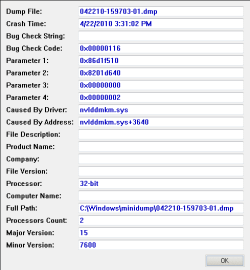
Your .dmp file shows your video driver ( nviddmkm.sys ) as the cause.. Download and install the latest version from Nvidias website for your card ...

Capture.PNG
 

My Computer

Computer type
PC/Desktop
Computer Manufacturer/Model Number
LENOVO K450 @3.0GHZ
OS
64-bit Windows 8.1 Pro
CPU
Core(TM) i5 CPU 4330 Haswell @ 3.20GHz
Motherboard
LENOVO
Memory
12.00 GB
Graphics Card(s)
Intel(R) HD Graphics
Sound Card
Intel HD integtrated
Monitor(s) Displays
HP 25' ISP Monitor
Screen Resolution
1900/1020
Hard Drives
(1) ST1000DM003-1CH162 (2) Generic STORAGE DEVICE USB Device (3) Generic STORAGE DEVICE USB Device
Internet Speed
100mb down/10mb up
I agree with Tom. Your video card driver was probably the cause, and needs updating. The driver you have now is 3.5 years old.

Code:
8201a000 82453180   nvlddmkm nvlddmkm.sys Tue Oct 10 01:44:34 2006 (452B3342)
 

My Computer

Computer Manufacturer/Model Number
Custom
OS
Windows 7 Professional x64
CPU
Intel i7 2600K OC'd @ 4620 MHz
Motherboard
Asus P8Z68-V Pro
Memory
16GB GSkill Sniper 2133 Mhz (4x4GB)
Graphics Card(s)
EVGA GeForce GTX 480 SuperClocked+
Sound Card
Realtek High Definition Audio
Monitor(s) Displays
2x Acer S273HLbmii 27"
Screen Resolution
2 x 1920x1080
Hard Drives
64GB Crucial M4 SSD

Storage: Hitachi 1TB 5400RPM, Samsung 1.5TB 5400RPM
PSU
Corsair HW Series 750w (modular)
Case
Cooler Master HAF 932 Advanced Blue Edition
Cooling
CM Hyper 212+ CPU cooler, 3x 230mm + 1x 140mm case fans
Keyboard
Logitech MK320 (wireless)
Mouse
Logitech MK320 (wireless)
Internet Speed
30 Mb/s : 2 Mb/s
I agree with Tom. Your video card driver was probably the cause, and needs updating. The driver you have now is 3.5 years old.

Code:
8201a000 82453180   nvlddmkm nvlddmkm.sys Tue Oct 10 01:44:34 2006 (452B3342)

Your .dmp file shows your video driver ( nviddmkm.sys ) as the cause.. Download and install the latest version from Nvidias website for your card ...

View attachment 68735

That's a problem, too...that driver is the one downloaded by the windows update...
when it acts funny, I decided to visit this forum and found an identical problem I mentioned in the first post...
the device manager part doesn't help, either, so I downloaded ForceWare 98.65 for Vista...and the result is this

I know it's old...but even in NVidia's site there's no Windows 7 driver for FX5200...

is there any other causing this problem or it's purely because of old driver?
 

My Computer

OS
Windows 7
CPU
Intel Pentium 4 (Prescott) 478
Motherboard
ASUS P4P800SE
Memory
1GB (2x512MB) Dual Channel PC-3200
Graphics Card(s)
NVIDIA GeForce FX5200 128MB
Monitor(s) Displays
Samsung SyncMaster 551v 15"
Screen Resolution
1024x768 pixels 60Hz 32bit True Color
Try uninstalling the driver in Device Manager, and rebooting. Let Windows automatically install the new driver.

One other thing we can try is looking on your computer manufacturer's site. Let me know the model, and I can take a look.
 

My Computer

Computer Manufacturer/Model Number
Custom
OS
Windows 7 Professional x64
CPU
Intel i7 2600K OC'd @ 4620 MHz
Motherboard
Asus P8Z68-V Pro
Memory
16GB GSkill Sniper 2133 Mhz (4x4GB)
Graphics Card(s)
EVGA GeForce GTX 480 SuperClocked+
Sound Card
Realtek High Definition Audio
Monitor(s) Displays
2x Acer S273HLbmii 27"
Screen Resolution
2 x 1920x1080
Hard Drives
64GB Crucial M4 SSD

Storage: Hitachi 1TB 5400RPM, Samsung 1.5TB 5400RPM
PSU
Corsair HW Series 750w (modular)
Case
Cooler Master HAF 932 Advanced Blue Edition
Cooling
CM Hyper 212+ CPU cooler, 3x 230mm + 1x 140mm case fans
Keyboard
Logitech MK320 (wireless)
Mouse
Logitech MK320 (wireless)
Internet Speed
30 Mb/s : 2 Mb/s

My Computer

Computer type
PC/Desktop
Computer Manufacturer/Model Number
self build
OS
win 7 ultimate32bit, Win8.1pro wmc 32bit
CPU
amd phenom x4 9600
Motherboard
asus m2n32-sli deluxe
Memory
corsair twinxs 2x2gb
Graphics Card(s)
2x nvidia 1gb 8500gt
Sound Card
onboard
Monitor(s) Displays
23" PB Viseo 233d
Screen Resolution
1920x1080
Hard Drives
maxtor sata 500gb
maxtor sata 320gb
fujitsu sata200gb
PSU
oryxx tornado 750w
Case
thermaltake xaser lll
Cooling
artic freezer64 pro + 7 case fans
Try uninstalling the driver in Device Manager, and rebooting. Let Windows automatically install the new driver.

One other thing we can try is looking on your computer manufacturer's site. Let me know the model, and I can take a look.

uuh, that may be a problem because my PC is a build-yourself-up, not a manufactured type...but if you need, I'll provide you my PC specs more thoroughly

you can use these drivers they are for XP NVIDIA DRIVERS 175.19 WHQL you will have to load them in compatibility mode http://www.sevenforums.com/tutorials/316-compatibility-mode.html the drivers that ms loads are the vista version which win7 does not like one bit :)

hm, I haven't tried that, but how do you change compatibility for drivers?
AFAIK you can change it on programs, but on drivers, I just heard that :D

however, though, I did install that version of ForceWare on compatibility mode. Installation runs fine, but the problem persists...it won't start Win7
 

My Computer

OS
Windows 7
CPU
Intel Pentium 4 (Prescott) 478
Motherboard
ASUS P4P800SE
Memory
1GB (2x512MB) Dual Channel PC-3200
Graphics Card(s)
NVIDIA GeForce FX5200 128MB
Monitor(s) Displays
Samsung SyncMaster 551v 15"
Screen Resolution
1024x768 pixels 60Hz 32bit True Color
is the only way to fix it is by upgrading?
 

My Computer

OS
Windows 7
CPU
Intel Pentium 4 (Prescott) 478
Motherboard
ASUS P4P800SE
Memory
1GB (2x512MB) Dual Channel PC-3200
Graphics Card(s)
NVIDIA GeForce FX5200 128MB
Monitor(s) Displays
Samsung SyncMaster 551v 15"
Screen Resolution
1024x768 pixels 60Hz 32bit True Color
Back
Top