GeForce GT220 with Asus A8N-E on Windows 7

kronflux

New member
Local time
7:15 PM
Messages
7
hey everyone,
this is a problem I'm having with a buddy of mine's computer..
he's got a GeForce GT220(it actually says 216 on the card itself, but I know I searched 220 when I solved the problem previously, and thats the closest driver that seems to be on nvidia's site.. so.)
he's got an Asus A8N-E and windows 7 installed.
basically what happens is windows shows the "starting windows" screen, then goes to a black screen and freezes there.
as I said, I've solved the problem before, I guess it was a problem with the newer drivers or something? after hours of searching, I found someone with the same problem who switched to a previous version of the drivers, in fact, I think the drivers were Windows Vista drivers. after installing those, it worked perfectly.
unfortunately I have no idea where I found out which drivers to use, and am failing to come up with the appropriate search terms in google, so I'm hoping someone here can help out with the problem and save me several hours of searching again!
 

My Computer My Computer

At a glance

Windows 7AMD Sempron +3600KingstonGeForce 7200 GS
Computer Manufacturer/Model Number
Custom
OS
Windows 7
CPU
AMD Sempron +3600
Motherboard
Asrock
Memory
Kingston
Graphics Card(s)
GeForce 7200 GS
Sound Card
Realtek
Monitor(s) Displays
Dell
cant you just go to nvidias site and then to drivers and put in your system as vista and it should find the drivers for you
 

My Computer My Computer

At a glance

windows 7 profi7 920 quad3gb triple memory 1333nvidia gts 250 1gb
Computer Manufacturer/Model Number
asus
OS
windows 7 prof
CPU
i7 920 quad
Motherboard
asus
Memory
3gb triple memory 1333
Graphics Card(s)
nvidia gts 250 1gb
Sound Card
on board
Monitor(s) Displays
22inch hannsg
Screen Resolution
1680 x1050
Hard Drives
1x1tb 1x 250gb 1x320 ext
PSU
650
Case
wizard
Cooling
3 fans
Keyboard
microsoft laser wireless
Mouse
microsoft laser wireless
Internet Speed
20mb
Other Info
wireless network n netgear 2000
well I guess the latest drivers, regardless of the system, don't work for this combination of hardware and operating system. so, as much as I'd like for your answer to be the right one, it's not quite that simple :P
 

My Computer My Computer

At a glance

Windows 7AMD Sempron +3600KingstonGeForce 7200 GS
Computer Manufacturer/Model Number
Custom
OS
Windows 7
CPU
AMD Sempron +3600
Motherboard
Asrock
Memory
Kingston
Graphics Card(s)
GeForce 7200 GS
Sound Card
Realtek
Monitor(s) Displays
Dell
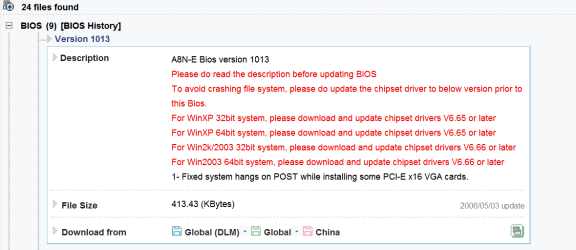
Welcome to Seven Forums. after doing some searching and not knowing if your running 32 or 64 bit Seven. Ausu only offers Vista drivers. I read on another forum about bios updates for some PCI-e cards causing freezing. They reccommend you have the lastest chipset drivers installed then check in on updating the bios as can be found here under expanded bios this is 32 bit Vista ASUSTeK Computer Inc.-Support- Hope in some way this can lead you to a fix. Fabe
 

My Computer My Computer

At a glance

Windows 7 ultimate 64 bit / XP Home sp3intel Core 2 Duo E8400 3.0ghz8 gigs 1066 OCZ Fata1tyEVGA GTX 580 Call of Duty Black Ops Edition
Computer Manufacturer/Model Number
Self Built
OS
Windows 7 ultimate 64 bit / XP Home sp3
CPU
intel Core 2 Duo E8400 3.0ghz
Motherboard
Asus P5ND bios 1401
Memory
8 gigs 1066 OCZ Fata1ty
Graphics Card(s)
EVGA GTX 580 Call of Duty Black Ops Edition
Sound Card
Creative Soundblaster Audigy 2zs
Monitor(s) Displays
Asus 24in LCD's 2MS X2
Screen Resolution
1920x1080p @60Hz
Hard Drives
WD Caviar 500 Black/ WD Caviar 200 Blue
PSU
OCZ 700W GameXtreme
Case
NZXT Apollo
Cooling
Corsair H50 CPU/120mm x3 /60mm x2 /Corsair Dominator Ram
Keyboard
Logitech Bluetooth Wireless MX5000
Mouse
Logitech Bluetooth Wireless MX1000
Internet Speed
Download 19.83 Upload 0.97
Other Info
Logitech Z2300 Speakers/ Bose Noise Cancelling Headphones/Avermedia PCI-e Hybrid TV Bravo/Epson NX415 all in one/ 4 Port Powered USB Hub/ LG 10x Bluray Burner /TSST Corp DVDRW External
sorry. I did forget to mention, it is a 32bit install of windows 7. and the graphics card is a BGF Tech GeForce GT220 1GB DDR2 PCI-E. (BFGEGT2201024D2BE)
after a lot of searching, I've come up with no luck in finding a bios update for this card. the manufacturer's website only offers a link for drivers, and that simply takes you to the nVidia site.
I also looked on NVIDIA GeForce GTX 295 285 275 260 ATI Radeon HD 4890 4870 4850 4830 :: MVKTech :: On the Edge of Technology but again found nothing.
and I've already updated the motherboard to the latest bios which had no effect whatsoever.
any ideas?
 

My Computer My Computer

At a glance

Windows 7AMD Sempron +3600KingstonGeForce 7200 GS
Computer Manufacturer/Model Number
Custom
OS
Windows 7
CPU
AMD Sempron +3600
Motherboard
Asrock
Memory
Kingston
Graphics Card(s)
GeForce 7200 GS
Sound Card
Realtek
Monitor(s) Displays
Dell
It sound like the new drivers are selecting a resolution that your monitor doesn't support.

Try- Boot, Hold F8 - Select Enable Low Resolution mode (640x480). This will enable Windows to load with full driver support at a set resolution of 640x480x32@60Hz. You should then be able to open the nVidia Control Centre and select your monitors native resolution.
 

My Computer My Computer

At a glance

Windows 7 Home Premium (64-bit) SP1 RTMIntel Core2Duo [email protected]2x2Gb GEIL DDR2 800 4-4-4-12 @ 1.8vASUS HD4850 512Mb @700/1100
OS
Windows 7 Home Premium (64-bit) SP1 RTM
CPU
Intel Core2Duo [email protected]
Motherboard
ASUS P5Q (BIOS 2208)
Memory
2x2Gb GEIL DDR2 800 4-4-4-12 @ 1.8v
Graphics Card(s)
ASUS HD4850 512Mb @700/1100
Sound Card
Realtek ALC1200 @ Intel 82801JB ICH10
Monitor(s) Displays
Samsung Syncmaster T220
Screen Resolution
1680x1050x32@60Hz
Hard Drives
Seagate ST3500410AS SATA300 500Gb
Hitachi HDS721032CLA362 SATA300 320Gb
PSU
Antec NeoPower 650W 3.3v@24A/5v@24A/12v@19A/12v@19A/12v@19A
Internet Speed
3Mbps
alrighty, I tried that, and it did the same thing. just goes to that blank screen right after the starting windows logo.
I tried safe mode, which worked fine, but unfortunately you can't open nvidia control panel from safe mode. is there some registry key I can change or something that stores the default resolution to boot with?
 

My Computer My Computer

At a glance

Windows 7AMD Sempron +3600KingstonGeForce 7200 GS
Computer Manufacturer/Model Number
Custom
OS
Windows 7
CPU
AMD Sempron +3600
Motherboard
Asrock
Memory
Kingston
Graphics Card(s)
GeForce 7200 GS
Sound Card
Realtek
Monitor(s) Displays
Dell
What about trying the other port on the video card (use an adapter if needed). Maybe the driver has changed the order and it now thinks that your monitor is monitor 2 (which by default is off until extended)
 

My Computer My Computer

At a glance

Windows 7 Home Premium (64-bit) SP1 RTMIntel Core2Duo [email protected]2x2Gb GEIL DDR2 800 4-4-4-12 @ 1.8vASUS HD4850 512Mb @700/1100
OS
Windows 7 Home Premium (64-bit) SP1 RTM
CPU
Intel Core2Duo [email protected]
Motherboard
ASUS P5Q (BIOS 2208)
Memory
2x2Gb GEIL DDR2 800 4-4-4-12 @ 1.8v
Graphics Card(s)
ASUS HD4850 512Mb @700/1100
Sound Card
Realtek ALC1200 @ Intel 82801JB ICH10
Monitor(s) Displays
Samsung Syncmaster T220
Screen Resolution
1680x1050x32@60Hz
Hard Drives
Seagate ST3500410AS SATA300 500Gb
Hitachi HDS721032CLA362 SATA300 320Gb
PSU
Antec NeoPower 650W 3.3v@24A/5v@24A/12v@19A/12v@19A/12v@19A
Internet Speed
3Mbps
well, I have dual monitors set up, so even if the default was overridden, it would simply switch to the other monitor.
 

My Computer My Computer

At a glance

Windows 7AMD Sempron +3600KingstonGeForce 7200 GS
Computer Manufacturer/Model Number
Custom
OS
Windows 7
CPU
AMD Sempron +3600
Motherboard
Asrock
Memory
Kingston
Graphics Card(s)
GeForce 7200 GS
Sound Card
Realtek
Monitor(s) Displays
Dell
Sorry the link I provided only shows a bios update to correct PCI-e freezing with 64 bit Vista.
Bios Vista 64 A8N-E.PNG
 

My Computer My Computer

At a glance

Windows 7 ultimate 64 bit / XP Home sp3intel Core 2 Duo E8400 3.0ghz8 gigs 1066 OCZ Fata1tyEVGA GTX 580 Call of Duty Black Ops Edition
Computer Manufacturer/Model Number
Self Built
OS
Windows 7 ultimate 64 bit / XP Home sp3
CPU
intel Core 2 Duo E8400 3.0ghz
Motherboard
Asus P5ND bios 1401
Memory
8 gigs 1066 OCZ Fata1ty
Graphics Card(s)
EVGA GTX 580 Call of Duty Black Ops Edition
Sound Card
Creative Soundblaster Audigy 2zs
Monitor(s) Displays
Asus 24in LCD's 2MS X2
Screen Resolution
1920x1080p @60Hz
Hard Drives
WD Caviar 500 Black/ WD Caviar 200 Blue
PSU
OCZ 700W GameXtreme
Case
NZXT Apollo
Cooling
Corsair H50 CPU/120mm x3 /60mm x2 /Corsair Dominator Ram
Keyboard
Logitech Bluetooth Wireless MX5000
Mouse
Logitech Bluetooth Wireless MX1000
Internet Speed
Download 19.83 Upload 0.97
Other Info
Logitech Z2300 Speakers/ Bose Noise Cancelling Headphones/Avermedia PCI-e Hybrid TV Bravo/Epson NX415 all in one/ 4 Port Powered USB Hub/ LG 10x Bluray Burner /TSST Corp DVDRW External
ah. 64 bit. I dont think that applies to this problem as A) we're running 32 bit, and B) it's windows 7, not vista, granted they are very similar, but in no way the same OS.

I think we were on to something with the resolution issues though. I hooked up an old LCD monitor to it, and it booted just fine. the dual monitor setup was using two somewhat older CRT monitors.
so basically it would seem that whats happening is that windows is detecting that there are new CRT monitors hooked up, and nVidia is automatically switching to the native resolution default, which is too high for the CRT monitors to display. using the boot option to switch to a lower resolution also isn't helping because it only starts in that lower resolution. windows still detects the new monitors and switches to the native accordingly, so it fails to boot properly.
so what I need to figure out is a way to remove any higher resolutions so that the native can only be as high as what these monitors can display.
 

My Computer My Computer

At a glance

Windows 7AMD Sempron +3600KingstonGeForce 7200 GS
Computer Manufacturer/Model Number
Custom
OS
Windows 7
CPU
AMD Sempron +3600
Motherboard
Asrock
Memory
Kingston
Graphics Card(s)
GeForce 7200 GS
Sound Card
Realtek
Monitor(s) Displays
Dell
Alright problem solved, I uninstalled the driver, booted in standard generic display drivers, and edited the driver in the setup folder, also edited the modes file. basically removed every resolution that was higher than the one I want. then installed the driver. got the driver unsigned crap messages and whatnot, but I got around those. had some further difficulties, but I tricked it by booting with the LCD plugged in, then connected the two CRT monitors and changed their appropriate resolutions. so it's all up and running, thanks for the help, but I guess I didn't really need most of it, I just needed people to bounce ideas off of :P
 

My Computer My Computer

At a glance

Windows 7AMD Sempron +3600KingstonGeForce 7200 GS
Computer Manufacturer/Model Number
Custom
OS
Windows 7
CPU
AMD Sempron +3600
Motherboard
Asrock
Memory
Kingston
Graphics Card(s)
GeForce 7200 GS
Sound Card
Realtek
Monitor(s) Displays
Dell
FIXED: Cool. You've fixed it. I was too busy typing this out


Regarding the BIOS update. This is a fix for all Operating Systems regarding some VGA cards not being detected properly. A8N-E Bios version 1013. 2006/3/5. You should install it may be relevant. It only mentions XP & Win2003 because Vista & 7 hadn't been released the last time this BIOS was updated. It may be that your card isn't detecting your monitor as a plug and play and is selecting the wrong native resolution.

You should also check that the Monitor is using the driver supplied by the manufacturer and not Microsofts generic driver. The Monitor driver should tell nVidia's driver the LCDs top resolution and exact timming at that resolution.

You could also edit the nv_disp file yourself and remove any resolution (nv_modes) above your monitors native. This would only cause an issue if you changed monitors for one with a higher resolution, but by that time you will have probably updated the drivers anyway.

Normally, you would also check that the chipset drivers are up to date, as this can affect how the card detects your monitor, but nVidia don't have nForce4 drivers for Win7.
 

My Computer My Computer

At a glance

Windows 7 Home Premium (64-bit) SP1 RTMIntel Core2Duo [email protected]2x2Gb GEIL DDR2 800 4-4-4-12 @ 1.8vASUS HD4850 512Mb @700/1100
OS
Windows 7 Home Premium (64-bit) SP1 RTM
CPU
Intel Core2Duo [email protected]
Motherboard
ASUS P5Q (BIOS 2208)
Memory
2x2Gb GEIL DDR2 800 4-4-4-12 @ 1.8v
Graphics Card(s)
ASUS HD4850 512Mb @700/1100
Sound Card
Realtek ALC1200 @ Intel 82801JB ICH10
Monitor(s) Displays
Samsung Syncmaster T220
Screen Resolution
1680x1050x32@60Hz
Hard Drives
Seagate ST3500410AS SATA300 500Gb
Hitachi HDS721032CLA362 SATA300 320Gb
PSU
Antec NeoPower 650W 3.3v@24A/5v@24A/12v@19A/12v@19A/12v@19A
Internet Speed
3Mbps
Back
Top