General help Win Explorer - Attaching a comment

BAZ

New member
Member
Local time
10:36 AM
Messages
78
Hi,

Is it possible to attach a comment to a folder? My end goal is to write a brief description to reflect what exactly are the contents of folders. Is there a software which can help make it possible/easy?
I do use OneNote and use it for general notetaking of all sorts but if it could be possible within Explorer that'll be great.

Thanks
Baz
 

My Computer

Computer Manufacturer/Model Number
TOSHIBA EQUIUM A200 (X86-based PC AT/AT COMPATIBLE)
OS
Windows 7 Ultimate x86
CPU
Intel(R) Pentium(R) Dual CPU T2310 @ 1.46GHz
Motherboard
Intel Corporation SANTA ROSA CRB
Memory
2GB
Graphics Card(s)
Mobile Intel(R) 965 Express Chipset Family
Screen Resolution
1280 * 800 Pixels
Hard Drives
ST9120822AS ATA Device (IDE)

My Computer

Computer Manufacturer/Model Number
HP Pavilion Elite 495UK
OS
Windows 7 Ultimate SP1 64-Bit
CPU
Intel Core i7 870 @ 2.93GHz
Motherboard
MSI 2A9C (CPU1)
Memory
8Gb Dual-Channel DDR3 @ 664MHz
Graphics Card(s)
nVidia GeForce GTX 460 1024MB dedicated RAM
Sound Card
Realtek HD Audio
Monitor(s) Displays
HP2310i
Screen Resolution
1920 x 1080
Hard Drives
1x1954GB Hitachi HDS22020ALA 330 (RAID), 1x1954GB Hitachi External for backup and storage
PSU
460W
Case
HP Elite
Cooling
Air cooled
Keyboard
Logitech K750 solar-powered keyboard
Mouse
Logitech Wireless M180 mouse
Internet Speed
2Mb
Other Info
Pure Avanti Flow Internet Radio with iPod Dock, 64Gb iPod, HP USB Speakers, Sony MDR-V500 Headphones, Sony Vaio F-Series Laptop

Attachments

  • w7f help.png
    w7f help.png
    40.1 KB · Views: 52

My Computer

Computer Manufacturer/Model Number
TOSHIBA EQUIUM A200 (X86-based PC AT/AT COMPATIBLE)
OS
Windows 7 Ultimate x86
CPU
Intel(R) Pentium(R) Dual CPU T2310 @ 1.46GHz
Motherboard
Intel Corporation SANTA ROSA CRB
Memory
2GB
Graphics Card(s)
Mobile Intel(R) 965 Express Chipset Family
Screen Resolution
1280 * 800 Pixels
Hard Drives
ST9120822AS ATA Device (IDE)
You're welcome Baz.

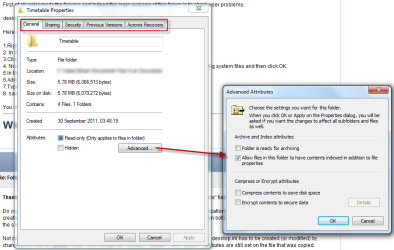
What happens if you check the "Hidden" box?
 

My Computer

Computer Manufacturer/Model Number
HP Pavilion Elite 495UK
OS
Windows 7 Ultimate SP1 64-Bit
CPU
Intel Core i7 870 @ 2.93GHz
Motherboard
MSI 2A9C (CPU1)
Memory
8Gb Dual-Channel DDR3 @ 664MHz
Graphics Card(s)
nVidia GeForce GTX 460 1024MB dedicated RAM
Sound Card
Realtek HD Audio
Monitor(s) Displays
HP2310i
Screen Resolution
1920 x 1080
Hard Drives
1x1954GB Hitachi HDS22020ALA 330 (RAID), 1x1954GB Hitachi External for backup and storage
PSU
460W
Case
HP Elite
Cooling
Air cooled
Keyboard
Logitech K750 solar-powered keyboard
Mouse
Logitech Wireless M180 mouse
Internet Speed
2Mb
Other Info
Pure Avanti Flow Internet Radio with iPod Dock, 64Gb iPod, HP USB Speakers, Sony MDR-V500 Headphones, Sony Vaio F-Series Laptop
It asks if I want the changes made to all of the folders & sub-folders..
jz8tx2.png
 

My Computer

Computer Manufacturer/Model Number
TOSHIBA EQUIUM A200 (X86-based PC AT/AT COMPATIBLE)
OS
Windows 7 Ultimate x86
CPU
Intel(R) Pentium(R) Dual CPU T2310 @ 1.46GHz
Motherboard
Intel Corporation SANTA ROSA CRB
Memory
2GB
Graphics Card(s)
Mobile Intel(R) 965 Express Chipset Family
Screen Resolution
1280 * 800 Pixels
Hard Drives
ST9120822AS ATA Device (IDE)
Last edited:

My Computer

Computer Manufacturer/Model Number
HP Pavilion Elite 495UK
OS
Windows 7 Ultimate SP1 64-Bit
CPU
Intel Core i7 870 @ 2.93GHz
Motherboard
MSI 2A9C (CPU1)
Memory
8Gb Dual-Channel DDR3 @ 664MHz
Graphics Card(s)
nVidia GeForce GTX 460 1024MB dedicated RAM
Sound Card
Realtek HD Audio
Monitor(s) Displays
HP2310i
Screen Resolution
1920 x 1080
Hard Drives
1x1954GB Hitachi HDS22020ALA 330 (RAID), 1x1954GB Hitachi External for backup and storage
PSU
460W
Case
HP Elite
Cooling
Air cooled
Keyboard
Logitech K750 solar-powered keyboard
Mouse
Logitech Wireless M180 mouse
Internet Speed
2Mb
Other Info
Pure Avanti Flow Internet Radio with iPod Dock, 64Gb iPod, HP USB Speakers, Sony MDR-V500 Headphones, Sony Vaio F-Series Laptop
  • Like
Reactions: BAZ
Thanks for the help. I'll try to work around it using shortcuts option.

Regards
Baz
 

My Computer

Computer Manufacturer/Model Number
TOSHIBA EQUIUM A200 (X86-based PC AT/AT COMPATIBLE)
OS
Windows 7 Ultimate x86
CPU
Intel(R) Pentium(R) Dual CPU T2310 @ 1.46GHz
Motherboard
Intel Corporation SANTA ROSA CRB
Memory
2GB
Graphics Card(s)
Mobile Intel(R) 965 Express Chipset Family
Screen Resolution
1280 * 800 Pixels
Hard Drives
ST9120822AS ATA Device (IDE)
OK, but keep checking this thread as someone else may have an idea.
 

My Computer

Computer Manufacturer/Model Number
HP Pavilion Elite 495UK
OS
Windows 7 Ultimate SP1 64-Bit
CPU
Intel Core i7 870 @ 2.93GHz
Motherboard
MSI 2A9C (CPU1)
Memory
8Gb Dual-Channel DDR3 @ 664MHz
Graphics Card(s)
nVidia GeForce GTX 460 1024MB dedicated RAM
Sound Card
Realtek HD Audio
Monitor(s) Displays
HP2310i
Screen Resolution
1920 x 1080
Hard Drives
1x1954GB Hitachi HDS22020ALA 330 (RAID), 1x1954GB Hitachi External for backup and storage
PSU
460W
Case
HP Elite
Cooling
Air cooled
Keyboard
Logitech K750 solar-powered keyboard
Mouse
Logitech Wireless M180 mouse
Internet Speed
2Mb
Other Info
Pure Avanti Flow Internet Radio with iPod Dock, 64Gb iPod, HP USB Speakers, Sony MDR-V500 Headphones, Sony Vaio F-Series Laptop
I sure will (subscribed via e-mail)
 

My Computer

Computer Manufacturer/Model Number
TOSHIBA EQUIUM A200 (X86-based PC AT/AT COMPATIBLE)
OS
Windows 7 Ultimate x86
CPU
Intel(R) Pentium(R) Dual CPU T2310 @ 1.46GHz
Motherboard
Intel Corporation SANTA ROSA CRB
Memory
2GB
Graphics Card(s)
Mobile Intel(R) 965 Express Chipset Family
Screen Resolution
1280 * 800 Pixels
Hard Drives
ST9120822AS ATA Device (IDE)
Hi Baz,

**WARNING : This is a bit of a hack and requires you edit a system file - only do so if you are comfortable doing that. You do so at your own risk***

There is a way to have a pop-up ballon tip appear when you hover your mouse over the folder, and also to display in the Comments column. I have messed about with this a little bit. To do that, please follow these steps:

1. Open Windows Explorer.
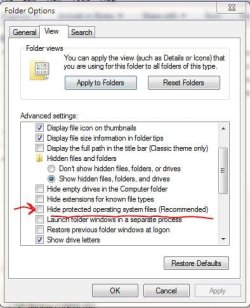
2. Click Tools, then Folder Options.
3. Click the View tab
4. You MUST uncheck the box labelled Hide protected operating system files (Recommended)

1.JPG

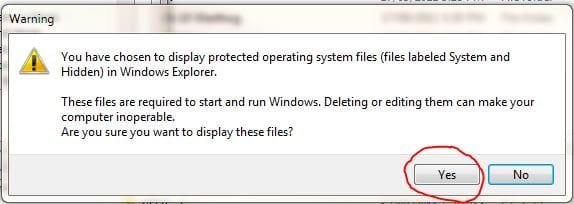
When prompted, you need to click YES.

2.JPG

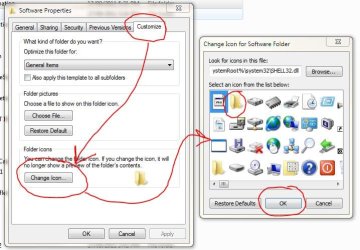
5. Right-click on the folder you are interested in, and then select Properties and then Customize. Select the Change Icon... button.

Note : you aren't actually going to change the icon if you don't wany to - this step is neccessary to get to the point that you can add comments to a folder.

In the icon panel, choose the FOLDER icon, or a different one if you like, and click OK.

3.JPG

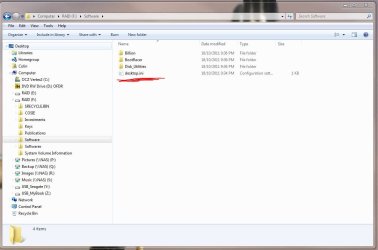
6. In the folder you are interested in, locate the file called desktop.ini and open it in Notepad.

4.JPG

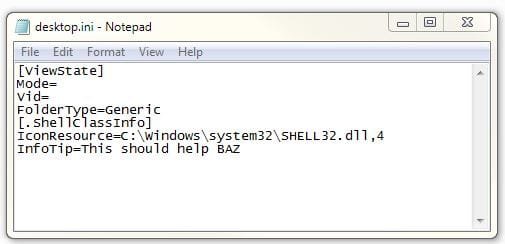
7. At the immediate bottom of the file, add this line:

InfoTip=

You can then add your comments immediately after the = symbol, like this for example:

Code:
InfoTip=This should help BAZ

This is what the file look like:

5.JPG

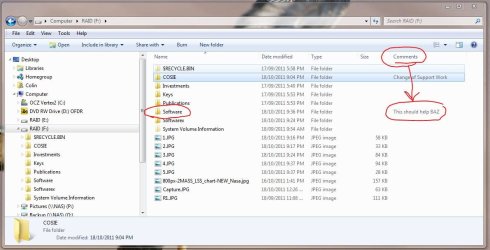
8. Save the file. You can add the Comments field to your columns in Windows Explorer, and now you should see this:

6.JPG

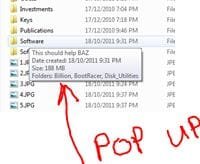
Also, when you hover your mouse over the folder, a pop-up baloon will display the folder comments.

7.JPG

Regards,
Golden
 
Last edited:

My Computer

Computer type
PC/Desktop
Computer Manufacturer/Model Number
Golden Mk. I.4
OS
Windows 10 Pro x64 ; Xubuntu x64
CPU
Intel i7 860 @ 2.80 GHz O/C'ed to 4.0GHz
Motherboard
Gigabyte P55A-UD3R Rev.1. Award BIOS F13
Memory
16GB Corsair Vengance DDR3 @ 661 MHz Dual Channel (9-9-9-24)
Graphics Card(s)
EVGA NVidia GTX 560 1024MB
Sound Card
Realtek Integrated
Monitor(s) Displays
Dual Samsung SyncMaster 2494HS
Screen Resolution
1920*1080 and 1920*1080
Hard Drives
1*Samsung 840 EVO 120GB SSD;
1*OCZ Vertex 2 60GB SSD;
2*Samsung F3 SpinPoint 1TB in RAID0;
1*Samsung F1 SpinPoint 1TB;
2*Western Digital 1TB External USB 3.0
1*Western Digital 500GB External USB 3.0
1*Seagate 500GB External USB 2.0
PSU
Thermaltake ToughPower QFan 750W
Case
Thermaltake Element S VK60001W2Z
Cooling
Corsair H60 Water Cooling, 2*230mm and 2*80mm case fans
Keyboard
Logitech G110
Mouse
Logitech MX518
Thank you very much for your help and for your precious time. I just tried it works on some and not other folders. I'll experiment on this in free time. Thank you!
 

My Computer

Computer Manufacturer/Model Number
TOSHIBA EQUIUM A200 (X86-based PC AT/AT COMPATIBLE)
OS
Windows 7 Ultimate x86
CPU
Intel(R) Pentium(R) Dual CPU T2310 @ 1.46GHz
Motherboard
Intel Corporation SANTA ROSA CRB
Memory
2GB
Graphics Card(s)
Mobile Intel(R) 965 Express Chipset Family
Screen Resolution
1280 * 800 Pixels
Hard Drives
ST9120822AS ATA Device (IDE)
No worries Baz - let us know if you find out why it doesn't work for some folders.

Regards,
Golden
 

My Computer

Computer type
PC/Desktop
Computer Manufacturer/Model Number
Golden Mk. I.4
OS
Windows 10 Pro x64 ; Xubuntu x64
CPU
Intel i7 860 @ 2.80 GHz O/C'ed to 4.0GHz
Motherboard
Gigabyte P55A-UD3R Rev.1. Award BIOS F13
Memory
16GB Corsair Vengance DDR3 @ 661 MHz Dual Channel (9-9-9-24)
Graphics Card(s)
EVGA NVidia GTX 560 1024MB
Sound Card
Realtek Integrated
Monitor(s) Displays
Dual Samsung SyncMaster 2494HS
Screen Resolution
1920*1080 and 1920*1080
Hard Drives
1*Samsung 840 EVO 120GB SSD;
1*OCZ Vertex 2 60GB SSD;
2*Samsung F3 SpinPoint 1TB in RAID0;
1*Samsung F1 SpinPoint 1TB;
2*Western Digital 1TB External USB 3.0
1*Western Digital 500GB External USB 3.0
1*Seagate 500GB External USB 2.0
PSU
Thermaltake ToughPower QFan 750W
Case
Thermaltake Element S VK60001W2Z
Cooling
Corsair H60 Water Cooling, 2*230mm and 2*80mm case fans
Keyboard
Logitech G110
Mouse
Logitech MX518
Back
Top