General Uniformed Informed Info Request - C++

glennc

New member
Power User
VIP
Local time
7:51 AM
Messages
1,024
Hello to all,
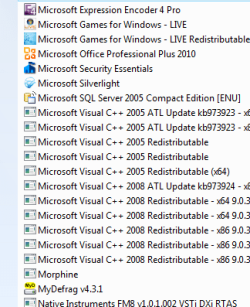
I have been using Revo Uninstaller Pro. In it's list of installed programs are multiple Microsoft Visual C ++ including 2005, 2008 ATL Update kb-973924-x64, 2008 redistributable - x64 and x86 versions of 9.0.21022 and 9.0.30729.414138. Do I need all of these I am running 64 bit and 32 bit browsers and programs. Also there is Microsoft Sync Framework 2.0 Core Components (x64) and MS Sync Framework Provider (x64). I also saw somewhere about Sync Framework 4 and 9. I am exceptionally confused and could use some learned advice. Thanks to any who respond.
glennc
 

My Computer

Computer type
PC/Desktop
Computer Manufacturer/Model Number
Self-Built
OS
Windows 7 Ultimate
CPU
AMD Phenom-II X4 965
Motherboard
Gigabyte GA-MA785GM-US2H
Memory
8192 MB DDR2-SDRAM
Graphics Card(s)
ATI Radeon HD 4200
Sound Card
ATI Radeon HD 4200 High Definition Audo
Monitor(s) Displays
LG Electronics W1943
Screen Resolution
1360 X 768
Hard Drives
C: 500 GB Caviar Black SATA
E: 500 GB Caviar Black SATA
PSU
Ultra LSP 750
Case
Ultra XBlaster
Cooling
2 Fans, CPU Fan, PS Fan
Keyboard
Acer
Mouse
Logitech
Internet Speed
6 MB
as far as the c++ stuff, my advice is to keep them. they are not taking much space nor slowing anything down.

the simple answer is that if you delete them, some programs may not work any more. they are meant to be installed.

i'm not sure about the microsoft sync stuff - probably comes from live essentials?
 

Attachments

  • c++.PNG
    c++.PNG
    8.7 KB · Views: 0

My Computer

Computer Manufacturer/Model Number
mickey megabyte 1234
OS
ultimate 64 sp1
CPU
i5 2500K [email protected]
Motherboard
MSI P67A-GD53
Memory
8 gigs GSkill Ripjaws 1600
Graphics Card(s)
amd hd6950
Sound Card
creative x-fi gamer
Monitor(s) Displays
samsung 24"
Screen Resolution
1920x1080
Hard Drives
ocz vertex 2e 60 gig, samsung f3 1tb, buffalo 2tb ext
PSU
antec 550
Case
antec three hundred
Cooling
i'm a cooling fan
Keyboard
saitek eclipse ii
Mouse
logitech g3
Internet Speed
about 4 Mbps
Other Info
i love win7
Hi,

Do you have MS Groove installed? It comes with Office 2007. Also do you have a Windows smartphone, or any smarphone suites installed? This would explain the sync entries as a lot of phones now try to sync outlook contacts etc.
 

My Computer

Computer Manufacturer/Model Number
Compaq Desktop
OS
Windows 7 Ultimate x64
CPU
AMD Sempron Dual Core
Memory
3GB
Graphics Card(s)
NVIDIA GeForce 6150SE nForce 430
Screen Resolution
1024x768
Hard Drives
150GB Sata
as far as the c++ stuff, my advice is to keep them. they are not taking much space nor slowing anything down.

the simple answer is that if you delete them, some programs may not work any more. they are meant to be installed.

i'm not sure about the microsoft sync stuff - probably comes from live essentials?

Hello micky megabyte,
Thanks for responding and your advice. I had live essentials on for about 10 minutes and removed it, used too much resources to do anything for me. Thanks, I didn't know if the newer versions covered the needs of previous versions.
glennc
 

My Computer

Computer type
PC/Desktop
Computer Manufacturer/Model Number
Self-Built
OS
Windows 7 Ultimate
CPU
AMD Phenom-II X4 965
Motherboard
Gigabyte GA-MA785GM-US2H
Memory
8192 MB DDR2-SDRAM
Graphics Card(s)
ATI Radeon HD 4200
Sound Card
ATI Radeon HD 4200 High Definition Audo
Monitor(s) Displays
LG Electronics W1943
Screen Resolution
1360 X 768
Hard Drives
C: 500 GB Caviar Black SATA
E: 500 GB Caviar Black SATA
PSU
Ultra LSP 750
Case
Ultra XBlaster
Cooling
2 Fans, CPU Fan, PS Fan
Keyboard
Acer
Mouse
Logitech
Internet Speed
6 MB
Hi,

Do you have MS Groove installed? It comes with Office 2007. Also do you have a Windows smartphone, or any smarphone suites installed? This would explain the sync entries as a lot of phones now try to sync outlook contacts etc.

Howdy Orbital Shark,
Thank you also for responding. No I don't use Office Any Year nor do I have a smartphone. Wouldn't know how to use it if I did and don't know what MS Groove is.
If the stuff isn't necessary I have a minor desire to delete it, but I'd rather be safe than sorry. Thanks again.
glennc
 

My Computer

Computer type
PC/Desktop
Computer Manufacturer/Model Number
Self-Built
OS
Windows 7 Ultimate
CPU
AMD Phenom-II X4 965
Motherboard
Gigabyte GA-MA785GM-US2H
Memory
8192 MB DDR2-SDRAM
Graphics Card(s)
ATI Radeon HD 4200
Sound Card
ATI Radeon HD 4200 High Definition Audo
Monitor(s) Displays
LG Electronics W1943
Screen Resolution
1360 X 768
Hard Drives
C: 500 GB Caviar Black SATA
E: 500 GB Caviar Black SATA
PSU
Ultra LSP 750
Case
Ultra XBlaster
Cooling
2 Fans, CPU Fan, PS Fan
Keyboard
Acer
Mouse
Logitech
Internet Speed
6 MB
Hello to Anyone,
Any further ideas in reference to my question? I am at a loss, and as advised previously, I left them for now. Appreciate any help.
glennc
 

My Computer

Computer type
PC/Desktop
Computer Manufacturer/Model Number
Self-Built
OS
Windows 7 Ultimate
CPU
AMD Phenom-II X4 965
Motherboard
Gigabyte GA-MA785GM-US2H
Memory
8192 MB DDR2-SDRAM
Graphics Card(s)
ATI Radeon HD 4200
Sound Card
ATI Radeon HD 4200 High Definition Audo
Monitor(s) Displays
LG Electronics W1943
Screen Resolution
1360 X 768
Hard Drives
C: 500 GB Caviar Black SATA
E: 500 GB Caviar Black SATA
PSU
Ultra LSP 750
Case
Ultra XBlaster
Cooling
2 Fans, CPU Fan, PS Fan
Keyboard
Acer
Mouse
Logitech
Internet Speed
6 MB
The redistributables are bits of code that get programs working when you do not have or do not need the full version of Visual C++ installed. The sync tools are probably there from software you installed recently either from a smartphone or SyncToy. Leave the first alone and the second find out what is using those features.
 

My Computer

Computer Manufacturer/Model Number
Self-Built
OS
Windows 7 Ultimate x64
CPU
AMD Phenom 965 @ 3.4GHz w/ Thermaltake Contac 29 (updraft)
Motherboard
Gigabyte 790GPT-UD3H w/ F3 BIOS & IGP disabled
Memory
Kingston 8GB DDR3 1333MHz 9-9-9-24 (2 x 4GB kits)
Graphics Card(s)
Sapphire 6870 1GB GDDR5 (reference model)
Sound Card
Onboard Realtek 889A codec
Monitor(s) Displays
BenQ 22" M2200HD
Screen Resolution
1920x1080
Hard Drives
1 x Seagate Barracuda 7200.12 1TB 7200RPM w/32MB cache
PSU
Xigmatek NRP-MC651 650w 80+ bronze certified
Case
Antec Two Hundred
Cooling
1 x 140mm exhaust top, 1 x 120mm exhaust rear
Keyboard
Stock PS/2 model
Mouse
Razer Salmosa
Internet Speed
ADSL2+/ 2MB/s
Glenn,

I have asked a similar question myself in this thread, but got no answers. However, if you look closely at that list of C++ redistributables, you will notice that half of the entries are same version but in two flavors - x86 and x64. Some of them are updates. And, furthermore, if you look at the file sizes, they are very small, less than a megabyte each. Of course, there was a time, when 1 MB was huge, but now it's next to nothing. Finally, these redistributables are not programs themselves, they do not run on their own and thus do not consume your resources (apart from minuscule amount of hard drive space). So, I would not worry about them. Leave them as they are.

Of course, if you really insist on deleting everything that is not absolutely necessary, you can delete them one by one (including your sync stuff), write down what you delete (or make a restore point before deleting) and see if anything stops working - simply by starting all of your install programs and making sure they work as they should. This is slow and tedious, but it looks like the only way right now, at least I have not got any answers when I asked how to do this in a more intelligent way.
 

My Computer

Computer Manufacturer/Model Number
Dell Inspiron 530
OS
Windows 7 Ultimate (x64)
CPU
Q6600
Memory
8 GB
Graphics Card(s)
ATI Radeon HD 2600 XT
Monitor(s) Displays
Samsung Syncmaster P2450
Screen Resolution
1920x1080
Hard Drives
Samsung HD103UJ
Samsung HD501LJ
Internet Speed
25 Mb/s
Glenn,

I have asked a similar question myself in this thread, but got no answers. However, if you look closely at that list of C++ redistributables, you will notice that half of the entries are same version but in two flavors - x86 and x64. Some of them are updates. And, furthermore, if you look at the file sizes, they are very small, less than a megabyte each. Of course, there was a time, when 1 MB was huge, but now it's next to nothing. Finally, these redistributables are not programs themselves, they do not run on their own and thus do not consume your resources (apart from minuscule amount of hard drive space). So, I would not worry about them. Leave them as they are.

Of course, if you really insist on deleting everything that is not absolutely necessary, you can delete them one by one (including your sync stuff), write down what you delete (or make a restore point before deleting) and see if anything stops working - simply by starting all of your install programs and making sure they work as they should. This is slow and tedious, but it looks like the only way right now, at least I have not got any answers when I asked how to do this in a more intelligent way.

Hello unifex,
I don't get emails about responses to some of my threads, this being one. Thank you kindly for joining in and sharing your knowledge. Since there had been no meaningful explanatory reply, I like your description and logic. Thanks again, I'll just leave it for now.
glennc
 

My Computer

Computer type
PC/Desktop
Computer Manufacturer/Model Number
Self-Built
OS
Windows 7 Ultimate
CPU
AMD Phenom-II X4 965
Motherboard
Gigabyte GA-MA785GM-US2H
Memory
8192 MB DDR2-SDRAM
Graphics Card(s)
ATI Radeon HD 4200
Sound Card
ATI Radeon HD 4200 High Definition Audo
Monitor(s) Displays
LG Electronics W1943
Screen Resolution
1360 X 768
Hard Drives
C: 500 GB Caviar Black SATA
E: 500 GB Caviar Black SATA
PSU
Ultra LSP 750
Case
Ultra XBlaster
Cooling
2 Fans, CPU Fan, PS Fan
Keyboard
Acer
Mouse
Logitech
Internet Speed
6 MB
Back
Top