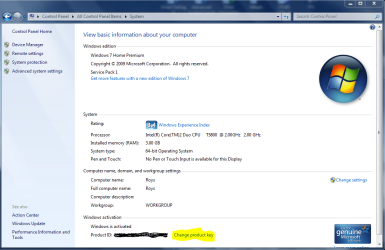
Hi,
I am running Windows 7 Pro on a MacBook Pro. A retail version of Windows 7 Pro was purchased when I bought the MacBook 4 years ago, and was installed using BootCamp. The system was activated and has worked without incident until this evening when my MacBook was rebooted, after failing to come out of hibernation correctly.
I'm perplexed and any help would be appreciated.
Thanks
Darel
The MGADiag dump;
Diagnostic Report (1.9.0027.0):
-----------------------------------------
Windows Validation Data-->
Validation Code: 50
Cached Online Validation Code: 0x0
Windows Product Key: *****-*****-V6MGY-G834Y-Y8QH3
Windows Product Key Hash: rtNFKFPViUJdHAbLucXCF+SK1pA=
Windows Product ID: 00426-321-7001157-70809
Windows Product ID Type: 5
Windows License Type: Retail
Windows OS version: 6.1.7601.2.00010100.1.0.048
ID: {81FB3094-9373-4BC3-8A3F-7311869BE4B3}(3)
Is Admin: Yes
TestCab: 0x0
LegitcheckControl ActiveX: N/A, hr = 0x80070002
Signed By: N/A, hr = 0x80070002
Product Name: Windows 7 Professional
Architecture: 0x00000009
Build lab: 7601.win7sp1_gdr.151019-1254
TTS Error:
Validation Diagnostic:
Resolution Status: N/A
Vista WgaER Data-->
ThreatID(s): N/A, hr = 0x80070002
Version: N/A, hr = 0x80070002
Windows XP Notifications Data-->
Cached Result: N/A, hr = 0x80070002
File Exists: No
Version: N/A, hr = 0x80070002
WgaTray.exe Signed By: N/A, hr = 0x80070002
WgaLogon.dll Signed By: N/A, hr = 0x80070002
OGA Notifications Data-->
Cached Result: N/A, hr = 0x80070002
Version: N/A, hr = 0x80070002
OGAExec.exe Signed By: N/A, hr = 0x80070002
OGAAddin.dll Signed By: N/A, hr = 0x80070002
OGA Data-->
Office Status: 109 N/A
OGA Version: N/A, 0x80070002
Signed By: N/A, hr = 0x80070002
Office Diagnostics: 025D1FF3-364-80041010_025D1FF3-229-80041010_025D1FF3-230-1_025D1FF3-517-80040154_025D1FF3-237-80040154_025D1FF3-238-2_025D1FF3-244-80070002_025D1FF3-258-3
Browser Data-->
Proxy settings: N/A
User Agent: Mozilla/4.0 (compatible; MSIE; Win32)
Default Browser: C:\Program Files (x86)\Google\Chrome\Application\chrome.exe
Download signed ActiveX controls: Prompt
Download unsigned ActiveX controls: Disabled
Run ActiveX controls and plug-ins: Allowed
Initialize and script ActiveX controls not marked as safe: Disabled
Allow scripting of Internet Explorer Webbrowser control: Disabled
Active scripting: Allowed
Script ActiveX controls marked as safe for scripting: Allowed
File Scan Data-->
Other data-->
Office Details: <GenuineResults><MachineData><UGUID>{81FB3094-9373-4BC3-8A3F-7311869BE4B3}</UGUID><Version>1.9.0027.0</Version><OS>6.1.7601.2.00010100.1.0.048</OS><Architecture>x64</Architecture><PKey>*****-*****-*****-*****-Y8QH3</PKey><PID>00426-321-7001157-70809</PID><PIDType>5</PIDType><SID>S-1-5-21-3594688423-3879999529-2206892026</SID><SYSTEM><Manufacturer>Apple Inc.</Manufacturer><Model>MacBookPro6,1</Model></SYSTEM><BIOS><Manufacturer>Apple Inc.</Manufacturer><Version> MBP61.88Z.0057.B0C.1007261552</Version><SMBIOSVersion major="2" minor="4"/><Date>20100726000000.000000+000</Date></BIOS><HWID>25DF3107018400FC</HWID><UserLCID>0409</UserLCID><SystemLCID>0409</SystemLCID><TimeZone>Mountain Standard Time(GMT-07:00)</TimeZone><iJoin>0</iJoin><SBID><stat>3</stat><msppid></msppid><name></name><model></model></SBID><OEM/><GANotification/></MachineData><Software><Office><Result>109</Result><Products/><Applications/></Office></Software></GenuineResults>
Spsys.log Content: 0x80070002
Licensing Data-->
Software licensing service version: 6.1.7601.17514
Name: Windows(R) 7, Professional edition
Description: Windows Operating System - Windows(R) 7, OEM_SLP channel
Activation ID: 50e329f7-a5fa-46b2-85fd-f224e5da7764
Application ID: 55c92734-d682-4d71-983e-d6ec3f16059f
Extended PID: 00371-00178-926-700008-02-1033-7600.0000-1892010
Installation ID: 016734962094457562557472438694238863937253931083215436
Processor Certificate URL: SpcService Web Service
Machine Certificate URL: RacService Web Service
Use License URL: UseLicenseService Web Service
Product Key Certificate URL: PkcService Web Service
Partial Product Key: 6P6GT
License Status: Notification
Notification Reason: 0xC004F057.
Remaining Windows rearm count: 4
Trusted time: 12/21/2015 8:35:55 PM
Windows Activation Technologies-->
HrOffline: 0x00000000
HrOnline: 0x00000000
HealthStatus: 0x0000000000000000
Event Time Stamp: 11:18:2015 08:34
ActiveX: Registered, Version: 7.1.7600.16395
Admin Service: Registered, Version: 7.1.7600.16395
HealthStatus Bitmask Output:
HWID Data-->
HWID Hash Current: OAAAAAIAAgABAAEAAQACAAAABAABAAEAln0O/IQCFT9iqgItFqQWCXf2GhXSTpeJkjX6Xmy6XF0=
OEM Activation 1.0 Data-->
N/A
OEM Activation 2.0 Data-->
BIOS valid for OA 2.0: yes, but no SLIC table
Windows marker version: N/A
OEMID and OEMTableID Consistent: N/A
BIOS Information:
ACPI Table Name OEMID Value OEMTableID Value
APIC APPLE Apple00
FACP APPLE Apple00
HPET APPLE Apple00
MCFG APPLE Apple00
ASF! APPLE Apple00
APIC APPLE Apple00
SBST APPLE Apple00
ECDT APPLE Apple00
SSDT APPLE UsbExcd
SSDT APPLE UsbExcd
SSDT APPLE UsbExcd
SSDT APPLE UsbExcd
I am running Windows 7 Pro on a MacBook Pro. A retail version of Windows 7 Pro was purchased when I bought the MacBook 4 years ago, and was installed using BootCamp. The system was activated and has worked without incident until this evening when my MacBook was rebooted, after failing to come out of hibernation correctly.
I'm perplexed and any help would be appreciated.
Thanks
Darel
The MGADiag dump;
Diagnostic Report (1.9.0027.0):
-----------------------------------------
Windows Validation Data-->
Validation Code: 50
Cached Online Validation Code: 0x0
Windows Product Key: *****-*****-V6MGY-G834Y-Y8QH3
Windows Product Key Hash: rtNFKFPViUJdHAbLucXCF+SK1pA=
Windows Product ID: 00426-321-7001157-70809
Windows Product ID Type: 5
Windows License Type: Retail
Windows OS version: 6.1.7601.2.00010100.1.0.048
ID: {81FB3094-9373-4BC3-8A3F-7311869BE4B3}(3)
Is Admin: Yes
TestCab: 0x0
LegitcheckControl ActiveX: N/A, hr = 0x80070002
Signed By: N/A, hr = 0x80070002
Product Name: Windows 7 Professional
Architecture: 0x00000009
Build lab: 7601.win7sp1_gdr.151019-1254
TTS Error:
Validation Diagnostic:
Resolution Status: N/A
Vista WgaER Data-->
ThreatID(s): N/A, hr = 0x80070002
Version: N/A, hr = 0x80070002
Windows XP Notifications Data-->
Cached Result: N/A, hr = 0x80070002
File Exists: No
Version: N/A, hr = 0x80070002
WgaTray.exe Signed By: N/A, hr = 0x80070002
WgaLogon.dll Signed By: N/A, hr = 0x80070002
OGA Notifications Data-->
Cached Result: N/A, hr = 0x80070002
Version: N/A, hr = 0x80070002
OGAExec.exe Signed By: N/A, hr = 0x80070002
OGAAddin.dll Signed By: N/A, hr = 0x80070002
OGA Data-->
Office Status: 109 N/A
OGA Version: N/A, 0x80070002
Signed By: N/A, hr = 0x80070002
Office Diagnostics: 025D1FF3-364-80041010_025D1FF3-229-80041010_025D1FF3-230-1_025D1FF3-517-80040154_025D1FF3-237-80040154_025D1FF3-238-2_025D1FF3-244-80070002_025D1FF3-258-3
Browser Data-->
Proxy settings: N/A
User Agent: Mozilla/4.0 (compatible; MSIE; Win32)
Default Browser: C:\Program Files (x86)\Google\Chrome\Application\chrome.exe
Download signed ActiveX controls: Prompt
Download unsigned ActiveX controls: Disabled
Run ActiveX controls and plug-ins: Allowed
Initialize and script ActiveX controls not marked as safe: Disabled
Allow scripting of Internet Explorer Webbrowser control: Disabled
Active scripting: Allowed
Script ActiveX controls marked as safe for scripting: Allowed
File Scan Data-->
Other data-->
Office Details: <GenuineResults><MachineData><UGUID>{81FB3094-9373-4BC3-8A3F-7311869BE4B3}</UGUID><Version>1.9.0027.0</Version><OS>6.1.7601.2.00010100.1.0.048</OS><Architecture>x64</Architecture><PKey>*****-*****-*****-*****-Y8QH3</PKey><PID>00426-321-7001157-70809</PID><PIDType>5</PIDType><SID>S-1-5-21-3594688423-3879999529-2206892026</SID><SYSTEM><Manufacturer>Apple Inc.</Manufacturer><Model>MacBookPro6,1</Model></SYSTEM><BIOS><Manufacturer>Apple Inc.</Manufacturer><Version> MBP61.88Z.0057.B0C.1007261552</Version><SMBIOSVersion major="2" minor="4"/><Date>20100726000000.000000+000</Date></BIOS><HWID>25DF3107018400FC</HWID><UserLCID>0409</UserLCID><SystemLCID>0409</SystemLCID><TimeZone>Mountain Standard Time(GMT-07:00)</TimeZone><iJoin>0</iJoin><SBID><stat>3</stat><msppid></msppid><name></name><model></model></SBID><OEM/><GANotification/></MachineData><Software><Office><Result>109</Result><Products/><Applications/></Office></Software></GenuineResults>
Spsys.log Content: 0x80070002
Licensing Data-->
Software licensing service version: 6.1.7601.17514
Name: Windows(R) 7, Professional edition
Description: Windows Operating System - Windows(R) 7, OEM_SLP channel
Activation ID: 50e329f7-a5fa-46b2-85fd-f224e5da7764
Application ID: 55c92734-d682-4d71-983e-d6ec3f16059f
Extended PID: 00371-00178-926-700008-02-1033-7600.0000-1892010
Installation ID: 016734962094457562557472438694238863937253931083215436
Processor Certificate URL: SpcService Web Service
Machine Certificate URL: RacService Web Service
Use License URL: UseLicenseService Web Service
Product Key Certificate URL: PkcService Web Service
Partial Product Key: 6P6GT
License Status: Notification
Notification Reason: 0xC004F057.
Remaining Windows rearm count: 4
Trusted time: 12/21/2015 8:35:55 PM
Windows Activation Technologies-->
HrOffline: 0x00000000
HrOnline: 0x00000000
HealthStatus: 0x0000000000000000
Event Time Stamp: 11:18:2015 08:34
ActiveX: Registered, Version: 7.1.7600.16395
Admin Service: Registered, Version: 7.1.7600.16395
HealthStatus Bitmask Output:
HWID Data-->
HWID Hash Current: OAAAAAIAAgABAAEAAQACAAAABAABAAEAln0O/IQCFT9iqgItFqQWCXf2GhXSTpeJkjX6Xmy6XF0=
OEM Activation 1.0 Data-->
N/A
OEM Activation 2.0 Data-->
BIOS valid for OA 2.0: yes, but no SLIC table
Windows marker version: N/A
OEMID and OEMTableID Consistent: N/A
BIOS Information:
ACPI Table Name OEMID Value OEMTableID Value
APIC APPLE Apple00
FACP APPLE Apple00
HPET APPLE Apple00
MCFG APPLE Apple00
ASF! APPLE Apple00
APIC APPLE Apple00
SBST APPLE Apple00
ECDT APPLE Apple00
SSDT APPLE UsbExcd
SSDT APPLE UsbExcd
SSDT APPLE UsbExcd
SSDT APPLE UsbExcd
My Computer
- Computer type
- Laptop
- Computer Manufacturer/Model Number
- Apple MacBook Pro
- OS
- Win7 Pro 64bit
- CPU
- I7
- Motherboard
- Apple MacBook Pro
- Memory
- 8GB