Solved get google chrome

ethel

New member
Power User
VIP
Local time
6:21 PM
Messages
474
Am using IE11, and have been since it came out. Just lately keep getting get google chrome annoying tab.
It has not happened for a long time. I have Ccleaner, and remove google cookies, but it does not make
any difference. Also have IE11 set to block pop ups. I don't know why this annoys me, just wondered if
anyone knew how to get rid of it.:)
 

My Computer

Computer type
PC/Desktop
Computer Manufacturer/Model Number
ASUS A85XM-A custom build
OS
Windows 10 Pro 64 bit
CPU
AMD A4-5300 APU with Radeon(tm) HD Graphics
Motherboard
ASUSTeK COMPUTER INC. A85XM-A
Memory
8.00 GB
Graphics Card(s)
AMD Radeon HD 7480D
Sound Card
(1) High Definition Audio Device (2) Realtek High Definiti
Monitor(s) Displays
HP W2072a 20 inch Led Backlit Monitor
Screen Resolution
1600 x 900 x 32 bits (4294967296 colors) @ 60 Hz
Hard Drives
TOSHIBA DT01ACA100 SATA Disk Device
Keyboard
Acer
Mouse
Acer
Internet Speed
varies
Antivirus
Windows Defender Antivirus
Browser
Waterfox, Edge
The only way I know of is to change UserAgent (not recommended unless you are an advanced user) or run a Greasemonkey script also not recommended.

See this post
 

My Computer

Computer type
Laptop
Computer Manufacturer/Model Number
ASUS
OS
Microsoft Windows 7 Home Premium 64-bit 7601 Multiprocessor Free Service Pack 1
CPU
AMD C-60 APU with Radeon(tm) HD Graphics
Motherboard
ASUSTeK COMPUTER INC. X501U
Memory
4.00 GB
Graphics Card(s)
AMD Radeon HD 6290 Graphics
Sound Card
(1) AMD High Definition Audio Device (2) Realtek High Defi
Screen Resolution
1366 x 768 x 32 bits (4294967296 colors) @ 60 Hz
Hard Drives
Hitachi HTS545050A7E380 SATA Disk Device
Antivirus
Comodo CIS & FW, SecureAplus App Whitelisting, Threatfire
Browser
Cyberfox 64bit, Opera 64bit, Airfox
Other Info
Spy-The-Spy, HitmanPro.Alert, Norton Connect Safe, MJRegWatcher, BitDefender TrafficLight, Voodoo Shield, Zemana AntiMalware
Could there be a rogue registry entry causing this? I have Chrome installed, but don't use it,except for testing web pages, and I don't see the tab in IE11.
 

My Computer

Computer type
PC/Desktop
Computer Manufacturer/Model Number
ASUS
OS
Windows 7 Home Premium 64 bit SP1
CPU
i5-2320 @3.00 GHz
Memory
6GB
Graphics Card(s)
NVIDIA GeForce 7300 LE
Monitor(s) Displays
Acer S200HQL 19.5 LED
Screen Resolution
1280 x 800 (1900 x 900 max)
Hard Drives
Drive 1: 1 TB SATA internal: C drive
Drive 2: 250 GB SATA internal: User Data Backup
Drive 3: 500 GB SATA USB: Full System Backup 1, Father
Drive 4: 500 GB SATA USB: Full System Backup 2, Son
Drive 5: 40 GB IDE USB: Kindle, ASUS Tabl
Keyboard
ASUS KB34211
Mouse
Logitech m325 cordless
Internet Speed
27Mb down, 3 Mb up cable modem w/Netgear R6400 WiFi
Antivirus
NIS, Spybot S&D, CCleaner, Malwarebytes, MSERT, MRT
Browser
FF v44.0.2;IE11 v11.0.9600.18015,uv11.0.23;Chrome v44.0.2403
Other Info
FF has AdBlockPlus and Ghostery plugins,
Could there be a rogue registry entry causing this? I have Chrome installed, but don't use it,except for testing web pages, and I don't see the tab in IE11.

As far as I know you will not see "Get Google Chrome" in IE if you have installed Chrome.
 

My Computer

Computer type
Laptop
Computer Manufacturer/Model Number
ASUS
OS
Microsoft Windows 7 Home Premium 64-bit 7601 Multiprocessor Free Service Pack 1
CPU
AMD C-60 APU with Radeon(tm) HD Graphics
Motherboard
ASUSTeK COMPUTER INC. X501U
Memory
4.00 GB
Graphics Card(s)
AMD Radeon HD 6290 Graphics
Sound Card
(1) AMD High Definition Audio Device (2) Realtek High Defi
Screen Resolution
1366 x 768 x 32 bits (4294967296 colors) @ 60 Hz
Hard Drives
Hitachi HTS545050A7E380 SATA Disk Device
Antivirus
Comodo CIS & FW, SecureAplus App Whitelisting, Threatfire
Browser
Cyberfox 64bit, Opera 64bit, Airfox
Other Info
Spy-The-Spy, HitmanPro.Alert, Norton Connect Safe, MJRegWatcher, BitDefender TrafficLight, Voodoo Shield, Zemana AntiMalware
Could there be a rogue registry entry causing this? I have Chrome installed, but don't use it,except for testing web pages, and I don't see the tab in IE11.

As far as I know you will not see "Get Google Chrome" in IE if you have installed Chrome.

I agree. Just explaining why I don't see it in IE. If I were the OP, I'd run a CCleaner registry scan to see if it finds any unlinked Chrome entries. I'd also use REGEDIT to search for "chrome" to see if there was something there that could be causing the tab to pop up.
 

My Computer

Computer type
PC/Desktop
Computer Manufacturer/Model Number
ASUS
OS
Windows 7 Home Premium 64 bit SP1
CPU
i5-2320 @3.00 GHz
Memory
6GB
Graphics Card(s)
NVIDIA GeForce 7300 LE
Monitor(s) Displays
Acer S200HQL 19.5 LED
Screen Resolution
1280 x 800 (1900 x 900 max)
Hard Drives
Drive 1: 1 TB SATA internal: C drive
Drive 2: 250 GB SATA internal: User Data Backup
Drive 3: 500 GB SATA USB: Full System Backup 1, Father
Drive 4: 500 GB SATA USB: Full System Backup 2, Son
Drive 5: 40 GB IDE USB: Kindle, ASUS Tabl
Keyboard
ASUS KB34211
Mouse
Logitech m325 cordless
Internet Speed
27Mb down, 3 Mb up cable modem w/Netgear R6400 WiFi
Antivirus
NIS, Spybot S&D, CCleaner, Malwarebytes, MSERT, MRT
Browser
FF v44.0.2;IE11 v11.0.9600.18015,uv11.0.23;Chrome v44.0.2403
Other Info
FF has AdBlockPlus and Ghostery plugins,

My Computer

Computer type
Laptop
Computer Manufacturer/Model Number
ASUS
OS
Microsoft Windows 7 Home Premium 64-bit 7601 Multiprocessor Free Service Pack 1
CPU
AMD C-60 APU with Radeon(tm) HD Graphics
Motherboard
ASUSTeK COMPUTER INC. X501U
Memory
4.00 GB
Graphics Card(s)
AMD Radeon HD 6290 Graphics
Sound Card
(1) AMD High Definition Audio Device (2) Realtek High Defi
Screen Resolution
1366 x 768 x 32 bits (4294967296 colors) @ 60 Hz
Hard Drives
Hitachi HTS545050A7E380 SATA Disk Device
Antivirus
Comodo CIS & FW, SecureAplus App Whitelisting, Threatfire
Browser
Cyberfox 64bit, Opera 64bit, Airfox
Other Info
Spy-The-Spy, HitmanPro.Alert, Norton Connect Safe, MJRegWatcher, BitDefender TrafficLight, Voodoo Shield, Zemana AntiMalware
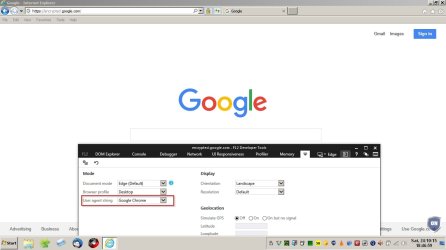
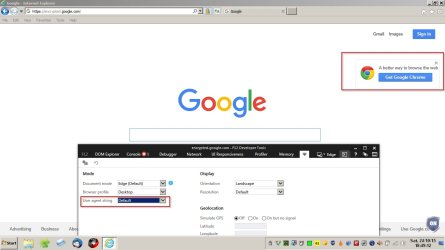
A quick test. Start IE and then press F12 to open Developer Tools. Change User Agent to Chrome or Firefox and visit your google home page. I use encrypted google dot com.

With user agent changed there is no "Get Google Chrome"

Developer.jpg

With default user agent selected the "Get Google Chrome" box returns.

Developer 2.jpg

The reason for not recommending switching user agent permanently is that it can break functionality on some websites.
 

My Computer

Computer type
Laptop
Computer Manufacturer/Model Number
ASUS
OS
Microsoft Windows 7 Home Premium 64-bit 7601 Multiprocessor Free Service Pack 1
CPU
AMD C-60 APU with Radeon(tm) HD Graphics
Motherboard
ASUSTeK COMPUTER INC. X501U
Memory
4.00 GB
Graphics Card(s)
AMD Radeon HD 6290 Graphics
Sound Card
(1) AMD High Definition Audio Device (2) Realtek High Defi
Screen Resolution
1366 x 768 x 32 bits (4294967296 colors) @ 60 Hz
Hard Drives
Hitachi HTS545050A7E380 SATA Disk Device
Antivirus
Comodo CIS & FW, SecureAplus App Whitelisting, Threatfire
Browser
Cyberfox 64bit, Opera 64bit, Airfox
Other Info
Spy-The-Spy, HitmanPro.Alert, Norton Connect Safe, MJRegWatcher, BitDefender TrafficLight, Voodoo Shield, Zemana AntiMalware
Could there be a rogue registry entry causing this? I have Chrome installed, but don't use it,except for testing web pages, and I don't see the tab in IE11.
This happens because Google detects IE11 (The user agent Callender talks you about) and then, shows this popup, has nothing to do with registry, the webpage has javascript routines to detect which browser you are running the site with.

This happens with Opera, Firefox and any non Chrome browser out there, the only way to remove that, without messing with user agents, is to have a Google account, I have one, and with that logged in, the advice doesn't appear anymore...
 

My Computer

Computer type
PC/Desktop
Computer Manufacturer/Model Number
Assembled Desktop PC
OS
Microsoft Windows 7 Home Premium SP1 64-bit Build 7600
CPU
AMD Athlon 64 X2 5200+ Dual Core CPU @ 2.7 Ghz (Brisbane)
Motherboard
PCChips A13G+ v3.0
Memory
2x2 GB DDR2 PC-5300 (667 Mhz) Kingston ValueRAM
Graphics Card(s)
XFX ATI Radeon HD 4350 GPU (512 MB + 512 MB HM)
Sound Card
Realtek High Definition Audio Driver ALC660 @ MCP61S
Monitor(s) Displays
HP S2031 20" LED HD Widescreen Display Monitor
Screen Resolution
1600 x 900 px
Hard Drives
Maxtor Diamond Max 10 (160 GB, 7200 RPM, SATA-II Hard Disk)
Western Digital Scorpion Blue (250 GB, 5400 RPM, SATA-II External Hard Disk - Personal Data)
Toshiba MQ01ABD050 (500 GB, 5400 RPM, SATA-II External Hard Disk - Software & ISOs)
PSU
Pixxo Transformer 850W 80+ Certification PSU
Case
Compaq 5BW353 Case
Cooling
Many solutions, see other info...
Keyboard
Green Leaf (Mitzu) Standard Keyboard
Mouse
Microsoft USB Lasser Pointing Device
Internet Speed
10 MB
Antivirus
Avast Antivirus Free
Browser
Firefox, Chrome, Internet Explorer
Other Info
Windows Experience Index Result: 3.8 of 7.9.

Cooling solutions:
- AVC @ 2000/5000 RPM Copper Heatpipes (For Athlon 64 X2 6000+ CPU used in an Athlon 64 X2 5200+)
- Rear Fan 80 mm @ 2700 RPM for heat extraction
- Manhatan Chipset Cooler @ 4700/7200 RPM (For nVidia Chipset in MoBo)
- Foxconn @ 2500 RPM (Old Pentium III heatsink fan) in XFX ATI Radeon HD 4350
Could there be a rogue registry entry causing this? I have Chrome installed, but don't use it,except for testing web pages, and I don't see the tab in IE11.

This happens with Opera, Firefox and any non Chrome browser out there, the only way to remove that, without messing with user agents, is to have a Google account, I have one, and with that logged in, the advice doesn't appear anymore...

Ahh! That explains it. I also have a google account due to having Chrome installed. I almost never use it, but it's there. Thanks.
 

My Computer

Computer type
PC/Desktop
Computer Manufacturer/Model Number
ASUS
OS
Windows 7 Home Premium 64 bit SP1
CPU
i5-2320 @3.00 GHz
Memory
6GB
Graphics Card(s)
NVIDIA GeForce 7300 LE
Monitor(s) Displays
Acer S200HQL 19.5 LED
Screen Resolution
1280 x 800 (1900 x 900 max)
Hard Drives
Drive 1: 1 TB SATA internal: C drive
Drive 2: 250 GB SATA internal: User Data Backup
Drive 3: 500 GB SATA USB: Full System Backup 1, Father
Drive 4: 500 GB SATA USB: Full System Backup 2, Son
Drive 5: 40 GB IDE USB: Kindle, ASUS Tabl
Keyboard
ASUS KB34211
Mouse
Logitech m325 cordless
Internet Speed
27Mb down, 3 Mb up cable modem w/Netgear R6400 WiFi
Antivirus
NIS, Spybot S&D, CCleaner, Malwarebytes, MSERT, MRT
Browser
FF v44.0.2;IE11 v11.0.9600.18015,uv11.0.23;Chrome v44.0.2403
Other Info
FF has AdBlockPlus and Ghostery plugins,
google chrome pop up

Thank you everyone for your replies. I think I will just have to get used to looking at the get google
chrome pop up on the google homepage. I want to stay with IE11.:D
 

My Computer

Computer type
PC/Desktop
Computer Manufacturer/Model Number
ASUS A85XM-A custom build
OS
Windows 10 Pro 64 bit
CPU
AMD A4-5300 APU with Radeon(tm) HD Graphics
Motherboard
ASUSTeK COMPUTER INC. A85XM-A
Memory
8.00 GB
Graphics Card(s)
AMD Radeon HD 7480D
Sound Card
(1) High Definition Audio Device (2) Realtek High Definiti
Monitor(s) Displays
HP W2072a 20 inch Led Backlit Monitor
Screen Resolution
1600 x 900 x 32 bits (4294967296 colors) @ 60 Hz
Hard Drives
TOSHIBA DT01ACA100 SATA Disk Device
Keyboard
Acer
Mouse
Acer
Internet Speed
varies
Antivirus
Windows Defender Antivirus
Browser
Waterfox, Edge
Thank you everyone for your replies. I think I will just have to get used to looking at the get google
chrome pop up on the google homepage. I want to stay with IE11.:D
If you will search from the address bar, you will never have to visit google.com. You will never have to see the "get chrome" advert.
 

My Computer

Computer type
Laptop
Computer Manufacturer/Model Number
Employer provided Dell Latitude
OS
W7 Pro SP1 64bit
CPU
i7
Memory
8GB
Graphics Card(s)
Intel HD Graphics
Hard Drives
crappy SSD
Antivirus
Employer mandated Symantec Endpoint Protection
Browser
Pale Moon 64bit, IE11 64bit & Chrome 64bit
Back
Top