Get router attached devices info

davesev

New member
Member
Local time
4:18 PM
Messages
56
I use Fing for Android which shows me a bunch of info for connected devices on the router including their IP address and name, but sometimes it's not enough and I'm looking for a Windows 7 tool that does the same thing. Is there something I'm missing in Control Panel or command line or do I need to install a third-party tool?
 

My Computer My Computer

At a glance

Windows 7 Pro 64-bit
Computer type
PC/Desktop
OS
Windows 7 Pro 64-bit
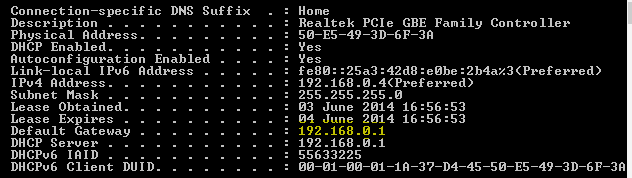
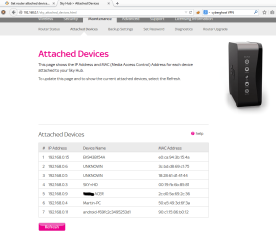
I don't know that Windows itself has that info, but if you log into the router itself (run ipconfig /all in command prompt, and use the default gateway as the address in a web browser) - this should give you what you are looking for.

Per example:
 

Attachments

  • CMD.PNG
    CMD.PNG
    3.8 KB · Views: 31
  • Attached Devices.PNG
    Attached Devices.PNG
    45.7 KB · Views: 2

My Computer My Computer

At a glance

Windows 10 Pro x64Intel Core i5 7400 @ 3.00GHz8GB 2133Mhz DDR4 (OEM supplied)Gygabyte Windforce GTX 1050Ti (Factory Overcl...
Computer type
PC/Desktop
Computer Manufacturer/Model Number
Medion Erazer (note to self: insert model number) - with custom additions
OS
Windows 10 Pro x64
CPU
Intel Core i5 7400 @ 3.00GHz
Motherboard
OEM supllied with PC
Memory
8GB 2133Mhz DDR4 (OEM supplied)
Graphics Card(s)
Gygabyte Windforce GTX 1050Ti (Factory Overclocked)
Sound Card
Realtek
Monitor(s) Displays
Acer Al1980 + HKC
Screen Resolution
1360*768(HKC) / 1280*1024(Acer)
Hard Drives
1TB Toshiba
1TB WD Caviar Green
120GB Samsung Evo 840
PSU
OEM supplied (no power rating on case)
Case
OEM Supplied
Cooling
Stock
Keyboard
Logitech Wireless
Mouse
Logitect Wireless
Internet Speed
40Mb/s Down 10Mb/s Up
Antivirus
Defender
Browser
Firefox
This is what I would do if I had router admin login, but Fing does not require that, and I am looking for a good Windows 7 equivalent to Fing.
 

My Computer My Computer

At a glance

Windows 7 Pro 64-bit
Computer type
PC/Desktop
OS
Windows 7 Pro 64-bit
Can I just ask, why exactly do you need this information?
 

My Computer My Computer

At a glance

Windows 10 Pro x64Intel Core i5 7400 @ 3.00GHz8GB 2133Mhz DDR4 (OEM supplied)Gygabyte Windforce GTX 1050Ti (Factory Overcl...
Computer type
PC/Desktop
Computer Manufacturer/Model Number
Medion Erazer (note to self: insert model number) - with custom additions
OS
Windows 10 Pro x64
CPU
Intel Core i5 7400 @ 3.00GHz
Motherboard
OEM supllied with PC
Memory
8GB 2133Mhz DDR4 (OEM supplied)
Graphics Card(s)
Gygabyte Windforce GTX 1050Ti (Factory Overclocked)
Sound Card
Realtek
Monitor(s) Displays
Acer Al1980 + HKC
Screen Resolution
1360*768(HKC) / 1280*1024(Acer)
Hard Drives
1TB Toshiba
1TB WD Caviar Green
120GB Samsung Evo 840
PSU
OEM supplied (no power rating on case)
Case
OEM Supplied
Cooling
Stock
Keyboard
Logitech Wireless
Mouse
Logitect Wireless
Internet Speed
40Mb/s Down 10Mb/s Up
Antivirus
Defender
Browser
Firefox
We were trying to troubleshoot why a printer stopped working after a modem switch. I don't understand why us wanting that information is a security concern when I can view it on Android but not Windows 7. That seems more like an issue with Windows.

I'd really love to know some recommendations people!
 

My Computer My Computer

At a glance

Windows 7 Pro 64-bit
Computer type
PC/Desktop
OS
Windows 7 Pro 64-bit
Just a question, is the printer using an Ethernet connection to the Router or USB to a computer?

Usually a Router password can be cleared by following the manufacturer's recommendation for doing a Reset using the Reset button on it [not a power-off reset].
 

My Computer My Computer

At a glance

Windows 7 Ultimate 64-bit, Windows 8.1 64-bit...
Computer type
PC/Desktop
Computer Manufacturer/Model Number
Customs, Dell, Gateway, HP, Toshiba, Acer, ASUS
OS
Windows 7 Ultimate 64-bit, Windows 8.1 64-bit, Mac OS X 10.10, Linux Mint 17, Windows 10 Pro TP
Keyboard
Microsoft
Mouse
Microsoft
click the Start button , click Control Panel, click Network and Internet, and then click Network and Sharing Center. In the upper-right corner, click View full map. (If your computer is on a domain, network mapping might be disabled). Once the map is created you can right click each device and click on properties for the additional information.
 

My Computer My Computer

At a glance

Windows 7 Pro 64bit
Computer type
PC/Desktop
OS
Windows 7 Pro 64bit
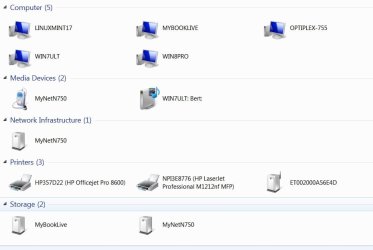
Mine shows only the Ethernet-connected devices, none of the Wi-Fi.
 

Attachments

  • Network.jpg
    Network.jpg
    33.7 KB · Views: 2

My Computer My Computer

At a glance

Windows 7 Ultimate 64-bit, Windows 8.1 64-bit...
Computer type
PC/Desktop
Computer Manufacturer/Model Number
Customs, Dell, Gateway, HP, Toshiba, Acer, ASUS
OS
Windows 7 Ultimate 64-bit, Windows 8.1 64-bit, Mac OS X 10.10, Linux Mint 17, Windows 10 Pro TP
Keyboard
Microsoft
Mouse
Microsoft
Log into your router and check under the Wireless setting for something similar to Isolate Wireless
 

My Computer My Computer

At a glance

Windows 7 Pro 64bit
Computer type
PC/Desktop
OS
Windows 7 Pro 64bit
Just a question, is the printer using an Ethernet connection to the Router or USB to a computer?

The printer is using an ethernet connection to the router but that doesn't matter; it could be using a wireless connection, that makes no difference to my question. I just want a tool in Windows to see IPs and their computer descriptions like I can with Fing on Android (has anyone here even tried Fing? It's on iPhone too).

Usually a Router password can be cleared by following the manufacturer's recommendation for doing a Reset using the Reset button on it [not a power-off reset].

The router password has nothing to do with this issue; it is easier to use Fing on Android than log into the router admin but it would be easier to use a Windows tool than Fing.

Please just someone recommend a tool for Windows that does this.
 

My Computer My Computer

At a glance

Windows 7 Pro 64-bit
Computer type
PC/Desktop
OS
Windows 7 Pro 64-bit
Since Fing is being used on an Android device it may be that there's no similar Windows-based application. I got Network Magic with a Linksys Router and it works with WIndows, don't know if it is still offered since Cisco bought Linksys.
 

My Computer My Computer

At a glance

Windows 7 Ultimate 64-bit, Windows 8.1 64-bit...
Computer type
PC/Desktop
Computer Manufacturer/Model Number
Customs, Dell, Gateway, HP, Toshiba, Acer, ASUS
OS
Windows 7 Ultimate 64-bit, Windows 8.1 64-bit, Mac OS X 10.10, Linux Mint 17, Windows 10 Pro TP
Keyboard
Microsoft
Mouse
Microsoft
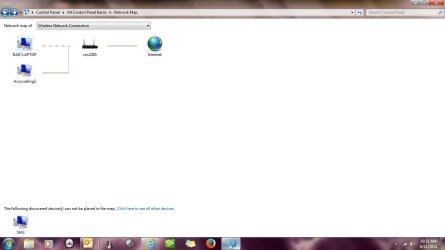
click the Start button , click Control Panel, click Network and Internet, and then click Network and Sharing Center. In the upper-right corner, click View full map. (If your computer is on a domain, network mapping might be disabled). Once the map is created you can right click each device and click on properties for the additional information.

It should look something like this
 

Attachments

  • Network Map.jpg
    Network Map.jpg
    38.4 KB · Views: 1

My Computer My Computer

At a glance

Windows 7 Pro 64bit
Computer type
PC/Desktop
OS
Windows 7 Pro 64bit

My Computers My Computers

  • At a glance

    Windows 11 Pro x64 [Latest Release and Releas...Ryzen 9 5950X, 3.8 - 5.2 MHz64GB [2 x 32GB] DDR4 3200MHz4GB NVIDIA GEFORCE GTX 1650 Ti
    Computer type
    PC/Desktop
    Computer Manufacturer/Model Number
    ChillBlast - Custom to my design
    OS
    Windows 11 Pro x64 [Latest Release and Release Preview]
    CPU
    Ryzen 9 5950X, 3.8 - 5.2 MHz
    Motherboard
    Asus Prime X570-Pro
    Memory
    64GB [2 x 32GB] DDR4 3200MHz
    Graphics Card(s)
    4GB NVIDIA GEFORCE GTX 1650 Ti
    Sound Card
    On-board SPDIF to 5.1 System + HDMI [5.1 system]
    Monitor(s) Displays
    32" UHD 32 Bit HDR Monitor + 43" UHD 4K 32Bit HDR TV
    Screen Resolution
    2 x 3840 x 2160 @60Hz
    Hard Drives
    1TB M2 SSD OS, 500GB Fast Access SSD, 2 x 8TB Data + Various Externals from 1TB to 4TB, 10TB NAS
    PSU
    NZXT C750 80 PLUS Gold 750W Modular PSU
    Case
    Workstation Case [Matt Black]
    Cooling
    NZXT Kraken X63 280mm CPU Cooler +2x Quiet Case fans
    Keyboard
    Logitech Wireless MX Keys & K400 + others
    Mouse
    Logitech Wireless MX Master 3S
    Internet Speed
    920 MB Down 50 MB Up
    Antivirus
    BitDefender Total Security Pro
    Browser
    Chrome (always run latest Non-Beta)
    Other Info
    Also run ...
    Laptop - Quad 8GB - Windows 10 Pro x64
    Nexus 7 Android tablet x2
    Samsung 10.2" tablet
    Blackview TAB 8 4G Android Tablet c/w Keyboard
    Wacom Intuos Pro Medium Pen Pad
    Wacom Intuos Pro Small Pen Pad
    Wacom Expresskeys Remote
    Loopdeck+ Graphics Controller
    Shuttle Pro v2 Control
  • At a glance

    Windows 11 Pro x64 Latest RPIntel I7 10750H 5.0GHz32GB [2x16GB] DDR4 2933 MHznVidia GTX1650Ti 4 GB GDDR6
    Computer type
    Laptop
    System Manufacturer/Model Number
    Dell XPS 17 10750H
    OS
    Windows 11 Pro x64 Latest RP
    CPU
    Intel I7 10750H 5.0GHz
    Motherboard
    Dell XPS
    Memory
    32GB [2x16GB] DDR4 2933 MHz
    Graphics Card(s)
    nVidia GTX1650Ti 4 GB GDDR6
    Sound Card
    Stock [Realtek] 4 Speaker
    Monitor(s) Displays
    17" IPS UHD+ Infinity Edge Touchscreen
    Screen Resolution
    3840 x 2400
    Hard Drives
    2TB M2 NVMe, 4TB External + various 500GB & 1TB External NVMe (also have access to spinner HDD from
    PSU
    Stock
    Case
    Stock XPS Aluminium & Carbon Fibre
    Cooling
    Stock - Active Fan Control
    Keyboard
    Backlit + Various Logitech
    Mouse
    Stock Track Pad + Logitech MX Trackball
    Internet Speed
    72 MB Down 18MB Up
    Browser
    Chrome
    Other Info
    Also run ...
    Laptop - Quad 8GB - Windows 10 Pro x64
    Nexus 7 Android tablet x2
    10.2" tablet
    Sony Z3 Android Smartphone
    Wacom Intuos Pro Medium Pen Pad
    Wacom Intuos Pro Small Pen Pad
    Wacom Expresskeys Remote
    Loopdeck+ Graphics Controller
    Shuttle Pro v2 Control Pad
    10TB NAS
click the Start button , click Control Panel, click Network and Internet, and then click Network and Sharing Center. In the upper-right corner, click View full map. (If your computer is on a domain, network mapping might be disabled). Once the map is created you can right click each device and click on properties for the additional information.

OK on my home network it just showed my computer connected to the router connected to the internet, then showed a bunch of other devices at the bottom and said they could not be mapped. Hovering over my computer showed my IP address and MAC address, which is good, but still very limited compared to Fing.

Right-clicking the Printer anywhere gave me a Properties option which is useful but still not as informative as Fing, and no other device had a Properties option. On Mac I can easily see the IP address of other devices, and on Fing I can see not only that but what services those devices have available over the network, which would be really useful to see on Windows!

I can pretty much see whatever is available to see through the router using Linux (which is hard) or Fing (which is easy but only on a mobile device) so I really just want the abilities of Fing on Windows, and I am looking for someone to recommend a program they have used that will do this, and maybe this is the wrong forum to ask on because maybe nobody has actually used any of those programs.
 

My Computer My Computer

At a glance

Windows 7 Pro 64-bit
Computer type
PC/Desktop
OS
Windows 7 Pro 64-bit
Back
Top