getting a error Element not found 0x80070490 error!

Maheshputt

New member
Member
Local time
11:46 PM
Messages
88
hi!

I am trying to do a backup.But i get a error 0x80070490 element not found.I ran chkdsk in safe mode and also went to the msconfig.exe and performed the following

In the System Configuration Utility dialog box, click Selective Startup on the General tab.
Click to clear the Load Startup Items check box.
Note The Use Original Boot.ini check box is unavailable.
Click the Services tab.
Click to select the Hide All Microsoft Services check box.
Click Disable All, and then click OK.
When you are prompted, click Restart.

I did all this but to no avail.

Help would be appreciated.

Thanks
Mahesh
 

My Computer

Computer Manufacturer/Model Number
DELL INSPIRION Desktop 545S
OS
windows7 64 bit
CPU
Intel core 2 DUO 8400@3GHZ
Motherboard
DELL INC OT287N SOCKET 775
Memory
4GB
Graphics Card(s)
ATI RADEON 4350 512 MB Ram
Sound Card
Realtek HIGH definition Audio
Monitor(s) Displays
DELL TFT monitor dell 1910N
Screen Resolution
1366*768 pixels
Hard Drives
SATA Hard drive came with the system
Internet Speed
512 MBPS broad band connection
Confirm the Volume Shadow Copy service is set to Automatic

Start> In search box type services.msc> Enter> Scroll down to Volume Shadow Copy, make sure it is set to automatic

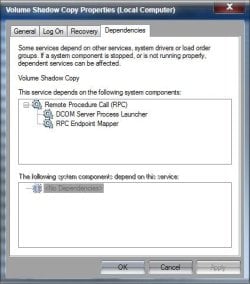
If not, change it to automatic. If it is already set to automatic, make sure the dependencies in the screen shot are also set to Automatic and Started

VSC.jpg

A Guy
 

My Computer

Computer type
PC/Desktop
OS
Windows 10 Home x64
CPU
INTEL Core i5-750 Quad-Core 3.37GHz
Motherboard
ASUS P7P55D
Memory
HyperX Fury Black Series 8GB (2 x 4GB) 1866Mhz
Graphics Card(s)
EVGA GeForce GTX 750 Superclocked 1GB 128-Bit GDDR5
Monitor(s) Displays
LG 32MA68HY 32" IPS
Screen Resolution
1920 x 1080
Hard Drives
Samsung 840 Evo 120GB, SEAGATE 500GB Barracuda® 7200.12, SATA 3 Gb/s, 7200 RPM, 16MB cache
PSU
ANTEC TruePower New TP-550, 80 PLUS, 550W
Case
ANTEC Three Hundred Illusion
Cooling
COOLER MASTER Hyper 212 Plus, 4 x 120mm 1 x 140mm Noctua's
Internet Speed
85 + Mbps
Antivirus
Avast
Browser
Vivaldi
hi!

there are no dependencies and the volume shadow copy is et to automatic.
Do i have to reload windows again?

thanks
mahesh
 

My Computer

Computer Manufacturer/Model Number
DELL INSPIRION Desktop 545S
OS
windows7 64 bit
CPU
Intel core 2 DUO 8400@3GHZ
Motherboard
DELL INC OT287N SOCKET 775
Memory
4GB
Graphics Card(s)
ATI RADEON 4350 512 MB Ram
Sound Card
Realtek HIGH definition Audio
Monitor(s) Displays
DELL TFT monitor dell 1910N
Screen Resolution
1366*768 pixels
Hard Drives
SATA Hard drive came with the system
Internet Speed
512 MBPS broad band connection
Try this:

Run sfc /scannow.

Review the CBS.log and uninstall any patches/updates with missing assemblies if indicated therein.

Reinstall the patches/updates.

http://www.sevenforums.com/tutorials/1538-sfc-scannow-command-system-file-checker.html

NOTE: This may or may not have a direct bearing on the problem. In any case running a system file check will help repair/replace any corrupt system files including the missing assemblies - if any.
 

My Computer

OS
Windows 7 Home Premium 32 bit
Hmmm, no dependencies is odd. I believe those dependencies should be the same for any Windows 7 system. See what jumanji's suggestion does, and post the sfcdetails.txt here if any problems are found. A Guy
 

My Computer

Computer type
PC/Desktop
OS
Windows 10 Home x64
CPU
INTEL Core i5-750 Quad-Core 3.37GHz
Motherboard
ASUS P7P55D
Memory
HyperX Fury Black Series 8GB (2 x 4GB) 1866Mhz
Graphics Card(s)
EVGA GeForce GTX 750 Superclocked 1GB 128-Bit GDDR5
Monitor(s) Displays
LG 32MA68HY 32" IPS
Screen Resolution
1920 x 1080
Hard Drives
Samsung 840 Evo 120GB, SEAGATE 500GB Barracuda® 7200.12, SATA 3 Gb/s, 7200 RPM, 16MB cache
PSU
ANTEC TruePower New TP-550, 80 PLUS, 550W
Case
ANTEC Three Hundred Illusion
Cooling
COOLER MASTER Hyper 212 Plus, 4 x 120mm 1 x 140mm Noctua's
Internet Speed
85 + Mbps
Antivirus
Avast
Browser
Vivaldi
hi!

I ran the following code
findstr /c:"[SR]" %windir%\Logs\CBS\CBS.log >"%userprofile%\Desktop\sfcdetails.txt"and gave me a message that it cannot open the CBSlog file.Please advise me as to how to open this file?It says as access denied when i tried to open the file by going to the directory.Please advise me as to how to change the permissions so that i can paste the log here.

thanks mahesh
 

My Computer

Computer Manufacturer/Model Number
DELL INSPIRION Desktop 545S
OS
windows7 64 bit
CPU
Intel core 2 DUO 8400@3GHZ
Motherboard
DELL INC OT287N SOCKET 775
Memory
4GB
Graphics Card(s)
ATI RADEON 4350 512 MB Ram
Sound Card
Realtek HIGH definition Audio
Monitor(s) Displays
DELL TFT monitor dell 1910N
Screen Resolution
1366*768 pixels
Hard Drives
SATA Hard drive came with the system
Internet Speed
512 MBPS broad band connection
hi!

I was able to create the sfcscandetails.txt.I am attaching the file.Please advise me as to what to do next.

Thanks
mahesh
 

Attachments

My Computer

Computer Manufacturer/Model Number
DELL INSPIRION Desktop 545S
OS
windows7 64 bit
CPU
Intel core 2 DUO 8400@3GHZ
Motherboard
DELL INC OT287N SOCKET 775
Memory
4GB
Graphics Card(s)
ATI RADEON 4350 512 MB Ram
Sound Card
Realtek HIGH definition Audio
Monitor(s) Displays
DELL TFT monitor dell 1910N
Screen Resolution
1366*768 pixels
Hard Drives
SATA Hard drive came with the system
Internet Speed
512 MBPS broad band connection
hmmm... we are back to square one.

The log file does not indicate any problems that it repaired or was unable to repair.

( For your info: How to analyze the log file entries that the Microsoft Windows Resource Checker (SFC.exe) program generates in Windows Vista)

So what now?

This is the second instance where we have drawn a blank in the last few days. The other one having a problem with the backup but with a different error message:
http://www.sevenforums.com/backup-restore/271708-cannot-get-backup-work-help.html

That leaves us perhaps with a repair install as I had suggested in that thread unless someone else comes up with their brain waves.
 

My Computer

OS
Windows 7 Home Premium 32 bit
I know your VSS service shows no dependencies, but do you have the services in my screenshot, and are they set to automatic and started? We never asked, were you able to do backups before, and only this last attempt failed? A Guy
 

My Computer

Computer type
PC/Desktop
OS
Windows 10 Home x64
CPU
INTEL Core i5-750 Quad-Core 3.37GHz
Motherboard
ASUS P7P55D
Memory
HyperX Fury Black Series 8GB (2 x 4GB) 1866Mhz
Graphics Card(s)
EVGA GeForce GTX 750 Superclocked 1GB 128-Bit GDDR5
Monitor(s) Displays
LG 32MA68HY 32" IPS
Screen Resolution
1920 x 1080
Hard Drives
Samsung 840 Evo 120GB, SEAGATE 500GB Barracuda® 7200.12, SATA 3 Gb/s, 7200 RPM, 16MB cache
PSU
ANTEC TruePower New TP-550, 80 PLUS, 550W
Case
ANTEC Three Hundred Illusion
Cooling
COOLER MASTER Hyper 212 Plus, 4 x 120mm 1 x 140mm Noctua's
Internet Speed
85 + Mbps
Antivirus
Avast
Browser
Vivaldi
hi!

I have set the volume shadow copy to automatic and there are no dependencies and i have the services in your screen shot.Tell me how to set the services to automatic as the vss is set to automatic i do not know if the services is set to automatic.
I was able to take backups without any problems but i ran the spybot and deleted some malware which were there in my system and i started getting this problem that is element not found error.There is some malware in my registry and in order to delete it ineed to take a back up of my system and follow the malware removal procedure.
Please advise as to what to do?
 

My Computer

Computer Manufacturer/Model Number
DELL INSPIRION Desktop 545S
OS
windows7 64 bit
CPU
Intel core 2 DUO 8400@3GHZ
Motherboard
DELL INC OT287N SOCKET 775
Memory
4GB
Graphics Card(s)
ATI RADEON 4350 512 MB Ram
Sound Card
Realtek HIGH definition Audio
Monitor(s) Displays
DELL TFT monitor dell 1910N
Screen Resolution
1366*768 pixels
Hard Drives
SATA Hard drive came with the system
Internet Speed
512 MBPS broad band connection

My Computer

Computer type
PC/Desktop
OS
Windows 10 Home x64
CPU
INTEL Core i5-750 Quad-Core 3.37GHz
Motherboard
ASUS P7P55D
Memory
HyperX Fury Black Series 8GB (2 x 4GB) 1866Mhz
Graphics Card(s)
EVGA GeForce GTX 750 Superclocked 1GB 128-Bit GDDR5
Monitor(s) Displays
LG 32MA68HY 32" IPS
Screen Resolution
1920 x 1080
Hard Drives
Samsung 840 Evo 120GB, SEAGATE 500GB Barracuda® 7200.12, SATA 3 Gb/s, 7200 RPM, 16MB cache
PSU
ANTEC TruePower New TP-550, 80 PLUS, 550W
Case
ANTEC Three Hundred Illusion
Cooling
COOLER MASTER Hyper 212 Plus, 4 x 120mm 1 x 140mm Noctua's
Internet Speed
85 + Mbps
Antivirus
Avast
Browser
Vivaldi
hi!

I will do that and post again

thanks
mahesh
 

My Computer

Computer Manufacturer/Model Number
DELL INSPIRION Desktop 545S
OS
windows7 64 bit
CPU
Intel core 2 DUO 8400@3GHZ
Motherboard
DELL INC OT287N SOCKET 775
Memory
4GB
Graphics Card(s)
ATI RADEON 4350 512 MB Ram
Sound Card
Realtek HIGH definition Audio
Monitor(s) Displays
DELL TFT monitor dell 1910N
Screen Resolution
1366*768 pixels
Hard Drives
SATA Hard drive came with the system
Internet Speed
512 MBPS broad band connection
hi!

I am trying to do a repair install and it tells me that the current version is latest than the ones trying to upgrade and so it cannot do the repair install.
Please advise me as to what to do?
 

My Computer

Computer Manufacturer/Model Number
DELL INSPIRION Desktop 545S
OS
windows7 64 bit
CPU
Intel core 2 DUO 8400@3GHZ
Motherboard
DELL INC OT287N SOCKET 775
Memory
4GB
Graphics Card(s)
ATI RADEON 4350 512 MB Ram
Sound Card
Realtek HIGH definition Audio
Monitor(s) Displays
DELL TFT monitor dell 1910N
Screen Resolution
1366*768 pixels
Hard Drives
SATA Hard drive came with the system
Internet Speed
512 MBPS broad band connection
Please run the following commands in an Elevated Command prompt, and post the results...

SC QC VSS
SC QC EVENTSYSTEM
SC QC EVENTLOG
SC QUERYEX VSS

post the results (see below)

Please also run the CheckSUR tool...

Please download and save the CheckSUR tool from http://support.microsoft.com/kb/947821
(you'll need to look in the details for Method 2)

Run it - The tool can take anywhere from 5 mins to a couple of hours to run (or 'Install') depending on how much it has to do, and may exit silently - it may appear to freeze for most of that time, but be patient.
The result is logged in the C:\Windows\Logs\CBS\CheckSUR.log file - and an archive …\checksur.persist.log file

Then zip the CheckSUR.log and attach it to your reply..


Here are some instructions to make life easier :)
1) To open an Elevated Command Prompt Window (the ECP window), click on Start, All Programs, Accessories – then right-click on Command Prompt, and select Run as Administrator. Accept the UAC prompt.
2) To run the commands easier, highlight the block of commands, and right-click on the highlight – select Copy. In the CP Window, click on the black/white icon at top left – select Paste. The commands will run but may not complete the last command, so hit the Enter Key once.
3) To copy the results... click on the Black/White icon in the top left, and select Edit... 'Select All', and hit the Enter key - then use Ctrl+V or r-click+Paste to paste it into your response.
 

My Computer

Computer type
Laptop
Computer Manufacturer/Model Number
Asus K52F or Lenovo B51-80
OS
Win 7 x64 Home Premium (and x86 VirtualBox VM)/Win10
CPU
i3 370M/i7 6500U
Motherboard
Asus/Lenovo
Memory
8GB - finally :)/8GB
Graphics Card(s)
it's an i3, dude!/dual Intel&nVidia
Sound Card
onboard
Monitor(s) Displays
15.6" built-in
Screen Resolution
1366x768/1920x1080
Hard Drives
750GB Seagate internal
Sundry external drives attached to other computers on the local network
1TB SSD on the Lenovo
PSU
n/a
Internet Speed
as much as I can get - usually on a dongle/phone, so <1MB/s
Antivirus
MSE/Defender
Browser
IE11/12/Edge/Chrome/FF(if I must)
Thanks Noel ;)

A Guy
 

My Computer

Computer type
PC/Desktop
OS
Windows 10 Home x64
CPU
INTEL Core i5-750 Quad-Core 3.37GHz
Motherboard
ASUS P7P55D
Memory
HyperX Fury Black Series 8GB (2 x 4GB) 1866Mhz
Graphics Card(s)
EVGA GeForce GTX 750 Superclocked 1GB 128-Bit GDDR5
Monitor(s) Displays
LG 32MA68HY 32" IPS
Screen Resolution
1920 x 1080
Hard Drives
Samsung 840 Evo 120GB, SEAGATE 500GB Barracuda® 7200.12, SATA 3 Gb/s, 7200 RPM, 16MB cache
PSU
ANTEC TruePower New TP-550, 80 PLUS, 550W
Case
ANTEC Three Hundred Illusion
Cooling
COOLER MASTER Hyper 212 Plus, 4 x 120mm 1 x 140mm Noctua's
Internet Speed
85 + Mbps
Antivirus
Avast
Browser
Vivaldi
I have exactly the same problem as Maheshputt. Was there a solution?
 

My Computer

Computer type
PC/Desktop
Computer Manufacturer/Model Number
Dell
OS
Windows 7x64
CPU
Intel Core2 Duo CPU E7200 2.53GHz
Memory
6GB
Hard Drives
C:
E:
two external USB drives
Antivirus
Avast
Browser
Firefox

My Computer

Computer type
Laptop
Computer Manufacturer/Model Number
Asus K52F or Lenovo B51-80
OS
Win 7 x64 Home Premium (and x86 VirtualBox VM)/Win10
CPU
i3 370M/i7 6500U
Motherboard
Asus/Lenovo
Memory
8GB - finally :)/8GB
Graphics Card(s)
it's an i3, dude!/dual Intel&nVidia
Sound Card
onboard
Monitor(s) Displays
15.6" built-in
Screen Resolution
1366x768/1920x1080
Hard Drives
750GB Seagate internal
Sundry external drives attached to other computers on the local network
1TB SSD on the Lenovo
PSU
n/a
Internet Speed
as much as I can get - usually on a dongle/phone, so <1MB/s
Antivirus
MSE/Defender
Browser
IE11/12/Edge/Chrome/FF(if I must)
Welcome to Seven Forums StevenHu. As Noel mentioned, you should start your own thread, if your issue is the backup issue the original poster in this thread has/had, you can reference this thread in your new post. Provide as much info as possible and someone can assist you. A Guy
 

My Computer

Computer type
PC/Desktop
OS
Windows 10 Home x64
CPU
INTEL Core i5-750 Quad-Core 3.37GHz
Motherboard
ASUS P7P55D
Memory
HyperX Fury Black Series 8GB (2 x 4GB) 1866Mhz
Graphics Card(s)
EVGA GeForce GTX 750 Superclocked 1GB 128-Bit GDDR5
Monitor(s) Displays
LG 32MA68HY 32" IPS
Screen Resolution
1920 x 1080
Hard Drives
Samsung 840 Evo 120GB, SEAGATE 500GB Barracuda® 7200.12, SATA 3 Gb/s, 7200 RPM, 16MB cache
PSU
ANTEC TruePower New TP-550, 80 PLUS, 550W
Case
ANTEC Three Hundred Illusion
Cooling
COOLER MASTER Hyper 212 Plus, 4 x 120mm 1 x 140mm Noctua's
Internet Speed
85 + Mbps
Antivirus
Avast
Browser
Vivaldi
Back
Top