Solved Getting a list of assigned Com Ports if the devices aren't connected

videobruce

Member
Member
VIP
Local time
7:22 PM
Messages
182
Device Manager is not the answer.
I did a search, but most of the results pointed to using DM which doesn't work if the devices are not connected. That only shows Com1.

Using programs that program radio devices (receivers and transceivers) that use a USB as the communications path. When you connect the device DM assigns a port to them (hopefully). The problem is, when I add another program to control a different device, the previous program looses it's assigned Com port forcing me to choose another. Similar to using DHCP instead of Static IP addresses, which is why I have always used Static addresses.

Best example is; I thought I may of had a issue with a Serial to USB adapter cable. I bought two, one as a spare. I removed the 1st one, connected the 2nd, it assigned a new port number to that even thou it was the same cable type and the same device. Doing so apparently 'bumped' another programs Com Port, forcing me to try to reassign a new port, which is a problem (that program and device has enough issues as it is. :mad:

There must be a file somewhere, unless it's in the Registry, that keeps track of the different devices and the Com port numbers somewhere even after they are removed, or just not in use so I can see the list of current and past assignments or whatever they are called.

I hope all of that made some sense. :confused:
 

My Computers My Computers

  • At a glance

    Win7 x64AMD
    Computer type
    Laptop
    Computer Manufacturer/Model Number
    Toshiba
    OS
    Win7 x64
    CPU
    AMD
  • At a glance

    Win 7 Pro x64AMD FX-835016GBnVidia GeForce 1060
    Computer type
    PC/Desktop
    System Manufacturer/Model Number
    AMD based MB
    OS
    Win 7 Pro x64
    CPU
    AMD FX-8350
    Motherboard
    Gigabyte GA-970A-D3P
    Memory
    16GB
    Graphics Card(s)
    nVidia GeForce 1060
    Monitor(s) Displays
    25"
    Screen Resolution
    1920x1200
    Hard Drives
    two SSD;
    two 4TB HDD
    PSU
    700watt Seasonic
    Internet Speed
    300MB up & down
    Browser
    Firefox
    Other Info
    BD Recorder
Its a bit more complicated than that com ports can be shared and share things like irq dma. How many ports do you have on the motherboard?
 

My Computer My Computer

At a glance

win 8 32 bit
Computer type
PC/Desktop
OS
win 8 32 bit
Nirsoft's USBDeview is what you might be interested in. View any installed/connected USB device on your system

Read ALL the option menus in the program. The program has a wealth of menu options...

I would download the USB device and vendor IDs from here. Now select ALL and copy/paste to a text editor like Notepad or Notepad ++, etc and save that text file as usb.ids. Now place that file in the same folder as USBDeview. Now when you launch USBDeview you'll see a vendor name and possibly a product name for the USB device.

USBDeview shows ALL of what was previously connected. The program can help to uninstall all the crap you longer use for troubleshooting purposes. But be very careful as to not uninstall your mouse and keyboard, etc. Otherwise you'll have to press and hold the computer's power button for a forced shutdown and then reboot so hopefully Windows will reinstall the mouse and keyboard drivers again. Been there done that...

Are these programs like ProScan, Chirp, etc? When I run ProScan the device IDs are unique and seem to hold their assigned COM ports. Though, I don't have more than one scanner of the same type either. Just more than one scanner. So that could[/i[ be a wrench in the gears in terms of unique COM port assignments if you had two of the same scanner or two-way radio.
 

My Computer My Computer

At a glance

Windows 7 Ultimate x64
Computer type
PC/Desktop
OS
Windows 7 Ultimate x64
Its a bit more complicated than that com ports can be shared and share things like irq dma. How many ports do you have on the motherboard?
The only one that always shows is "Communications Port(Com1)"
There is a added serial port card, but that is rarely if ever used. It was only for 2 pieces of older equipment that only had serial as a interface. used. Any time something else is connected, it will just show that specific device assuming there isn't a conflict and the driver was loaded properly.

- - - Updated - - -

Nirsoft's USBDeview is what you might be interested in. View any installed/connected USB device on your system USBDeview shows ALL of what was previously connected.
Are these programs like ProScan, Chirp, etc? When I run ProScan the device IDs are unique and seem to hold their assigned COM ports. Though, I don't have more than one scanner of the same type either. Just more than one scanner. So that could[/i[ be a wrench in the gears in terms of unique COM port assignments if you had two of the same scanner or two-way radio.
Golly, I forgot about that. I have used it in the past a couple of times, but it was some time back.
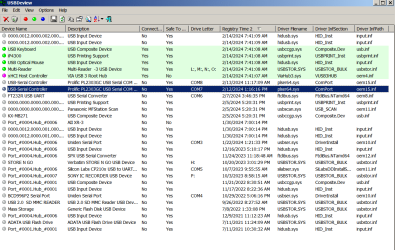
Good guess on ProScan & Chirp (which I probably won't use since the radio has it's own program), Icom's IC-2730 which is the reason for the post. The adapter cables use the Prolific chipset. But, where is Com 2?? :huh:

Here is a screen shot (with all the extra columns hidden, which it easier to read this. Also, I have it sorted by date/time which makes finding something easier.
 

Attachments

  • USB Deview screen shot.png
    USB Deview screen shot.png
    45.6 KB · Views: 1
Last edited:

My Computers My Computers

  • At a glance

    Win7 x64AMD
    Computer type
    Laptop
    Computer Manufacturer/Model Number
    Toshiba
    OS
    Win7 x64
    CPU
    AMD
  • At a glance

    Win 7 Pro x64AMD FX-835016GBnVidia GeForce 1060
    Computer type
    PC/Desktop
    System Manufacturer/Model Number
    AMD based MB
    OS
    Win 7 Pro x64
    CPU
    AMD FX-8350
    Motherboard
    Gigabyte GA-970A-D3P
    Memory
    16GB
    Graphics Card(s)
    nVidia GeForce 1060
    Monitor(s) Displays
    25"
    Screen Resolution
    1920x1200
    Hard Drives
    two SSD;
    two 4TB HDD
    PSU
    700watt Seasonic
    Internet Speed
    300MB up & down
    Browser
    Firefox
    Other Info
    BD Recorder
Click on the "Drive Letter" column once or twice and that'll sort the COM ports.

Have you tried radioreference.com? I'm a member there too. LOL
 

My Computer My Computer

At a glance

Windows 7 Ultimate x64
Computer type
PC/Desktop
OS
Windows 7 Ultimate x64
I thought I recognized your handle. ;)
 

My Computers My Computers

  • At a glance

    Win7 x64AMD
    Computer type
    Laptop
    Computer Manufacturer/Model Number
    Toshiba
    OS
    Win7 x64
    CPU
    AMD
  • At a glance

    Win 7 Pro x64AMD FX-835016GBnVidia GeForce 1060
    Computer type
    PC/Desktop
    System Manufacturer/Model Number
    AMD based MB
    OS
    Win 7 Pro x64
    CPU
    AMD FX-8350
    Motherboard
    Gigabyte GA-970A-D3P
    Memory
    16GB
    Graphics Card(s)
    nVidia GeForce 1060
    Monitor(s) Displays
    25"
    Screen Resolution
    1920x1200
    Hard Drives
    two SSD;
    two 4TB HDD
    PSU
    700watt Seasonic
    Internet Speed
    300MB up & down
    Browser
    Firefox
    Other Info
    BD Recorder
No, I use a different username. Always do across the Internet except for these forums.
 

My Computer My Computer

At a glance

Windows 7 Ultimate x64
Computer type
PC/Desktop
OS
Windows 7 Ultimate x64
Back
Top