Hello Friends,
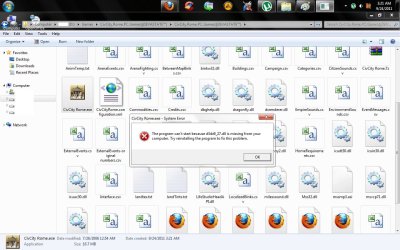
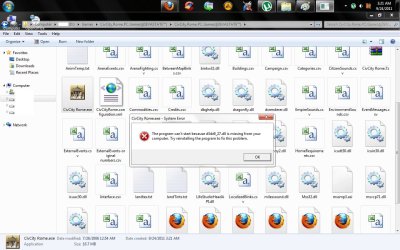
I've been getting an error : "d3d9.dll is missing" while trying to run/play CivCity Rome (Civilisation City Rome). Following are the screenshots of the error, dxdiag result, resolution that i tried.
This is the error message while trying to run the CivCityRome.exe file. I also tried = Right Click > Select "Take Ownership" from Context Menu > Run as Administrator from Context Menu. Still getting same error.
So i tried to identify the version of DirectX update installed on computer since its been a longtime. Run > dxdiag > enter. Here is the result of the search. I'm using DirectX 11 version & not sure if i have to downgrade it???
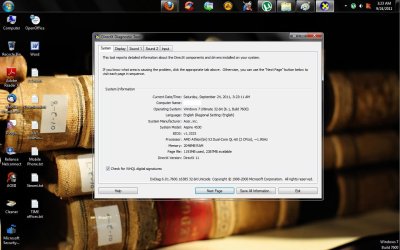
Note: This also has my comps specification.
Here is the GPU details:

I also downloaded d3d9.dll from a website & here 1 can see that existing file on my pc is latest while the update is an old update.

So, i need help with identifying the steps to resolve this error.
I've been getting an error : "d3d9.dll is missing" while trying to run/play CivCity Rome (Civilisation City Rome). Following are the screenshots of the error, dxdiag result, resolution that i tried.
This is the error message while trying to run the CivCityRome.exe file. I also tried = Right Click > Select "Take Ownership" from Context Menu > Run as Administrator from Context Menu. Still getting same error.
So i tried to identify the version of DirectX update installed on computer since its been a longtime. Run > dxdiag > enter. Here is the result of the search. I'm using DirectX 11 version & not sure if i have to downgrade it???
Note: This also has my comps specification.
Here is the GPU details:
I also downloaded d3d9.dll from a website & here 1 can see that existing file on my pc is latest while the update is an old update.
So, i need help with identifying the steps to resolve this error.
My Computer
- Computer type
- Laptop
- OS
- Windows 7 Ultimate