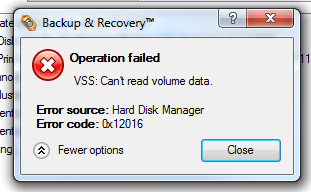
Getting an error when trying to run Paragon Backup, please help.

JohnnyScience

New member
Power User
Local time
5:53 PM
Messages
889
I was trying to run Paragon backup the other day to back up my OS like I've done many times with it before. Now all of a sudden I'm getting this error message:


Any help is greatly appreciated.

Thanks.
 

Attachments

  • Untitled.png
    Untitled.png
    9 KB · Views: 324

My Computer My Computer

Computer Manufacturer/Model Number
Built it myself
OS
Windows 7 64 & Ubuntu 64
CPU
Intel Quad Core Q6600 2.40GHz
Motherboard
Asus
Memory
8g
Graphics Card(s)
Nvidia 9600 GT & 9800 GT
Sound Card
Turtle Beach 5.1
Monitor(s) Displays
Three 19" Dell's & one 46" Samsung 750
I had that happen to me. I discovered it usually meant your hard drive has bad blocks. I fixed it by running Seagates Seatools on my HDD. The windows disk check did not see the problem. Seatools found and corrected the error. Barring that, try Paragons own Hot Processing method.

Open Paragon, On top menu Tools> Settings> Hot Processing Options> Click Enable Hot Processing> Switch form Microsoft Volume Shadow Service to Paragon Hot Processing> Click Use Hot Processing only when partition is locked> Ok your way out

Try a backup that way. It will work just the same, and restore fine if needed. As I say, if you want to correct the original problem, you can try chkdsk , but it didn't find anything for me, whereas the Seatools disc did. Also make sure the Volume Shadow Copy service is set to automatic.

A Guy
 

My Computer My Computer

Computer type
PC/Desktop
OS
Windows 10 Home x64
CPU
INTEL Core i5-750 Quad-Core 3.37GHz
Motherboard
ASUS P7P55D
Memory
HyperX Fury Black Series 8GB (2 x 4GB) 1866Mhz
Graphics Card(s)
EVGA GeForce GTX 750 Superclocked 1GB 128-Bit GDDR5
Monitor(s) Displays
LG 32MA68HY 32" IPS
Screen Resolution
1920 x 1080
Hard Drives
Samsung 840 Evo 120GB, SEAGATE 500GB Barracuda® 7200.12, SATA 3 Gb/s, 7200 RPM, 16MB cache
PSU
ANTEC TruePower New TP-550, 80 PLUS, 550W
Case
ANTEC Three Hundred Illusion
Cooling
COOLER MASTER Hyper 212 Plus, 4 x 120mm 1 x 140mm Noctua's
Internet Speed
85 + Mbps
Antivirus
Avast
Browser
Vivaldi
Paragon is very sensitive to errors on a hard drive. Other imaging software may indicate "non-fatal" errors and image the system. But Paragon will refuse unless even those non-fatal errors are fixed by Seatools. My personal experience.
 

My Computer My Computer

OS
Windows 7 Home Premium 32 bit
Well let me explain this,

I have 2 HDD's a 500g Seagate for my OS & a 2TB WD for my Media.

I was using Paragon to make a completely copy of my OS C: drive which is on the 500g Seagae and it was saving to the 2TB WD in my Paragon file.

So how can I tell which HDD might be the problem?

Should I just run the Seatools regardless? (Is it already installed or do I need to DL it?)

Does WD have a similar program that I can run on the 2TB drive?

Thanks.
 

My Computer My Computer

Computer Manufacturer/Model Number
Built it myself
OS
Windows 7 64 & Ubuntu 64
CPU
Intel Quad Core Q6600 2.40GHz
Motherboard
Asus
Memory
8g
Graphics Card(s)
Nvidia 9600 GT & 9800 GT
Sound Card
Turtle Beach 5.1
Monitor(s) Displays
Three 19" Dell's & one 46" Samsung 750
If Paragon gives out an error message while imaging your system drive, you should run the HDD Diagnostic tool on it.

First download Seatools for Windows and run. If it indicates errors, then you should download Seatools for DOS (which has the ability to repair sectors in most cases), burn it on a CD or bootable USB pendrive, boot from it and run.

| Seagate
 

My Computer My Computer

OS
Windows 7 Home Premium 32 bit
If Paragon gives out an error message while imaging your system drive, you should run the HDD Diagnostic tool on it.

First download Seatools for Windows and run. If it indicates errors, then you should download Seatools for DOS (which has the ability to repair sectors in most cases), burn it on a CD or bootable USB pendrive, boot from it and run.

| Seagate

:ditto: The Seatools for DOS is what you'll need if there are bad blocks. If not, try the Hot Processing option. A Guy
 

My Computer My Computer

Computer type
PC/Desktop
OS
Windows 10 Home x64
CPU
INTEL Core i5-750 Quad-Core 3.37GHz
Motherboard
ASUS P7P55D
Memory
HyperX Fury Black Series 8GB (2 x 4GB) 1866Mhz
Graphics Card(s)
EVGA GeForce GTX 750 Superclocked 1GB 128-Bit GDDR5
Monitor(s) Displays
LG 32MA68HY 32" IPS
Screen Resolution
1920 x 1080
Hard Drives
Samsung 840 Evo 120GB, SEAGATE 500GB Barracuda® 7200.12, SATA 3 Gb/s, 7200 RPM, 16MB cache
PSU
ANTEC TruePower New TP-550, 80 PLUS, 550W
Case
ANTEC Three Hundred Illusion
Cooling
COOLER MASTER Hyper 212 Plus, 4 x 120mm 1 x 140mm Noctua's
Internet Speed
85 + Mbps
Antivirus
Avast
Browser
Vivaldi
Ok, I've downloaded Seatools & just a bit scared to hit the GO button since it tells me to make sure all data is backed up...

Which brings me to the original problem of not being able to back up data via paragon.

Is running this going to destroy any of my data?
 

My Computer My Computer

Computer Manufacturer/Model Number
Built it myself
OS
Windows 7 64 & Ubuntu 64
CPU
Intel Quad Core Q6600 2.40GHz
Motherboard
Asus
Memory
8g
Graphics Card(s)
Nvidia 9600 GT & 9800 GT
Sound Card
Turtle Beach 5.1
Monitor(s) Displays
Three 19" Dell's & one 46" Samsung 750
  • Like
Reactions: JMH
Do you have a backup made before this happened just in case? If not, you can try to make a windows backup:

http://www.sevenforums.com/tutorials/663-backup-complete-computer-create-image-backup.html

You can also change Paragon to Hot Processing and see if that will work to make a current backup. I am currently using my Paragon with Hot Processing.

I have never had Seatools cause any problems, not a one. They have to add that warning. I cannot say 100% it is not possible to have a problem, but it would no doubt be very rare. A Guy
 

My Computer My Computer

Computer type
PC/Desktop
OS
Windows 10 Home x64
CPU
INTEL Core i5-750 Quad-Core 3.37GHz
Motherboard
ASUS P7P55D
Memory
HyperX Fury Black Series 8GB (2 x 4GB) 1866Mhz
Graphics Card(s)
EVGA GeForce GTX 750 Superclocked 1GB 128-Bit GDDR5
Monitor(s) Displays
LG 32MA68HY 32" IPS
Screen Resolution
1920 x 1080
Hard Drives
Samsung 840 Evo 120GB, SEAGATE 500GB Barracuda® 7200.12, SATA 3 Gb/s, 7200 RPM, 16MB cache
PSU
ANTEC TruePower New TP-550, 80 PLUS, 550W
Case
ANTEC Three Hundred Illusion
Cooling
COOLER MASTER Hyper 212 Plus, 4 x 120mm 1 x 140mm Noctua's
Internet Speed
85 + Mbps
Antivirus
Avast
Browser
Vivaldi
Back
Top