
Getting BSOD daily, no DumpFiles created even when options are right.

Hillo

New member
Local time
4:40 AM
Messages
1
Hi.
So for a while, I've been getting 1 BSOD every day about.
These are my configs.
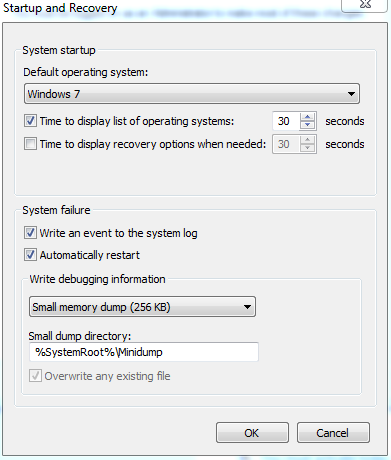
7e9f264bbf42fc1a058075a369e59eb1.png

It happened just few minutes ago, the event viewer always has the same event displayed.

59d1e216d0372b4e4fffa0f543af1b16.png


I attached the DM collection zip, but I don't know if you can help with anything since I don't have dump files.
I also was gonna take a picture of the BSOD, but it lasted like 2 seconds before rebooting.
 

My Computer My Computer

At a glance

Windows ultimate 64-bit
Computer type
PC/Desktop
OS
Windows ultimate 64-bit
Can you take a camera snap of the blue screen and let us see it? Some info will be obtained from those onscreen codes.
 

My Computer My Computer

At a glance

Microsoft Windows 10 Pro Insider Preview 64-bitIntel(R) Core(TM) i3-4130 CPU @ 3.40GHzCorsair Vengence 4GB x2 (8.00GB Dual-Channel ...2047MB GeForce GTS 450 (ZOTAC International)
Computer type
PC/Desktop
Computer Manufacturer/Model Number
Self Assembled
OS
Microsoft Windows 10 Pro Insider Preview 64-bit
CPU
Intel(R) Core(TM) i3-4130 CPU @ 3.40GHz
Motherboard
Gigabyte Technology Co., Ltd. B85M-D3H
Memory
Corsair Vengence 4GB x2 (8.00GB Dual-Channel DDR3 @ 798MHz)
Graphics Card(s)
2047MB GeForce GTS 450 (ZOTAC International)
Sound Card
Onboard (Realtek High Definition Audio)
Monitor(s) Displays
LG Flatron E2040T
Screen Resolution
1600x900
Hard Drives
Western Digital 1 TB
Seagate 500 GB
PSU
Corsair VS550
Case
Cooler Master K380
Cooling
Cooler Master Seidon 120V Plus
Keyboard
Logitech MK260r
Mouse
Logitech MK260r
Internet Speed
PMPL Broadband
Antivirus
Windows Defender + MBAM
Browser
Firefox
Other Info
Dell Studio 15" Laptop
Back
Top