Getting Drivers

Copyright

New member
Member
VIP
Local time
3:48 PM
Messages
102
I'm trying to install XP but it keeps BSODing from the lack of HDD drivers. W7 installs them fine so I was wondering if I could possibly "slipstream" (if that's the correct term, I have no idea.) from the W7 CD? Is this even possible?
 

My Computer

Computer Manufacturer/Model Number
Dell Laptop Studio 1537
OS
Windows 7 x64 7229
CPU
Intel Core 2 Duo CPU T6400
Memory
4 GB
Graphics Card(s)
Mobile Intel 45 Chipset
copyright

Not really. what HD driver do you need?

Ken
 

My Computer

Computer Manufacturer/Model Number
HP Pavillion dv-7 1005 Tx
OS
Win 8 Release candidate 8400
CPU
[email protected]
Memory
4 gigs
Graphics Card(s)
Nvidia 9600M
Sound Card
HD built-in
Monitor(s) Displays
17" Wxga
Screen Resolution
1440x900
Cooling
none
Internet Speed
45Mb down 5Mb up

My Computer

Computer Manufacturer/Model Number
HP Pavillion dv-7 1005 Tx
OS
Win 8 Release candidate 8400
CPU
[email protected]
Memory
4 gigs
Graphics Card(s)
Nvidia 9600M
Sound Card
HD built-in
Monitor(s) Displays
17" Wxga
Screen Resolution
1440x900
Cooling
none
Internet Speed
45Mb down 5Mb up
Emachines EL1210

OK You are installing XP on this EL1210? What install media are you using? Is it the original restore CD? Is it a retail copy of XP? Can you tell what SP (Service Pack 1, 2, or 3) the install applies?

You may be able to "Slipstream" SP3 into you install CD and resolve your HD driver issue, if you are not already using an XP SP3?

Edit: you can also add chipset drivers to the install CD.
 
Last edited:

My Computer

OS
...
See the ElderGeek for a quality step-by-step for slipstreaming XP SP3. It is actually quite easy to do. F6 drivers are another matter entirely. If XP is booting, you are not referring to F6 drivers though.

You will have the option to include all of your drivers,plus more, on the install CD. Including your favorite reg tweaks.
 
OK You are installing XP on this EL1210? What install media are you using? Is it the original restore CD? Is it a retail copy of XP? Can you tell what SP (Service Pack 1, 2, or 3) the install applies?

You may be able to "Slipstream" SP3 into you install CD and resolve your HD driver issue, if you are not already using an XP SP3?

Edit: you can also add chipset drivers to the install CD.
I have a Retail Copy of SP3.
 

My Computer

Computer Manufacturer/Model Number
Dell Laptop Studio 1537
OS
Windows 7 x64 7229
CPU
Intel Core 2 Duo CPU T6400
Memory
4 GB
Graphics Card(s)
Mobile Intel 45 Chipset
XP SP3 CD - good. Start here. Here is an example of a WINNT.SIF

[Data]
AutoPartition=0
MsDosInitiated="0"
UnattendedInstall="Yes"

[Unattended]
UnattendMode=FullUnattended
OemSkipEula=Yes
TargetPath=XP <<YOU MAY WISH TO USE C:\WINDOWS
OemPreinstall=Yes
UnattendSwitch="yes"
FileSystem=*
WaitForReboot="No"
<< YOUR DRIVER DIRECTORY MAY DIFFER IN ORDER/CONTENT
OemPnPDriversPath="Drivers\000_Chipset;Drivers\001_HPOINT;Drivers\002_NIC;Drivers\003_VIDEO;Drivers\004_WiFi;Drivers\005_JMB363;Drivers\006_Modem"
DriverSigningPolicy=Ignore
ProgramFilesDir="C:\Programs" <<YOU MAY WISH TO USE C:\Program Files
CommonProgramFilesDir="C:\Programs\Common" <<YOU MAY WISH TO USE C:\Program Files\Common Files

[GuiUnattended]
AdminPassword=*
EncryptedAdminPassword=NO
OEMSkipRegional=1
TimeZone=35
OemSkipWelcome=1
ProfilesDir="D:\XPbin\" << THIS IS WHERE YOU CAN MOVE USER FILES OFF THE C:\ DRIVE

[UserData]
ProductKey=*****-*****-*****-*****-***** <<AVAILABLE FOR A NOMINAL FEE
FullName="Anthony D. ******" << NOTICE THE QUOTES
OrgName="AntPRO Systems Group"
ComputerName=AsusP5B

[Display] <<SET YOUR SCREEN RESOLUTION
BitsPerPel=32
Xresolution=1920
YResolution=1200
Vrefresh=60

[TapiLocation] <<SET YOUR OWN CODES
CountryCode=1
Dialing=Tone
AreaCode=703

[GuiRunOnce] << I INSTALL RECOVERY CONSOLE
Command0= "D:\I386\winnt32 /cmdcons /unattend"

[Identification]<<SET YOUR OWN
JoinWorkgroup=AntPRO

[Networking] <<YOU LIKELY WANT TO SAY YES HERE AND DO NOT ENTER BLUE TEXT
InstallDefaultComponents=No

[NetAdapters]
Adapter1=params.Adapter1


[params.Adapter1]
INFID=*


[NetProtocols]
MS_TCPIP=params.MS_TCPIP


[params.MS_TCPIP]
DNS=Yes
UseDomainNameDevolution=No
EnableLMHosts=No
AdapterSections=params.MS_TCPIP.Adapter1


[params.MS_TCPIP.Adapter1]
SpecificTo=Adapter1
DHCP=Yes
WINS=No
NetBIOSOptions=2


[Shell] << DISABLES LUNA
DefaultStartPanelOff = Yes
DefaultThemesOff = Yes

[Components] << CHOOSE YOUR OWN ON/OFF
AccessOpt=Off
AutoUpdate=Off
Calc=On
Charmap=On
Chat=Off
Clipbook=Off
Complusnetwork=Off
Deskpaper=Off
Dialer=On
Dtcnetwork=Off
Fax=On
Freecell=Off
Hearts=Off
Indexsrv_system=Off
Inetprint=Off
Media_clips=Off
Media_utopia=Off
Minesweeper=On
Mousepoint=Off
Msnexplr=Off
Netcis=Off
Netoc=Off
Objectpkg=Off
Paint=On
Pinball=On
Rec=On
Reminst=Off
Rstorage=Off
Solitaire=On
Spider=On
Templates=Off
TerminalServer=Off
TSWebClient=Off
WBEMSNMP=Off
Zonegames=Off
 
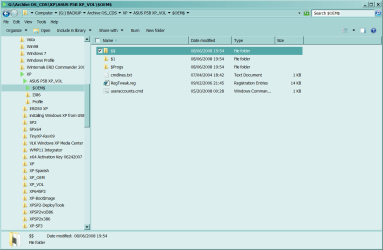
Snapshot of custom boot CD $OEM folder

Contents of useraccounts.cmd
::create user and pwd
::remove some stuff I don't use
::register some DLLs to enable some apps I include in the CD and don't need to install if the DLLs are registered
::shown for demo only

net user Antman *PASSWORD* /add
net localgroup Administrators Antman /add
net accounts /maxpwage:unlimited

regedit /s RegTweak.reg

::Remove Items
regsvr32 /u C:\XP\system32\zipfldr.dll
RunDll32 advpack.dll,LaunchINFSection %windir%\INF\msmsgs.inf,BLC.Remove
RunDll32 advpack.dll,LaunchINFSection %windir%\inf\msnetmtg.inf,NetMtg.Remove

::Add Items
regsvr32 C:\xp\system32\ContextAttrib.dll
regsvr32 C:\xp\system32\comctl32.ocx
regsvr32 C:\xp\system32\ISORecorder.dll
regsvr32 C:\programs\AntTools\FolderBox\FolderBox.dll
regsvr32 C:\programs\FolderBox\FolderBoxShell.dll
regsvr32 C:\programs\IrfanView\IVEx.dll
regsvr32 C:\programs\QMP\Plugins\QCDTrayControls.dll
regsvr32 C:\programs\QMP\Plugins\QMPBalloonTip.dll
regsvr32 C:\programs\QMP\Plugins\QCDToolBar.dll
regsvr32 C:\programs\QMP\QMPShell.dll
 

Attachments

  • Capture.PNG
    Capture.PNG
    32.9 KB · Views: 6
I have a Retail Copy of SP3.

Rats ... I mean I'm glad you already have XP SP3!

Well, I'm reaching here but is this the original hard drive or have you replaced it with a newer one? Perhaps find an older hard drive?

Does the MB have the latest BIOS? You said you don't have a floppy ... I got one of those usb floppy drives cheap ... works great for stuff like flashing the BIOS when there is no floppy.

Wish I could be more helpful!
 

My Computer

OS
...
The BIOS is updated, I checked that before I deleted the Windows 7 partition lol. I know this is a W7, but thanks for the help guys. Working on Antman's approach as we speak.
 

My Computer

Computer Manufacturer/Model Number
Dell Laptop Studio 1537
OS
Windows 7 x64 7229
CPU
Intel Core 2 Duo CPU T6400
Memory
4 GB
Graphics Card(s)
Mobile Intel 45 Chipset
I use nLite for slip streaming. Simple. Easy.
 

My Computer

OS
...
Back
Top