Getting files off external hard drive

tessaboe

New member
Local time
7:08 PM
Messages
4
We had an external hard drive hooked up to our last computer that automatically backed up everything once a week. My dad was trying to copy the files from the hard drive (which was from an XP) to the windows 7. He says he doesn't understand the formatting of Windows 7 and wanted me to figure it out, but I'm not the best at computers and figure this would be easier. He apparently doesn't know how to access the file of the hard drive from the computer to copy the files. I'm afraid that some of the viruses that made our last computer crash will end up on our new computer so I don't want to just plug it in and look around ( I'll let him do that so he can't blame me)

Sorry if this doesn't make a whole lot of sense, but thanks for any help you can give! :)
 

My Computer

OS
windows 7
Hey, and welcome to the forums! From what I understand, you're going to open up files, from a Windows XP PC to a Windows 7 PC? Well, that shouldn't be a problem, and it should work, as long as nothing is manually deleted. Am I correct, thats what you and your dad are trying to do?
Edit: @whs, I just figured he would have used a 3rd party program to update auto, but that makes sense. +1
 

My Computer

Computer Manufacturer/Model Number
Custom Built
OS
64 bit Windows seven home premium
CPU
2.7 GhZ AMD Athlon x2 x64
Motherboard
Gigabyte M61PME-S2P
Memory
4GB
Graphics Card(s)
NVIDIA GeForce GT 220 1GB
Sound Card
Internal Realtek high quality
Monitor(s) Displays
1 LCD ViewSonic Model VS10047
Screen Resolution
1280 x 1024
Hard Drives
298 GB SATA (Local)
18.6 GB IDE (Extra)
PSU
Blue Sonic 400W Peak Power
Case
Blue Sonic
Cooling
PSU, processor, graphics card, back panel, side panel.
Keyboard
Logitech wireless PS3 keyboard with trackpad
Mouse
DELL USB four button laser mouse
Internet Speed
Wifi (1Mbps), Wired (10Mbps)
Other Info
WACOM Fun tablet and mouse, Logitech dual action gamepad, Belkin N52TE game controller.
If the XP file backup facility was used, chances are the Win7 does not understand the file format. The easiest would be to pull those backups in under XP and make your own copy with copy to folder to either a folder on a USB stick or an external disk. Then you can scan those files with your security program or any good scanner (malwarebytes, superantispyware) or better even send them to a scanning website. That is more thorough. Then you can just copy them into the Win7 system using "copy to folder or move to folder".
 

My Computer

Computer Manufacturer/Model Number
HP, Dell, Gateway, Toshiba - 4 laptops and 2 desktops
OS
Vista, Windows7, Mint Mate, Zorin, Windows 8
CPU
from 1.6GHz Duo to i7
Monitor(s) Displays
2x HP w2207
Hard Drives
5x HDD, 7x SSD, 12x Externals
Keyboard
with trackball - no mices
Mouse
Trackball mice
Internet Speed
DSL 6000
Did you have virus protection and do you now. Norton has really knocked them dead for me.
 

My Computer

Computer Manufacturer/Model Number
Dell 546 Inspiron desktop
OS
Windows 7 home premium with 64 bit
CPU
AMD Athlon 630 2.8ghz X4 (Quad)
Motherboard
Dell 780g
Memory
8 Gigs of ddr2 at 800 mhz
Graphics Card(s)
Dell integrated ATI 3200
Sound Card
None
Monitor(s) Displays
20" Dell
Screen Resolution
1200x1600
Hard Drives
Two 1TRB Seagate Barracuda drives with a 32MB cache in raid 1 (Mirrored)
PSU
300 Watts Dell
Case
Mini-tower
Cooling
3 Fans total at PSU, CPU, and case.
Keyboard
Dell
Mouse
Logitech trackball (marble mouse)
Internet Speed
DSL
Other Info
Western Digital 1.5tb external drive (green back-up drive) Cool and quiet!
We had and still do have virus protection, but somehow my sister can manage to get viruses on every computer we get, haha. I don't know much about hard drives, but it is a Maxtor external hard drive of some sort that automatically backed it up. From what I understand, I think he just can't figure out how to access the folder for the hard drive once he plugs it in, in order to copy the files onto the newer computer. (I think he's making it much more difficult than it needs to be, but I haven't tried personally.) Thanks for all your help.
 

My Computer

OS
windows 7
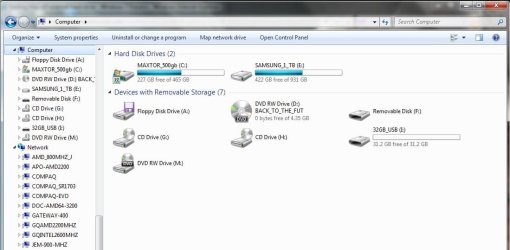
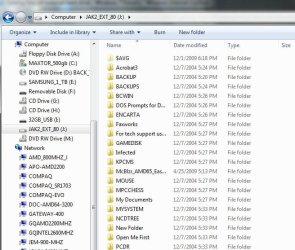
Try

Start :ar: Windows Explorer

Click on it, Look for an Ext Hard Drive listed in the left hand column,
See if you can click on any folders to view them


:) Added second snip with EXT HD turned ON! Circled in RED ! ;)
 

Attachments

  • HD_Snip.JPG
    HD_Snip.JPG
    69.1 KB · Views: 212
  • HD_w_EXT_80GB_HD_Snip.JPG
    HD_w_EXT_80GB_HD_Snip.JPG
    76.3 KB · Views: 273
  • HD_Snip_W_files_on Ext_80gb_HD_In_Folders.JPG
    HD_Snip_W_files_on Ext_80gb_HD_In_Folders.JPG
    70.7 KB · Views: 157
Last edited:

My Computer

Computer type
PC/Desktop
Computer Manufacturer/Model Number
Built them myself, Science Experiments !
OS
Win7 Enterprise, Win7 x86 (Ult 7600), Win7 x64 Ult 7600, TechNet RTM on AMD x64 (2.8Ghz)
CPU
AMD fx8350 4ghz, AMD-32 2400mhz, AMD-64 3200mhz, AMDx64 2.8G
Motherboard
SIS 755, ECS-K8M890M-M (Ult 7600), GigaByte & others
Memory
2gb, 4gb on the Ult 7600, 4gb on Technet RTM, 32gb on FX8350
Graphics Card(s)
Draw my own Graphics, several nVidia cards
Sound Card
on motherboard
Monitor(s) Displays
19" flat scr, 28" I-Inc widescr,22" Emprex Widescr, 23" Acer
Screen Resolution
1280 x 1024, 1440 x 900, 1920 x 1080
Hard Drives
6 pata Ide HD's & 2 Sata HD's
added 80gb external on Ult 7600 computer,
numerous extra 1tb, 2TB, 3Tb SATA HD's
A collection of ext HD Docks w/ HDs
PSU
430w, 550w, 600w, 700, 800, etc
Case
All Generic Full Towers
Cooling
Open Air & a few fans, some w/ colored LEDs
Keyboard
Compaq & Dell recycled from GoodWill
Mouse
Made in China Optical Wired Mouse
Internet Speed
Fast Cable InterNet
Antivirus
AVG Free on 24 different Desktops, NO Problems!
Browser
IE 8 is preferred, but use FireFox sometimes
Other Info
Linksys Routers, switches, & Hubs
Too Many USB Flash Drives to count, Biggest is 64GB !
Eight computers in my home network.
Sixteen computers at my business network.
Linked via TeamViewer !
Lots of old used spare computer parts everywhere!
Thanks so much! I'm sure he'll be able to figure it out now :)
 

My Computer

OS
windows 7
Ok, so I guess we have 2 hard drives, and the one that is most updated is a "Sabrent USB 2.0 SATA/IDE Adapter" ... whatever that means. We plugged it in and everything and saw some folders that sounded like they were from our older computer, but when we tried to click on them, it said to check and make sure the device was plugged in correctly. Now I'm really confused
 

My Computer

OS
windows 7
Back
Top