
Solved getting multiple computers, do I need a switch or a router?

Diosoth

New member
Guru
Local time
8:07 AM
Messages
451
I just bought a used refurbished Dell PC with XP installed, and am also considering a Raspberry Pi. Provided I would want to hook all 3(well, 2- I have 2 monitors and can only run 2 at a time at most) to the internet so I'm not using one at a time, would I need a switch or a router for this? We'll assume I'm not setting up a LAN for the devices to communicate direct to each other, I just want them online together.

Switches cost less but I don't want to buy it and find it's not what I need.
 

My Computer

Computer type
PC/Desktop
Computer Manufacturer/Model Number
Gateway DX4822-01
OS
Windows 7 Home Premium x64
CPU
Intel Pentium Dual Core 2.6 GHz
Motherboard
stock factory for this model
Memory
6 GB
Graphics Card(s)
stock factory for this model
Sound Card
stock factory for this model
Monitor(s) Displays
Dell P2010Ht
Screen Resolution
1600 x 900
Hard Drives
1 TB Western Digital
PSU
300 watt
Cooling
80mm case fan, CPU fan, 60mm front intake
Keyboard
Logitech
Mouse
HP 3-button optical wheel mouse
Internet Speed
fiber optic
Antivirus
MSE, SuperAntiSpyware, Malwarebytes Free
Hello Diosoth,

Most home use routers come with 4 available ports for connectivity, so as long as you have 4 or less devices to connect via hard line, you don't need a switch.

Also if you prefer to avoid using a switch you can purchase a WiFi router and use WiFi adapters on any piece of equipment beyond the 4 hard lined devices.

At the bare minimum you will still need to set up the router to be a DHCP server, and all devices to be DHCP.

Finally, you could have all 3 devices on the internet at the same time if you wanted to with only the 2 monitors by using a cheap KVM and attaching 2 of the devices to 1 Keyboard Video Mouse setup; or you could do all 3 devices to 1 monitor using a 4 port KVM.

Good Luck!
 

My Computer

Computer type
Laptop
Computer Manufacturer/Model Number
Samsung Series 7 Chronos
OS
Windows 7 Professional 64bit
CPU
i7 3615QM
Memory
8GB 1600MHz
Graphics Card(s)
NVidia 650M 512MB
Hard Drives
Samsung 1TB 5400RPM w/ 8GB Flash
Antivirus
Norton 360
Browser
Firefox, Chrome, IE9. Depends on the compatibility of site
I think for my needs, if I get a Pi I may want my W7 PC and Pi with XBMC for video streaming on at all times. The XP PC won't need to be connected at all times since, at best, it's a backup/older game computer that I'll only go online with if I need to, and I probably won't be using it full time anyway.

I prefer to go wired. Wireless anything seems iffy indoors in my house, even cell phones have issues.

Should mention my current ISP-supplied modem is a Comtrend CT-5072T
http://www.speedguide.net/routers/comtrend-ct-5072t-adsl2-single-port-router-975


My area is also getting upgraded to fiber optic phone and internet "eventually". No actual time frame though the phone company has been installing the fiber optic lines all over for months. I'm not sure if this will be fiber to the home or not so... assuming the do fiber to the home, would a switch or router be obsolete in a few months if I buy one? I'm not entirely certain how this arrangement will work.
 

My Computer

Computer type
PC/Desktop
Computer Manufacturer/Model Number
Gateway DX4822-01
OS
Windows 7 Home Premium x64
CPU
Intel Pentium Dual Core 2.6 GHz
Motherboard
stock factory for this model
Memory
6 GB
Graphics Card(s)
stock factory for this model
Sound Card
stock factory for this model
Monitor(s) Displays
Dell P2010Ht
Screen Resolution
1600 x 900
Hard Drives
1 TB Western Digital
PSU
300 watt
Cooling
80mm case fan, CPU fan, 60mm front intake
Keyboard
Logitech
Mouse
HP 3-button optical wheel mouse
Internet Speed
fiber optic
Antivirus
MSE, SuperAntiSpyware, Malwarebytes Free
That router looks like a 1 port 100mbps device. I'd say get a gigabit switch ie

router - switch - all the pcs

even though you say you're not bothered about devices talking to each other, if in the future you need this facility eg copy files, this is done via the switch and a gigabit switch is 10X faster than a 10/100 box. Also networking is a useful skill to learn. When deciding how many ports you need, remember one is taken up by the router connection. I have an 8 port gigabit switch for my home network - only cost about £25.
 

My Computer

Computer type
PC/Desktop
Computer Manufacturer/Model Number
self build
OS
Windows 7 pro x64 SP1
CPU
Intel i7-2600k o/c to 4.6GHz
Motherboard
MSI Z68-GD80
Memory
8GB Mushkin 1866MHz
Graphics Card(s)
Nvidia GTX 750 Ti 2GB
Sound Card
integrated
Monitor(s) Displays
Liyama ProLite 27"
Screen Resolution
1920*1080 px
Hard Drives
Seagate 2TB
PSU
Coolermaster GX 750W
Case
Antec 300 case + 5 fans
Cooling
Dark Rock Pro
Internet Speed
62Mbit down 18Mbit up
Antivirus
MSE
Browser
Firefox
Other Info
Blackgold BGT3650 Quad HD TV card. Also have various 3770 + 4770K render boxes.
Going by that suggestion, my best choices for a price I like are a Dynex DX-GB5PRT, a TP-LINK TL-SG1005D, a NetGear [FONT=Arial, Helvetica, sans-serif]GS605 or a D-Link [/FONT]DGS-1005G. Each is $20 shipped.
 

My Computer

Computer type
PC/Desktop
Computer Manufacturer/Model Number
Gateway DX4822-01
OS
Windows 7 Home Premium x64
CPU
Intel Pentium Dual Core 2.6 GHz
Motherboard
stock factory for this model
Memory
6 GB
Graphics Card(s)
stock factory for this model
Sound Card
stock factory for this model
Monitor(s) Displays
Dell P2010Ht
Screen Resolution
1600 x 900
Hard Drives
1 TB Western Digital
PSU
300 watt
Cooling
80mm case fan, CPU fan, 60mm front intake
Keyboard
Logitech
Mouse
HP 3-button optical wheel mouse
Internet Speed
fiber optic
Antivirus
MSE, SuperAntiSpyware, Malwarebytes Free
In order to connect all devices together whether it be wireless or wired you will need a switch or hub but I would strongly recommend a switch for performance. Based on what you have said you would like to do I would look for an unmanaged switch since you do not need to change any settings for it. All you need to do is just power the switch and connect all your devices to it using a crossover Ethernet cable, then you sir have a nice peer to peer LAN.

To enable internet connectivity you will need to have router (A router is used to transfer information from one network to another). Most commercial routers will have switching capabilities within them however are normally limited to 4 devices at a time [wired] therefore the need to have an 8 port or larger switch connected. Typically, commercial routers will also have DHCP enabled for connected clients otherwise you will need to manually set an ip address for each computer or device connected to the network whether it be wired or wireless. Managed switches normally offer a DHCP service however are much more expensive than unmanaged ones.

Next to consider when purchasing switches and routers are the speed. Typically for cheaper unmanaged switches you there will be 100Mbps between each port. This shouldn't be an issue unless your internet download speed is over 100Mbps.

In conclusion I would get an unmanaged switch and a router, using a crossover Ethernet cable connect the router to the switch and then any wired devices to the switch. Normally routers will have wireless capabilities and therefore can join the network that way if not you will need an adapter to add to one of the ports on the switch.

Hope this helps,
Josh! :)
 

My Computer

Computer type
PC/Desktop
Computer Manufacturer/Model Number
Custom Built
OS
Windows 7 Professional x64 SP1 ; Windows Server 2012 R2 Standard
CPU
Intel Core i5 2400 @ 3.10GHz
Motherboard
Foxconn H67MP-S/-V/H67MP
Memory
8.0GB DDR3 @ 665MHz (2GBx4)
Graphics Card(s)
AMD Radeon HD 6870
Sound Card
Realtek High Definition Audio
Monitor(s) Displays
AOC 2243W & SMB1930NW
Screen Resolution
1440x900 & 1920x1080
Hard Drives
977GB Seagate ST31000524AS ATA Drive (SATA)
250GB WD iSCSI attached Drive
PSU
750W Gaming PSU
Case
Novatech Night
Cooling
Fan
Keyboard
Dell Standard PS/2 Keyboard
Mouse
R.A.T 07 Gaming Mouse
Internet Speed
Download: 10 Mbps Ping: 30ms Upload: 0.81 Mbps
Browser
Google Chrome
Other Info
Optiarc DVD RW AD-5260S ATA Device
@shadowjk - I think you are wrong re crossover cables. A crossover cable is only needed when you connect pc to pc directly. It hooks up i/p to o/p. With a switch, router etc only regular cables are needed. Anyhow modern switches, routers and indeed nic cards auto detect straight or crossover so in general you can use either.

The OP said he may be going fiber. With any luck, his ISP will supply a new modem router, hopefully wireless enabled. That is my setup -

FTTC - copper to house - wireless router - 8 port switch

the wifi is handy when someone comes round with a laptop
 

My Computer

Computer type
PC/Desktop
Computer Manufacturer/Model Number
self build
OS
Windows 7 pro x64 SP1
CPU
Intel i7-2600k o/c to 4.6GHz
Motherboard
MSI Z68-GD80
Memory
8GB Mushkin 1866MHz
Graphics Card(s)
Nvidia GTX 750 Ti 2GB
Sound Card
integrated
Monitor(s) Displays
Liyama ProLite 27"
Screen Resolution
1920*1080 px
Hard Drives
Seagate 2TB
PSU
Coolermaster GX 750W
Case
Antec 300 case + 5 fans
Cooling
Dark Rock Pro
Internet Speed
62Mbit down 18Mbit up
Antivirus
MSE
Browser
Firefox
Other Info
Blackgold BGT3650 Quad HD TV card. Also have various 3770 + 4770K render boxes.
You are correct mate however I always suggest crossover cables to end users since I do not fully know their knowledge and a crossover cable would allow them to use it in cases such as connecting pc-pc in future if need be. Was just thinking on return of investment that's all :)
 

My Computer

Computer type
PC/Desktop
Computer Manufacturer/Model Number
Custom Built
OS
Windows 7 Professional x64 SP1 ; Windows Server 2012 R2 Standard
CPU
Intel Core i5 2400 @ 3.10GHz
Motherboard
Foxconn H67MP-S/-V/H67MP
Memory
8.0GB DDR3 @ 665MHz (2GBx4)
Graphics Card(s)
AMD Radeon HD 6870
Sound Card
Realtek High Definition Audio
Monitor(s) Displays
AOC 2243W & SMB1930NW
Screen Resolution
1440x900 & 1920x1080
Hard Drives
977GB Seagate ST31000524AS ATA Drive (SATA)
250GB WD iSCSI attached Drive
PSU
750W Gaming PSU
Case
Novatech Night
Cooling
Fan
Keyboard
Dell Standard PS/2 Keyboard
Mouse
R.A.T 07 Gaming Mouse
Internet Speed
Download: 10 Mbps Ping: 30ms Upload: 0.81 Mbps
Browser
Google Chrome
Other Info
Optiarc DVD RW AD-5260S ATA Device
the TP-Link model I'm looking at says it automatically detects the connection type so it doesn't need crossover cables.
 

My Computer

Computer type
PC/Desktop
Computer Manufacturer/Model Number
Gateway DX4822-01
OS
Windows 7 Home Premium x64
CPU
Intel Pentium Dual Core 2.6 GHz
Motherboard
stock factory for this model
Memory
6 GB
Graphics Card(s)
stock factory for this model
Sound Card
stock factory for this model
Monitor(s) Displays
Dell P2010Ht
Screen Resolution
1600 x 900
Hard Drives
1 TB Western Digital
PSU
300 watt
Cooling
80mm case fan, CPU fan, 60mm front intake
Keyboard
Logitech
Mouse
HP 3-button optical wheel mouse
Internet Speed
fiber optic
Antivirus
MSE, SuperAntiSpyware, Malwarebytes Free
Crossover cables are just for pc to pc using just a cable and nothing else. The Rx and Tx are switched at one end so 1 pc sends and the other pc receives. If you connect pc - switch - pc you need straight cables. So in a home network, you only need straight cables, although because of auto detection you can substitute the 'wrong' type if necessary.

BTW my switch is also TP-Link and works ok.
 

My Computer

Computer type
PC/Desktop
Computer Manufacturer/Model Number
self build
OS
Windows 7 pro x64 SP1
CPU
Intel i7-2600k o/c to 4.6GHz
Motherboard
MSI Z68-GD80
Memory
8GB Mushkin 1866MHz
Graphics Card(s)
Nvidia GTX 750 Ti 2GB
Sound Card
integrated
Monitor(s) Displays
Liyama ProLite 27"
Screen Resolution
1920*1080 px
Hard Drives
Seagate 2TB
PSU
Coolermaster GX 750W
Case
Antec 300 case + 5 fans
Cooling
Dark Rock Pro
Internet Speed
62Mbit down 18Mbit up
Antivirus
MSE
Browser
Firefox
Other Info
Blackgold BGT3650 Quad HD TV card. Also have various 3770 + 4770K render boxes.
I went ahead and bought the TP-Link switch since it seems to have the strongest positive review rating of all the models I considered.
 

My Computer

Computer type
PC/Desktop
Computer Manufacturer/Model Number
Gateway DX4822-01
OS
Windows 7 Home Premium x64
CPU
Intel Pentium Dual Core 2.6 GHz
Motherboard
stock factory for this model
Memory
6 GB
Graphics Card(s)
stock factory for this model
Sound Card
stock factory for this model
Monitor(s) Displays
Dell P2010Ht
Screen Resolution
1600 x 900
Hard Drives
1 TB Western Digital
PSU
300 watt
Cooling
80mm case fan, CPU fan, 60mm front intake
Keyboard
Logitech
Mouse
HP 3-button optical wheel mouse
Internet Speed
fiber optic
Antivirus
MSE, SuperAntiSpyware, Malwarebytes Free
Hello Diosoth,

I'm sure that will work just fine with your intentions, but keep in mind; adding additional devices to your network is adding potential troubleshooting steps should anything go wrong. That was the reasoning for my suggestion of using a device that has the modem, router, switch, and WiFi all in one.

On a side note, through my own exprience most DSL providers supplied such a device that I suggested. Is this not an option from your provider? Have you asked them? -just curious for my own knowledge.

Ryan
 

My Computer

Computer type
Laptop
Computer Manufacturer/Model Number
Samsung Series 7 Chronos
OS
Windows 7 Professional 64bit
CPU
i7 3615QM
Memory
8GB 1600MHz
Graphics Card(s)
NVidia 650M 512MB
Hard Drives
Samsung 1TB 5400RPM w/ 8GB Flash
Antivirus
Norton 360
Browser
Firefox, Chrome, IE9. Depends on the compatibility of site
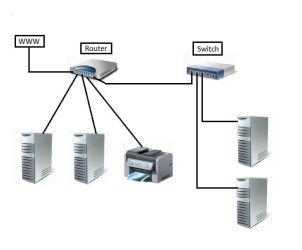
Keep in mind that a Switch is not a router and won't allow connected devices to talk to each other. A switch connects individual ports to the primary port one at a time. The primary port of the switch is connected to a router which will direct packets to other devices, including devices connected to a switch.

Here's an example of a Local Area Network (LAN).
 

Attachments

  • Local Area Switched Network.jpg
    Local Area Switched Network.jpg
    18.1 KB · Views: 3

My Computer

Computer type
PC/Desktop
Computer Manufacturer/Model Number
Built 2/11/2011
OS
Windows 7 Pro-x64
CPU
i7-2600 3.4GHz - 3.8GHz Turbo
Motherboard
Intel DH67BL-B3
Memory
8Gb - 2x4GB, Muskin 991770 PC3-1333
Graphics Card(s)
Integrated Intel HD 2000
Sound Card
Integrated Intel 10.1 HD, RealTek ALC892
Monitor(s) Displays
Asus LCD VH222H, Haier HL24XSL2a
Screen Resolution
1920x1080, 1920x1080
Hard Drives
Crucial SSD C300-128Gb,
Western Digital WD5002AALX - 500Gb,
Western Digital WD7501AALS - 750Gb
PSU
Seasonic 650W 80+ Gold Modular
Case
Rosewill Defender
Cooling
Stock CPU, Four 120mm case fans, PCH fan added
Keyboard
Logitech EX100 Y-RBH94 Wireless
Mouse
Logitech EX100 M-RCE95 Wireless
Internet Speed
3.0/1.5 Mbs
Antivirus
Microsoft Security Essentials
Browser
Microsoft Internet Explorer 11
Other Info
Antec Veris Premier-Multimedia IR Station,
Cyber Accoustics-3602 Speakers,
AFT XM-5U Card Reader,
Hauppauge TV-HVR-2250,
Sony LX300 USB Turntable
Keep in mind that a Switch is not a router and won't allow connected devices to talk to each other.

This doesn't make any sense considering that's exactly what a switch is for. As long as all devices connected to the switch are on the "same subnet", they will communicate with each other, even if the switch has an IP on a different subnet entirely; this is because the switch passes traffic based on MAC address rather than IP, unless you have a layer 3 switch passing traffic based on IP, however I find this highly unlikely in this scenario considering the cost of layer 3 switches.
 

My Computer

Computer type
Laptop
Computer Manufacturer/Model Number
Samsung Series 7 Chronos
OS
Windows 7 Professional 64bit
CPU
i7 3615QM
Memory
8GB 1600MHz
Graphics Card(s)
NVidia 650M 512MB
Hard Drives
Samsung 1TB 5400RPM w/ 8GB Flash
Antivirus
Norton 360
Browser
Firefox, Chrome, IE9. Depends on the compatibility of site
You are correct Ryan. I had a spend a few of hours and bring myself up to date on Transparent Bridging. I guess technology has improved in the last 20 years. :o The older switches were more like port expanders.

Forget all I said in the previous post. The "new" stuff is pretty cool.:)
 

My Computer

Computer type
PC/Desktop
Computer Manufacturer/Model Number
Built 2/11/2011
OS
Windows 7 Pro-x64
CPU
i7-2600 3.4GHz - 3.8GHz Turbo
Motherboard
Intel DH67BL-B3
Memory
8Gb - 2x4GB, Muskin 991770 PC3-1333
Graphics Card(s)
Integrated Intel HD 2000
Sound Card
Integrated Intel 10.1 HD, RealTek ALC892
Monitor(s) Displays
Asus LCD VH222H, Haier HL24XSL2a
Screen Resolution
1920x1080, 1920x1080
Hard Drives
Crucial SSD C300-128Gb,
Western Digital WD5002AALX - 500Gb,
Western Digital WD7501AALS - 750Gb
PSU
Seasonic 650W 80+ Gold Modular
Case
Rosewill Defender
Cooling
Stock CPU, Four 120mm case fans, PCH fan added
Keyboard
Logitech EX100 Y-RBH94 Wireless
Mouse
Logitech EX100 M-RCE95 Wireless
Internet Speed
3.0/1.5 Mbs
Antivirus
Microsoft Security Essentials
Browser
Microsoft Internet Explorer 11
Other Info
Antec Veris Premier-Multimedia IR Station,
Cyber Accoustics-3602 Speakers,
AFT XM-5U Card Reader,
Hauppauge TV-HVR-2250,
Sony LX300 USB Turntable
I'm not too reliant on devices taking to each other... I guess. Maybe.

I might need that functionality to edit stuff and add files to the Raspberry Pi since I believe Windows can't properly read a Linux file system, even on an SD card like the Pi uses. I also just got an old Dell Optiplex 745 PC with Windows XP and will need to get files onto it(right now it's sitting idle until I get my new monitor cable in the mail and can set up a place for the keyboard and mouse and all that- even then it'll be mainly a backup PC). I bought a Kingston 8 GB flash drive to do that with, though communicating between the two would be helpful at times.
 

My Computer

Computer type
PC/Desktop
Computer Manufacturer/Model Number
Gateway DX4822-01
OS
Windows 7 Home Premium x64
CPU
Intel Pentium Dual Core 2.6 GHz
Motherboard
stock factory for this model
Memory
6 GB
Graphics Card(s)
stock factory for this model
Sound Card
stock factory for this model
Monitor(s) Displays
Dell P2010Ht
Screen Resolution
1600 x 900
Hard Drives
1 TB Western Digital
PSU
300 watt
Cooling
80mm case fan, CPU fan, 60mm front intake
Keyboard
Logitech
Mouse
HP 3-button optical wheel mouse
Internet Speed
fiber optic
Antivirus
MSE, SuperAntiSpyware, Malwarebytes Free
Just for reference, here's my setup-

1) Gateway PC with Windows 7
2) Dell PC with Windows XP
3) Raspberry Pi

The Gateway is my main PC- it handles my internet browsing, gaming, all that. The Dell is bought mainly to run older games, as well as a backup internet PC if I need it. I will likely keep it offline unless I need to use it for net access, and it won't be on all the time. The Pi will largely be used for XBMC so it needs to be online for streaming, but I'll have a second card for Raspbian which does have a web browser.
 

My Computer

Computer type
PC/Desktop
Computer Manufacturer/Model Number
Gateway DX4822-01
OS
Windows 7 Home Premium x64
CPU
Intel Pentium Dual Core 2.6 GHz
Motherboard
stock factory for this model
Memory
6 GB
Graphics Card(s)
stock factory for this model
Sound Card
stock factory for this model
Monitor(s) Displays
Dell P2010Ht
Screen Resolution
1600 x 900
Hard Drives
1 TB Western Digital
PSU
300 watt
Cooling
80mm case fan, CPU fan, 60mm front intake
Keyboard
Logitech
Mouse
HP 3-button optical wheel mouse
Internet Speed
fiber optic
Antivirus
MSE, SuperAntiSpyware, Malwarebytes Free
Hi there
Why do you need a switch - or even a HUB at all --if the computers are on a HOME computer network you can wire then in via LAN cable (usually 4 ports on a typical home router) or if the computers have decent Wi-Fi cards in them (laptops will have these built in - a desktop can use cheap USB Wi-Fi) and if you enable sharing the computers will be able to see each other all on the same LAN. Nothing more technical than that is needed.

Depending on what you want to do the Wifi should be decently fast --even for video streaming a 54 mb/s Wi-Fi card should be adequate -- although there are faster cards available now. The router Wi-Fi system preferably should be the newer faster protocol.

Network multi-media streaming should be fairly easy - whether via XBOX, Logitech devices or whatever. Plenty of decent hard / software around for that.

So I'm confused as to what you are trying to do here --sounds to me really simple -- I don't know where all these "switches", "Hubs" and Cross over cables come from or are are even needed. Any basic Wi-Fi capable router will do what you want. Simple networking / sharing does the rest.

Switching computers to a single monitor is also easy. I'm not sure but there might be some hardware around that could display the output of several computers concurrently on a single monitor (large monitor) in some sort of Windows -- I haven't got any experience with that though - I just manually switch via a Logik 4 port HDMI box. HDMI cables from computers into the box and the output HDMI cable to the monitor.

If your computers don't have HDMI do the same with the RGB connectors (used to be called VGA output). Also don't forget that modern TV sets also have computer input facilities so you might be able to use a TV as well as a Monitor for your computers.

(I'm assuming this is a simple HOME setup --obviously in commercial applications switches and all sorts of other networking hardware is used).

Cheers
jimbo
 

My Computer

Computer type
PC/Desktop
Computer Manufacturer/Model Number
Custom built, several laptops HP/ASUS
OS
Linux CENTOS 7 / various Windows OS'es and servers
CPU
Intel i7 Intel i5
Memory
8GB, 16GB
Graphics Card(s)
On Motherboard
Sound Card
Realtek HD audio
Monitor(s) Displays
Apple Cinema display, Samsung LCD
Screen Resolution
1920 X 1080
Hard Drives
4 X 1TB SATA
Mouse
Toshiba wireless laser
Internet Speed
> 20MB up
I don't have wi-fi in my house. My PC has a single Ethernet plug, as do the Dell and Pi. I'm also on a budget so buying an expensive router with wi-fi plus wi-fi adapters for the other devices would've been pushing it. I also have issues with wireless devices in this house- cordless phones, cell phones, etc, so I prefer to stay wired.

Right now I have my Gateway PC hooked directly to the modem with no router, switch or hub in between. I'll add in the switch so the Pi can be online for XBMC and so I can use the Dell online without having to swap cables.

As far as networking or streaming from one device to the others... I'm trying not to have everything reliant on one computer. I've had several issues with this PC(rootkit malware, fried HDD from a power surge, other malware infections, recent issues with Windows Update conflicts) and want my devices to all work independent. I bought the Dell largely as a cheap alternative in case I have yet another major issue with my Gateway and would need a means to get online and do other tasks if this one becomes inoperable(secondary rason to play older games that 7 has issues with but ran fine in XP). The Pi with XBMC is going to be an alternative to getting satellite TV.

Monitors... well, I have the Gateway which has VGA and DVI-D, and my Gateway PC does HDMI out. I've been running on VGA but I just ordered an HDMI-DVI cable. My recent TV purchase has a VGA input so I will hook the Dell up to that, with the Pi going in through HDMI. So I have 2 monitors, one will be shared between two devices that I won't be using at the same time.

You might wonder why I don't just link the Gateway to the new TV and use the monitor with the Dell... mainly it's positioning. The Dell case is made to sit flat so I could put it on a shelf above the TV. My Gateway PC and monitor will be staying where they are.

I get what you're saying but my setup is designed to keep all 3 devices independent and wired, without spending more than I have to. I know I could stream content from my PC to the Pi, but it seems almost.... confusing? to do that since I cold just watch the media on the PC direct. The final cost for the Pi after all the peripherals was pushing $100.
 

My Computer

Computer type
PC/Desktop
Computer Manufacturer/Model Number
Gateway DX4822-01
OS
Windows 7 Home Premium x64
CPU
Intel Pentium Dual Core 2.6 GHz
Motherboard
stock factory for this model
Memory
6 GB
Graphics Card(s)
stock factory for this model
Sound Card
stock factory for this model
Monitor(s) Displays
Dell P2010Ht
Screen Resolution
1600 x 900
Hard Drives
1 TB Western Digital
PSU
300 watt
Cooling
80mm case fan, CPU fan, 60mm front intake
Keyboard
Logitech
Mouse
HP 3-button optical wheel mouse
Internet Speed
fiber optic
Antivirus
MSE, SuperAntiSpyware, Malwarebytes Free
Right now I have my Gateway PC hooked directly to the modem with no router, ... <--- This sentence; explains this sentence---> I've had several issues with this PC(rootkit malware,..., other malware infections, recent issues with Windows Update conflicts) and want my devices to all work independent. (Router firewalls are very handy and better than the Windows provided firewall IMO)

I get what you're saying but my setup is designed to keep all 3 devices independent and wired, without spending more than I have to (again this can be done as I mentioned in my OR to your OP for $60-$100US on a simple router with 4 LAN ports on it). I know I could stream content from my PC to the Pi, but it seems almost.... confusing? (sharing media across a network has become much easier than it once was, but either method is viable) to do that since I cold just watch the media on the PC direct. The final cost for the Pi after all the peripherals was pushing $100.

A surge protector/UPS would solve "fried HDD from a power surge" in the future, and cost as little as $20US.

Again, the choice is yours but the way you're choosing to do this, in my opinion, is going to generate more headaches than what I'm suggesting.
 

My Computer

Computer type
Laptop
Computer Manufacturer/Model Number
Samsung Series 7 Chronos
OS
Windows 7 Professional 64bit
CPU
i7 3615QM
Memory
8GB 1600MHz
Graphics Card(s)
NVidia 650M 512MB
Hard Drives
Samsung 1TB 5400RPM w/ 8GB Flash
Antivirus
Norton 360
Browser
Firefox, Chrome, IE9. Depends on the compatibility of site
Back
Top