JavaScript is disabled. For a better experience, please enable JavaScript in your browser before proceeding.
You are using an out of date browser. It may not display this or other websites correctly.
You should upgrade or use an
alternative browser .
Getting only half the broadband speed being sent to router
Hi All
Capture1.JPG
70.4 KB
· Views: 10
Capture2.JPG
120.7 KB
· Views: 12
Capture3.JPG
50.3 KB
· Views: 8
Windows 7 64 bit I5 2.66mb 4bb Ati Radeon HD5450 Built by me Windows 7 64 bit I5 2.66mb Gigabyte H55m-s2h 4bb Ati Radeon HD5450 ATI HDMI 128 gb SSD boot drive and several other Sata drives 750W
My first guess would be to blame AVG. Try starting up with out AVG then testing for connection speed might help.
Windows 7 Ult, Windows 8.1 Pro, Q9650-4.275GHz, E8600 4.5GHz, E6750-3.8GHz G.Skill PC2 9600 1200Mhz 5 5 5 15 2T GTX480 PC/Desktop Home built Windows 7 Ult, Windows 8.1 Pro, Q9650-4.275GHz, E8600 4.5GHz, E6750-3.8GHz Evga 780i FTW G.Skill PC2 9600 1200Mhz 5 5 5 15 2T GTX480 Asus Xonar D2 HannsG 1680X1050 GSkill Phoenix Pro 120GB SSD ThermalTake Toughpower 1000Watt modular ThermalTake XaserV Xigmatek S1283 Logitech G15 Logitech G9 T1
New member
Thread Starter
My first guess would be to blame AVG. Try starting up with out AVG then testing for connection speed might help.
Hi and thanks for the prompt reply.
I stopped avg and have not noticed any speed improvement.
Tried renewing the winsock settings but again nothing
Windows 7 64 bit I5 2.66mb 4bb Ati Radeon HD5450 Built by me Windows 7 64 bit I5 2.66mb Gigabyte H55m-s2h 4bb Ati Radeon HD5450 ATI HDMI 128 gb SSD boot drive and several other Sata drives 750W
My first guess would be to blame AVG. Try starting up with out AVG then testing for connection speed might help.
Hi and thanks for the prompt reply.
I stopped avg and have not noticed any speed improvement.
Tried renewing the winsock settings but again nothing
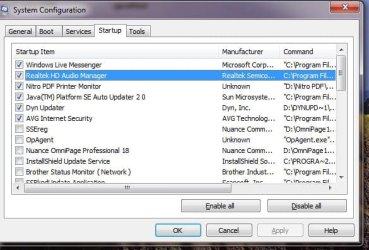
About all you can do is uncheck the start up programs one at a time and keep testing.
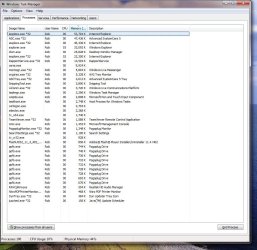
You might try looking in the task manager and the resource monitor to look for any program that is using up bandwidth in the network.
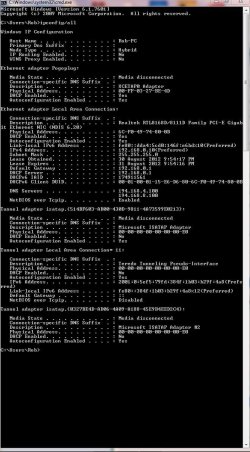
If you can post the ipconfig/all from this machine I might be able to spot other problems.
Windows 7 Ult, Windows 8.1 Pro, Q9650-4.275GHz, E8600 4.5GHz, E6750-3.8GHz G.Skill PC2 9600 1200Mhz 5 5 5 15 2T GTX480 PC/Desktop Home built Windows 7 Ult, Windows 8.1 Pro, Q9650-4.275GHz, E8600 4.5GHz, E6750-3.8GHz Evga 780i FTW G.Skill PC2 9600 1200Mhz 5 5 5 15 2T GTX480 Asus Xonar D2 HannsG 1680X1050 GSkill Phoenix Pro 120GB SSD ThermalTake Toughpower 1000Watt modular ThermalTake XaserV Xigmatek S1283 Logitech G15 Logitech G9 T1
New member
Thread Starter
Hi chev65
Capture4.JPG
114.1 KB
· Views: 13
Windows 7 64 bit I5 2.66mb 4bb Ati Radeon HD5450 Built by me Windows 7 64 bit I5 2.66mb Gigabyte H55m-s2h 4bb Ati Radeon HD5450 ATI HDMI 128 gb SSD boot drive and several other Sata drives 750W
New member
Guru
Gold Member
contact your isp as they may have dealt with similar cases and be able to point you to the issue easily.
Microsoft Windows 7 Home Premium 64-bit 7600 IIx4 amd athelon 635 processor 2x2gb ati radeon HD 5450 Hewlett packard/p6512uk Microsoft Windows 7 Home Premium 64-bit 7600 IIx4 amd athelon 635 processor FOXCONN 2AA9 2x2gb ati radeon HD 5450 (1) Realtek High Definition Audio (2) AMD High Definition samsung lcd tv 32" 1360x 768 (1) WDC WD10 01FAES-60Z2A0 SATA Disk Device (2) Maxtor OneTouch USB Device (3) ST310003 33AS USB Device (4) WD My Book 1111 USB Device ? air! wireless hp wireless Hp,optical 1.10mb/s MSE Firefox
Could be problem with your ISP, contact them and most ISPs with good customer support even send in a Technician to diagnose the problem =)
Windows 7 Ultimate SP1 (32-bit) Intel Core i3-2120 @ 3.30GHz (Stock) 1x Kingston DDR3 SDRAM @ 1333MHz 4GB (Stock) PALIT NVIDIA GeForce 210 @ 1GB DDR3 (Stock) PC/Desktop UNDER CONSTRUCTION Windows 7 Ultimate SP1 (32-bit) Intel Core i3-2120 @ 3.30GHz (Stock) ASUS P8H61-M LX (Rev 3.0) 1x Kingston DDR3 SDRAM @ 1333MHz 4GB (Stock) PALIT NVIDIA GeForce 210 @ 1GB DDR3 (Stock) Realtek ALC887 (On-Board) LG Flatron L227WTG-PF 22" LCD Monitor 1680x1050 (Monitor) & 1176x664 (TV) Western Digital Caviar Blue @ 500GB (Internal) & Western Digital Elements @ 500GB (External) Seasonic M12II Bronze Evo Edition @ 520W Cooler Master HAF X DEEPCOOL Gamma Archer CPU Cooler & 1x 120mm Side Intake Fan Compaq KB-0133 PS/2 Keyboard Elephant Blade Runner GR WEM-1019 USB Laser Gaming Mouse PLDT Home DSL @ 3 Mbps ↓ & 0.75 Mbps ↑ Microsoft SE & Malwarebytes Anti-Malware (Premium) Google Chrome Edifier 2.1 Speaker System + Bose SoundLink Mini | Samsung LN540520X/XAA LCD TV via HDMI | Epson L120
New member
Thread Starter
Thanks guys for all your help and support.Superfluous. I will let you know if there is a real bandwidth Killer on my system Thanks again
Windows 7 64 bit I5 2.66mb 4bb Ati Radeon HD5450 Built by me Windows 7 64 bit I5 2.66mb Gigabyte H55m-s2h 4bb Ati Radeon HD5450 ATI HDMI 128 gb SSD boot drive and several other Sata drives 750W
The ipconfig looks good.task manager to see which running process are using your network and slowing down the connection.
Windows 7 Ult, Windows 8.1 Pro, Q9650-4.275GHz, E8600 4.5GHz, E6750-3.8GHz G.Skill PC2 9600 1200Mhz 5 5 5 15 2T GTX480 PC/Desktop Home built Windows 7 Ult, Windows 8.1 Pro, Q9650-4.275GHz, E8600 4.5GHz, E6750-3.8GHz Evga 780i FTW G.Skill PC2 9600 1200Mhz 5 5 5 15 2T GTX480 Asus Xonar D2 HannsG 1680X1050 GSkill Phoenix Pro 120GB SSD ThermalTake Toughpower 1000Watt modular ThermalTake XaserV Xigmatek S1283 Logitech G15 Logitech G9 T1