Getting rid of Chinese! (language, not people)

DarrenDriven

New member
Local time
7:14 PM
Messages
18
I am an America in Shanghai China and my laptop hard drive went belly up. I don't want to deal with that here, so I just bought a cheap Toshiba T210 running Windows 7 Basic at the market and I gave my old laptop away.

I wrongly assumed that the language Windows uses was just a simply setting, but apparently it is more comprehensive than that. The store that I bought the laptop from did reload the entire machine from scratch (after language problems on the first day of ownership) and changed some unknown-to-me settings.

Mostly everything works just fine with little evidence of the Chinese language. The problem is that some programs are still installing in Chinese and it is a major pain to correct them when you can't read the words! (Two examples are AVG Free and CrashPlan Pro) I would like to make sure that everything on my computer points to US English so that I don't have to deal with this forever.

So after doing some more research I came across the Region and Language settings box. Format, Location and Default Input Language settings. All of these were changed to English before I had the installation problems.

Does anybody know where else I can look? Somehow certain programs still think that I want to read in Chinese! Thanks.
 

My Computer My Computer

At a glance

Windows 7 Basic 32bit
Computer Manufacturer/Model Number
Toshiba T210 Laptop
OS
Windows 7 Basic 32bit

My Computer My Computer

At a glance

Windows 7 x64 pro/ Windows 7 x86 Pro/ XP SP3 x86
Computer Manufacturer/Model Number
Too many to describe...
OS
Windows 7 x64 pro/ Windows 7 x86 Pro/ XP SP3 x86
Yup, system locale is also set to United States. Every setting that I could find in the Region and Language dialog box have been set to English / United States.

I'm guessing that there is still something lingering in the registry somewhere, but I don't want to start dinking around in there and cause more damage.
 

My Computer My Computer

At a glance

Windows 7 Basic 32bit
Computer Manufacturer/Model Number
Toshiba T210 Laptop
OS
Windows 7 Basic 32bit
First, welcome to the Seven Forums, Darren.

Judging from your post there are two possibilities: the shop upgraded you to Windows Ultimate and installed English Language Pack, or they used available hacks to do the same.

What speaks for the latter is that I doubt a shop would just give you the Ultimate edition. I hope I'm wrong and they did it because these unofficial hacks used to get language packs that normally require Ultimate would in-validate your Windows so it would no longer pass validation needed for software that controls that you run a genuine Windows.

So, to start we need to know if you still have Seven Home Basic or if the computer was upgraded to Ultimate. Please check this and post back.

Kari
 

My Computer My Computer

At a glance

Windows 10 Pro x64 EN-GB1.6 GHz Intel Core i7-720QM Processor6 GBATI Mobility Radeon HD 5850 Graphics
Computer type
Laptop
Computer Manufacturer/Model Number
HP ENVY 17-1150eg
OS
Windows 10 Pro x64 EN-GB
CPU
1.6 GHz Intel Core i7-720QM Processor
Memory
6 GB
Graphics Card(s)
ATI Mobility Radeon HD 5850 Graphics
Sound Card
Beats sound system with integrated subwoofer
Monitor(s) Displays
17" laptop display, 22" LED and 32" Full HD TV through HDMI
Screen Resolution
1600*900 (1), 1920*1080 (2&3)
Hard Drives
Internal: 2 x 500 GB SATA Hard Disk Drive 7200 rpm
External: 2TB for backups, 3TB USB3 network drive for media
Cooling
As Envy runs a bit warm, I have it on a Cooler Master pad
Keyboard
Logitech diNovo Media Desktop Laser (bluetooth)
Mouse
Logitech Performance Mouse MX
Internet Speed
50/10 Mbps VDSL
Antivirus
Windows Defender 4.3.9431.0
Browser
Maxthon 3.5.2., IE11
I believe you will find the Key is locked to CHINA only.
 

My Computer My Computer

At a glance

ME/XP/Vista/Win7
OS
ME/XP/Vista/Win7
Try uninstalling AVG completely, also remove any leftover folders in C:\Users\<Username>\AppData\ and C:\ProgramData. Then run the CCleaner registry clean, then reinstall AVG making sure you select English as the setup language.
 

My Computer My Computer

At a glance

Windows 7 x64 pro/ Windows 7 x86 Pro/ XP SP3 x86
Computer Manufacturer/Model Number
Too many to describe...
OS
Windows 7 x64 pro/ Windows 7 x86 Pro/ XP SP3 x86
Thanks for the warm welcome, guys!

It's Windows 7 Basic for sure. The only way for a Chinese copy of Basic to be in English (without upgrading) is to hack it? Crap.

I have performed all of the Windows upgrades on the machine with no problems. Is there a way that I can check validity so that I can go back to the shop with problems now? (I'm leaving China in three weeks and heading to Australia)

Another alternative I'm curious about: my old laptop is still here and runs Home Premium. Is there a way for me to upgrade my new Toshiba laptop to Home Premium with the license from my old laptop? The hard drive is crapping out on it anyway, and since I don't have disks or anything the new owner will have to reload it with a new OS.

If I don't worry about this until it "becomes a problem" then I would probably be looking at a forced upgrade to an English-language version of Windows 7 later, right?
 

My Computer My Computer

At a glance

Windows 7 Basic 32bit
Computer Manufacturer/Model Number
Toshiba T210 Laptop
OS
Windows 7 Basic 32bit
Try uninstalling AVG completely, also remove any leftover folders in C:\Users\<Username>\AppData\ and C:\ProgramData. Then run the CCleaner registry clean, then reinstall AVG making sure you select English as the setup language.

AVG is in English now, so that isn't a problem. The problem was that it took me 15 minutes to get it into English when it was installing. I don't want that to be a problem for future programs that I install.

So could I just run CCleaner now, without uninstalling anything?
 

My Computer My Computer

At a glance

Windows 7 Basic 32bit
Computer Manufacturer/Model Number
Toshiba T210 Laptop
OS
Windows 7 Basic 32bit
There is also a chance seeing as you mentioned 3rd party software:

Two examples are AVG Free and CrashPlan Pro

That it's a Government thing. Only Chinese language software available in China?

I mean, we are talking China with its limited nanny state Internet.

Just a thought...
 

My Computer My Computer

At a glance

windows 7 ultimate
OS
windows 7 ultimate
OK, with Home Basic to change the display language it must be a hack. Here's something worth to read for you: Windows 7 Validated As Non-Genuine on Unsupported Editions with MUI Language Pack Installed » My Digital Life

There's not much more you can do, as you have already localized the PC as much as possible from Windows' side. Most software check the localization data and use default display language to install, but for those which check not the localization data but location of physical IP address instead, there's one neat trick: Uninstall any programs that have refused to install in English. Use Revo Uninstaller with advanced scan, or if uninstalling using native uninstall, manually delete all traces of said apps in C:\ProgramData and C:\Users\Your_Username\AppData and it's subfolders. Delete also all registry entries for those apps. Download and install IMO the best free VPN proxy HotSpot Shield (Hotspot). Launch HotSpot Shield, which gives you an American IP. Download app again and install it, it should now install itself in English.

I'm sorry but as far as I know there's nothing more you can do for now.

Kari
 

My Computer My Computer

At a glance

Windows 10 Pro x64 EN-GB1.6 GHz Intel Core i7-720QM Processor6 GBATI Mobility Radeon HD 5850 Graphics
Computer type
Laptop
Computer Manufacturer/Model Number
HP ENVY 17-1150eg
OS
Windows 10 Pro x64 EN-GB
CPU
1.6 GHz Intel Core i7-720QM Processor
Memory
6 GB
Graphics Card(s)
ATI Mobility Radeon HD 5850 Graphics
Sound Card
Beats sound system with integrated subwoofer
Monitor(s) Displays
17" laptop display, 22" LED and 32" Full HD TV through HDMI
Screen Resolution
1600*900 (1), 1920*1080 (2&3)
Hard Drives
Internal: 2 x 500 GB SATA Hard Disk Drive 7200 rpm
External: 2TB for backups, 3TB USB3 network drive for media
Cooling
As Envy runs a bit warm, I have it on a Cooler Master pad
Keyboard
Logitech diNovo Media Desktop Laser (bluetooth)
Mouse
Logitech Performance Mouse MX
Internet Speed
50/10 Mbps VDSL
Antivirus
Windows Defender 4.3.9431.0
Browser
Maxthon 3.5.2., IE11
Thanks for the warm welcome, guys!

It's Windows 7 Basic for sure. The only way for a Chinese copy of Basic to be in English (without upgrading) is to hack it? Crap.

I have performed all of the Windows upgrades on the machine with no problems. Is there a way that I can check validity so that I can go back to the shop with problems now? (I'm leaving China in three weeks and heading to Australia)

Another alternative I'm curious about: my old laptop is still here and runs Home Premium. Is there a way for me to upgrade my new Toshiba laptop to Home Premium with the license from my old laptop? The hard drive is crapping out on it anyway, and since I don't have disks or anything the new owner will have to reload it with a new OS.

If I don't worry about this until it "becomes a problem" then I would probably be looking at a forced upgrade to an English-language version of Windows 7 later, right?
1) Go to this site to validate your copy of windows.

Genuine Microsoft Software

2) Did your old laptop come with home premium preinstalled? If yes, that is an OEM copy and is tied to that computr and cannot be transferred. But if you bought your copy from a shop (not System builder OEM from newgg etc. though), then the license can be transferred to your new computer.

3) The only way to ensure there wont be problems later would be to install english win7. I cannot guarantee this will work but if you can lay your hands on a win7 english disk, you can do a clean install of home basic, then try activate online or failing that by calling MS. This procedure normally works but why I'm qualifying this is the chinese language origin of this computer.

http://www.sevenforums.com/tutorials/3408-activate-windows-7-online.html

http://www.sevenforums.com/tutorials/18715-activate-windows-7-phone.html
 

My Computer My Computer

At a glance

Windows 7 x64 pro/ Windows 7 x86 Pro/ XP SP3 x86
Computer Manufacturer/Model Number
Too many to describe...
OS
Windows 7 x64 pro/ Windows 7 x86 Pro/ XP SP3 x86
Well, my copy of Windows validated as genuine, so that is good news. According to the link, that could change down the road, though. As long as it doesn't happen in the next four months I can deal with it.

Also, I already use a VPN and had it on when I downloaded and installed AVG and Crashplan.

I'm not freaking out or anything, I just wanted to make sure there wasn't some secret setting that I didn't change. I can deal with the occasional Chinese characters.

Thanks guys.
 

My Computer My Computer

At a glance

Windows 7 Basic 32bit
Computer Manufacturer/Model Number
Toshiba T210 Laptop
OS
Windows 7 Basic 32bit
Getting rid of Chinese! (language, not people)

THIS MADE ME LAUGH SO MUCH

im sorry that its no help and sorry if it broke the rules (hope not) but i had to say somthing
 

My Computer My Computer

At a glance

ultimate X32Intel Atom N2701GB
Computer Manufacturer/Model Number
Acer Aspire One AOA150bb
OS
ultimate X32
CPU
Intel Atom N270
Motherboard
Acer Aspire One
Memory
1GB
Hard Drives
160GB toshiba
What do you get here ?

HKEY_LOCAL_MACHINE\SYSTEM\ControlSet001\Control\MUI\UILanguages

HKEY_CURRENT_USER\Control Panel\Desktop\MuiCached

HKEY_CURRENT_USER\Control Panel\Desktop\LanguageConfiguration

Export the keys and post them up
 

My Computers My Computers

  • At a glance

    7 X64i5 84002x8gb 3200mhz
    Computer type
    PC/Desktop
    OS
    7 X64
    CPU
    i5 8400
    Motherboard
    gigabyte b365m ds3h
    Memory
    2x8gb 3200mhz
    Hard Drives
    various
    PSU
    pure power 11 400w cm
    Case
    Coolermaster
    Cooling
    cryorig m9i
  • At a glance

    7x64g54008gb ddr4 2400
    Computer type
    PC/Desktop
    OS
    7x64
    CPU
    g5400
    Motherboard
    ga b365m ds3h
    Memory
    8gb ddr4 2400
    PSU
    xfx pro 450w
HKEY_LOCAL_MACHINE\SYSTEM\ControlSet001\Control\MUI\UILanguages
(Default) REG_SZ (value not set)

HKEY_CURRENT_USER\Control Panel\Desktop\MuiCached
(Default) REG_SZ (value not set)
MachinePreferredUILanguages REGMULTI_SZ en-US

HKEY_CURRENT_USER\Control Panel\Desktop\LanguageConfiguration
(Default) REG_SZ (value not set)
 

My Computer My Computer

At a glance

Windows 7 Basic 32bit
Computer Manufacturer/Model Number
Toshiba T210 Laptop
OS
Windows 7 Basic 32bit
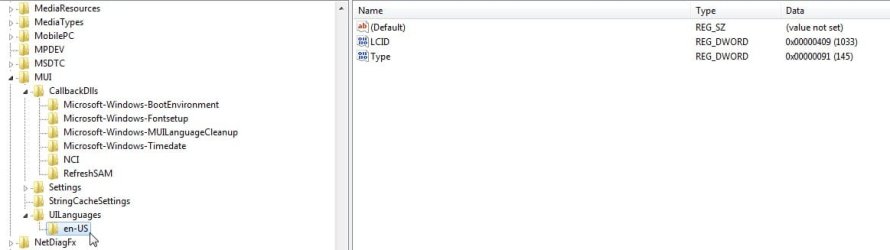
Do you have this , or zh-cn as well?

A-MUI.jpg
 

My Computers My Computers

  • At a glance

    7 X64i5 84002x8gb 3200mhz
    Computer type
    PC/Desktop
    OS
    7 X64
    CPU
    i5 8400
    Motherboard
    gigabyte b365m ds3h
    Memory
    2x8gb 3200mhz
    Hard Drives
    various
    PSU
    pure power 11 400w cm
    Case
    Coolermaster
    Cooling
    cryorig m9i
  • At a glance

    7x64g54008gb ddr4 2400
    Computer type
    PC/Desktop
    OS
    7x64
    CPU
    g5400
    Motherboard
    ga b365m ds3h
    Memory
    8gb ddr4 2400
    PSU
    xfx pro 450w
I don't have my screen capture utility installed yet, so I can't show you a cap of what I have, but here it is...

UILanguages
--en-US
----(Default) REG_SZ (value not set)
----LCIS REG_DWORD 0x00000409 (1033)
----Mode REG_DWORD 0x00000001 (1)
----Type REG_DWORD 0x00000091 (145)
----Version REG_DWORD 0x0000000 (0)
--zh-CN
----(Default) REG_SZ (value not set)
----DefaultFallback REG_SZ en-US
----en-US REG_MULTI_SZ
----LCID REG_DWORD 0x00000804 (2052)
----Mode REG_DWORD 0x00000001 (1)
----Type REG_DWORD 0x00000092 (146)
----Version REG_DWORD 0x0000000 (0)
 

My Computer My Computer

At a glance

Windows 7 Basic 32bit
Computer Manufacturer/Model Number
Toshiba T210 Laptop
OS
Windows 7 Basic 32bit
It started as English then had zh lang pack installed.

I don't suppose you could copy and paste the hives into a folder, zip it up and post it.

It won't let you copy hives that are in use, so you need to do it from outside windows, either from another o/s , or from the 7 boot disc.
 

My Computers My Computers

  • At a glance

    7 X64i5 84002x8gb 3200mhz
    Computer type
    PC/Desktop
    OS
    7 X64
    CPU
    i5 8400
    Motherboard
    gigabyte b365m ds3h
    Memory
    2x8gb 3200mhz
    Hard Drives
    various
    PSU
    pure power 11 400w cm
    Case
    Coolermaster
    Cooling
    cryorig m9i
  • At a glance

    7x64g54008gb ddr4 2400
    Computer type
    PC/Desktop
    OS
    7x64
    CPU
    g5400
    Motherboard
    ga b365m ds3h
    Memory
    8gb ddr4 2400
    PSU
    xfx pro 450w
It started as English then had zh lang pack installed.

I don't suppose you could copy and paste the hives into a folder, zip it up and post it.

It won't let you copy hives that are in use, so you need to do it from outside windows, either from another o/s , or from the 7 boot disc.

That is a little outside of my experience. Do you have a link that might explain how to do that?
 

My Computer My Computer

At a glance

Windows 7 Basic 32bit
Computer Manufacturer/Model Number
Toshiba T210 Laptop
OS
Windows 7 Basic 32bit
Boot the 7 dvd/repair disc.

Go to command prompt.

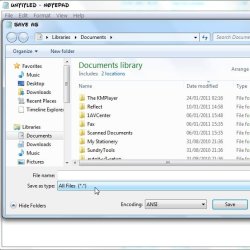
type notepad (then press enter)

when notepad pops up, click File >Save

select "all files " in notepad dropdown.

ANOTEPAD.jpg


Create a new folder on your HD - call it anything you like HIVESCOPY will be fine.

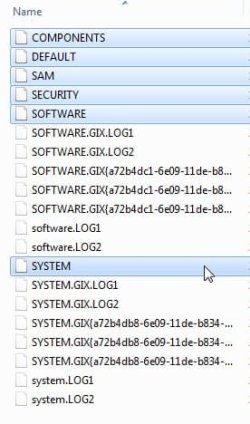
Browse to your windows\system32\config

copy and paste the hives ( the ones with no extensions - don't bother about the .log and regtrans files ) into the HIVESCOPY folder.

A-HIVES.jpg

You're done.

Boot back into windows and zip up the hives.

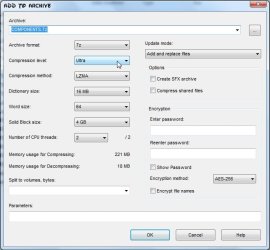
They are quite large, so I suggest zipping each one separarely using 7-zip ( select ULTRA compression )

http://www.7-zip.org/

A7-ZIP.jpg
 

My Computers My Computers

  • At a glance

    7 X64i5 84002x8gb 3200mhz
    Computer type
    PC/Desktop
    OS
    7 X64
    CPU
    i5 8400
    Motherboard
    gigabyte b365m ds3h
    Memory
    2x8gb 3200mhz
    Hard Drives
    various
    PSU
    pure power 11 400w cm
    Case
    Coolermaster
    Cooling
    cryorig m9i
  • At a glance

    7x64g54008gb ddr4 2400
    Computer type
    PC/Desktop
    OS
    7x64
    CPU
    g5400
    Motherboard
    ga b365m ds3h
    Memory
    8gb ddr4 2400
    PSU
    xfx pro 450w
Back
Top