Getting round poor hearing problems

Arcadian

New member
Member
VIP
Local time
9:13 PM
Messages
199
Hi everyone :)

Unfortunately I’m definitely not a techie nevertheless I would very much appreciate some advice as to what options are or are not available for poor hearing now that I’ve just bought a laptop Win 7 64bit ….

I’ve not the best of hearing due to a sporting accident years ago, basic hearing aids unfortunately being of no help at all, so it’s always been sub-titles etc. when watching dvds if they’re ever available which is often rare. The core problem is I can’t distinguish much pitch at all sounds always coming across very muffled, so to get round this when watching on my pc I first bought some powerful speakers that helped a bit but not only were too loud for others nearby, most sounds still remained muffled as well.

However my last pc was Win XP Home and I eventually found that by clicking on a radio button called I think “boost” or “on-line” or something similar in the audio panel as against the radio button to click on for microphone, the stereo jack needing some sort of boosting to overcome something, my stereo headphones which also have volume control dials worked just fine improving things by almost 50/60% and not disturbing anyone !

I’ve now just bought a laptop Windows 7 64bit and the speakers are fine but as before still too loud for others, but unfortunately apart from “Headphone Visualization” which I’ve clicked on in Realtek HD Audio Manager, the sounds from the headphones are just as quiet as they were before I found the “boost” (?) button on XP and still no use at all….

Hope I’ve managed to explain it sufficiently well enough for some of it to make sense, as I would really appreciate some advice in laymans’s language to know whether I can repeat the same operation again on my laptop or not ?

Many thanks in advance....
 

My Computer

Computer type
Laptop
Computer Manufacturer/Model Number
HP Presario CQ 56
OS
Windows 7 Home Premium 64bit
Antivirus
Zone Alarm
Browser
Firefox
The "Boost" option in Audio is for the microphone, NOT the "playback" (speakers/headphones, etc).

If its not loud enough, I would suggest getting a small headphone amplifier to boost the signal.

Here is an example of a headphone amp (I know nothing about this other than I found it doing a google search).
T613-BNC (T613BNC) Headphone Amplifier & Splitter
 

My Computer

Computer type
PC/Desktop
Computer Manufacturer/Model Number
My Own Build
OS
Windows 10 64 bit
CPU
Intel i7 6700K
Motherboard
ASUS ROG Maximus VIII Hero
Memory
16GB Corsair Dominator
Graphics Card(s)
Intel CPU Graphics
Sound Card
RealTek
Monitor(s) Displays
27" Dell S2719dgf
Screen Resolution
2560X1440
Hard Drives
1 TB Samsung 850 EVO SSD for Win 10 Pro
500GB Samsung 850 EVO SSD for Win 10 Insider
2 TB drive for backup
PSU
EVGA Supernova 750G2
Case
BeQuiet Silent Base 600
Cooling
Deepcool Captain 120EX
Keyboard
Microsoft Wireless 2000
Mouse
Microsoft wireless
Internet Speed
100 MB/sec (Cable)
Antivirus
Microsoft Defender and Malwarebytes
Browser
Edge/Firefox
Other Info
Cakewalk (Sonar) by BandLab and Studio One 4.1 Pro recording studio software. MOTU 896Mk3 Hybrid recording interface, Frontier Tranzport wireless control unit, Behringer X-Touch Control Surface.
Five USB connected optical drives for CD Audio production using Nero BurningROM
That's the word - "amplifier" ! It worked just fine. Is this possibly something to do with "impedance" so that I know in future....?

Great very many thanks ! :D
 

My Computer

Computer type
Laptop
Computer Manufacturer/Model Number
HP Presario CQ 56
OS
Windows 7 Home Premium 64bit
Antivirus
Zone Alarm
Browser
Firefox
I doubt that impedance has anything to do with it. I've used all types of headsets with a PC and they all work OK (I have a recording studio). The PC's headphone output just needs amplified to be loud enough for your.
 

My Computer

Computer type
PC/Desktop
Computer Manufacturer/Model Number
My Own Build
OS
Windows 10 64 bit
CPU
Intel i7 6700K
Motherboard
ASUS ROG Maximus VIII Hero
Memory
16GB Corsair Dominator
Graphics Card(s)
Intel CPU Graphics
Sound Card
RealTek
Monitor(s) Displays
27" Dell S2719dgf
Screen Resolution
2560X1440
Hard Drives
1 TB Samsung 850 EVO SSD for Win 10 Pro
500GB Samsung 850 EVO SSD for Win 10 Insider
2 TB drive for backup
PSU
EVGA Supernova 750G2
Case
BeQuiet Silent Base 600
Cooling
Deepcool Captain 120EX
Keyboard
Microsoft Wireless 2000
Mouse
Microsoft wireless
Internet Speed
100 MB/sec (Cable)
Antivirus
Microsoft Defender and Malwarebytes
Browser
Edge/Firefox
Other Info
Cakewalk (Sonar) by BandLab and Studio One 4.1 Pro recording studio software. MOTU 896Mk3 Hybrid recording interface, Frontier Tranzport wireless control unit, Behringer X-Touch Control Surface.
Five USB connected optical drives for CD Audio production using Nero BurningROM
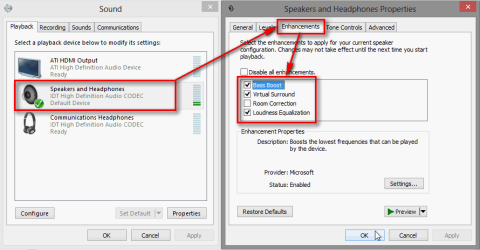
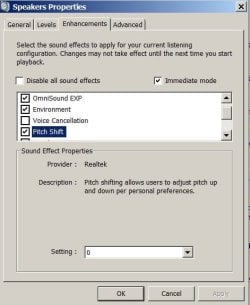
Control Panel > Hardware and sound > Sound, right click your Audio Device and select Properties. Check if changing the Enhancement settings will help you.

2013-04-26_232443.png

Kari
 

My Computer

Computer type
Laptop
Computer Manufacturer/Model Number
HP ENVY 17-1150eg
OS
Windows 10 Pro x64 EN-GB
CPU
1.6 GHz Intel Core i7-720QM Processor
Memory
6 GB
Graphics Card(s)
ATI Mobility Radeon HD 5850 Graphics
Sound Card
Beats sound system with integrated subwoofer
Monitor(s) Displays
17" laptop display, 22" LED and 32" Full HD TV through HDMI
Screen Resolution
1600*900 (1), 1920*1080 (2&3)
Hard Drives
Internal: 2 x 500 GB SATA Hard Disk Drive 7200 rpm
External: 2TB for backups, 3TB USB3 network drive for media
Cooling
As Envy runs a bit warm, I have it on a Cooler Master pad
Keyboard
Logitech diNovo Media Desktop Laser (bluetooth)
Mouse
Logitech Performance Mouse MX
Internet Speed
50/10 Mbps VDSL
Antivirus
Windows Defender 4.3.9431.0
Browser
Maxthon 3.5.2., IE11
In addition, if you switch to VLC media player instead of the default windows player, you can double the volume over whatever controls you maximise in windows. Very handy for low audio issues.

And if an amp is too awkward, what of headphones? Not ideal of course.
 

My Computer

Computer type
PC/Desktop
Computer Manufacturer/Model Number
Systems by SmartEyeball
OS
8 Pro x64
CPU
i7 3770K 4.6GHz
Motherboard
ASUS P8Z77 WS
Memory
16GB G.Skill Trident X 2666mhz
Graphics Card(s)
x2 EVGA 780 Ti Superclocked SLI
Sound Card
SB X-FI Surround 5.1 PRO USB / ATH-AD900 Headphones
Monitor(s) Displays
x3 Dell U2410 / 58" Samsung
Screen Resolution
5760*1200/ 1920*1200
Hard Drives
2x Intel 520 240GB (RAID 0) * 2x WD Caviar Blacks 2TB (RAID 0) * 2TB WD Caviar Black * Sony Optirac DVD
PSU
Silverstone Strider Evolution 1200W
Case
Thermaltake Level 10 GT Snow Edition
Cooling
Noctua NH-D14
Keyboard
Topre Realforce // Ducky Shine MX Black // Filco Ninja TKL
Mouse
Thermaltake Theron (Highly Recommended) + Razer Imperator
Antivirus
MSE
Browser
IE, FF, WaterFox
Other Info
GT Extreme V2 Sim Racing Cockpit + 40" LCD and K/B Mouse stand ▼
Fanatec CSR Elite Wheel + Clubsport V1 Pedals + CSR shifter/7G-H ▼Saitek X52 Pro ▼ TrackIR 5 Pro
Buttkicker v2 Seat Rumbler with Dedicated 5.1 and Sub Woofer attached to frame ▼
=
Bloody Big Grin
In addition, if you switch to VLC media player instead of the default windows player, you can double the volume over whatever controls you maximise in windows. Very handy for low audio issues.

And if an amp is too awkward, what of headphones? Not ideal of course.
+1. Very good idea.

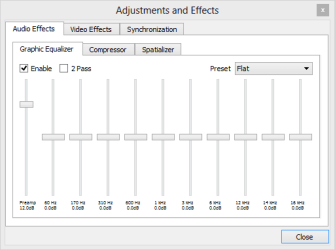
VLC Player also has a quite good built-in equalizer to further enhance the audio signal.

VLC.png

I use VLC Player as my main media player because it plays just about anything you throw to it, without additional codecs. One feature I like very much is the VLC Player's ability to to play network streams. If you for instance would like to open a Youtube video in VLC to get that 200% volume level or to enjoy some other VLC features, simply select Open Network Stream in Media menu, type or paste the URL of that Youtube video and watch.

2013-04-27_110830.png

Want to save that Youtube video locally on your PC? Click Record and it will be saved on your Videos folder.

VLC Player free download: VideoLAN - Official page for VLC media player, the Open Source video framework!

Kari
 

My Computer

Computer type
Laptop
Computer Manufacturer/Model Number
HP ENVY 17-1150eg
OS
Windows 10 Pro x64 EN-GB
CPU
1.6 GHz Intel Core i7-720QM Processor
Memory
6 GB
Graphics Card(s)
ATI Mobility Radeon HD 5850 Graphics
Sound Card
Beats sound system with integrated subwoofer
Monitor(s) Displays
17" laptop display, 22" LED and 32" Full HD TV through HDMI
Screen Resolution
1600*900 (1), 1920*1080 (2&3)
Hard Drives
Internal: 2 x 500 GB SATA Hard Disk Drive 7200 rpm
External: 2TB for backups, 3TB USB3 network drive for media
Cooling
As Envy runs a bit warm, I have it on a Cooler Master pad
Keyboard
Logitech diNovo Media Desktop Laser (bluetooth)
Mouse
Logitech Performance Mouse MX
Internet Speed
50/10 Mbps VDSL
Antivirus
Windows Defender 4.3.9431.0
Browser
Maxthon 3.5.2., IE11
Control Panel > Hardware and sound > Sound, right click your Audio Device and select Properties. Check if changing the Enhancement settings will help you.Kari

Lots of very useful information indeed many thanks everyone !

Firstly as in the attachment I don't seem to have anything else in Sound other than Realtek....? But must try the idea of increasing the volume in VLC using headphones first to see if I can hear any better before buying an amplifier I think.

As you so rightly say I've always used VLC because there are so many great options especially sub-titles etc., but as I've only had Windows 7 for a couple of weeks I'm still finding my way round so no idea how to make it the default player ?

As a side issue I had no end of problems on my old XP when viewing old movies ( there are some really great Forties and Fifties b/w classics all free) as to how to synchronise the sub-title file downloads, which also come free but separately from just about anywhere, though I was getting somewhere with VLC. Unfortunately it just got too complicated to follow in the end as the titles were either too early or too late keeping up with the actor's lip movements. But now I'm on Win 7 I'm hoping it might be easier ? Looking forward to trying out the streams idea too....:p

Edit: how do you get a screen pic onto the thread as I'd intended ?
 

Attachments

My Computer

Computer type
Laptop
Computer Manufacturer/Model Number
HP Presario CQ 56
OS
Windows 7 Home Premium 64bit
Antivirus
Zone Alarm
Browser
Firefox
Firstly as in the attachment I don't seem to have anything else in Sound other than Realtek....? But must try the idea of increasing the volume in VLC using headphones first to see if I can hear any better before buying an amplifier I think.
Simply right click that Realtek High Definition Audio device you have to open a context menu, select Properties and follow the instructions given.

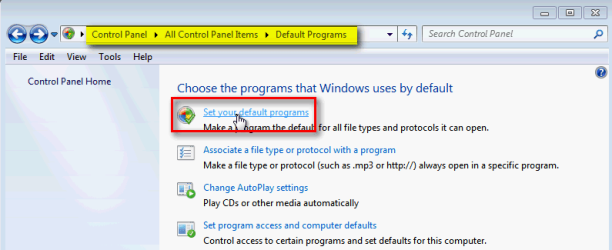
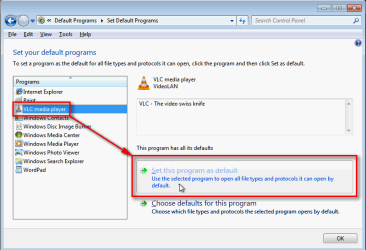
As you so rightly say I've always used VLC because there are so many great options especially sub-titles etc., but as I've only had Windows 7 for a couple of weeks I'm still finding my way round so no idea how to make it the default player ?
If your Control Panel is using Category View, click Programs > Default Programs. If Control Panel is set to use Icon View, click Default Programs.

Now click Set your default programs:

2013-04-27_124116.png

Select VLC from the list, click Set this program as default:

2013-04-27_124258.png

Click OK to save settings.

That's it. Full tutorial here: http://www.sevenforums.com/tutorials/2630-default-programs-set-programs-default-associations.html

Edit: how do you get a screen pic onto the thread as I'd intended ?
Kari
 

My Computer

Computer type
Laptop
Computer Manufacturer/Model Number
HP ENVY 17-1150eg
OS
Windows 10 Pro x64 EN-GB
CPU
1.6 GHz Intel Core i7-720QM Processor
Memory
6 GB
Graphics Card(s)
ATI Mobility Radeon HD 5850 Graphics
Sound Card
Beats sound system with integrated subwoofer
Monitor(s) Displays
17" laptop display, 22" LED and 32" Full HD TV through HDMI
Screen Resolution
1600*900 (1), 1920*1080 (2&3)
Hard Drives
Internal: 2 x 500 GB SATA Hard Disk Drive 7200 rpm
External: 2TB for backups, 3TB USB3 network drive for media
Cooling
As Envy runs a bit warm, I have it on a Cooler Master pad
Keyboard
Logitech diNovo Media Desktop Laser (bluetooth)
Mouse
Logitech Performance Mouse MX
Internet Speed
50/10 Mbps VDSL
Antivirus
Windows Defender 4.3.9431.0
Browser
Maxthon 3.5.2., IE11
Many thanks Kari all sorted especially the "Enhancements" panel which even has a "pitch" level adjustment so can't wait to try it.... !! :p

Thanks again everyone :D
 

Attachments

  • Hearing settings.jpg
    Hearing settings.jpg
    31.3 KB · Views: 2

My Computer

Computer type
Laptop
Computer Manufacturer/Model Number
HP Presario CQ 56
OS
Windows 7 Home Premium 64bit
Antivirus
Zone Alarm
Browser
Firefox
You are welcome, hopefully you get it as you need to.
 

My Computer

Computer type
Laptop
Computer Manufacturer/Model Number
HP ENVY 17-1150eg
OS
Windows 10 Pro x64 EN-GB
CPU
1.6 GHz Intel Core i7-720QM Processor
Memory
6 GB
Graphics Card(s)
ATI Mobility Radeon HD 5850 Graphics
Sound Card
Beats sound system with integrated subwoofer
Monitor(s) Displays
17" laptop display, 22" LED and 32" Full HD TV through HDMI
Screen Resolution
1600*900 (1), 1920*1080 (2&3)
Hard Drives
Internal: 2 x 500 GB SATA Hard Disk Drive 7200 rpm
External: 2TB for backups, 3TB USB3 network drive for media
Cooling
As Envy runs a bit warm, I have it on a Cooler Master pad
Keyboard
Logitech diNovo Media Desktop Laser (bluetooth)
Mouse
Logitech Performance Mouse MX
Internet Speed
50/10 Mbps VDSL
Antivirus
Windows Defender 4.3.9431.0
Browser
Maxthon 3.5.2., IE11
Back
Top