Getting Swamped

jvsimo1

New member
Member
Local time
10:03 AM
Messages
73
Location
Carnarvon, North west australia
I have a desktop computer which gets 90% of the action in our household. I also have a laptop which only gets turned on once every month two 2. My problem is when I go onto e-mail on the laptop it will start downloading all the e-mails from the last month or two. This can be anything from one to 2 thousand.
Question: What can I do to the laptop so it only downloads say, the most recent day os so of incomming e-mails?
 

My Computer

Computer Manufacturer/Model Number
Dell inspiron 560 MT desktop
OS
Windows 7 Home Premium 32 bit
CPU
500 GB Sata
Memory
4 GB ( 4X 1 GB)
Hard Drives
One Sata
As far as I know, your can only do it if using POP mail. With IMAP I can not think of any way of achieving what you want to.

With a POP mail account, you could do this:

Change the mail client settings in one of the following two ways (examples from Outlook, other mail clients have similar settings):
  • Method 1
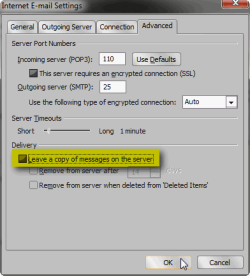
    • On desktop, disable Leave a copy of messages on the server. This deletes all messages when they are read from the server using desktop
    • On laptop, enable Leave a copy of messages on the server
    • Using this method, all messages are deleted from the server when mail is read using desktop. If you then use laptop let's say the very next day for reading mail, it only reads messages from the last day (since last time desktop read mail) leaving them on server so next time mail is read with desktop it can still get those same messages to keep mailfile complete
      .
      Leave_Mail_1.png
      .
  • Method 2
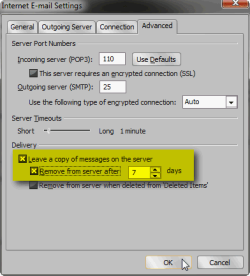
    • On desktop, enable Leave a copy of messages on the server but set the time after which messages are deleted very short. This deletes all messages from server after the amount of days set
    • On laptop, enable Leave a copy of messages on the server
    • This method deletes all messages from the server after the amount of days you have chosen when mail is read using desktop. When mail is read using the laptop, it only collects mail from as many days as is set up on desktop settings leaving them on server so next time mail is read with desktop it can still get those same messages to keep mailfile complete
      .
      Leave_Mail_2.png
Kari
 

My Computer

Computer type
Laptop
Computer Manufacturer/Model Number
HP ENVY 17-1150eg
OS
Windows 10 Pro x64 EN-GB
CPU
1.6 GHz Intel Core i7-720QM Processor
Memory
6 GB
Graphics Card(s)
ATI Mobility Radeon HD 5850 Graphics
Sound Card
Beats sound system with integrated subwoofer
Monitor(s) Displays
17" laptop display, 22" LED and 32" Full HD TV through HDMI
Screen Resolution
1600*900 (1), 1920*1080 (2&3)
Hard Drives
Internal: 2 x 500 GB SATA Hard Disk Drive 7200 rpm
External: 2TB for backups, 3TB USB3 network drive for media
Cooling
As Envy runs a bit warm, I have it on a Cooler Master pad
Keyboard
Logitech diNovo Media Desktop Laser (bluetooth)
Mouse
Logitech Performance Mouse MX
Internet Speed
50/10 Mbps VDSL
Antivirus
Windows Defender 4.3.9431.0
Browser
Maxthon 3.5.2., IE11
Use another mail server. I use AOL and never have that problem.
 

My Computer

Computer Manufacturer/Model Number
HP, Dell, Gateway, Toshiba - 4 laptops and 2 desktops
OS
Vista, Windows7, Mint Mate, Zorin, Windows 8
CPU
from 1.6GHz Duo to i7
Monitor(s) Displays
2x HP w2207
Hard Drives
5x HDD, 7x SSD, 12x Externals
Keyboard
with trackball - no mices
Mouse
Trackball mice
Internet Speed
DSL 6000
Back
Top