
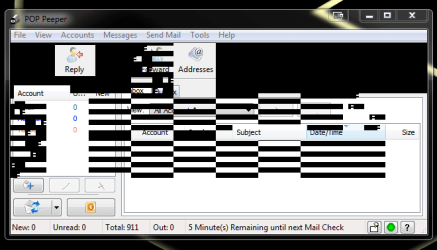
Getting weird vertical black bars in window

mystvearn

New member
Member
VIP
Local time
8:43 PM
Messages
123
I'm not sure if this is a RAM, or video card issue. I've just started seeing this today. Seen it happen in an active and inactive application window like FF. Poppeeper. When I move the bar of the app around (disappearing below the start menu bar) then bring it up again, the problem is gone.

Any ideas which hardware/software is starting to fail?
 

Attachments
  • Capture.PNG
    Capture.PNG
    14.6 KB · Views: 11

My Computer

OS
Windows 7 64 bit Pro
Sound Card
On board
Monitor(s) Displays
Dual Monitor: Dell U2311H 23" monitor, LG M227WD
Screen Resolution
1920x1080x2 (landscape)
Keyboard
Microsoft Ergonomic Keyboard 4000
Mouse
Logitech M 705
Internet Speed
25mb/1mb
Other Info
Printer: HP F4180
Speakers: Creative Gigaworks T20 Series II
Oooooh. This looks like either a driver issue or a bad display card. Is this a laptop or a desktop? If it's an HP laptop, does it have the ATI or the nVidia display chipset? My wife has a recent HP Laptop with the ATI display system and it had been notoriously hard to get working correctly. If you can post that information I'll see what I can do.

Andacar.
 

My Computer

Computer Manufacturer/Model Number
Custom machine
OS
Windows 7 Professional 64 bit
CPU
i7 920
Motherboard
ASUS P6T Deluxe V2
Memory
6 gigabytes
Graphics Card(s)
nVidia Quadro FX 1800
Sound Card
Creative SB Audigy 2
Monitor(s) Displays
IBM 21" CRT
Screen Resolution
1600 x 1200
Hard Drives
Hitachi 1 TB Main Drive
Western Digital 1 TB Storage
Western Digital 2 TB Projects
Keyboard
Logitec Access 600
Mouse
Logitec M100
I'd upgrade display driver, if latest uninstall and reboot to reinstall it.

If that doesn't help reinstall the video card checking for debris in slot and connection is tight.

Next run a full scan with Malwarebytes.

Then SFC -SCANNOW Command.

Establish a Clean Boot to make sure another program is not interfering, check the logs and System Resources and work through the other steps in Troubleshooting Steps for Windows 7
 
Thanks. This is from the desktop (in my signature-system specs). Will see if a new driver fixes this.
 

My Computer

OS
Windows 7 64 bit Pro
Sound Card
On board
Monitor(s) Displays
Dual Monitor: Dell U2311H 23" monitor, LG M227WD
Screen Resolution
1920x1080x2 (landscape)
Keyboard
Microsoft Ergonomic Keyboard 4000
Mouse
Logitech M 705
Internet Speed
25mb/1mb
Other Info
Printer: HP F4180
Speakers: Creative Gigaworks T20 Series II
Back
Top