GF 8600m nvidia setup error

variatsioon

New member
Local time
5:59 PM
Messages
4
Hi.
Im trying to update my video card drivers.
I uninstalled old(2009?) driveris and tred to install new from nvidia website but I got error: "nvidia setup program could not locate any idrivers that are compatible with your current hardware"

Now windows 7 installed 2006 year driver.

How can I install newst driver for my laptop vide card? (nvidia geforce 8600m gt)

thanks.
 
Last edited:

My Computer

OS
Windows 7 Ultimate x64
Hi! variatsioon, welcome to W7F :)

Hi.
Im trying to update my video card drivers.
I uninstalled old(2009?) driveris and tred to install new from nvidia website but I got error: "nvidia setup program could not locate any idrivers that are compatible with your current hardware"

Now windows 7 installed 2006 year driver.

How can I install newst driver for my laptop vide card? (nvidia geforce 8600m gt)

thanks.
If I did this correctly you should be able to find one here:
NVIDIA Driver Downloads - Advanced Search

Look around there are links to help installation also.

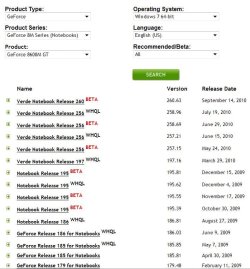
As the pix shows I tried to use all available info you provided.
You will have to enter the correct info if I got any wrong:
 

Attachments

  • nvdia.JPG
    nvdia.JPG
    70 KB · Views: 26

My Computer

Computer type
PC/Desktop
Computer Manufacturer/Model Number
Gateway DX4831-01e (Mid-Tower Desktop)
OS
Originally Win 7 Hm Prem x64 Ver 6.1.7600 Build 7601-SP1 | Upgraded to Windows 10 December 14, 2019
CPU
Intel i3 530 2.93GHz, 2933MHz 2 Cores 4 Logical Processors
Motherboard
Gateway H57M01 133 megahertz
Memory
6GB of 1,333MHz DDR3 SDRAM
Graphics Card(s)
32MB Intel Graphics Media Accelerator HD IGChip
Sound Card
Realtek High Definition Audio
Monitor(s) Displays
Gateway HX2000 20inch TFT active matrix TN
Screen Resolution
1600 x 900 x 59 hertz
Hard Drives
WDC WD10EADS-00M2B0 [HDD] (1000.20 GB) -- drive 0,
HL-DT-ST DVDRAM GH41N [CD-ROM dr]
Four card readers, and Four USB 2.0
PSU
300watts.
Case
Mid-Tower Desktop
Cooling
Stock from Gateway
Keyboard
Natural Ergonomic Keyboard 4000, see Other Info
Mouse
Orig. Gateway wore out now using Insignia USB wired optical
Internet Speed
Vz FIOS 10ms png 57.64Mbps down 65.53Mbps up Speedtest.org
Antivirus
Zamana Anti-logger with Anti-malware, MSE, Windows Firewall,
Browser
IE11.0.9600.19399-Upd ver11.0.135, Firefox 68.0.1 x64
Other Info
System Specs by Belarc.

BIOS: American Megatrends Inc. P01-A0 11/17/2009

Replaced the MS 'Natural' Standard PS/2 Enhanced 101-102 Keyboard with a new Natural Ergonomic Keyboard 4000 on August 1st 2014.

Canon Pixma MG3222 Printer.

Updated to IE11 on 12102015 | Fios Quantum Router g1100

Additional AV: SpywareBlaster, manual Mbam, SAS
Thank you!

I allready did that and that donwloaded file gave me that error.
i didnt work.
 

My Computer

OS
Windows 7 Ultimate x64
Have you tried a restore point? Back to before you uninstalled old(2009?) driver.
 

My Computer

Computer type
PC/Desktop
Computer Manufacturer/Model Number
Gateway DX4831-01e (Mid-Tower Desktop)
OS
Originally Win 7 Hm Prem x64 Ver 6.1.7600 Build 7601-SP1 | Upgraded to Windows 10 December 14, 2019
CPU
Intel i3 530 2.93GHz, 2933MHz 2 Cores 4 Logical Processors
Motherboard
Gateway H57M01 133 megahertz
Memory
6GB of 1,333MHz DDR3 SDRAM
Graphics Card(s)
32MB Intel Graphics Media Accelerator HD IGChip
Sound Card
Realtek High Definition Audio
Monitor(s) Displays
Gateway HX2000 20inch TFT active matrix TN
Screen Resolution
1600 x 900 x 59 hertz
Hard Drives
WDC WD10EADS-00M2B0 [HDD] (1000.20 GB) -- drive 0,
HL-DT-ST DVDRAM GH41N [CD-ROM dr]
Four card readers, and Four USB 2.0
PSU
300watts.
Case
Mid-Tower Desktop
Cooling
Stock from Gateway
Keyboard
Natural Ergonomic Keyboard 4000, see Other Info
Mouse
Orig. Gateway wore out now using Insignia USB wired optical
Internet Speed
Vz FIOS 10ms png 57.64Mbps down 65.53Mbps up Speedtest.org
Antivirus
Zamana Anti-logger with Anti-malware, MSE, Windows Firewall,
Browser
IE11.0.9600.19399-Upd ver11.0.135, Firefox 68.0.1 x64
Other Info
System Specs by Belarc.

BIOS: American Megatrends Inc. P01-A0 11/17/2009

Replaced the MS 'Natural' Standard PS/2 Enhanced 101-102 Keyboard with a new Natural Ergonomic Keyboard 4000 on August 1st 2014.

Canon Pixma MG3222 Printer.

Updated to IE11 on 12102015 | Fios Quantum Router g1100

Additional AV: SpywareBlaster, manual Mbam, SAS

My Computer

Computer type
PC/Desktop
Computer Manufacturer/Model Number
Custom Build
OS
Windows 10 Pro x64, Arch Linux
CPU
Intel Core 2 Quad Q8200 OC'd 3.08GHz
Motherboard
Asus Rampage formula LGA775
Memory
8GB DDR2 900Mhz
Graphics Card(s)
MSI GT730 2GB GDDR5 (Kepler)
Sound Card
Supreme FX2
Monitor(s) Displays
Samsung LS22F350 LED
Screen Resolution
1080P
Hard Drives
Kingston SSDNow UV400 120GB, 500GB Hitachi, 2TB Samsung, 500GB Seagate FreeAgent, 640GB Samsung, 160GB Toshiba (Arch)
PSU
AeroCool 500W Bronze
Cooling
Cooler Master V6 + 3X fans
Keyboard
Prolink keyboard
Mouse
Logitech M705
Internet Speed
1MiB/s
Browser
Chrome Beta
Here is a download link for the 258.96 drivers for Windows 7 x64. Give them a try again.

NVIDIA DRIVERS 258.96 WHQL

I have the 8600M on this laptop I'm using.
 

My Computer

Computer Manufacturer/Model Number
Custom | Whitebox
OS
Windows 7 Ultimate, OS X 10.7, Ubuntu 11.04
CPU
Intel E6750 @ 3.80GHz
Motherboard
Gigabyte GA-EP45-UD3L (Revision 1.1)
Memory
2x2GB & 2x1GB (6GB) OCZ Reaper 1066MHz @ 1080MHz
Graphics Card(s)
EVGA nVidia GTX 260 896mb (216 Core) FTW Edition
Sound Card
Realtek ALC888
Monitor(s) Displays
21" VIZIO TV
Screen Resolution
1680x1050 @ 60Hz
Hard Drives
Western Digital WD6401AALS - 640GB
Hitachi HDP725016GLA380 - 160GB
PSU
Corsair 750W
Case
NZXT Nemesis Elite
Cooling
Thermaltake SpinQ
Keyboard
Logitech Wireless S520
Mouse
Logitech Wireless S520 - Microsoft Wireless Arc Mouse
Internet Speed
Download: 20mbps, Upload: 3mbps
hi, Which driver have you installed, you should be using the 258.96 driver. Download it from this link, when downloading use Firefox or I.E
NVIDIA DRIVERS 258.96 WHQL
sometimes although the download looks ok windows does not know what to do with it so i would delete all downloads relating to the driver first, then re download it.
if that fails to work then download this, Guru3D - Driver Sweeper (Setup) download from Guru3D.com. its called driver sweeper, install it but don't run it yet.
Then uninstall your video drivers using the normal uninstall method, once that is done restart your pc and start in safe mode,
Once in safe mode run driver sweeper but only select the nvidia box please ensure that none of the other box's are ticked, when you have done that restart in normal mode and install the 258.96 driver which hopefully should then work correctly.

Raz
 

My Computer

Computer Manufacturer/Model Number
home built PC. Laptop studio1557
OS
windows 7 64 bit and dual boot Pinguyos
CPU
PC, intel i7 920 2.7ghz, laptop i7 720
Motherboard
PC, Asus P6t .laptop probably rubbish from dell
Memory
PC 6GB, laptop 2GB, me 2 seconds after 6 pints
Graphics Card(s)
PC Asus eah5870,laptop, ati hd 4580
Monitor(s) Displays
Sharp 42" HD TV using HDMI + HDMI to onkyo surround amp
Screen Resolution
1920x1080
Hard Drives
1x ssd OCZ 60GB, 2x250GB raid0, 2x1TB (storage),2TB
PSU
OCZ 700w
Case
antec 902
Cooling
antec khuler h20 920
Keyboard
logitek wave
Mouse
x8 sidewinder
Internet Speed
dog slow
I don't know if you have resolved your issue.
With these Laptop graphics card drivers, usually the manufacture has modified the.inf file.

I've had success by directing members to this site NVIDIA MobilityModder The modding tool can be downloaded at the bottom of the page.

Just follow the instructions and it should mod the .inf and allow it to install
Get the latest driver for your card from Nvidia. Drivers - Download NVIDIA Drivers

Please post back if you have resolved your driver issue so others can benefit from your thread.
Thanks. Fabe
 

My Computer

Computer Manufacturer/Model Number
Self Built
OS
Windows 7 ultimate 64 bit / XP Home sp3
CPU
intel Core 2 Duo E8400 3.0ghz
Motherboard
Asus P5ND bios 1401
Memory
8 gigs 1066 OCZ Fata1ty
Graphics Card(s)
EVGA GTX 580 Call of Duty Black Ops Edition
Sound Card
Creative Soundblaster Audigy 2zs
Monitor(s) Displays
Asus 24in LCD's 2MS X2
Screen Resolution
1920x1080p @60Hz
Hard Drives
WD Caviar 500 Black/ WD Caviar 200 Blue
PSU
OCZ 700W GameXtreme
Case
NZXT Apollo
Cooling
Corsair H50 CPU/120mm x3 /60mm x2 /Corsair Dominator Ram
Keyboard
Logitech Bluetooth Wireless MX5000
Mouse
Logitech Bluetooth Wireless MX1000
Internet Speed
Download 19.83 Upload 0.97
Other Info
Logitech Z2300 Speakers/ Bose Noise Cancelling Headphones/Avermedia PCI-e Hybrid TV Bravo/Epson NX415 all in one/ 4 Port Powered USB Hub/ LG 10x Bluray Burner /TSST Corp DVDRW External
Thank you all.

razy60 first link worked for me!

cheers :)

Here is a download link for the 258.96 drivers for Windows 7 x64. Give them a try again.

NVIDIA DRIVERS 258.96 WHQL

I have the 8600M on this laptop I'm using.

Didn't work. same problem.

hi, Which driver have you installed, you should be using the 258.96 driver. Download it from this link, when downloading use Firefox or I.E
NVIDIA DRIVERS 258.96 WHQL
sometimes although the download looks ok windows does not know what to do with it so i would delete all downloads relating to the driver first, then re download it.
if that fails to work then download this, Guru3D - Driver Sweeper (Setup) download from Guru3D.com. its called driver sweeper, install it but don't run it yet.
Then uninstall your video drivers using the normal uninstall method, once that is done restart your pc and start in safe mode,
Once in safe mode run driver sweeper but only select the nvidia box please ensure that none of the other box's are ticked, when you have done that restart in normal mode and install the 258.96 driver which hopefully should then work correctly.

Raz

first link worked!
problem is now fixed!

I don't know if you have resolved your issue.
With these Laptop graphics card drivers, usually the manufacture has modified the.inf file.

I've had success by directing members to this site NVIDIA MobilityModder The modding tool can be downloaded at the bottom of the page.

Just follow the instructions and it should mod the .inf and allow it to install
Get the latest driver for your card from Nvidia. Drivers - Download NVIDIA Drivers

Please post back if you have resolved your driver issue so others can benefit from your thread.
Thanks. Fabe

It changed some ini failes and first time driver started to install but at end it said:
installation didnt make any change. or something like that. - failed
 

My Computer

OS
Windows 7 Ultimate x64
Thank you all.

razy60 first link worked for me!

cheers :)

Here is a download link for the 258.96 drivers for Windows 7 x64. Give them a try again.

NVIDIA DRIVERS 258.96 WHQL

I have the 8600M on this laptop I'm using.

Didn't work. same problem.

hi, Which driver have you installed, you should be using the 258.96 driver. Download it from this link, when downloading use Firefox or I.E
NVIDIA DRIVERS 258.96 WHQL
sometimes although the download looks ok windows does not know what to do with it so i would delete all downloads relating to the driver first, then re download it.
if that fails to work then download this, Guru3D - Driver Sweeper (Setup) download from Guru3D.com. its called driver sweeper, install it but don't run it yet.
Then uninstall your video drivers using the normal uninstall method, once that is done restart your pc and start in safe mode,
Once in safe mode run driver sweeper but only select the nvidia box please ensure that none of the other box's are ticked, when you have done that restart in normal mode and install the 258.96 driver which hopefully should then work correctly.

Raz

first link worked!
problem is now fixed!

That is strange, since our links were identical except mine was .com and his was .co.uk. Oh well, glad to know your problem is fixed, whatever you do stay away from the latest beta drivers, they kill the Windows installation with 8600M GT's.
 

My Computer

Computer Manufacturer/Model Number
Custom | Whitebox
OS
Windows 7 Ultimate, OS X 10.7, Ubuntu 11.04
CPU
Intel E6750 @ 3.80GHz
Motherboard
Gigabyte GA-EP45-UD3L (Revision 1.1)
Memory
2x2GB & 2x1GB (6GB) OCZ Reaper 1066MHz @ 1080MHz
Graphics Card(s)
EVGA nVidia GTX 260 896mb (216 Core) FTW Edition
Sound Card
Realtek ALC888
Monitor(s) Displays
21" VIZIO TV
Screen Resolution
1680x1050 @ 60Hz
Hard Drives
Western Digital WD6401AALS - 640GB
Hitachi HDP725016GLA380 - 160GB
PSU
Corsair 750W
Case
NZXT Nemesis Elite
Cooling
Thermaltake SpinQ
Keyboard
Logitech Wireless S520
Mouse
Logitech Wireless S520 - Microsoft Wireless Arc Mouse
Internet Speed
Download: 20mbps, Upload: 3mbps
Back
Top