
Gfx problem PLZ HELP!!!

xXINSANELOSERXx

New member
Local time
6:57 PM
Messages
29
Okay well I built this computer and it has an nVida GeForce FX 5200 (128mb) and I have a dual monitor setup with it (like you have 2 monitors acting as 1 big one) and I have a game called "Microsoft Flight Simulator X" and when I load the game it runs the setup screen you select your plane then I click the "Fly Now" button, it changes the resolution then it loads the data, then it displays the runway with the jet then it freezes and crashes and i'm guessing that is a problem with my gfx card because I was previously coding a program in dark basic and I exited back to windows and it worked a few times then about the fifth time it gave me the "Blue screen of death" it said that some of my drivers or system software was not installed correctly but iv'e tryed updating the drivers and still the same prob. could someone please help me with this?

now that i think about it i updated the processor in the computer from a intel pentium 4 @1.66 GHz to a intel pentium 4 HT @3.00 GHz and the computer is stuck @1.50 GHz could any one tell me how to get it to full speed?


Yes i know that my computer is a mess but i really want it to work =D
 

My Computer

Computer Manufacturer/Model Number
Dell Optiplex GX260 (Huge case model)
OS
Windows XP Professional SP 2
CPU
Intel Pentium 4 3.00 GHz (HT)
Motherboard
Dell
Memory
2GB RAM
Graphics Card(s)
NVIDA GeForce Fx5200
Sound Card
Integrated SoundMAX Digital Audio
Monitor(s) Displays
2xLCD Dual Monitor setup
Screen Resolution
1280x1024
Hard Drives
1x 40GB HDD for Operating System

1x 150GB HDD for other files
Case
Just a Dell case
Cooling
Copper tube heatsink w/heat sensitive fan
Keyboard
102-103 key I Think
Mouse
Dell Wireless keyboard/mouse
Internet Speed
54megabites per sec (Wireless)
Other Info
logitech rumblepad 2
DVD/CD-RW drive
CD-RW drive
3.5 inch floppy drive
5.25 inch floppy drive (Old Skool)

Built mah self & is chugging allong =D
Update the motherboard bios to latest. Then check your RAM settings and fsb settings to get correct clock speed.

Install the Vista driver for your card from NVIDIA's site.

It's a very weak card. I'm surprised it even started Simulator.
 

My Computer

Computer Manufacturer/Model Number
self built
OS
7600.20510 x86
CPU
P4 550 3.4 GHz HT running at 3.5 GHz
Motherboard
MSI PM8M3-V (MS-7211 v1.x) Micro-ATX mainboard
Memory
OCZ 2 GB(2x1GB) DDR400mHz running @ 414 mHz
Graphics Card(s)
HIS Radeon HD 3850 IceQ 3 Turbo HDMI Dual DL-DVI AGP
Sound Card
MOTU Traveler firewire studio interface 192 kHz 24 bit
Monitor(s) Displays
22" widescreen Acer X223W LCD, 17" Compaq P75 CRT
Screen Resolution
1680x1050 and 1280x1024
Hard Drives
SATA I x2 WD, 400 GB and 120 GB, SATA 2 WD Caviar Black 1 TB
PSU
350W generic
Case
Cybertronpc, it glows blue
Cooling
stock cpu fan, Ice-Q 3 gpu and system, many case fans
Keyboard
Logitch Classical Keyboard 200
Mouse
Logitech Mediaplay cordless
Internet Speed
1792/448 kbits/sec
Other Info
SATA II PCI fake RAID adapter, 1 GB Readyboost, original ATI Remote Wonder (even works with WMC perfectly), Logitech Rumblepad 2 game controller x2
ok so i updated the bios and how do i check the RAM and the FSB settings? oh and BTW i have windows XP that the computer is running on.
 

My Computer

Computer Manufacturer/Model Number
Dell Optiplex GX260 (Huge case model)
OS
Windows XP Professional SP 2
CPU
Intel Pentium 4 3.00 GHz (HT)
Motherboard
Dell
Memory
2GB RAM
Graphics Card(s)
NVIDA GeForce Fx5200
Sound Card
Integrated SoundMAX Digital Audio
Monitor(s) Displays
2xLCD Dual Monitor setup
Screen Resolution
1280x1024
Hard Drives
1x 40GB HDD for Operating System

1x 150GB HDD for other files
Case
Just a Dell case
Cooling
Copper tube heatsink w/heat sensitive fan
Keyboard
102-103 key I Think
Mouse
Dell Wireless keyboard/mouse
Internet Speed
54megabites per sec (Wireless)
Other Info
logitech rumblepad 2
DVD/CD-RW drive
CD-RW drive
3.5 inch floppy drive
5.25 inch floppy drive (Old Skool)

Built mah self & is chugging allong =D
Look in the motherboard manual.

You might have said XP in the first post as this is a 7 forum. ;)

You want to make sure hyperthreading is enabled too.

It's probably the 100 mhz (or close to it like 133 - bus speed) number you have to adjust to 200 mhz. Put it to 204 for a very small overclock and see how it goes. Also disable spread spectrum.

It's also best you double check on this info related to your board. It could be completely different values needed. But this is best bet because of 800 mhz system most likely.

It could also be that the cpu is not compatible with the motherboard. Updating to latest bios is the best chance though, like you did already.

Some cheap motherboards can not fsb speeds, so then you're out of luck and incompatible mixture most likely.

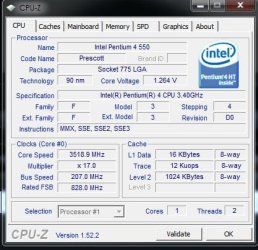
Use CPU-Z in Windows to see your cpu speed.

Notice my current overclock:
 

Attachments

  • Capture.JPG
    Capture.JPG
    44.1 KB · Views: 12

My Computer

Computer Manufacturer/Model Number
self built
OS
7600.20510 x86
CPU
P4 550 3.4 GHz HT running at 3.5 GHz
Motherboard
MSI PM8M3-V (MS-7211 v1.x) Micro-ATX mainboard
Memory
OCZ 2 GB(2x1GB) DDR400mHz running @ 414 mHz
Graphics Card(s)
HIS Radeon HD 3850 IceQ 3 Turbo HDMI Dual DL-DVI AGP
Sound Card
MOTU Traveler firewire studio interface 192 kHz 24 bit
Monitor(s) Displays
22" widescreen Acer X223W LCD, 17" Compaq P75 CRT
Screen Resolution
1680x1050 and 1280x1024
Hard Drives
SATA I x2 WD, 400 GB and 120 GB, SATA 2 WD Caviar Black 1 TB
PSU
350W generic
Case
Cybertronpc, it glows blue
Cooling
stock cpu fan, Ice-Q 3 gpu and system, many case fans
Keyboard
Logitch Classical Keyboard 200
Mouse
Logitech Mediaplay cordless
Internet Speed
1792/448 kbits/sec
Other Info
SATA II PCI fake RAID adapter, 1 GB Readyboost, original ATI Remote Wonder (even works with WMC perfectly), Logitech Rumblepad 2 game controller x2
ummm i'm kinda a noob but whats hyperthreading? and whats spread spectrum?
 

My Computer

Computer Manufacturer/Model Number
Dell Optiplex GX260 (Huge case model)
OS
Windows XP Professional SP 2
CPU
Intel Pentium 4 3.00 GHz (HT)
Motherboard
Dell
Memory
2GB RAM
Graphics Card(s)
NVIDA GeForce Fx5200
Sound Card
Integrated SoundMAX Digital Audio
Monitor(s) Displays
2xLCD Dual Monitor setup
Screen Resolution
1280x1024
Hard Drives
1x 40GB HDD for Operating System

1x 150GB HDD for other files
Case
Just a Dell case
Cooling
Copper tube heatsink w/heat sensitive fan
Keyboard
102-103 key I Think
Mouse
Dell Wireless keyboard/mouse
Internet Speed
54megabites per sec (Wireless)
Other Info
logitech rumblepad 2
DVD/CD-RW drive
CD-RW drive
3.5 inch floppy drive
5.25 inch floppy drive (Old Skool)

Built mah self & is chugging allong =D
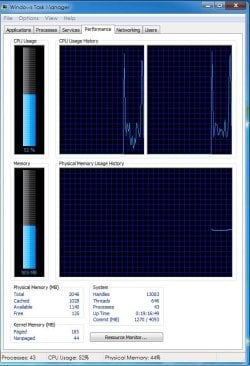
Hyperthreading enables the cpu two distinct and separate threads to run.

So in theory, it behaves like two processors instead of one.

You can check the task manager for the 2 threads enabled.

Spread spectrum cuts down on electronic interference from the motherboard. The setting is almost never needed to be enabled and if it is, messes with overclocking. It is safe to disable and should be.
 

Attachments

  • Capture.JPG
    Capture.JPG
    89.6 KB · Views: 23

My Computer

Computer Manufacturer/Model Number
self built
OS
7600.20510 x86
CPU
P4 550 3.4 GHz HT running at 3.5 GHz
Motherboard
MSI PM8M3-V (MS-7211 v1.x) Micro-ATX mainboard
Memory
OCZ 2 GB(2x1GB) DDR400mHz running @ 414 mHz
Graphics Card(s)
HIS Radeon HD 3850 IceQ 3 Turbo HDMI Dual DL-DVI AGP
Sound Card
MOTU Traveler firewire studio interface 192 kHz 24 bit
Monitor(s) Displays
22" widescreen Acer X223W LCD, 17" Compaq P75 CRT
Screen Resolution
1680x1050 and 1280x1024
Hard Drives
SATA I x2 WD, 400 GB and 120 GB, SATA 2 WD Caviar Black 1 TB
PSU
350W generic
Case
Cybertronpc, it glows blue
Cooling
stock cpu fan, Ice-Q 3 gpu and system, many case fans
Keyboard
Logitch Classical Keyboard 200
Mouse
Logitech Mediaplay cordless
Internet Speed
1792/448 kbits/sec
Other Info
SATA II PCI fake RAID adapter, 1 GB Readyboost, original ATI Remote Wonder (even works with WMC perfectly), Logitech Rumblepad 2 game controller x2
woh that's really cool, i've used cpu-z before but i never messed around with it much so if i get cpu-z i can enable hyperthreading and disable spread spectrum? btw nice over clock imma gonna learn how to that next, heh heh :D
 

My Computer

Computer Manufacturer/Model Number
Dell Optiplex GX260 (Huge case model)
OS
Windows XP Professional SP 2
CPU
Intel Pentium 4 3.00 GHz (HT)
Motherboard
Dell
Memory
2GB RAM
Graphics Card(s)
NVIDA GeForce Fx5200
Sound Card
Integrated SoundMAX Digital Audio
Monitor(s) Displays
2xLCD Dual Monitor setup
Screen Resolution
1280x1024
Hard Drives
1x 40GB HDD for Operating System

1x 150GB HDD for other files
Case
Just a Dell case
Cooling
Copper tube heatsink w/heat sensitive fan
Keyboard
102-103 key I Think
Mouse
Dell Wireless keyboard/mouse
Internet Speed
54megabites per sec (Wireless)
Other Info
logitech rumblepad 2
DVD/CD-RW drive
CD-RW drive
3.5 inch floppy drive
5.25 inch floppy drive (Old Skool)

Built mah self & is chugging allong =D
No, you have to enable hyperthreading in the bios and also disable spread spectrum in the bios too. And also, the bus speed to 200 mhz or higher to overclock - like to 204 as I said. That should be good and not cause any issue since it's minor, but worth it.

Task manager and CPU-Z are only tools to view changes made already in the bios.
 

My Computer

Computer Manufacturer/Model Number
self built
OS
7600.20510 x86
CPU
P4 550 3.4 GHz HT running at 3.5 GHz
Motherboard
MSI PM8M3-V (MS-7211 v1.x) Micro-ATX mainboard
Memory
OCZ 2 GB(2x1GB) DDR400mHz running @ 414 mHz
Graphics Card(s)
HIS Radeon HD 3850 IceQ 3 Turbo HDMI Dual DL-DVI AGP
Sound Card
MOTU Traveler firewire studio interface 192 kHz 24 bit
Monitor(s) Displays
22" widescreen Acer X223W LCD, 17" Compaq P75 CRT
Screen Resolution
1680x1050 and 1280x1024
Hard Drives
SATA I x2 WD, 400 GB and 120 GB, SATA 2 WD Caviar Black 1 TB
PSU
350W generic
Case
Cybertronpc, it glows blue
Cooling
stock cpu fan, Ice-Q 3 gpu and system, many case fans
Keyboard
Logitch Classical Keyboard 200
Mouse
Logitech Mediaplay cordless
Internet Speed
1792/448 kbits/sec
Other Info
SATA II PCI fake RAID adapter, 1 GB Readyboost, original ATI Remote Wonder (even works with WMC perfectly), Logitech Rumblepad 2 game controller x2
ok well now cpu-z says that is running at 3.00 GHz now... but heres the gfx card prob ok well i updated the drivers and it works but it doesn't work heres the issue well i open up the program and i goto setup multiple displays... then i select horizontal span and click ok then my computer shuts down and dosent do anything what am i doing wrong, is windows interfering with the monitors?
 

My Computer

Computer Manufacturer/Model Number
Dell Optiplex GX260 (Huge case model)
OS
Windows XP Professional SP 2
CPU
Intel Pentium 4 3.00 GHz (HT)
Motherboard
Dell
Memory
2GB RAM
Graphics Card(s)
NVIDA GeForce Fx5200
Sound Card
Integrated SoundMAX Digital Audio
Monitor(s) Displays
2xLCD Dual Monitor setup
Screen Resolution
1280x1024
Hard Drives
1x 40GB HDD for Operating System

1x 150GB HDD for other files
Case
Just a Dell case
Cooling
Copper tube heatsink w/heat sensitive fan
Keyboard
102-103 key I Think
Mouse
Dell Wireless keyboard/mouse
Internet Speed
54megabites per sec (Wireless)
Other Info
logitech rumblepad 2
DVD/CD-RW drive
CD-RW drive
3.5 inch floppy drive
5.25 inch floppy drive (Old Skool)

Built mah self & is chugging allong =D
Back
Top