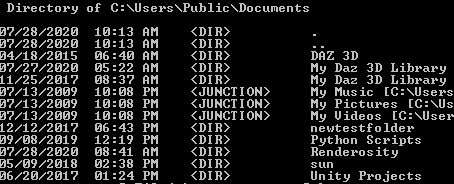
Ghost file with duplicate name under same parent dir

morongo

New member
Local time
8:27 AM
Messages
3
I used robocopy to copy/merge updated files into my DAZ directory.

This worked, no performance issues.

However, I now have two 'My Daz 3D Library' folders existing side by side under the same parent directory, so two dirs with the same name under the same parent.

Looking at the contents in Explorer, they each show identical dir/file structure.

Listing 'Properties' shows one dir at 87GB, the other at 17MB.

Attempting to rename the 'ghost' dir, results in the rename being applied to the 'real' dir.

They are, in some way, linked. I don't want to lose 87 gigs of data and work experimenting with file deletion if I can't 'for sure' rename the ghost, thus unmapping it from my main (real) dir.

And, yes, clicking on any file/subdir in the 'Ghost' dir results in: '...refers to a locaction that is unavailable...'

Furthermore, after renaming the ghost directory, the 'real' dir get's renamed, not the 'Ghost and I am able to see that the ghost only has two subdirs under it...I would have tried deleting these, but if they are linked data with the 'real' dir, I could lose those folders, so I'm going with caution until I get some expert advice.

I contemplated going ahead with the rename, deleting the ghost and then renaming my original dir back again, but figured I'd wait to see what others had to say.


AAQ6nNLI
 

My Computer

Computer type
PC/Desktop
Computer Manufacturer/Model Number
lenovo
OS
Windows 7 Pro sp1 64 bit
CPU
?
Motherboard
?
Memory
8GB
Graphics Card(s)
Nvidia
Hard Drives
WD 1TB
Antivirus
avira
Browser
Firefox
What I would do is copy/paste the real directory to another spot as a backup and then try to delete the ghost directory. However, I'm thinking that if you copy/paste the real directory to another location I'm thinking the ghost directory will come along for a ride.

I know of a small program that might help with this and/or delete the ghost directory. It's called FastCopy. Download FastCopy - MajorGeeks

PS: Your image there from Dropfiles isn't parsed correctly. You can just attach images here using the advanced posting option, or use the image BBcode.
 

My Computer

Computer type
PC/Desktop
OS
Windows 7 Ultimate x64
Thanks, F22.

Yeah, like I said, I've thought about doing the renaming thing, which does separate the contents of the folders with the exception of two subdirectories. Those two could have something to do with the link, symlink, or whatever Robocopy managed to mess up when I was merging files.

On copying over the real directory, I think you may be right, Windows will probably maintain the linkage, similarly to the way it copies the 'files' dependancies when you move an html page.

Renaming is probably the only way to de-link the two folders, at this point.
I'll backup the real dir (after renaming), then try a delete on the ghost and see where it goes.

I'll post back the results.

Thanks again.


Here's the image that didn't make it in the last post:
ghost.png
 

My Computer

Computer type
PC/Desktop
Computer Manufacturer/Model Number
lenovo
OS
Windows 7 Pro sp1 64 bit
CPU
?
Motherboard
?
Memory
8GB
Graphics Card(s)
Nvidia
Hard Drives
WD 1TB
Antivirus
avira
Browser
Firefox
No, that didn't work either, I'll try FastCopy and see if it can do anything.
 

My Computer

Computer type
PC/Desktop
Computer Manufacturer/Model Number
lenovo
OS
Windows 7 Pro sp1 64 bit
CPU
?
Motherboard
?
Memory
8GB
Graphics Card(s)
Nvidia
Hard Drives
WD 1TB
Antivirus
avira
Browser
Firefox
Thanks, F22.
On copying over the real directory, I think you may be right, Windows will probably maintain the linkage, similarly to the way it copies the 'files' dependancies when you move an html page.

This is the exact analogy I had in mind when I wrote that. How Windows does that with saved HTML files and their accompanying resources in a folder of JS, CSS and what not I one day have to learn. It's very interesting how Windows knows that HTML file is associated to that resource folder. Perhaps understanding this may be the answer you're looking for. I was also thinking something about the thumbs file which is invisible, but I'm not sure.

It could be some sort of symlink. I only know those to be used where you'd want to redirect a Windows folder or something to another directory. I did it once to symlink my browser cache folder to a RAM drive so everything was dumped on exit, but since that was the case, between PC reboots the symlink disappeared. I used a nifty GUI-based program to create the symlink. I don't remember its name now, but I think I made a post about it years ago on my website.

Your issue now is just one reason why I won't use something like Robocopy. For general backups I use FreeFileSync. I guess for some people Robocopy works for them, by my computer clairvoyance tells me something different. LOL
 

My Computer

Computer type
PC/Desktop
OS
Windows 7 Ultimate x64
No, that didn't work either, I'll try FastCopy and see if it can do anything.


You might want to backup then rename just to be on the safe side. I hope I'm not too late.
 

My Computer

Computer type
PC/Desktop
OS
Windows 7 Ultimate x64
Hello,

I used robocopy to copy/merge updated files into my DAZ directory.

This worked, no performance issues.

However, I now have two 'My Daz 3D Library' folders existing side by side under the same parent directory, so two dirs with the same name under the same parent.

Looking at the contents in Explorer, they each show identical dir/file structure.

Listing 'Properties' shows one dir at 87GB, the other at 17MB.

Attempting to rename the 'ghost' dir, results in the rename being applied to the 'real' dir.

How are you renaming files? Do you use the REN command from CMD prompt? Or are you renaming files via the Windows Explorer (File Explorer) program?

Problems can occur if the Security Attributes are not copied over when you used ROBOCOPY, as Windows will then assume them to be separate Folders.
 

My Computer

Computer type
PC/Desktop
OS
Windows 7 x64, Vista x64, 8.1 smartphone
CPU
Intel E8400 65W 64-bit
Motherboard
Gigabyte EP45-UD3LR
Memory
DDR2 2 x 2GB, 1GB x 2
Graphics Card(s)
XFX Radeon HD5750
Sound Card
AMD High Definition Audio; Realtek High Definition Audio
Monitor(s) Displays
iiyama prolite X2377HDS
Screen Resolution
1920 x 1080
Hard Drives
500GB 7200 rpm Seagate ST3500413AS 16MB, 500GB 5400 rpm Toshiba MQ02ABF050H 32MB, 200GB 7200 rpm Seagate ST3200820AS 8MB, 2TB 7200 rpm Western Digital WD20EZRX 64MB
PSU
Enermax Liberty Modular
Case
Antec P193 Midi Tower
Keyboard
Mionix ZIBAL 60
Mouse
Razer USB 2.0 Diamondback Mouse or Huion Graphics Tablet
Browser
Internet Explorer, Lunascape, Firefox, Opera, Avast Safezone
Back
Top