"Ghost network" serious network adapter bug

Go to the Device Manager and delete the Broadcom adapter from there. Answer yes when it asks you if you're sure. Reboot the system and Windows will redetect the Broadcom and reinstall it. It should name it with a different number for the adapter now and in theory, that should force it to "forget" about the previous networks. Hope that works.
 
Last edited:

My Computer

OS
windows 7
I had Bonjour installed as well as part of my TiVo desktop software. I set the Bonjour service to automatic (delayed start) as well and that appears to have worked for me too! Thanks for the tip srq2625 and griffgruff.
 

My Computer

OS
Win 7 RC 7100
FWIW - With the new (fresh) install of 7229, I was able to start from scratch. The Bonjour service was not there before the PS CS3 and was after the install. Go into Services manager and set the start priority on it to "Automatic (Delayed)" and all is sweet. Very good advice above.
 

My Computer

Computer Manufacturer/Model Number
Cobbled together :)
OS
Win7 Ultimate, x64
CPU
i7 920, currently NOT OC
Motherboard
Asrock X58 Deluxe
Memory
OCZ Platinum 12GB (6 x 2GB) 240-Pin DDR3 SDRAM DDR3 1600
Graphics Card(s)
nvidia geforce 7600 gt
Sound Card
integrated
Monitor(s) Displays
Samsung SyncMaster 204t (dual monitors)
Screen Resolution
1600 x 1200
Hard Drives
WDC WD2000JS-00MHB0 ATA
WDC WD5000AAKS-65YGA0 ATA
PSU
750w
Cooling
Air, 4 120mm
I just wanted to update that I finally got tired of disabling/enabling everytime i booted up, so I put in a PCI (Realtek, I think) LAN card. Problem went away. So ... switching from an onboard Intel Ethernet card to a PCI Realtek Ethernet card cleared whatever was happening. Driver issue??
 

My Computer

OS
Windows 7 Ultimate Beta 32-bit
Setting the Bonjour Service to start "Automatic (Delayed Start)" fixed the problem, until now...
 

My Computer

OS
Windows 7 and Vista
CPU
Intel Core 2Duo E7400
Motherboard
Asus P5KPL/1600
Memory
2024Mb
Graphics Card(s)
NVidia Geforce 7100
Setting the Bonjour Service to start "Automatic (Delayed Start)" fixed the problem, until now...
Yeah, that's me too. I found that it was really spinning up another service that was totally thrashing my HDD - for about 300 seconds (that's a search key word there, in case you're interested). I ended up doing this - Completly Uninstall and Remove Bonjour Service and Files (mDNSResponder.exe, mdnsNSP.dll) for Windows « Amarjeet Rai’s Blog - to get it all taken care of. Works like a charm.
 

My Computer

Computer Manufacturer/Model Number
Cobbled together :)
OS
Win7 Ultimate, x64
CPU
i7 920, currently NOT OC
Motherboard
Asrock X58 Deluxe
Memory
OCZ Platinum 12GB (6 x 2GB) 240-Pin DDR3 SDRAM DDR3 1600
Graphics Card(s)
nvidia geforce 7600 gt
Sound Card
integrated
Monitor(s) Displays
Samsung SyncMaster 204t (dual monitors)
Screen Resolution
1600 x 1200
Hard Drives
WDC WD2000JS-00MHB0 ATA
WDC WD5000AAKS-65YGA0 ATA
PSU
750w
Cooling
Air, 4 120mm
I used to have the same connectivity problem on my Dell XPS 410.
That Bonjour thing has resolved my problem so far, however I'm pretty sure the problem started when I stopped using my Linksys WRT54G Router.

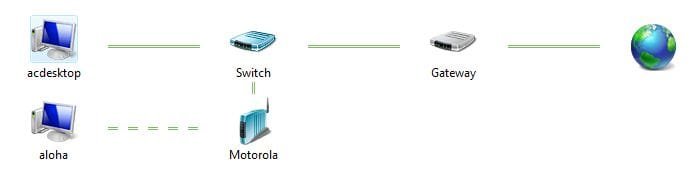
And although right now everything is fine the only weird thing is my network map that looks like this:
Network map.JPG

The weird thing is my pc (acdesktop) is connected directly to the Motorola modem and the switch is no longer in use.

When I had the connectivity problem it looked the same except my computer showed the red cross between the switch and the gateway I believe.
 

My Computer

Computer type
PC/Desktop
Computer Manufacturer/Model Number
Custom Build
OS
Windows 7
CPU
Core i5 2500k
Motherboard
Asus P8H67-M PRO/CSM
Memory
Kingston HyperX 4GB x 2
Graphics Card(s)
AMD Radeon HD 6700
Monitor(s) Displays
AOC 27" x 2
Hard Drives
Samsung SSD 840 Pro 120 Gb (Windows)
Western Digital 3 TB (Storage)
PSU
Thermaltake 430W
Case
NZXT Vulcan
Cooling
Cooler Master Hyper EVO 212
Keyboard
Microsoft Natural ergonomic 4000
Mouse
Microsoft Basic Optical Mouse V2.0
Internet Speed
10 MB
I used to have the same connectivity problem on my Dell XPS 410.
That Bonjour thing has resolved my problem so far, however I'm pretty sure the problem started when I stopped using my Linksys WRT54G Router.

And although right now everything is fine the only weird thing is my network map that looks like this:
View attachment 19631

The weird thing is my pc (acdesktop) is connected directly to the Motorola modem and the switch is no longer in use.

When I had the connectivity problem it looked the same except my computer showed the red cross between the switch and the gateway I believe.
I think that the network map is a little buggy...it thinks I have put this computer behind a switch and I have NEVER been behind a switch...
 

My Computer

Computer Manufacturer/Model Number
Compal JFT02 (Custom Build Laptop)
OS
Windows 7 Home Premium x64 - Mac OS X 10.6.4 x64
CPU
Intel Core 2 Duo T9300 2.5 GHz
Motherboard
JFT02
Memory
4GB Kingston DDR2-800
Graphics Card(s)
NVIDIA Geforce 8600M GT (512MB Model)
Sound Card
Realtek HD Audio
Monitor(s) Displays
WUXGA Standard Laptop Display
Screen Resolution
1680*1050
Hard Drives
Toshiba 320GB 5400RPM Laptop HD
PSU
Standard Laptop Power Supply
Case
Standard Laptop Case
Cooling
Standard Laptop Cooling
Keyboard
Standard Laptop 105 Key-Keyboard
Mouse
Synaptics Touchpad
Internet Speed
Verizion Online DSL 3360/864 kbs (dl/up)
I think that the network map is a little buggy...it thinks I have put this computer behind a switch and I have NEVER been behind a switch...

I wonder if it is identifying the built in switch in most appliance cablemodems as a seperate device?

My map shows a switch (which is there) but then I have a Linux machine running a firewall between it and the actual cablemodem and it is the "gateway" so it doesn't map beyond that. If my actual switch was connected to the 4 port switch in the cable modem and using that as the gateway, I wonder if it would show two switches in the map...
 

My Computer

Computer Manufacturer/Model Number
Scratch built
OS
Windows 7 x64 Ultimate
CPU
i7 960
Motherboard
Asus P6X58D
Memory
12 Gig Corsair Dominator
Graphics Card(s)
Nvidia 480
Sound Card
Maudio Delta 44 + breakout box
Monitor(s) Displays
Dell UltraSharp U2410 24in and Samsung 21 dual monitors
Screen Resolution
1920x1200 and 1280x1024
Hard Drives
Primary: Intel X-25M G2 160G SSD
Secondary: Segate baracuda 1.0 TB
HDs in AHCI mode.
PSU
Corasair TX850
Case
Cooler Master HAF
Cooling
Corsair H50
Keyboard
Logitech G15 + N52 game pad
Mouse
Logitech MX518
Internet Speed
15kbs down 4.5kbps up
Other Info
WEI 7.6
CPU & RAM 7.6
Graphics 7.9
Hard disk 7.7
@gibbsjj, Thank you for your help with Adobe CS3. Disabling Bonjour solved my internet connectivity issue (which was driving me nuts and I couldn't figure out what the issue was). Thanks again!
 

My Computer

Computer Manufacturer/Model Number
Dell Dimension 4700
OS
Windows 7
CPU
Intel P4 3.2
Bonjour is terrible. So many people have internet issues with that installed. I immediately remove it on any system I touch regardless, usually using Dameware to uninstall the service.

Here's how to do it from the command prompt. Copy and paste each line into it, then hit enter after each.

del "%PROGRAMFILES%\Bonjour\mDNSResponder.exe -remove"


regsvr32 /u “%PROGRAMFILES%\Bonjour\mdnsNSP.dll”
 

My Computer

Computer Manufacturer/Model Number
self built
OS
7600.20510 x86
CPU
P4 550 3.4 GHz HT running at 3.5 GHz
Motherboard
MSI PM8M3-V (MS-7211 v1.x) Micro-ATX mainboard
Memory
OCZ 2 GB(2x1GB) DDR400mHz running @ 414 mHz
Graphics Card(s)
HIS Radeon HD 3850 IceQ 3 Turbo HDMI Dual DL-DVI AGP
Sound Card
MOTU Traveler firewire studio interface 192 kHz 24 bit
Monitor(s) Displays
22" widescreen Acer X223W LCD, 17" Compaq P75 CRT
Screen Resolution
1680x1050 and 1280x1024
Hard Drives
SATA I x2 WD, 400 GB and 120 GB, SATA 2 WD Caviar Black 1 TB
PSU
350W generic
Case
Cybertronpc, it glows blue
Cooling
stock cpu fan, Ice-Q 3 gpu and system, many case fans
Keyboard
Logitch Classical Keyboard 200
Mouse
Logitech Mediaplay cordless
Internet Speed
1792/448 kbits/sec
Other Info
SATA II PCI fake RAID adapter, 1 GB Readyboost, original ATI Remote Wonder (even works with WMC perfectly), Logitech Rumblepad 2 game controller x2
Back
Top