Ghost Programs

ian1983

New member
Local time
2:49 PM
Messages
18
I dont know if this has been asked before but do programs such as Acronis True Image and Norton Ghost work with Windows 7?

I know windows7 offers full back up but I find the above programs so much easier to use and because I work away quite often if the computer has issues I can talk my wife through the restore process with these.
 

My Computer

OS
XP Windows7

My Computer

Computer Manufacturer/Model Number
Custom made
OS
Window 7 build 7600, Xp pro(VM)
CPU
Amd Athlon 2000 xp+
Motherboard
Asus x series
Memory
kingstone(1gb+256MB)
Graphics Card(s)
Nvdia 6200(256 mb+255mb(shared))
Sound Card
soundmax
Monitor(s) Displays
Lg Flatron w1943
Screen Resolution
1360x768
Hard Drives
segate 80GB
Case
i-ball
Keyboard
i-ball
Mouse
i-ball
Internet Speed
256kbps up and 256 kbps down
I imaged 7100 w/ acronis, no hitches...but I never tried restoring as yet. probably ditch it this weekend as the time limit is up for the MS key I got for it which I never used. I'll stay w/ 7264 x64.
 

My Computer

Computer Manufacturer/Model Number
Dell E520
OS
7600x64 RTM
CPU
Intel® Q6700, 2.66 GHz stock clock (upgraded)
Motherboard
Dell
Memory
4g (upgraded)
Graphics Card(s)
Sapphire Radeon Toxic HD 3870 512MB GDDR4 (upgraded)
Sound Card
HT Omega Claro Plus (upgraded)
Monitor(s) Displays
22' , 40"
Screen Resolution
1050, 1080p
Hard Drives
1.5tb (upgraded)
PSU
Zalman 600w (upgraded)
Case
Dell
Cooling
stock Dell
Keyboard
dell
Mouse
dell
Internet Speed
100m Fiber optical
Other Info
Bought the Dell secondhand for cheap and upgraded cpu, vga, ram, soundcard, psu and HDD's.
I know offering another solution is not really the answer you are looking for but Windows Home Server works flawlessly on Windows 7 and the backup process can support daily, weekly, incremental, and also image restores via PXE boot from the nightly backups without any downtime.
 

My Computer

Computer Manufacturer/Model Number
Built Myself
OS
Windows 7 7600.16384 x64
CPU
Intel Core i7 OC'd to 3.20 GHz
Motherboard
Gigabyte
Memory
6GB GSkillz Triple Channel DDR3 OC'd to 1600 MHz
Graphics Card(s)
Nvidia GTX 280
Sound Card
X-Fi Platinum
Monitor(s) Displays
Dual 2001FWP
Screen Resolution
1680x1050 x 2
Hard Drives
System - Dual 150GB Raptors Raid0
Doc Storage - 1TB SATA 32MB cache Samsung
TV Recordings - 1TB SATA 32MB cache Samsung
PSU
Gigawatt Antec
Case
Antec 900
Keyboard
Saitek
Mouse
logitech MX 10000
Internet Speed
30 mb/s
ghost acronis

I dont know if this has been asked before but do programs such as Acronis True Image and Norton Ghost work with Windows 7?

I know windows7 offers full back up but I find the above programs so much easier to use and because I work away quite often if the computer has issues I can talk my wife through the restore process with these.

Yes they work and they are more flexible than windows built in backup. I have both ghost and acronis installed on different machines, and much as I hate to admit it (im not a symantec fan) ghost has saved me more times than I can count. I even use a ghost image to refresh my system. as soon as i do a clean install and get the basic apps set up I do a ghost back up then when I notice a slowdown or error I just restore the system back to the clean install state. I can install whatever I want.
Acronis is also good in its own way its quick stabile and you can restor almost anything

Ken
 

My Computer

Computer Manufacturer/Model Number
HP Pavillion dv-7 1005 Tx
OS
Win 8 Release candidate 8400
CPU
[email protected]
Memory
4 gigs
Graphics Card(s)
Nvidia 9600M
Sound Card
HD built-in
Monitor(s) Displays
17" Wxga
Screen Resolution
1440x900
Cooling
none
Internet Speed
45Mb down 5Mb up
thanks for the replies,

zigzag im not a fan of symantec either, i install it and like you said once all progs and updates are done....get the system how i like it and back up.

i had a hard drive that dies a few years ago and didnt have any backups....ive learnt since then
 

My Computer

OS
XP Windows7
I've used Acronis True Image 11 and True Image 2009 sucessfully in Windows 7 (x86 and x64). True Image works well for me. There were some problems getting TI 2009 to install in earlier builds of W7 but somewhere after RC it started working correctly.
Newegg is running a special on TI 2009 right now for $23.99 before a $20 rebate if you subscribe to their email promos, or $28.99 before a $20 rebate if you don't subscribe. Not a bad deal at all.


Newegg.com - Acronis True Image Home 2009 (CD) - Security / Utilities Software
 

My Computer

Computer type
PC/Desktop
Computer Manufacturer/Model Number
Dell: XPS 420 (2), XPS M1330 (several), XPS 14z, Mini 9, Mini 10v
OS
W8 Pro, W7 Ultimate, XP Pro x64, Vista x64, Ubuntu
CPU
Q6600, Q6700, T7500, T7500, N270, N270
Motherboard
Dell
Memory
8GB, 8GB, 4GB, 4GB, 2GB, 2GB
Graphics Card(s)
ATI, nVidia, nVidia, nVidia, Intel, Intel
Monitor(s) Displays
Dell 2408WFP
Hard Drives
A drawer full. OCZ Vertex's in RAID 0. Vertex 3's, Vertex 4, Samsung 830's, Samsung 840's, Intel 330. Don't use dino drives any more except for servers.
Keyboard
Logitech Wave
Internet Speed
29 Mbps DL / .95 Mbps UL
Other Info
New project(2013)...Another low power server. Zotac H67ITX, i3-2100T, Windows Server 2012 Essentials on Samsung SSD.
Previous project...Low power (38-40 watts using Kill-a-Watt) Windows Home Server. Zotac ION (Atom 330, GeForce9400), 4GB RAM, 2x2TB WD Green, IN WIM miniITX Case. Fits on a shelf in laundry closet, practically silent.
The system image backup within Windows 7 Ultimate is extremely easy to use. Right click on your C drive within My Computer, click on Properties, go to Tools, Click on Backup. On the left will be a link to do a system image. It will ask you which drives you want to backup (the hidden 100mb partition, c drive...and whichever other drives you have). Then, the backup can backup to either 1) DVD 2) another partition that isn't C or another drive you are backing up 3). An external hard drive. Once you pick the backup location, click Go and it backs up.

To restore, put in the Windows 7 install disc. Boot from it, say repair Windows, choose option to restore a system image, point it at your 1) DVD 2)Partitioin 3) external drive containing your backup. Choose the backup image you want. Sit back and wait for it to finish.

Reboot computer. Yes, it's really that easy and I've used it on a few occasions now. I used to use Ghost and Clonezilla...but don't see a need any longer.
 

My Computer

Computer Manufacturer/Model Number
Self-Built in July 2009
OS
Windows 7 Ultimate x64
CPU
Intel Q9550 2.83Ghz OC'd to 3.40Ghz
Motherboard
Gigabyte GA-EP45-UD3R rev. 1.1, F12 BIOS
Memory
8GB G.Skill PI DDR2-800, 4-4-4-12 timings
Graphics Card(s)
EVGA 1280MB Nvidia GeForce GTX570
Sound Card
Realtek ALC899A 8 channel onboard audio
Monitor(s) Displays
23" Acer x233H
Screen Resolution
1920x1080
Hard Drives
Intel X25-M 80GB Gen 2 SSD
Western Digital 1TB Caviar Black, 32MB cache. WD1001FALS
PSU
Corsair 620HX modular
Case
Antec P182
Cooling
stock
Keyboard
ABS M1 Mechanical
Mouse
Logitech G9 Laser Mouse
Internet Speed
15/2 cable modem
Other Info
Windows and Linux enthusiast. Logitech G35 Headset.
The system image backup within Windows 7 Ultimate is extremely easy to use. Right click on your C drive within My Computer, click on Properties, go to Tools, Click on Backup. On the left will be a link to do a system image. It will ask you which drives you want to backup (the hidden 100mb partition, c drive...and whichever other drives you have). Then, the backup can backup to either 1) DVD 2) another partition that isn't C or another drive you are backing up 3). An external hard drive. Once you pick the backup location, click Go and it backs up.

To restore, put in the Windows 7 install disc. Boot from it, say repair Windows, choose option to restore a system image, point it at your 1) DVD 2)Partitioin 3) external drive containing your backup. Choose the backup image you want. Sit back and wait for it to finish.

Reboot computer. Yes, it's really that easy and I've used it on a few occasions now. I used to use Ghost and Clonezilla...but don't see a need any longer.


Good point, the bundled, backup solution from Windows 7 !
 

My Computer

Computer Manufacturer/Model Number
Built Myself
OS
Windows 7 7600.16384 x64
CPU
Intel Core i7 OC'd to 3.20 GHz
Motherboard
Gigabyte
Memory
6GB GSkillz Triple Channel DDR3 OC'd to 1600 MHz
Graphics Card(s)
Nvidia GTX 280
Sound Card
X-Fi Platinum
Monitor(s) Displays
Dual 2001FWP
Screen Resolution
1680x1050 x 2
Hard Drives
System - Dual 150GB Raptors Raid0
Doc Storage - 1TB SATA 32MB cache Samsung
TV Recordings - 1TB SATA 32MB cache Samsung
PSU
Gigawatt Antec
Case
Antec 900
Keyboard
Saitek
Mouse
logitech MX 10000
Internet Speed
30 mb/s
Acroins True Image has a recovery problem IF you have added a partition after the System C partition.
I'm expecting this to be worked out when (or after) W7 gets released.
Last I read .. Acronis is not supporting W7 at this time.

The Free version of Macrium has a 64bit version .. I've heard it works but haven't tried it.
 

My Computer

Computer Manufacturer/Model Number
HP d4996t (upgraded)
OS
XP MCE .... XP Pro 64 .... W7 U x64
CPU
E6750, 2.67GHz C2D
Memory
4GB, PC2 6400
Graphics Card(s)
GeForce 9400GT
Monitor(s) Displays
Twin Samsung 2443BWT
Screen Resolution
1920x1200
Hard Drives
Many .. 3 Installed
PSU
460W
Internet Speed
Cable
i didnt realise it would be that easy, however im just trying it out now and because i dual boot it is creating a system image of both os's which are on separate drives

one more thing....is this feature available in 7 home premium?

ok

i meant two more things.....i take it this is different from system restore which monitors you drives constantly? because i have that turned off, will that affect windows doing a backup?
 

My Computer

OS
XP Windows7
....is this feature available in 7 home premium?
No .. But a similar feature is in the higher versions.
I'm getting Home Premium and will use Acronis.

i take it this is different from system restore which monitors you drives constantly?
Correct

because i have that turned off, will that affect windows doing a backup?

You can't go back to a previous Window date ...
But this will not stop an Acronis backup
 

My Computer

Computer Manufacturer/Model Number
HP d4996t (upgraded)
OS
XP MCE .... XP Pro 64 .... W7 U x64
CPU
E6750, 2.67GHz C2D
Memory
4GB, PC2 6400
Graphics Card(s)
GeForce 9400GT
Monitor(s) Displays
Twin Samsung 2443BWT
Screen Resolution
1920x1200
Hard Drives
Many .. 3 Installed
PSU
460W
Internet Speed
Cable
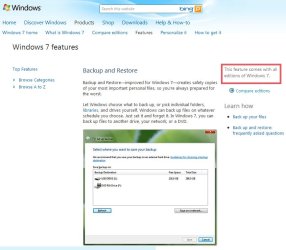
just been on my wifes netbook while doing a restore using windows7 and the backup feature is on all editions of 7

so no need for third party imaging programs

source Backup and Restore: Windows 7 features it is mentioned on the right hand side

only saving to a network location is added in professional and ultimate
 

My Computer

OS
XP Windows7
All the trials of W7 (that I know of) are the Ultimate Version, that includes the Backup/Restore Feature.
Which one is right for you?
I haven't seen a trial of the Home Premium version.

A third party Imaging program is cheaper than the higher versions of W7 ...
And can be used on any of the computers in your home.
 

My Computer

Computer Manufacturer/Model Number
HP d4996t (upgraded)
OS
XP MCE .... XP Pro 64 .... W7 U x64
CPU
E6750, 2.67GHz C2D
Memory
4GB, PC2 6400
Graphics Card(s)
GeForce 9400GT
Monitor(s) Displays
Twin Samsung 2443BWT
Screen Resolution
1920x1200
Hard Drives
Many .. 3 Installed
PSU
460W
Internet Speed
Cable
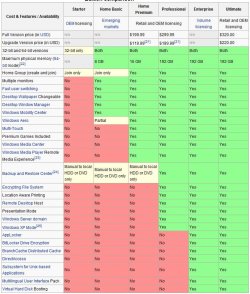
from what i can gather all versions even starter include the backup and restore feature, it just with professional and ultimate you can save to a network location

with the others its just dvd's and hard drives

editions.JPGMS backup.jpg
 

My Computer

OS
XP Windows7
I'm guessing there's some confusion between backing up Data ..
and Imaging the Hard drive ..
And I'm not sure what your Chart is saying ??? .. Looks like it referring to Data only ???

Any computer can Copy > Paste Data to an external .. or a CD/DVD.
But it takes Imaging software to make a Backup/Recovery Image file of the operating system, boot partitions and MBR.
Best Free Drive Imaging Program

Personally, the Backup feature is the only app I see in the more expensive versions that might be of interest to me (as a home user).

Here, I will opt to use a less expensive 3rd Party and use it on all my computers.
They will also be updating as required.

Not too sure I'd like to have M$ do this ...
Sounds like hiring the Fox to protect the Hen house to me.
 

My Computer

Computer Manufacturer/Model Number
HP d4996t (upgraded)
OS
XP MCE .... XP Pro 64 .... W7 U x64
CPU
E6750, 2.67GHz C2D
Memory
4GB, PC2 6400
Graphics Card(s)
GeForce 9400GT
Monitor(s) Displays
Twin Samsung 2443BWT
Screen Resolution
1920x1200
Hard Drives
Many .. 3 Installed
PSU
460W
Internet Speed
Cable
I'm not yet convinced that the "System Image" portion of backup comes with anything but Business, Enterprise and Ultimate. My understanding is that "system image" requires Volume Shadow copy...which isn't included on Home versions.
 

My Computer

Computer Manufacturer/Model Number
Self-Built in July 2009
OS
Windows 7 Ultimate x64
CPU
Intel Q9550 2.83Ghz OC'd to 3.40Ghz
Motherboard
Gigabyte GA-EP45-UD3R rev. 1.1, F12 BIOS
Memory
8GB G.Skill PI DDR2-800, 4-4-4-12 timings
Graphics Card(s)
EVGA 1280MB Nvidia GeForce GTX570
Sound Card
Realtek ALC899A 8 channel onboard audio
Monitor(s) Displays
23" Acer x233H
Screen Resolution
1920x1080
Hard Drives
Intel X25-M 80GB Gen 2 SSD
Western Digital 1TB Caviar Black, 32MB cache. WD1001FALS
PSU
Corsair 620HX modular
Case
Antec P182
Cooling
stock
Keyboard
ABS M1 Mechanical
Mouse
Logitech G9 Laser Mouse
Internet Speed
15/2 cable modem
Other Info
Windows and Linux enthusiast. Logitech G35 Headset.
I understand complete PC Backup will come with the Premium Edition - just not the network bit.

I much prefer the flexibility, speed and reliability of 3rd party apps. - much better compression options , too.

I use Macrium and Paragon products - they work perfectly for me on 7x64.
 

My Computers

System One System Two

  • Computer type
    PC/Desktop
    OS
    7 X64
    CPU
    i5 8400
    Motherboard
    gigabyte b365m ds3h
    Memory
    2x8gb 3200mhz
    Hard Drives
    various
    PSU
    pure power 11 400w cm
    Case
    Coolermaster
    Cooling
    cryorig m9i
  • Computer type
    PC/Desktop
    OS
    7x64
    CPU
    g5400
    Motherboard
    ga b365m ds3h
    Memory
    8gb ddr4 2400
    PSU
    xfx pro 450w
backup/image apps

I understand complete PC Backup will come with the Premium Edition - just not the network bit.

I much prefer the flexibility, speed and reliability of 3rd party apps. - much better compression options , too.

I use Macrium and Paragon products - they work perfectly for me on 7x64.


I completely forgot to tell them about macrium reflect. Its free, it works and its a small footprint, which is more than i can say for Norton ghost.

Ken
 

My Computer

Computer Manufacturer/Model Number
HP Pavillion dv-7 1005 Tx
OS
Win 8 Release candidate 8400
CPU
[email protected]
Memory
4 gigs
Graphics Card(s)
Nvidia 9600M
Sound Card
HD built-in
Monitor(s) Displays
17" Wxga
Screen Resolution
1440x900
Cooling
none
Internet Speed
45Mb down 5Mb up
If you can boot into Windows you can restore a system image right from Control Panel.

On the "All Control Panel Items" page click on "Recovery".

Underneath System Restore, click on "Advanced recovery methods". There you'll see that the top option is to restore from a system image.
 

My Computer

OS
Windows 7
Back
Top