Solved ghosted a drive need help with boot loader

ulao

New member
Local time
3:58 PM
Messages
28
I have a 1 tb drive with my OS primary on 100 gig of it and the remainder to a data drive.
I just ghosted that partition to a new drive (entire drive used 114 gig ) and the boot loader is not the same?

My original partition had one option "win 7" and when I tell the bios to boot to the new drive it shows 3 options... I'm pretty sure I know how this happened. The partition I copped over had its own boot loader in addition to the MBR's boot loader. So copping the partition over didn't copy the right (MBR ) boot loader.

So I have my os back up on the original set up and my ghosted drive currently without a drive letter. I can assign one but need to know what to do here. I need to some how create a boot loader on the new drive or copy the old one over. I assume I can still use c:\ as my drive letter once I swap the bios settings. Guessing windows will do that automatically?

In DM is says the drive is simple basic NTFS primary partition. Should I mark it as active and is there a way to put a MBR boot loader on there?
 

My Computer

Computer type
PC/Desktop
OS
Windows 7 Ultimate x64,
Please connect all drives and post back a screenshot of Disk Management - Post a Screen Capture Image. Tell us what is on each partition.

Were there choices when you transferred the image for Auto drive letter, transfer MBR and Track0, and keep Active partition marked same?

If not we should see what's awry in the DM picture.
 
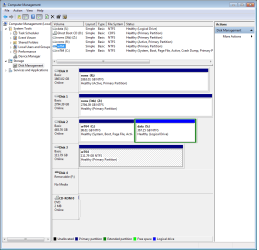
the two drives in question are

Disk2 w764 (c : ) This is my current boot drive ( I'm boot to this drive ) and it also has S : for my data drive.
Disk3 w764 this is my new ghosted drive not yet assigned a letter and not active.

I want to use DISK3 as my new OS drive and have the boot loader on it.
Once I have that ready I'll be deleting my old DISK 2 and making it one partition for data.

The other drives listed are not in question.

Were there choices when you transferred the image for Auto drive letter, transfer MBR and Track0, and keep Active partition marked same?
No but possibly that exist some where? I used ghost partition to partition and the source disk is to large for my destination disk. Ghost does have an option screen. I dont mind re doing the image if you would assist.
 

Attachments

  • drivers.png
    drivers.png
    29.6 KB · Views: 1

My Computer

Computer type
PC/Desktop
OS
Windows 7 Ultimate x64,
I always make an image with Macrium - Image your system (required for UEFI) or Acronis, then apply it using the boot disk. The choices which may be offered that must be attended to are to include MBR, Track0, Active partition and Auto drive letter.

You can try starting the present install to see if it will boot. You said you can still assign a letter so it will need to be C, then Mark Partition Active, power down to unplug all other drives while swapping the DISK0 cable to the clone HD so it will be DISK0 which is preferred if your mobo supports that drive in that port.

Then boot the Win7 disk to run Startup Repair - Run 3 Separate Times until Win7 boots and wears the System Active flags.

You can then plug back in the other drives, boot the other Win7 HD using the one-time BIOS Boot Menu key while making sure to keep the new Win7 drive set as first HD to boot in BIOS. Only the Win7 boot partitions for each OS drive should be marked Active, so mark the data partition Inactive: Partition - Mark as Inactive - Windows 7 Forums
 
Yeah I heard about this boot 3 times thing before? Confusing, anyways ill see if ghost allows theses options, if so see you in an hour.
 

My Computer

Computer type
PC/Desktop
OS
Windows 7 Ultimate x64,
It may require 3 separate Repairs with reboots to do the job completely, since testing if it actually starts is part of the regimen. It needs to know this so it can next try to repair or after that actually rewrite the boot files while updating the MBR.
 
Oh that makes sense, so year ghost does not have any options.

So about the advise...
"You said you can still assign a letter so it will need to be C", Somethign is missing there because no os would let you do that? I doubles checked encase win7 was different but again no letter c to pick from. What did I miss?
 

My Computer

Computer type
PC/Desktop
OS
Windows 7 Ultimate x64,
I would read the Manual for your ghosting program which can be found on its Support Downloads webpage. If you tell us the brand someone might know the correct settings.

Otherwise I'd use Macrium to create and recover using an Image since it's never had this issue that I remember. You'll want to follow the Manual of course.
 
brand? You mean like who made it? Ghost is Nortons imaging disk utility. It copies the MBR and sets the drive active then you do disk to disk but partition to partition has no such option. I'll give Macrium a look see.
 

My Computer

Computer type
PC/Desktop
OS
Windows 7 Ultimate x64,
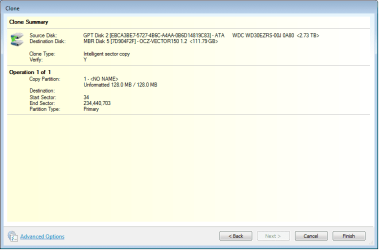
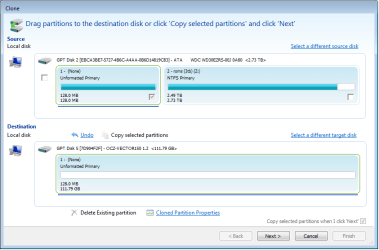
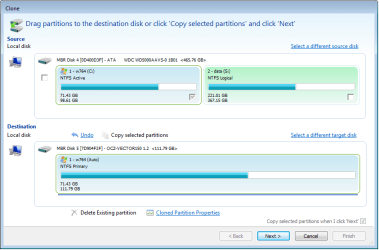
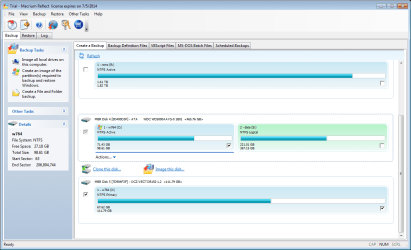
I got the macrium and the UI is great. I found a tut to follow and everything looks ok but I dont see the options about MBR , active, or coping a boot loader over. Just that its set to primary so the same thing is going to happen. I need the boot loader from the source disk to be moved to the destination disc. Will this be implied? Also advanced option does not seem to offer anything.

I see this "add recover boot menu settings" but I'm trial, will that do it?
 

Attachments

  • 1.png
    1.png
    14.9 KB · Views: 1
  • 2.png
    2.png
    17.4 KB · Views: 0
  • 3.png
    3.png
    43.7 KB · Views: 2

My Computer

Computer type
PC/Desktop
OS
Windows 7 Ultimate x64,
You have a GPT DISK which doesn't support MBR booting. The screenshots conflict but I'm Assuming its the target HD as Win7 wouldn't boot otherwise.

If so rightclick on the Disk # in Disk Mgmt to Convert to MBR which should bring it to Unallocated space then try the clone. More options should appear or you can mark Active then repair afterwards with all other drives unplugged.
 
by GPT I think you are referring to the 3tb drive. This disk is not in question and working fine?

edit: ok I apologize I selected the wrong one.

Now I have a drive letter option but again I can't use c as its taken and I have the option to use primary,active, or logical. I kind of want primary and active no?

also set aliment to vista/7 was set to xp
 

Attachments

  • 2.png
    2.png
    19.9 KB · Views: 0
  • 3.png
    3.png
    40.5 KB · Views: 1

My Computer

Computer type
PC/Desktop
OS
Windows 7 Ultimate x64,
This is handled by Auto setting in Acronis. But for something so critical required for every OS clone it's gotta be in the Manual.

Primary Active
 
in the mean time I checked with EBCD and used the bcd store option. I had to assign it a letter to see it. and it read the loader as:
There is one entry in the Windows bootloader.
Path: X:\Boot\BCD

Default: Windows 7 64 ssd
Timeout: 5 seconds
EasyBCD Boot Device: X:\

Entry #1
Name: Windows 7 64 ssd
BCD ID: {default}
Drive: C:\
Bootloader Path: \Windows\system32\winload.exe
but when I try to boot to it no boot loader is shown. No os is found. The drive is now primary and active.

Please someone correct me if I'm wrong but since I have used computers say well before windows was around a driver letters mean nothing at MBR level. This is what confuses my about today times. Maybe its a win7 thing I dont know, but we used to tarted drive(0) part(1) ect... not by driver letters. So what does

Drive: C:\
Bootloader Path: \Windows\system32\winload.exe

mean? How can a boot loader know what a C: is? Is EBCD converting the disk location to a readable letter, should I change that to x: ? I dont want my OS to use x:\ as %system root%
 

My Computer

Computer type
PC/Desktop
OS
Windows 7 Ultimate x64,
ok I used MbrFix64 to fix the mbr and sector. Now the new drive shows a boot loader. But instead of booting to its OS its looking at my old OS. So I guess I have to tell the boot loader to boot to x: but I really dont want to do this.

Edit: I changed the bootloader to boot to "boot" instead of c:\ and it started to boot, then did an autocheck failed then blue screen. So this drive letter stuff is just overly confusing IMO. I guess using the win7 disc at this point may get it work.
 

My Computer

Computer type
PC/Desktop
OS
Windows 7 Ultimate x64,
Is there some reason you can't follow the Manual or Help to image your OS and then apply the image?

If the instructions are not clear then I'd use the free Acronis app for WD drives which has a Manual anyone can understand right on the Downloads page at WD Support
 
I dont see anywhere in the manual where it talks about my issue. I belive my issue is no longer the imaging process but a catch 22.

Both drives can not be C:\, in order to boot the new drive I need it to be c:\. Normally in a disc clone you discard the source drive. I guess going from a partition to a disk is a big deal?

Unfortunately I just can find the answer I need to figure it out at the moment. I'm just going to have to find out how the win7 boot loader works, was hopping someone already new.
 

My Computer

Computer type
PC/Desktop
OS
Windows 7 Ultimate x64,


Are you unplugging all other HD's ?

After cloning are you unplugging the source HD?

If not are you setting the cloned HD first to boot in BIOS setup?

Try again following the video making sure to unplug all other drives.

If this fails I would change to imaging, save image externally or to another HD, unplug source HD, boot Rescue Media to apply image to unallocated space.
 
Yes that is what I was doing, and the drive has a boot loader and it boots, then I get a black screen about auto check disc then a blue screen. So I put in the windows 7 install CD and let it run its checks and on the second go if found the problem and told me it cant fix it. Under the details it complained about a bad driver.

The cloned Disc is a SSD, maybe the MB stata driver is causing issue? So I was going to boot in to safe mode and now the MBR is broke again, guessing windows did this. So my plan is to fix it yet and again and this time boot to safe mode.

Strangely I enjoy this stuff, I'll report back.
 

My Computer

Computer type
PC/Desktop
OS
Windows 7 Ultimate x64,
Back
Top