Ghosting VG248QE

Hieya

New member
Local time
12:38 AM
Messages
20
Hello, Im getting a problem where i can see my previous frame in my currrent frame and the blend in making this ugly motion blur lag effect. Here is a video so you can see what I mean :

https://www.youtube.com/watch?v=JYB2iC4BKBg (PLAY SPEEED : x.25 )


Here is my computer :

Intel Core i7-4790K, Gigabyte GeForce GTX 970, Corsair 450D - System Build - PCPartPicker

I have this lag affect on windows and all games. (csgo/minecraft/h1z1/bo3/etc)

Stuff Tried:
I disabled Aero
Scanned for Viruses
All windows Updates
Enabled 144hz
Enable LightBoost

I use ufo test : Blur Busters UFO Motion Tests

Which shows me that im getting this affect also in the browser and probably on Windows 7 also.

What is this thing im seeing and how can i get rid of it?

-Thank you for any feedback
 

My Computer

Computer type
Laptop
Computer Manufacturer/Model Number
Acer
OS
Windos 7 Ultimate 64-bit
CPU
Intel Core i5-3230M Processor - 2.6 GHz (3 MB Cache)
Motherboard
N/A
Memory
8 GB DDR3 RAM
Graphics Card(s)
NVIDIA GeForce GT 730M
Hard Drives
500GB SATA 5400RPM
Antivirus
avast anti-virus
Browser
Google Chrome
Hello, Im getting a problem where i can see my previous frame in my currrent frame and the blend in making this ugly motion blur lag effect. Here is a video so you can see what I mean :

https://www.youtube.com/watch?v=JYB2iC4BKBg (PLAY SPEEED : x.25 )


Here is my computer :

Intel Core i7-4790K, Gigabyte GeForce GTX 970, Corsair 450D - System Build - PCPartPicker

I have this lag affect on windows and all games. (csgo/minecraft/h1z1/bo3/etc)

Stuff Tried:
I disabled Aero
Scanned for Viruses
All windows Updates
Enabled 144hz
Enable LightBoost

I use ufo test : Blur Busters UFO Motion Tests

Which shows me that im getting this affect also in the browser and probably on Windows 7 also.

What is this thing im seeing and how can i get rid of it?

-Thank you for any feedback

How do you have it set up because supposedly it has Gsync ?

If you do have a Gsync Monitor you are supposed to use the display port and make sure Gsync is enabled in the Nvidia3d settings

Also you might want to study what Trace Free is https://pcmonitors.info/reviews/asus-vg248qe/ seems that might be the issue the article states this
 

My Computer

Computer type
PC/Desktop
Computer Manufacturer/Model Number
CoreI7-6700K MrFingerIII Special Builds
OS
Windows 10 Home Premium 64bit sp1
CPU
Intel I7-6700K @ 4.6 Ghz 1.344 volts everyday OC
Motherboard
Asrock Fatality K6 Z170 Socket 1151
Memory
32GB G-Skill TridentZ 3200mhz 16-18-18-38 DDR4
Graphics Card(s)
Sli Gigabyte Windforce GTX 980 G1
Sound Card
AC97 Creative Rage Tactic 3D Headphones Bluetooth
Monitor(s) Displays
27" Asus ROG Swift PG278Q G-Sync 48" Vizio Smart HD TV
Screen Resolution
2560x1440p 27"- 48" Currently Gaming at 2560x1440p Res 2K
Hard Drives
250GB Samsung Evo840SSD Seagate baracuda 500 GB WD Mybook 500Gb 1TB Seagate Barracuda
PSU
HX1050w Corsair Silver 80plus certified crosfire/sli
Case
Enthod Pro Full Tower
Cooling
Corsair H110i GT 280 mm High Performance WaterBlock
Keyboard
Logitech wireless keyboard
Mouse
Logitech wireless mouse
Internet Speed
Cox Cable 100+ mb
Antivirus
WebRoot Spysweeper with Antivirus
Browser
IE-10, Chrome, Opera
Other Info
My Other Rig is a AMD FX8320E @4.6Ghz 16GB Ballistic Sport Ram
Mobo Asrock Fatality 990FX 120GB OCZ SSD 1TB Seagate Barracuda Corsair H75 Cooling PSU Corsair CX750
GPU GTX Gigabyte 970G1
Hi,
I have the same monitor and haven't noticed that effect
Are you overclocking anything cpu/ ram/ gpu ?

Indeed using the display port is best this model does not come with Gsync
But is where you enabled 144Hz or resolution is that in NVidia control panel ?

What are you set on Image quality and resolution ?
I'd restore defaults in NVidia control panel and just switch the image quality to Quality and resolution to 144Hz using a display port.

Which monitor mode are you using ?
I prefer pretty much theater mode to be the best

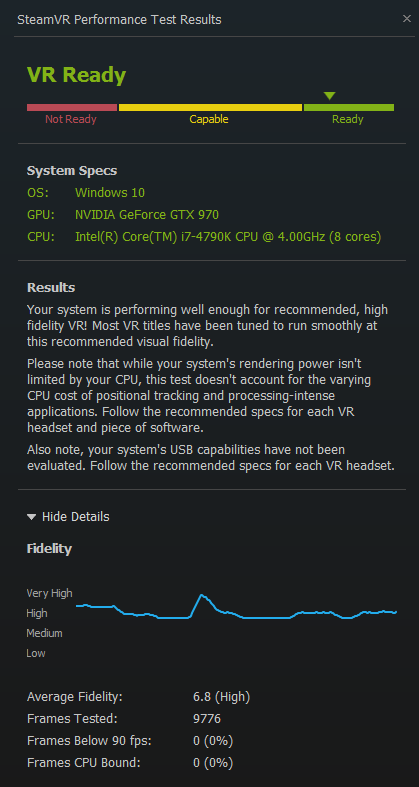
You might try this test on steam
http://www.sevenforums.com/news/392077-your-pc-virtual-reality-ready.html
382371d1456288843-your-pc-virtual-reality-ready-acer-vr-ready-test.jpg
 

My Computer

Computer type
PC/Desktop
Computer Manufacturer/Model Number
Custom assembled by me :}
OS
Win-7-Pro64bit 7-H-Prem-64bit
CPU
i7-5930K 2nd i9-9940x both water blocked VRM's too
Motherboard
ASUS SABERTOOTH X99 2nd ASUS x299 Apex
Memory
Trident-z 3200C14 2nd Trident-z 3600C16
Graphics Card(s)
EVGA 1080ti ftw3 2nd Titan Xp both water blocked
Sound Card
Built-in Realtek
Monitor(s) Displays
1-AOC G2460PG 24"G-Sync 144Hz/ 2nd 1-ASUS VG248QE 24" 144Hz
Screen Resolution
1920 x 1080 144Hz
Hard Drives
2-Samsung M.2 Evo & Evo Plus
2-Samsung 850 EVO 500GB SSD's/ 3-2.5 W.D. Black 1tb-&3-1tb/3-3.5 WD Black 1tb hdd's
PSU
EVGA SuperNOVA 1000-P2 2nd 1200-P2
Case
2-Corsair Obsidian Series 450D Black ATX Mid Tower
Cooling
Custom water loops
Keyboard
Logitech G710+/ 2nd Logitech G910
Mouse
2-RedDragon M901 Perdition 16400 dpi Gaming mouse = wired
Internet Speed
Comcast Ping 19ms 89.31mbps download speed 6.12mbps upload
Antivirus
Malwarebytes Pro/ Superantispyware Pro
Browser
FireFox & Pale moon
Other Info
2nd ASUS X299 Apex/Intel i9-9940x with Custom water loop/7H-Prem-x64/Corsair 450D case/Ram Trident-z 3600C16 4x8gb / Samsung970Evo plus 500gb SSD/Dual ssd EZ swap evo/PSU EVGA SuperNova 1200w-P2 80+Platinum/GPU Titan Xp /8-ML-140 on push-pull on 2-280GTX rads
G-Sync / Trace Free Reply

@solarstarshines I looked at the website you posted and it helped. I tried to use light boost but when when i used 120hz and 80 tracefree it did help remove some of it.

@thrashzone I am not overclocking anything yet. Ill use theather mode and test it out. I will go out and buy a display port but i dont intend to use G-sync.

s8dRrGI.png
 

My Computer

Computer type
Laptop
Computer Manufacturer/Model Number
Acer
OS
Windos 7 Ultimate 64-bit
CPU
Intel Core i5-3230M Processor - 2.6 GHz (3 MB Cache)
Motherboard
N/A
Memory
8 GB DDR3 RAM
Graphics Card(s)
NVIDIA GeForce GT 730M
Hard Drives
500GB SATA 5400RPM
Antivirus
avast anti-virus
Browser
Google Chrome
Hi,
This monitor as far as I know did not come with Gsync it had a upgrade board offered briefly
It was not an easy upgrade and voided the warranty in doing it :)
G-SYNC Gets Even Better With New Features, New Monitors & Game Changing G-SYNC Notebooks | GeForce

Seeing you're using win-10 I'd suggest asking here
Windows 10 Forums

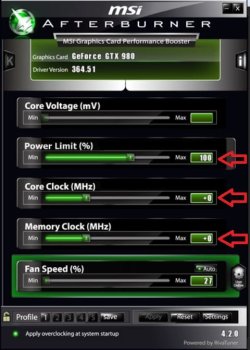
If you overclock something use msi afterbuner and juice the power and ram on the gpu ;)
Which I believe is your problem anyway not sure if this is a 4gb card or not you haven't given any spec's on it or an exact brand/ model :/
 

My Computer

Computer type
PC/Desktop
Computer Manufacturer/Model Number
Custom assembled by me :}
OS
Win-7-Pro64bit 7-H-Prem-64bit
CPU
i7-5930K 2nd i9-9940x both water blocked VRM's too
Motherboard
ASUS SABERTOOTH X99 2nd ASUS x299 Apex
Memory
Trident-z 3200C14 2nd Trident-z 3600C16
Graphics Card(s)
EVGA 1080ti ftw3 2nd Titan Xp both water blocked
Sound Card
Built-in Realtek
Monitor(s) Displays
1-AOC G2460PG 24"G-Sync 144Hz/ 2nd 1-ASUS VG248QE 24" 144Hz
Screen Resolution
1920 x 1080 144Hz
Hard Drives
2-Samsung M.2 Evo & Evo Plus
2-Samsung 850 EVO 500GB SSD's/ 3-2.5 W.D. Black 1tb-&3-1tb/3-3.5 WD Black 1tb hdd's
PSU
EVGA SuperNOVA 1000-P2 2nd 1200-P2
Case
2-Corsair Obsidian Series 450D Black ATX Mid Tower
Cooling
Custom water loops
Keyboard
Logitech G710+/ 2nd Logitech G910
Mouse
2-RedDragon M901 Perdition 16400 dpi Gaming mouse = wired
Internet Speed
Comcast Ping 19ms 89.31mbps download speed 6.12mbps upload
Antivirus
Malwarebytes Pro/ Superantispyware Pro
Browser
FireFox & Pale moon
Other Info
2nd ASUS X299 Apex/Intel i9-9940x with Custom water loop/7H-Prem-x64/Corsair 450D case/Ram Trident-z 3600C16 4x8gb / Samsung970Evo plus 500gb SSD/Dual ssd EZ swap evo/PSU EVGA SuperNova 1200w-P2 80+Platinum/GPU Titan Xp /8-ML-140 on push-pull on 2-280GTX rads

My Computer

Computer type
Laptop
Computer Manufacturer/Model Number
Acer
OS
Windos 7 Ultimate 64-bit
CPU
Intel Core i5-3230M Processor - 2.6 GHz (3 MB Cache)
Motherboard
N/A
Memory
8 GB DDR3 RAM
Graphics Card(s)
NVIDIA GeForce GT 730M
Hard Drives
500GB SATA 5400RPM
Antivirus
avast anti-virus
Browser
Google Chrome
Use a display cable not a dvi cable for best results,
The monitor just shows what the gpu tells it too so to me it's a gpu issue having issues with the higher resolution

You still have not linked use to your gpu = is it a 4gb card or a 2gb card ?
Superclocked or not ?
On the bottom here you'll see Downloads
Top left msi afterburner Latest version,
Turn up the memory and Power
https://gaming.msi.com/features/afterburner
Power limit +106
Core clock +50
Memory clock +50
Save click Profile 1 and Minimize msi and test the game.
A-Burner.JPG
 

My Computer

Computer type
PC/Desktop
Computer Manufacturer/Model Number
Custom assembled by me :}
OS
Win-7-Pro64bit 7-H-Prem-64bit
CPU
i7-5930K 2nd i9-9940x both water blocked VRM's too
Motherboard
ASUS SABERTOOTH X99 2nd ASUS x299 Apex
Memory
Trident-z 3200C14 2nd Trident-z 3600C16
Graphics Card(s)
EVGA 1080ti ftw3 2nd Titan Xp both water blocked
Sound Card
Built-in Realtek
Monitor(s) Displays
1-AOC G2460PG 24"G-Sync 144Hz/ 2nd 1-ASUS VG248QE 24" 144Hz
Screen Resolution
1920 x 1080 144Hz
Hard Drives
2-Samsung M.2 Evo & Evo Plus
2-Samsung 850 EVO 500GB SSD's/ 3-2.5 W.D. Black 1tb-&3-1tb/3-3.5 WD Black 1tb hdd's
PSU
EVGA SuperNOVA 1000-P2 2nd 1200-P2
Case
2-Corsair Obsidian Series 450D Black ATX Mid Tower
Cooling
Custom water loops
Keyboard
Logitech G710+/ 2nd Logitech G910
Mouse
2-RedDragon M901 Perdition 16400 dpi Gaming mouse = wired
Internet Speed
Comcast Ping 19ms 89.31mbps download speed 6.12mbps upload
Antivirus
Malwarebytes Pro/ Superantispyware Pro
Browser
FireFox & Pale moon
Other Info
2nd ASUS X299 Apex/Intel i9-9940x with Custom water loop/7H-Prem-x64/Corsair 450D case/Ram Trident-z 3600C16 4x8gb / Samsung970Evo plus 500gb SSD/Dual ssd EZ swap evo/PSU EVGA SuperNova 1200w-P2 80+Platinum/GPU Titan Xp /8-ML-140 on push-pull on 2-280GTX rads
Im confused why people are talking about G-SYNC and Oculus rift Ready?
Will overlclocking help remove or lower ghosting on my ASUS VG248QE monitor?
I play cs:go at 1280x1024 and its still ghosting so it has no problem with higher resolutions.
I did the MSI afterburner settings but that did not do anything.
Does anyone recommend a monitor with no ghosting? Like one thats not GSYNC or FREESYNC?
The only two things that cause ghosting is the gpu and monitor? is there anything that may cause this?

-thank you for all the feedback :D
 

My Computer

Computer type
Laptop
Computer Manufacturer/Model Number
Acer
OS
Windos 7 Ultimate 64-bit
CPU
Intel Core i5-3230M Processor - 2.6 GHz (3 MB Cache)
Motherboard
N/A
Memory
8 GB DDR3 RAM
Graphics Card(s)
NVIDIA GeForce GT 730M
Hard Drives
500GB SATA 5400RPM
Antivirus
avast anti-virus
Browser
Google Chrome
An easy test would be to set the resolution or Hz of the monitor back down to 60Hz instead of 144Hz

Not sure why the reference to GSync of which your monitor model does not have it :)
 

My Computer

Computer type
PC/Desktop
Computer Manufacturer/Model Number
Custom assembled by me :}
OS
Win-7-Pro64bit 7-H-Prem-64bit
CPU
i7-5930K 2nd i9-9940x both water blocked VRM's too
Motherboard
ASUS SABERTOOTH X99 2nd ASUS x299 Apex
Memory
Trident-z 3200C14 2nd Trident-z 3600C16
Graphics Card(s)
EVGA 1080ti ftw3 2nd Titan Xp both water blocked
Sound Card
Built-in Realtek
Monitor(s) Displays
1-AOC G2460PG 24"G-Sync 144Hz/ 2nd 1-ASUS VG248QE 24" 144Hz
Screen Resolution
1920 x 1080 144Hz
Hard Drives
2-Samsung M.2 Evo & Evo Plus
2-Samsung 850 EVO 500GB SSD's/ 3-2.5 W.D. Black 1tb-&3-1tb/3-3.5 WD Black 1tb hdd's
PSU
EVGA SuperNOVA 1000-P2 2nd 1200-P2
Case
2-Corsair Obsidian Series 450D Black ATX Mid Tower
Cooling
Custom water loops
Keyboard
Logitech G710+/ 2nd Logitech G910
Mouse
2-RedDragon M901 Perdition 16400 dpi Gaming mouse = wired
Internet Speed
Comcast Ping 19ms 89.31mbps download speed 6.12mbps upload
Antivirus
Malwarebytes Pro/ Superantispyware Pro
Browser
FireFox & Pale moon
Other Info
2nd ASUS X299 Apex/Intel i9-9940x with Custom water loop/7H-Prem-x64/Corsair 450D case/Ram Trident-z 3600C16 4x8gb / Samsung970Evo plus 500gb SSD/Dual ssd EZ swap evo/PSU EVGA SuperNova 1200w-P2 80+Platinum/GPU Titan Xp /8-ML-140 on push-pull on 2-280GTX rads
Back
Top