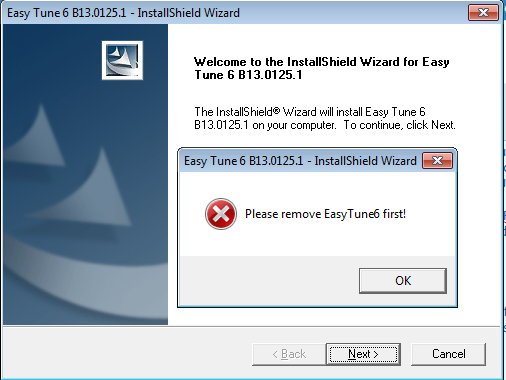
Gigabyte EasyTune 6 Removal "You require permission from SYSTEM to.."
Just to give an explanation of what happened.. I reformatted my PC (I like to do this often, probably once every 2-3 months. More frequent if I deem it necessary) and I was installing drivers and the likes.. Windows Update, etc..
I was installing EasyTune 6 (This is basically a Fan Control program made by GIGABYTE for their motherboards because their Bio's is complete shit.. but that is a different story) for my motherboard because my CPU fan likes to scream like a goat for no reason at all. The BIOS and default settings like to rev up the RPM on this fan for no reason. No heavy load of programs or anything.. So yeah, we use EasyTune6 to control the fan speeds. I tried to install it with a pre-downloaded version but I kept getting errors and it would Undo the installation (Or what have you). I tried it a few times with no luck. While I was trying again, I was installing Windows Update at the same time. Easy Tune 6 failed to install, and so I clicked "OK" on the error box and let it do its thing. I had to poop, so I went to do my business. I come back to see the computer has restarted (Windows update ^^,) and my EasyTune6 wasn't fully removed. I cannot install a new EasyTune6 with the previous one "Still Installed" - which it isn't.
So, now I have a directory on my computer (C:\Program Files (x86)\GIGABYTE\ET6\) and it only has 1 file inside of it (Flash11e.ocx) that I cannot remove. I use to get the error "You require permission from SYSTEM to make changes to this file" - So then I got to 'googling'.
>>I was using this at first, to see if I can fix this (This whole sentence is a link)<<
(Below was all used in CMD)
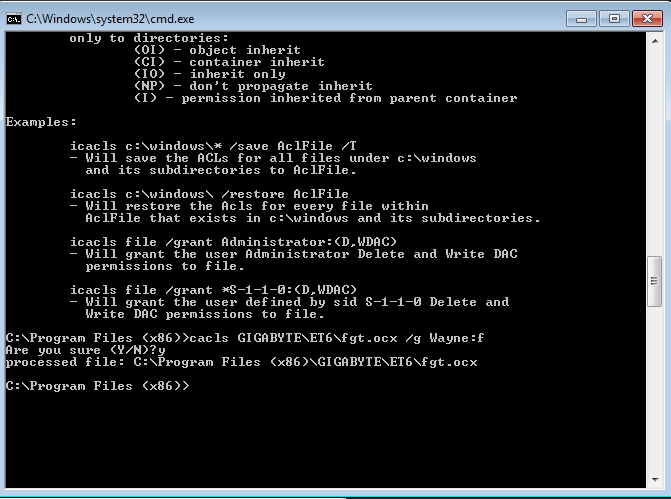
Trying to use:
I get this error:
So then, I just decide "**** it, let's get to the next thing"
Trying to use the other command (cacls) this is what happens:
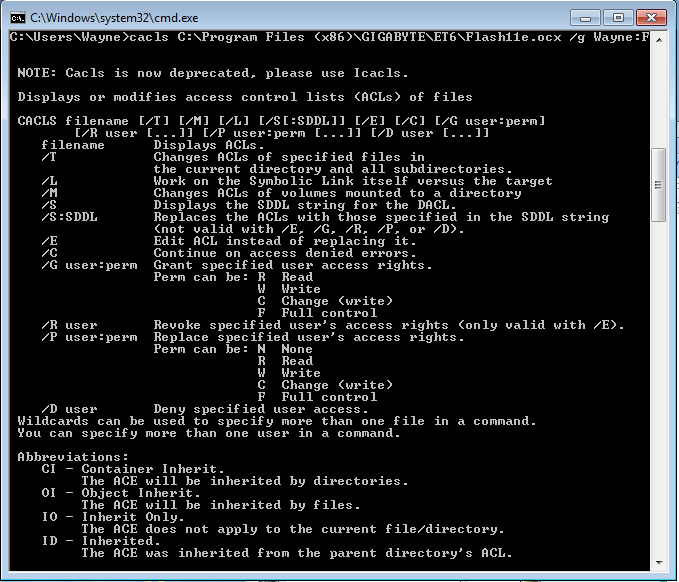
Since it told me to use Icacls, I typed that string in, instead of cacls. This is what it tells me:
I know I'm not miss typing it, I've checked and checked. Anyway, with no success, I tried a different route. I right clicked, went to properties, and "Allow"ed everything I could, for everyone.. Which includes 'Everyone, SYSTEM, Wayne, Administrators, & Users' which you will see in this screenshot. Everything was checked "Allow" except "Special Permissions" because I couldn't change it.
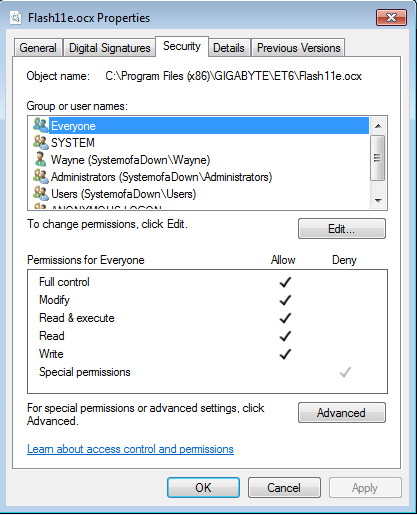
Now, before I continue, I need to add that I tried a few other things I stumbled upon on the internet. These were .reg files. These consists of:
&
Which, honestly, these two just seem like it was another "Run As Administrator" type of thing. I'm not sure, I'm new to programming so this is way out of my league. Anyways, back to my problem.. Now when I try to delete it, it gives me THIS error:
WHAT THE HELL? I AM MYPCNAME\USERNAME! This is soooo complicated. I'm actually very surprised windows forced a shut down while a program was doing it's thing.
I cannot install EasyTune6 with this file on here. It won't let me, it tells me to remove it.
I'll be throwing in my PC specs under my profile after I post this, even though I think it's a bit irrelevant.
EDIT: I've tried using Unlocker, which I found under "Similar Threads" and the likes, and every time I open it, nothing happens. When I open "Unlocker Assistant" it gives me a tray icon, and I still can't open "Unlocker". I've tried re-installing, re-starting. my fan won't stfu
Just to give an explanation of what happened.. I reformatted my PC (I like to do this often, probably once every 2-3 months. More frequent if I deem it necessary) and I was installing drivers and the likes.. Windows Update, etc..
I was installing EasyTune 6 (This is basically a Fan Control program made by GIGABYTE for their motherboards because their Bio's is complete shit.. but that is a different story) for my motherboard because my CPU fan likes to scream like a goat for no reason at all. The BIOS and default settings like to rev up the RPM on this fan for no reason. No heavy load of programs or anything.. So yeah, we use EasyTune6 to control the fan speeds. I tried to install it with a pre-downloaded version but I kept getting errors and it would Undo the installation (Or what have you). I tried it a few times with no luck. While I was trying again, I was installing Windows Update at the same time. Easy Tune 6 failed to install, and so I clicked "OK" on the error box and let it do its thing. I had to poop, so I went to do my business. I come back to see the computer has restarted (Windows update ^^,) and my EasyTune6 wasn't fully removed. I cannot install a new EasyTune6 with the previous one "Still Installed" - which it isn't.
So, now I have a directory on my computer (C:\Program Files (x86)\GIGABYTE\ET6\) and it only has 1 file inside of it (Flash11e.ocx) that I cannot remove. I use to get the error "You require permission from SYSTEM to make changes to this file" - So then I got to 'googling'.
>>I was using this at first, to see if I can fix this (This whole sentence is a link)<<
(Below was all used in CMD)
Trying to use:
Code:
takeown /f C:\Program Files (x86)\GIGABYTE\ET6\Flash11e.ocxI get this error:
ERROR: Invalid argument/option - 'Files'.
Type "TAKEOWN /?" for usage.
So then, I just decide "**** it, let's get to the next thing"
Trying to use the other command (cacls) this is what happens:
Since it told me to use Icacls, I typed that string in, instead of cacls. This is what it tells me:
Code:
Invalid parameter "Files"I know I'm not miss typing it, I've checked and checked. Anyway, with no success, I tried a different route. I right clicked, went to properties, and "Allow"ed everything I could, for everyone.. Which includes 'Everyone, SYSTEM, Wayne, Administrators, & Users' which you will see in this screenshot. Everything was checked "Allow" except "Special Permissions" because I couldn't change it.
Now, before I continue, I need to add that I tried a few other things I stumbled upon on the internet. These were .reg files. These consists of:
Code:
Add_Open_Command_Window_Here_as_Administrator
Code:
Add_Take_OwnershipWhich, honestly, these two just seem like it was another "Run As Administrator" type of thing. I'm not sure, I'm new to programming so this is way out of my league. Anyways, back to my problem.. Now when I try to delete it, it gives me THIS error:
You require permission from MYPCNAME\USERNAME to make changes to this file
WHAT THE HELL? I AM MYPCNAME\USERNAME! This is soooo complicated. I'm actually very surprised windows forced a shut down while a program was doing it's thing.
I cannot install EasyTune6 with this file on here. It won't let me, it tells me to remove it.
I'll be throwing in my PC specs under my profile after I post this, even though I think it's a bit irrelevant.
EDIT: I've tried using Unlocker, which I found under "Similar Threads" and the likes, and every time I open it, nothing happens. When I open "Unlocker Assistant" it gives me a tray icon, and I still can't open "Unlocker". I've tried re-installing, re-starting.
my fan won't stfu
Last edited:
My Computer
At a glance
Windows 7 Home Premium 64bitAMD Phenom II x4 955 Black Edition 3.2Ghz8 Gigs of Patriot 1333Mhz RAMAMD Radeon HD 6770 1 Gig. 128-bit
- OS
- Windows 7 Home Premium 64bit
- CPU
- AMD Phenom II x4 955 Black Edition 3.2Ghz
- Motherboard
- GIGABYTE 880GM-D2H
- Memory
- 8 Gigs of Patriot 1333Mhz RAM
- Graphics Card(s)
- AMD Radeon HD 6770 1 Gig. 128-bit
- Hard Drives
- 1 TB Seagate 7,200 RPM 6.0 GBPS & 500GB WD 7,200 RPM 3.0 GPBS
- PSU
- 600 Watts