Gigabyte GA-H61M-DS2 DVI - how do I turn on UFEI for hard disks?

ZaphodB

New member
Power User
VIP
Local time
5:38 AM
Messages
203
Hi folks,

A bit of a specialised question this since it is motherboard-specific.

I have a Win 7 SP1 installation which I have cloned from a 2TB hard disk to a larger 5TB hard disk.

I have, of course, hit the '2TB problem' because the drive was formatted in the MBR partition scheme (and hence the clone is too).

I have some instructions as to how to convert the drive to use the GPT partition scheme (link is here for those interested > How to convert MBR disk to GPT, but, of course, the BIOS of the motherboard now needs to be changed to recognise that the hard disk is a GPT disk.

As the thread title says, the motherboard is a Gigabyte GA H61M-DS2 DVI.

The BIOS is Gigabyte UFEI DualBIOS (c) 2013 American Megatrends Inc

I've looked at the relevant page in the BIOS (under 'BIOS Features') but can't understand what I am seeing. The User Manual for this motherboard (page 22) is also quite cryptic.

On this page in my BIOS, I get the following:

Under 'Boot Option Priorities'

Boot Option #1 ubuntu
Boot Option #2 P1 ASUS DRW-24F1ST (my DVD-RW optical drive)
Boot Option #3 UFEI OS
Boot Option #4 ubuntu
Boot Option #5 P0 TOSHIBA HDWE150 (my 5TB hard disk)
Boot Option #6 ubuntu
Boot Option #7 ubuntu

< I don't understand what the ubuntu entries are doing there - that's Linux isn't it? >
< I'm also unsure as ti exactly what is meant by 'UFEI OS' option #3 >

Further down the page unter 'Boot Mode Selection' I have: UFEI and Legacy

Can anyone explain, in simple, easy-to-understand steps, what I have to do? If I'm reading this correctly, I don't need to do anything if under 'Boot Mode' the setting is 'UFEI and Legacy. However, I don't want to convert the disk from MBR to GPT and not be able to boot the computer, so I need some reassurance first.

Thanks in anticipation,

Zaph
 

My Computer My Computer

At a glance

Windows 7 Home Premium SP1 64-bit (now lookin...Core2 Duo T5750 2GHz/Core2 Duo T5800 2GHz/Cor...4Gb / 4Gb / 8GbIntel 965 Express/ATi Mob Radeon HD 3400/AMD ...
Computer type
Laptop
Computer Manufacturer/Model Number
DELL Inspiron 1525 / Sony VAIO VGN FW21L / Zoostorm 7877-0095
OS
Windows 7 Home Premium SP1 64-bit (now looking at Linux Mint!)
CPU
Core2 Duo T5750 2GHz/Core2 Duo T5800 2GHz/Core i5 3300 3.1GH
Motherboard
DELL 0U990C / "SONY Corp VAIO" (??) / GA-H61M-DS2 DVI
Memory
4Gb / 4Gb / 8Gb
Graphics Card(s)
Intel 965 Express/ATi Mob Radeon HD 3400/AMD Radeon R7 200
Hard Drives
WD 750Gb Black (WD7500BPKT) - DELL
WD 1Tb Black (WD10JPLX) - SONY
ST 2Tb Barracuda (2000DM001) - Zoostorm
Internet Speed
VM Fibre 100 Mbps
Antivirus
Kaspersky IS 2019 / Kaspersky IS 2019 / Kaspersky IS 2019
Browser
Chrome 76.0.3809 / Chrome 79.0.3945 / Chrome 76.0.3809
Your boot mode selection is what you probably want. So it would be the UEFI option of course.

The boot option priorities is just what partition or device you want to boot from. And Yes, Ubuntu is Linux and why it's there as a boot partition I don't know. Did you add Linux to your hard drive at one time? If so, the boot manager may still be on the HDD.

The other reason why Ubuntu may be showing is if you have a USB or SD card connected to your computer that has a boot manager identified by your BIOS as a possible boot device.

If all fails with the 5TB drive you still will have your original 2TB drive with data, correct?
 

My Computer My Computer

At a glance

Windows 7 Ultimate x64
Computer type
PC/Desktop
OS
Windows 7 Ultimate x64
Your boot mode selection is what you probably want. So it would be the UEFI option of course.

The boot option priorities is just what partition or device you want to boot from. And Yes, Ubuntu is Linux and why it's there as a boot partition I don't know. Did you add Linux to your hard drive at one time? If so, the boot manager may still be on the HDD.
Only ran Linux off a Live USB stick - I didn't install Linux so it shouldn't be on the drive.

F22 Simpilot said:
The other reason why Ubuntu may be showing is if you have a USB or SD card connected to your computer that has a boot manager identified by your BIOS as a possible boot device.
Not aware of having any USB stick in the pc at the time I looked at the BIOS

F22 Simpilot said:
If all fails with the 5TB drive you still will have your original 2TB drive with data, correct?
Yes, that's correct.

I don't like doing anything without having a cloned backup of the drive. So, for example, when going from 1TB >> 2TB, I end up with two copies, I use the 2TB disk and keep back the 1TB "just in case".

Similarly here, the 2TB was cloned onto the 5TB disk and I still have the 2TB in case any "fiddling" I do causes everything to go south.

My understanding (and the bit I'm seeking confirmation about) is the Dual Boot 'UFEI and Legacy' option. To me this reads that I can connect either a MBR-partitioned or GPT-partitioned disk and the BIOS will quite happily see the drive and boot from it.

Does that sound reasonable?

Zaph
 

My Computer My Computer

At a glance

Windows 7 Home Premium SP1 64-bit (now lookin...Core2 Duo T5750 2GHz/Core2 Duo T5800 2GHz/Cor...4Gb / 4Gb / 8GbIntel 965 Express/ATi Mob Radeon HD 3400/AMD ...
Computer type
Laptop
Computer Manufacturer/Model Number
DELL Inspiron 1525 / Sony VAIO VGN FW21L / Zoostorm 7877-0095
OS
Windows 7 Home Premium SP1 64-bit (now looking at Linux Mint!)
CPU
Core2 Duo T5750 2GHz/Core2 Duo T5800 2GHz/Core i5 3300 3.1GH
Motherboard
DELL 0U990C / "SONY Corp VAIO" (??) / GA-H61M-DS2 DVI
Memory
4Gb / 4Gb / 8Gb
Graphics Card(s)
Intel 965 Express/ATi Mob Radeon HD 3400/AMD Radeon R7 200
Hard Drives
WD 750Gb Black (WD7500BPKT) - DELL
WD 1Tb Black (WD10JPLX) - SONY
ST 2Tb Barracuda (2000DM001) - Zoostorm
Internet Speed
VM Fibre 100 Mbps
Antivirus
Kaspersky IS 2019 / Kaspersky IS 2019 / Kaspersky IS 2019
Browser
Chrome 76.0.3809 / Chrome 79.0.3945 / Chrome 76.0.3809

My Computers My Computers

  • At a glance

    7 X64i5 84002x8gb 3200mhz
    Computer type
    PC/Desktop
    OS
    7 X64
    CPU
    i5 8400
    Motherboard
    gigabyte b365m ds3h
    Memory
    2x8gb 3200mhz
    Hard Drives
    various
    PSU
    pure power 11 400w cm
    Case
    Coolermaster
    Cooling
    cryorig m9i
  • At a glance

    7x64g54008gb ddr4 2400
    Computer type
    PC/Desktop
    OS
    7x64
    CPU
    g5400
    Motherboard
    ga b365m ds3h
    Memory
    8gb ddr4 2400
    PSU
    xfx pro 450w
Please post a Disk manager image so we can see what you have on your disks.

Windows 10 has a MBRtoUEFI application that also work for Win 7.
To convert a MBR Win 7 disk to GPT you must boot a Win 10 PE and run the app.
Best way is to create a windows 10 recovery tools boot able disk and run the MBRtoUEFI app.
Detach ALL other drives from the MB (Power or SATA cable), leaving on only the 5T HDD.

Use Brink tutorial
Convert MBR Disk to GPT Disk in Windows 10 | Tutorials option two

Boot from the windows 10 recovery tools
1 Open a command prompt (CMD window).

2 Find the disk number (n)
diskpart (to enter diskpart)
list disk (take note of the number assigned to your 5T HDD)
Exit (to exit diskpart)

3 Copy and paste this cmd line:
mbr2gpt /convert /disk:n
command into the command prompt, and press Enter.
(n is the disk number you you found with list disk)

4 When the conversion has successfully completed, you will need to boot to UEFI firmware settings, and switch the firmware to boot to UEFI mode instead of Legacy BIOS (CSM).
 
Last edited:

My Computers My Computers

  • At a glance

    Windows 7 HP 64i5 6600K - 800MHz to 4200MHz4+4G GSkill DDR4 3000IG - Intel 530
    Computer type
    PC/Desktop
    Computer Manufacturer/Model Number
    custom build
    OS
    Windows 7 HP 64
    CPU
    i5 6600K - 800MHz to 4200MHz
    Motherboard
    GA-Z170-HD3P
    Memory
    4+4G GSkill DDR4 3000
    Graphics Card(s)
    IG - Intel 530
    Monitor(s) Displays
    Samsung 226BW
    Screen Resolution
    1680x1050
    Hard Drives
    (1) -1 SM951 – 128GB M.2 AHCI PCIe SSD drive for Windows 7 and Lubuntu
    (2) -1 WD SATA 3 - 1T for Data
    (3) -1 WD SATA 3 - 1T for backup
    PSU
    Thermaltake 450W TR2 gold
    Keyboard
    Old and good Chicony mechanical keyboard
    Mouse
    Logitech mX performance - 9 buttons (had to disable some)
    Internet Speed
    500Mb/s
    Browser
    Firefox 64
    Other Info
    TinyWall firewall
  • At a glance

    Windows 7 Proi7-4500U 800MHz to 3.0GHz(4+4)G DDR3 1600IG intel 4400 + NVIDIA GeForce GT 745M
    Computer type
    Laptop
    System Manufacturer/Model Number
    Asus Q550LF
    OS
    Windows 7 Pro
    CPU
    i7-4500U 800MHz to 3.0GHz
    Motherboard
    Asus Q550LF
    Memory
    (4+4)G DDR3 1600
    Graphics Card(s)
    IG intel 4400 + NVIDIA GeForce GT 745M
    Sound Card
    Realtek
    Monitor(s) Displays
    LG Display LP156WF4-SPH1
    Screen Resolution
    1920 x 1080
    Hard Drives
    BX500 120G SSD for Windows and programs +
    1T HDD for data
    Internet Speed
    500 Mb/s
    Browser
    Firefox
    Other Info
    TinyWall firewall
There are several ways to non destrutively convert mbr> gpt

You could use aomei part assistant, or with a bit more manual input you can use diskgenius ( free version)

AOMEI PART ASSIST PRO


HOW TO CONVERT TO GPT WITH DISKGENIUS

They will both create winpe boot media, which you can boot into to do the job.
 

My Computers My Computers

  • At a glance

    7 X64i5 84002x8gb 3200mhz
    Computer type
    PC/Desktop
    OS
    7 X64
    CPU
    i5 8400
    Motherboard
    gigabyte b365m ds3h
    Memory
    2x8gb 3200mhz
    Hard Drives
    various
    PSU
    pure power 11 400w cm
    Case
    Coolermaster
    Cooling
    cryorig m9i
  • At a glance

    7x64g54008gb ddr4 2400
    Computer type
    PC/Desktop
    OS
    7x64
    CPU
    g5400
    Motherboard
    ga b365m ds3h
    Memory
    8gb ddr4 2400
    PSU
    xfx pro 450w
SIW2, it has to convert to GPT AND create the Fat32 UEFI partition.
Does does Aomei and / or diskgenius do the job?
 

My Computers My Computers

  • At a glance

    Windows 7 HP 64i5 6600K - 800MHz to 4200MHz4+4G GSkill DDR4 3000IG - Intel 530
    Computer type
    PC/Desktop
    Computer Manufacturer/Model Number
    custom build
    OS
    Windows 7 HP 64
    CPU
    i5 6600K - 800MHz to 4200MHz
    Motherboard
    GA-Z170-HD3P
    Memory
    4+4G GSkill DDR4 3000
    Graphics Card(s)
    IG - Intel 530
    Monitor(s) Displays
    Samsung 226BW
    Screen Resolution
    1680x1050
    Hard Drives
    (1) -1 SM951 – 128GB M.2 AHCI PCIe SSD drive for Windows 7 and Lubuntu
    (2) -1 WD SATA 3 - 1T for Data
    (3) -1 WD SATA 3 - 1T for backup
    PSU
    Thermaltake 450W TR2 gold
    Keyboard
    Old and good Chicony mechanical keyboard
    Mouse
    Logitech mX performance - 9 buttons (had to disable some)
    Internet Speed
    500Mb/s
    Browser
    Firefox 64
    Other Info
    TinyWall firewall
  • At a glance

    Windows 7 Proi7-4500U 800MHz to 3.0GHz(4+4)G DDR3 1600IG intel 4400 + NVIDIA GeForce GT 745M
    Computer type
    Laptop
    System Manufacturer/Model Number
    Asus Q550LF
    OS
    Windows 7 Pro
    CPU
    i7-4500U 800MHz to 3.0GHz
    Motherboard
    Asus Q550LF
    Memory
    (4+4)G DDR3 1600
    Graphics Card(s)
    IG intel 4400 + NVIDIA GeForce GT 745M
    Sound Card
    Realtek
    Monitor(s) Displays
    LG Display LP156WF4-SPH1
    Screen Resolution
    1920 x 1080
    Hard Drives
    BX500 120G SSD for Windows and programs +
    1T HDD for data
    Internet Speed
    500 Mb/s
    Browser
    Firefox
    Other Info
    TinyWall firewall
Yes. Look at the links in my previous post


SIW2, it has to convert to GPT AND create the Fat32 UEFI partition.
Does does Aomei and / or diskgenius do the job?
 

My Computers My Computers

  • At a glance

    7 X64i5 84002x8gb 3200mhz
    Computer type
    PC/Desktop
    OS
    7 X64
    CPU
    i5 8400
    Motherboard
    gigabyte b365m ds3h
    Memory
    2x8gb 3200mhz
    Hard Drives
    various
    PSU
    pure power 11 400w cm
    Case
    Coolermaster
    Cooling
    cryorig m9i
  • At a glance

    7x64g54008gb ddr4 2400
    Computer type
    PC/Desktop
    OS
    7x64
    CPU
    g5400
    Motherboard
    ga b365m ds3h
    Memory
    8gb ddr4 2400
    PSU
    xfx pro 450w

My Computers My Computers

  • At a glance

    Windows 7 HP 64i5 6600K - 800MHz to 4200MHz4+4G GSkill DDR4 3000IG - Intel 530
    Computer type
    PC/Desktop
    Computer Manufacturer/Model Number
    custom build
    OS
    Windows 7 HP 64
    CPU
    i5 6600K - 800MHz to 4200MHz
    Motherboard
    GA-Z170-HD3P
    Memory
    4+4G GSkill DDR4 3000
    Graphics Card(s)
    IG - Intel 530
    Monitor(s) Displays
    Samsung 226BW
    Screen Resolution
    1680x1050
    Hard Drives
    (1) -1 SM951 – 128GB M.2 AHCI PCIe SSD drive for Windows 7 and Lubuntu
    (2) -1 WD SATA 3 - 1T for Data
    (3) -1 WD SATA 3 - 1T for backup
    PSU
    Thermaltake 450W TR2 gold
    Keyboard
    Old and good Chicony mechanical keyboard
    Mouse
    Logitech mX performance - 9 buttons (had to disable some)
    Internet Speed
    500Mb/s
    Browser
    Firefox 64
    Other Info
    TinyWall firewall
  • At a glance

    Windows 7 Proi7-4500U 800MHz to 3.0GHz(4+4)G DDR3 1600IG intel 4400 + NVIDIA GeForce GT 745M
    Computer type
    Laptop
    System Manufacturer/Model Number
    Asus Q550LF
    OS
    Windows 7 Pro
    CPU
    i7-4500U 800MHz to 3.0GHz
    Motherboard
    Asus Q550LF
    Memory
    (4+4)G DDR3 1600
    Graphics Card(s)
    IG intel 4400 + NVIDIA GeForce GT 745M
    Sound Card
    Realtek
    Monitor(s) Displays
    LG Display LP156WF4-SPH1
    Screen Resolution
    1920 x 1080
    Hard Drives
    BX500 120G SSD for Windows and programs +
    1T HDD for data
    Internet Speed
    500 Mb/s
    Browser
    Firefox
    Other Info
    TinyWall firewall
Thanks guys - especially SIW2

One question before I do this (and I think I know the answer) ...

If I convert the disk from MBR >> GPT and (for whatever reason) the BIOS/Mobo can't read the newly-changed HDD, can I revert the disk (non-destructively) back to MBR (I'm guessing NO).

Zaph
 

My Computer My Computer

At a glance

Windows 7 Home Premium SP1 64-bit (now lookin...Core2 Duo T5750 2GHz/Core2 Duo T5800 2GHz/Cor...4Gb / 4Gb / 8GbIntel 965 Express/ATi Mob Radeon HD 3400/AMD ...
Computer type
Laptop
Computer Manufacturer/Model Number
DELL Inspiron 1525 / Sony VAIO VGN FW21L / Zoostorm 7877-0095
OS
Windows 7 Home Premium SP1 64-bit (now looking at Linux Mint!)
CPU
Core2 Duo T5750 2GHz/Core2 Duo T5800 2GHz/Core i5 3300 3.1GH
Motherboard
DELL 0U990C / "SONY Corp VAIO" (??) / GA-H61M-DS2 DVI
Memory
4Gb / 4Gb / 8Gb
Graphics Card(s)
Intel 965 Express/ATi Mob Radeon HD 3400/AMD Radeon R7 200
Hard Drives
WD 750Gb Black (WD7500BPKT) - DELL
WD 1Tb Black (WD10JPLX) - SONY
ST 2Tb Barracuda (2000DM001) - Zoostorm
Internet Speed
VM Fibre 100 Mbps
Antivirus
Kaspersky IS 2019 / Kaspersky IS 2019 / Kaspersky IS 2019
Browser
Chrome 76.0.3809 / Chrome 79.0.3945 / Chrome 76.0.3809
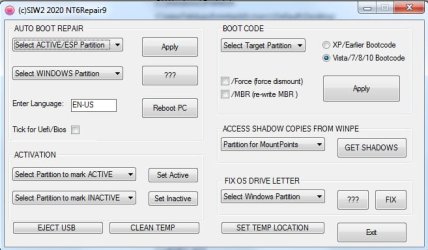
Yes.After gpt>mbr conversion check that one of the primary partitions is marked active and use bcdboot to create boot critical files on it, just in case. I made a thing which is in my boot media. It also contains fix os drive letter, which I use as well, to make sure.

nt6repair9.jpg
 

My Computers My Computers

  • At a glance

    7 X64i5 84002x8gb 3200mhz
    Computer type
    PC/Desktop
    OS
    7 X64
    CPU
    i5 8400
    Motherboard
    gigabyte b365m ds3h
    Memory
    2x8gb 3200mhz
    Hard Drives
    various
    PSU
    pure power 11 400w cm
    Case
    Coolermaster
    Cooling
    cryorig m9i
  • At a glance

    7x64g54008gb ddr4 2400
    Computer type
    PC/Desktop
    OS
    7x64
    CPU
    g5400
    Motherboard
    ga b365m ds3h
    Memory
    8gb ddr4 2400
    PSU
    xfx pro 450w
convert-partition-table-style-04.png
 

My Computers My Computers

  • At a glance

    7 X64i5 84002x8gb 3200mhz
    Computer type
    PC/Desktop
    OS
    7 X64
    CPU
    i5 8400
    Motherboard
    gigabyte b365m ds3h
    Memory
    2x8gb 3200mhz
    Hard Drives
    various
    PSU
    pure power 11 400w cm
    Case
    Coolermaster
    Cooling
    cryorig m9i
  • At a glance

    7x64g54008gb ddr4 2400
    Computer type
    PC/Desktop
    OS
    7x64
    CPU
    g5400
    Motherboard
    ga b365m ds3h
    Memory
    8gb ddr4 2400
    PSU
    xfx pro 450w
Back
Top