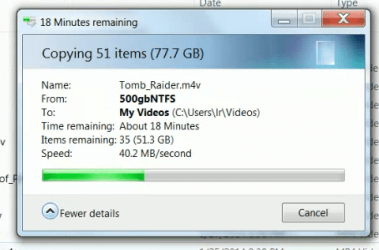
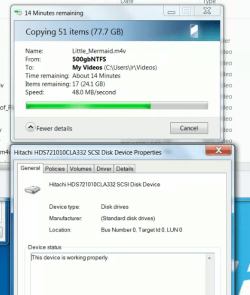
I am always critical if the speed drops below 60 MB/sec
Right now copying 77gb's the speed started at 18 and is up to 40
I have seen it drop under 10 MB/sec, not on this copy.
First, why does it start so slow and then why increase?
And does this seem slow?
Source computer asus p5qc with a Toshiba sata 6 drive TOSHIBA DT01ACA100
Destination computer HP MSI 7548 with a Hitachi HDS721010CLA32 drive
It is to do with TCP windowing effect. TCP (Transmission Control Protocol) manages the connection between two networked devices to ensure that data integrity is maintained. Whenever your machine sends a packet the other party must send an acknowledgement that they received the packet. This can be a time consuming process therefore TCP will slowly send more packets to the other party and wait for an acknowledgement that they received.
This effect shows that to begin with TCP sent 40MB worth of data per second and then as stability improved it increased the window size and then sent 48MB of data per second. It is nothing wrong with your switch or setup, just a design requirement for TCP. It also the exact same reason as to why when you start a download from the internet that the estimated time remaining is not so accurate. As TCP increases the window size the estimated time is reduced since less acknowledgements are sent.
This link provides an more in-depth view of TCP windowing and might be a good read.
Overall I am confident that this isn't a hardware issue. Should this happen on a local transfer between HDD then I would be slightly concerned.
EDIT: Just out of curiosity, are the two devices the only devices connected to the switch? There may be network overhead caused by other devices which could result in slower transfer speeds.
Hope this helps,
Josh
Last edited:
My Computer
At a glance
Windows 7 Professional x64 SP1 ; Windows Serv...Intel Core i5 2400 @ 3.10GHz8.0GB DDR3 @ 665MHz (2GBx4)AMD Radeon HD 6870
Computer type
PC/Desktop
Computer Manufacturer/Model Number
Custom Built
OS
Windows 7 Professional x64 SP1 ; Windows Server 2012 R2 Standard
are the two devices the only devices connected to the switch? There may be network overhead caused by other devices which could result in slower transfer speeds.
Hi,
the trendnet switch has 4 devices plugged in.
The wireless 54g netgear router, wgt624.
Asus gigbit PC
HP gigabit PC
Intel non gig PC (has a supposed gig port on the MB), but it never can connect at gig speeds.
Tried many ways to make it connect at a gig speed, different cables, etc....
So the only one I care to get highest speeds is between the asus and the hp.
I have over the last year seen transfer speeds as high as 78 mb/sec and as low as 5mb/sec
If it drops below 10, I just cancel and unplug routers, cables, then reconnect cable and the speeds usually improve.
What type of cables are you using? Category 5e offer less protection against cross talk and interference therefore the chance of getting gigabit speeds are slim.
If you remove the router out of the switch and try the transfer are the speeds roughly the same?
Do you know the make/model of you our switch? Is it managed or unmanaged?
It should be noted that true gigabit speeds are near impossible to achieve and I would say that about 70-80 MB per second is of suitable speeds for it.
Are you using your device for any network related task during the transfer? Browsing the internet? Do you have any network related applications installed such a skydive or skype? Three would all affect the bandwidth since the gigabit connection is shared across all applications.
Josh
My Computer
At a glance
Windows 7 Professional x64 SP1 ; Windows Serv...Intel Core i5 2400 @ 3.10GHz8.0GB DDR3 @ 665MHz (2GBx4)AMD Radeon HD 6870
Computer type
PC/Desktop
Computer Manufacturer/Model Number
Custom Built
OS
Windows 7 Professional x64 SP1 ; Windows Server 2012 R2 Standard
What type of cables are you using? Category 5e offer less protection against cross talk and interference therefore the chance of getting gigabit speeds are slim.
supposedly all is cat 5e, no cat 6 AFAIK.
I recall reading cat5e should be ok with gigabit LAN
If you remove the router out of the switch and try the transfer are the speeds roughly the same?
I will try this.
Do you know the make/model of you our switch? Is it managed or unmanaged?
unmanaged, TEG-S50g V2.0R with 5 ports
It should be noted that true gigabit speeds are near impossible to achieve and I would say that about 70-80 MB per second is of suitable speeds for it.
Are you using your device for any network related task during the transfer? No
Browsing the internet? not usually, sometimes, but not downloading
Do you have any network related applications installed such a skydive or skype? yes, skype, google drive.
Three would all affect the bandwidth since the gigabit connection is shared across all applications.
Josh
I figure the router is just assigning DHCP, when copying would not need to be involved, should be out of the loop.
I disconnected the netgear router from the switch.
No difference in the speeds.
I see from a momentary 75 mb/sec which continually dropped till 41 mb/sec.
Then on a copy back from the other pc, speeds in the mid 20's mb/sec.