Gigiabyte Mobo will only accept one stick of 4GB Ram out of slots

hawkwind99

New member
Local time
2:21 AM
Messages
9
Location
Isle of Lewis
Hello,

Forgive me if I do not explain this correctly, or give sufficient information. I am writing this on behalf of my husband who is disabled.

He has recently built a new computer using good quality ram and a gigabyte motherboard.

All seems fine on one stick of ram in the first slot, anything else added gives the BSOD can anyone help me?

I am happy to provide more information if you tell me what you need to know.

Thank you
 

My Computer My Computer

At a glance

Windows 7 Professional 64 bitIntel iCore5 Ivybridge16gb (4x8gb) Corsair Vengeance DDR3Gigabyte GTX 550TI
Computer Manufacturer/Model Number
Myself
OS
Windows 7 Professional 64 bit
CPU
Intel iCore5 Ivybridge
Motherboard
Gigabyte GA-Z77X-D3H
Memory
16gb (4x8gb) Corsair Vengeance DDR3
Graphics Card(s)
Gigabyte GTX 550TI
Sound Card
VIA Envy HD
Monitor(s) Displays
HP w20
Hard Drives
Seagate 2tb

Seagate 500mb X2
PSU
Antec 620
Case
Venom Toxic
Cooling
Hypermaster 612s
Apologies I forgot to add, that we have tried many combinations of the memory and they all seem fine and will work individually in the one slot but not all together or in pairs etc.
 

My Computer My Computer

At a glance

Windows 7 Professional 64 bitIntel iCore5 Ivybridge16gb (4x8gb) Corsair Vengeance DDR3Gigabyte GTX 550TI
Computer Manufacturer/Model Number
Myself
OS
Windows 7 Professional 64 bit
CPU
Intel iCore5 Ivybridge
Motherboard
Gigabyte GA-Z77X-D3H
Memory
16gb (4x8gb) Corsair Vengeance DDR3
Graphics Card(s)
Gigabyte GTX 550TI
Sound Card
VIA Envy HD
Monitor(s) Displays
HP w20
Hard Drives
Seagate 2tb

Seagate 500mb X2
PSU
Antec 620
Case
Venom Toxic
Cooling
Hypermaster 612s
Welcome to the Forum. Well to give you a little hand with the specs. Use this little program. To give you a little idea of what we need just click on the My System Specs lower left of this post and you will see mine. Those specs follow my every post. Use this little program.
Speccy - System Information - Free Download
At the top of the page use User CP to install them in the proper location for this Forum. Those specs help us help you.
 

My Computer My Computer

At a glance

Windows 10 Pro. 64/ version 1709 Windows 7 Pr...Intel i7-6800K @ 4.3Corsair Platinum 16 gig @2400EVGA GTX 1070 OC
Computer type
PC/Desktop
Computer Manufacturer/Model Number
Home made Desktop
OS
Windows 10 Pro. 64/ version 1709 Windows 7 Pro/64
CPU
Intel i7-6800K @ 4.3
Motherboard
ASUS X-99 Deluxe II
Memory
Corsair Platinum 16 gig @2400
Graphics Card(s)
EVGA GTX 1070 OC
Monitor(s) Displays
Asus 27" LED LCD/VE278Q
Screen Resolution
1920-1080 or 1280-720 HDMI
Hard Drives
INTEL SSD 730-240 Gb Sata 3.0/
PSU
EVGA Platium 1200W
Case
Phanteks Luxe Tempered Glass 8 fans/ one radiator
Cooling
XSPC/ Water Cooled CPU
Keyboard
Das 4 Professional
Mouse
Logitech M705/MX Anywhere 2-S
Internet Speed
100 mbits
Antivirus
Microsoft Security Essentials/ Malwarebytes Premium 3.0/ SAS
Browser
I.E. 11 default/Firefox/ ISP Time Warner Cable/Spectrum
Other Info
LG BluRay Burner/
Sound system-KLipsch-THX/
Icy Dock ssd Hot Swap bays.
Hello, thank you.

I will try and do that, I thought we had filled in the system specs you obviously cannot see them?
 

My Computer My Computer

At a glance

Windows 7 Professional 64 bitIntel iCore5 Ivybridge16gb (4x8gb) Corsair Vengeance DDR3Gigabyte GTX 550TI
Computer Manufacturer/Model Number
Myself
OS
Windows 7 Professional 64 bit
CPU
Intel iCore5 Ivybridge
Motherboard
Gigabyte GA-Z77X-D3H
Memory
16gb (4x8gb) Corsair Vengeance DDR3
Graphics Card(s)
Gigabyte GTX 550TI
Sound Card
VIA Envy HD
Monitor(s) Displays
HP w20
Hard Drives
Seagate 2tb

Seagate 500mb X2
PSU
Antec 620
Case
Venom Toxic
Cooling
Hypermaster 612s
I can see your system specs.

I assume your motherboard has RAM slots of 2 different colors?

Have you tried just 2 sticks in slots of one color and failed? And just 2 sticks using the other color and failed? Two sticks, not all 4.

Using just 1 RAM stick, only 1 of the 4 slots will boot your PC, regardless of the stick? But all 4 sticks work individually in that good slot?

If all 4 sticks will boot the PC, but only when just one stick is used and only in one particular slot, it doesn't sound like the sticks are defective.

But I'd still test all 4 sticks using memtest86+ from a burned CD.

I can't recall seeing quite this same problem on a Gigabyte board with an Intel processor.

Is your BIOS set to defaults?
 

My Computer My Computer

At a glance

Windows 7 Home Premium SP1, 64-bitIntel Skylake i5-6600K, not overclocked8 GB HyperX DDR4-2666 (2 x 4 GB)none; graphics are integrated on CPU
Computer type
PC/Desktop
Computer Manufacturer/Model Number
Ignatz Special; 4 speed manual gearbox; factory air conditioning; one of one
OS
Windows 7 Home Premium SP1, 64-bit
CPU
Intel Skylake i5-6600K, not overclocked
Motherboard
AsRock Z170M Extreme 4, micro ATX
Memory
8 GB HyperX DDR4-2666 (2 x 4 GB)
Graphics Card(s)
none; graphics are integrated on CPU
Sound Card
onboard: Realtek ALC1150; external: USB Behringer UF0-202
Monitor(s) Displays
Dell S2340M 23 inch IPS
Screen Resolution
1600 x 900
Hard Drives
System: Crucial MX100 series SSD, 128 GB;
Data: Samsung Spinpoint 103SJ, 1 TB;
Backup: WD Caviar Green WD30EZRX-00D8PB0, 3 TB
PSU
Rosewill SilentNight 500 watt fanless, semi-modular
Case
Antec Solo II
Cooling
Noctua NH-U12S; Noctua F12 intake, Noctua S12A exhaust
Keyboard
Microsoft 200 6JH-00001 USB
Mouse
Dell or Microsoft optical wired; USB
Antivirus
Microsoft Security Essentials and Malwarebytes Premium
Browser
Pale Moon
Other Info
All fans PWM; speeds at idle: CPU circa 500 rpm; intake circa 600 rpm; exhaust circa 600 rpm; CPU temps 27 idle and 47 C load in a warm room (27 C/81 F) when running Intel Extreme Tuning Utility stress test.
Hello,

Thank you for your help, no the motherboard memory slots are not coloured they are just black. We have tried using each stick in the slot that works and the computer boots fine. Each time we add another stick in any configuration it crashes. We did once get it to boot on two sticks but it was not recognised as being there and only showed 4gb being present so we removed it.

The bios is set to optimized defaults.

I could try testing the sticks using memtest86+ if you think it would help?
 

My Computer My Computer

At a glance

Windows 7 Professional 64 bitIntel iCore5 Ivybridge16gb (4x8gb) Corsair Vengeance DDR3Gigabyte GTX 550TI
Computer Manufacturer/Model Number
Myself
OS
Windows 7 Professional 64 bit
CPU
Intel iCore5 Ivybridge
Motherboard
Gigabyte GA-Z77X-D3H
Memory
16gb (4x8gb) Corsair Vengeance DDR3
Graphics Card(s)
Gigabyte GTX 550TI
Sound Card
VIA Envy HD
Monitor(s) Displays
HP w20
Hard Drives
Seagate 2tb

Seagate 500mb X2
PSU
Antec 620
Case
Venom Toxic
Cooling
Hypermaster 612s
Thank you hawkwind good job, I can see them now.
 

My Computer My Computer

At a glance

Windows 10 Pro. 64/ version 1709 Windows 7 Pr...Intel i7-6800K @ 4.3Corsair Platinum 16 gig @2400EVGA GTX 1070 OC
Computer type
PC/Desktop
Computer Manufacturer/Model Number
Home made Desktop
OS
Windows 10 Pro. 64/ version 1709 Windows 7 Pro/64
CPU
Intel i7-6800K @ 4.3
Motherboard
ASUS X-99 Deluxe II
Memory
Corsair Platinum 16 gig @2400
Graphics Card(s)
EVGA GTX 1070 OC
Monitor(s) Displays
Asus 27" LED LCD/VE278Q
Screen Resolution
1920-1080 or 1280-720 HDMI
Hard Drives
INTEL SSD 730-240 Gb Sata 3.0/
PSU
EVGA Platium 1200W
Case
Phanteks Luxe Tempered Glass 8 fans/ one radiator
Cooling
XSPC/ Water Cooled CPU
Keyboard
Das 4 Professional
Mouse
Logitech M705/MX Anywhere 2-S
Internet Speed
100 mbits
Antivirus
Microsoft Security Essentials/ Malwarebytes Premium 3.0/ SAS
Browser
I.E. 11 default/Firefox/ ISP Time Warner Cable/Spectrum
Other Info
LG BluRay Burner/
Sound system-KLipsch-THX/
Icy Dock ssd Hot Swap bays.
Hello,

Thank you for your help, no the motherboard memory slots are not coloured they are just black. We have tried using each stick in the slot that works and the computer boots fine. Each time we add another stick in any configuration it crashes. We did once get it to boot on two sticks but it was not recognised as being there and only showed 4gb being present so we removed it.

The bios is set to optimized defaults.

I could try testing the sticks using memtest86+ if you think it would help?

The fact that all 4 sticks will work one at a time leads me to think that the memory is not outright defective.

Will it boot from one stick, REGARDLESS of the slot you use? Or is it possible you have at least one dead slot?

Here is the support site for your motherboard:

GIGABYTE - Motherboard - Socket 1155 - GA-Z77X-D3H (rev. 1.0)

I just looked at the manual. You should download it if you haven't.

Look at page 16.

The manual says that using 2 sticks, you should install one stick in the slot farthest away from the CPU and the other stick two slots closer to the CPU (second closest slot to the CPU).

I assume you are aware of the notches in the sticks and that they are seating and locking properly?

Have you confirmed that your memory is on the supported memory list?

http://download.gigabyte.us/FileList/Memory/mb_memory_ga-z77x-d3h.pdf

Memory that is NOT on that list should still work if within basic specifications.

If you have proper memory, properly installed, I would contact Gigabyte support to see what they have to say.
 

My Computer My Computer

At a glance

Windows 7 Home Premium SP1, 64-bitIntel Skylake i5-6600K, not overclocked8 GB HyperX DDR4-2666 (2 x 4 GB)none; graphics are integrated on CPU
Computer type
PC/Desktop
Computer Manufacturer/Model Number
Ignatz Special; 4 speed manual gearbox; factory air conditioning; one of one
OS
Windows 7 Home Premium SP1, 64-bit
CPU
Intel Skylake i5-6600K, not overclocked
Motherboard
AsRock Z170M Extreme 4, micro ATX
Memory
8 GB HyperX DDR4-2666 (2 x 4 GB)
Graphics Card(s)
none; graphics are integrated on CPU
Sound Card
onboard: Realtek ALC1150; external: USB Behringer UF0-202
Monitor(s) Displays
Dell S2340M 23 inch IPS
Screen Resolution
1600 x 900
Hard Drives
System: Crucial MX100 series SSD, 128 GB;
Data: Samsung Spinpoint 103SJ, 1 TB;
Backup: WD Caviar Green WD30EZRX-00D8PB0, 3 TB
PSU
Rosewill SilentNight 500 watt fanless, semi-modular
Case
Antec Solo II
Cooling
Noctua NH-U12S; Noctua F12 intake, Noctua S12A exhaust
Keyboard
Microsoft 200 6JH-00001 USB
Mouse
Dell or Microsoft optical wired; USB
Antivirus
Microsoft Security Essentials and Malwarebytes Premium
Browser
Pale Moon
Other Info
All fans PWM; speeds at idle: CPU circa 500 rpm; intake circa 600 rpm; exhaust circa 600 rpm; CPU temps 27 idle and 47 C load in a warm room (27 C/81 F) when running Intel Extreme Tuning Utility stress test.
Doing a little Google research and found that a few of the posters had a problem with motherboard stand offs. The little post that hold the motherboard off of its mounting tray. They indicated that motherboard has a little more flex than some others. Also a proper torque pattern would be helpful even more necessary on that motherboard. That lack of stiffness in the motherboard was cured with the UD3H board. Just a little friendly information.
 

My Computer My Computer

At a glance

Windows 10 Pro. 64/ version 1709 Windows 7 Pr...Intel i7-6800K @ 4.3Corsair Platinum 16 gig @2400EVGA GTX 1070 OC
Computer type
PC/Desktop
Computer Manufacturer/Model Number
Home made Desktop
OS
Windows 10 Pro. 64/ version 1709 Windows 7 Pro/64
CPU
Intel i7-6800K @ 4.3
Motherboard
ASUS X-99 Deluxe II
Memory
Corsair Platinum 16 gig @2400
Graphics Card(s)
EVGA GTX 1070 OC
Monitor(s) Displays
Asus 27" LED LCD/VE278Q
Screen Resolution
1920-1080 or 1280-720 HDMI
Hard Drives
INTEL SSD 730-240 Gb Sata 3.0/
PSU
EVGA Platium 1200W
Case
Phanteks Luxe Tempered Glass 8 fans/ one radiator
Cooling
XSPC/ Water Cooled CPU
Keyboard
Das 4 Professional
Mouse
Logitech M705/MX Anywhere 2-S
Internet Speed
100 mbits
Antivirus
Microsoft Security Essentials/ Malwarebytes Premium 3.0/ SAS
Browser
I.E. 11 default/Firefox/ ISP Time Warner Cable/Spectrum
Other Info
LG BluRay Burner/
Sound system-KLipsch-THX/
Icy Dock ssd Hot Swap bays.
Welcome hawkwind99.
After checking the standoffs, trying one RAM in each of the other slots, one at a time, and still no boot except form the one known good slot I think you have a bad motherboard.
OR
Default setting will sometimes under volt and under clock RAM. Make sure after setting defaults, save and exit, go right back to BIOS and set your RAM timings, frequency, and voltage per the RAM specs. Try to boot then after saving the new settings.
 

My Computer My Computer

At a glance

Windows 7 Ultimate X64 SP1Intel i5-2550K, Differing ~4.4-4.8GHz No buil...16GB G.Skill Sniper 1866MHz @ 2133MHz 2x8GBASUS GTX650TIB-DC2OC-2GD5, (650TI Boost)
Computer type
PC/Desktop
Computer Manufacturer/Model Number
Home Built Desktop By DataTech
OS
Windows 7 Ultimate X64 SP1
CPU
Intel i5-2550K, Differing ~4.4-4.8GHz No built in GPU
Motherboard
ASUS P8Z68-V PRO/GEN3
Memory
16GB G.Skill Sniper 1866MHz @ 2133MHz 2x8GB
Graphics Card(s)
ASUS GTX650TIB-DC2OC-2GD5, (650TI Boost)
Sound Card
Onboard Realtek 5-1
Monitor(s) Displays
Samsung P2570HD
Screen Resolution
1920x1080
Hard Drives
Samsung 840 Pro 256GB SSD for OS, 500GB Seagate Constellation (Enterprise drive) for Data
PSU
Corsair HX650W
Case
Inwin Dragon Rider
Cooling
Hyper 212 EVO w/two Noctua fans, push-pull, @1300 RPM
Keyboard
E-Z Eyes, bright yellow keys with large characters
Mouse
steelseries SENSEI Laser Pro Gaming
Internet Speed
48-51Mbs Mbs down, 11 Mbs up Xfinity Cable
Antivirus
Norton Internet Security 2013
Browser
IE 10, Opera, Pale Moon if needed
Other Info
4 case fans, LG BluRay-RE, ASUS DVD-RW, Mr. Fusion power supply, 1.21 gigawatts.
Forgive me, as I am trying to sort this out for Hawkwind and I am not that computer wise! I have checked that the ram is compatible with the motherboard on the supported list of memory information.

I will try one stick of ram in the other memory slots to see if it works and report back. The motherboard is brand new and recently supplied by scan in the Uk.

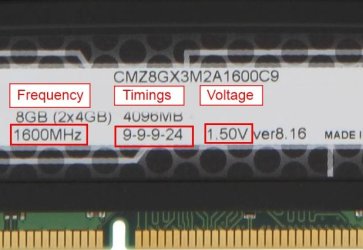
Where do I find the ram specs?

Thank you all for trying to help me :)
 

My Computer My Computer

At a glance

Windows 7 Professional 64 bitIntel iCore5 Ivybridge16gb (4x8gb) Corsair Vengeance DDR3Gigabyte GTX 550TI
Computer Manufacturer/Model Number
Myself
OS
Windows 7 Professional 64 bit
CPU
Intel iCore5 Ivybridge
Motherboard
Gigabyte GA-Z77X-D3H
Memory
16gb (4x8gb) Corsair Vengeance DDR3
Graphics Card(s)
Gigabyte GTX 550TI
Sound Card
VIA Envy HD
Monitor(s) Displays
HP w20
Hard Drives
Seagate 2tb

Seagate 500mb X2
PSU
Antec 620
Case
Venom Toxic
Cooling
Hypermaster 612s

My Computer My Computer

At a glance

Windows 7 Home Premium SP1, 64-bitIntel Skylake i5-6600K, not overclocked8 GB HyperX DDR4-2666 (2 x 4 GB)none; graphics are integrated on CPU
Computer type
PC/Desktop
Computer Manufacturer/Model Number
Ignatz Special; 4 speed manual gearbox; factory air conditioning; one of one
OS
Windows 7 Home Premium SP1, 64-bit
CPU
Intel Skylake i5-6600K, not overclocked
Motherboard
AsRock Z170M Extreme 4, micro ATX
Memory
8 GB HyperX DDR4-2666 (2 x 4 GB)
Graphics Card(s)
none; graphics are integrated on CPU
Sound Card
onboard: Realtek ALC1150; external: USB Behringer UF0-202
Monitor(s) Displays
Dell S2340M 23 inch IPS
Screen Resolution
1600 x 900
Hard Drives
System: Crucial MX100 series SSD, 128 GB;
Data: Samsung Spinpoint 103SJ, 1 TB;
Backup: WD Caviar Green WD30EZRX-00D8PB0, 3 TB
PSU
Rosewill SilentNight 500 watt fanless, semi-modular
Case
Antec Solo II
Cooling
Noctua NH-U12S; Noctua F12 intake, Noctua S12A exhaust
Keyboard
Microsoft 200 6JH-00001 USB
Mouse
Dell or Microsoft optical wired; USB
Antivirus
Microsoft Security Essentials and Malwarebytes Premium
Browser
Pale Moon
Other Info
All fans PWM; speeds at idle: CPU circa 500 rpm; intake circa 600 rpm; exhaust circa 600 rpm; CPU temps 27 idle and 47 C load in a warm room (27 C/81 F) when running Intel Extreme Tuning Utility stress test.
Your RAM specs will be printed on a label on them.
A sample only:
RAM label.JPG
 

My Computer My Computer

At a glance

Windows 7 Ultimate X64 SP1Intel i5-2550K, Differing ~4.4-4.8GHz No buil...16GB G.Skill Sniper 1866MHz @ 2133MHz 2x8GBASUS GTX650TIB-DC2OC-2GD5, (650TI Boost)
Computer type
PC/Desktop
Computer Manufacturer/Model Number
Home Built Desktop By DataTech
OS
Windows 7 Ultimate X64 SP1
CPU
Intel i5-2550K, Differing ~4.4-4.8GHz No built in GPU
Motherboard
ASUS P8Z68-V PRO/GEN3
Memory
16GB G.Skill Sniper 1866MHz @ 2133MHz 2x8GB
Graphics Card(s)
ASUS GTX650TIB-DC2OC-2GD5, (650TI Boost)
Sound Card
Onboard Realtek 5-1
Monitor(s) Displays
Samsung P2570HD
Screen Resolution
1920x1080
Hard Drives
Samsung 840 Pro 256GB SSD for OS, 500GB Seagate Constellation (Enterprise drive) for Data
PSU
Corsair HX650W
Case
Inwin Dragon Rider
Cooling
Hyper 212 EVO w/two Noctua fans, push-pull, @1300 RPM
Keyboard
E-Z Eyes, bright yellow keys with large characters
Mouse
steelseries SENSEI Laser Pro Gaming
Internet Speed
48-51Mbs Mbs down, 11 Mbs up Xfinity Cable
Antivirus
Norton Internet Security 2013
Browser
IE 10, Opera, Pale Moon if needed
Other Info
4 case fans, LG BluRay-RE, ASUS DVD-RW, Mr. Fusion power supply, 1.21 gigawatts.
Ah okay I am learning as I go on. Okay yesterday I tried all the memory individually in each slot and it was clear from the BSOD each time I tried that the slot closest to the CPU, and the one next to it is not working. The ram worked in the two other slots individually. I will try looking into the specs of the ram today.
 

My Computer My Computer

At a glance

Windows 7 Professional 64 bitIntel iCore5 Ivybridge16gb (4x8gb) Corsair Vengeance DDR3Gigabyte GTX 550TI
Computer Manufacturer/Model Number
Myself
OS
Windows 7 Professional 64 bit
CPU
Intel iCore5 Ivybridge
Motherboard
Gigabyte GA-Z77X-D3H
Memory
16gb (4x8gb) Corsair Vengeance DDR3
Graphics Card(s)
Gigabyte GTX 550TI
Sound Card
VIA Envy HD
Monitor(s) Displays
HP w20
Hard Drives
Seagate 2tb

Seagate 500mb X2
PSU
Antec 620
Case
Venom Toxic
Cooling
Hypermaster 612s
OK, when you go to BIOS to set RAM specs, use only the known good slot, save settings, shut down and try one more slot, the one recommended as for dual channel.
 

My Computer My Computer

At a glance

Windows 7 Ultimate X64 SP1Intel i5-2550K, Differing ~4.4-4.8GHz No buil...16GB G.Skill Sniper 1866MHz @ 2133MHz 2x8GBASUS GTX650TIB-DC2OC-2GD5, (650TI Boost)
Computer type
PC/Desktop
Computer Manufacturer/Model Number
Home Built Desktop By DataTech
OS
Windows 7 Ultimate X64 SP1
CPU
Intel i5-2550K, Differing ~4.4-4.8GHz No built in GPU
Motherboard
ASUS P8Z68-V PRO/GEN3
Memory
16GB G.Skill Sniper 1866MHz @ 2133MHz 2x8GB
Graphics Card(s)
ASUS GTX650TIB-DC2OC-2GD5, (650TI Boost)
Sound Card
Onboard Realtek 5-1
Monitor(s) Displays
Samsung P2570HD
Screen Resolution
1920x1080
Hard Drives
Samsung 840 Pro 256GB SSD for OS, 500GB Seagate Constellation (Enterprise drive) for Data
PSU
Corsair HX650W
Case
Inwin Dragon Rider
Cooling
Hyper 212 EVO w/two Noctua fans, push-pull, @1300 RPM
Keyboard
E-Z Eyes, bright yellow keys with large characters
Mouse
steelseries SENSEI Laser Pro Gaming
Internet Speed
48-51Mbs Mbs down, 11 Mbs up Xfinity Cable
Antivirus
Norton Internet Security 2013
Browser
IE 10, Opera, Pale Moon if needed
Other Info
4 case fans, LG BluRay-RE, ASUS DVD-RW, Mr. Fusion power supply, 1.21 gigawatts.
Okay I have checked the ram specifications and I am able to set the voltage and the speed in the bios which in fact are the same as the sample above. I can find nowhere to enter in the figures 9-9-9 24 should I be able to?
 

My Computer My Computer

At a glance

Windows 7 Professional 64 bitIntel iCore5 Ivybridge16gb (4x8gb) Corsair Vengeance DDR3Gigabyte GTX 550TI
Computer Manufacturer/Model Number
Myself
OS
Windows 7 Professional 64 bit
CPU
Intel iCore5 Ivybridge
Motherboard
Gigabyte GA-Z77X-D3H
Memory
16gb (4x8gb) Corsair Vengeance DDR3
Graphics Card(s)
Gigabyte GTX 550TI
Sound Card
VIA Envy HD
Monitor(s) Displays
HP w20
Hard Drives
Seagate 2tb

Seagate 500mb X2
PSU
Antec 620
Case
Venom Toxic
Cooling
Hypermaster 612s
Yes.

Look in the "MB Intelligent Tweaker" section of the BIOS.

And look in the memory settings portion of that section.
 

My Computer My Computer

At a glance

Windows 7 Home Premium SP1, 64-bitIntel Skylake i5-6600K, not overclocked8 GB HyperX DDR4-2666 (2 x 4 GB)none; graphics are integrated on CPU
Computer type
PC/Desktop
Computer Manufacturer/Model Number
Ignatz Special; 4 speed manual gearbox; factory air conditioning; one of one
OS
Windows 7 Home Premium SP1, 64-bit
CPU
Intel Skylake i5-6600K, not overclocked
Motherboard
AsRock Z170M Extreme 4, micro ATX
Memory
8 GB HyperX DDR4-2666 (2 x 4 GB)
Graphics Card(s)
none; graphics are integrated on CPU
Sound Card
onboard: Realtek ALC1150; external: USB Behringer UF0-202
Monitor(s) Displays
Dell S2340M 23 inch IPS
Screen Resolution
1600 x 900
Hard Drives
System: Crucial MX100 series SSD, 128 GB;
Data: Samsung Spinpoint 103SJ, 1 TB;
Backup: WD Caviar Green WD30EZRX-00D8PB0, 3 TB
PSU
Rosewill SilentNight 500 watt fanless, semi-modular
Case
Antec Solo II
Cooling
Noctua NH-U12S; Noctua F12 intake, Noctua S12A exhaust
Keyboard
Microsoft 200 6JH-00001 USB
Mouse
Dell or Microsoft optical wired; USB
Antivirus
Microsoft Security Essentials and Malwarebytes Premium
Browser
Pale Moon
Other Info
All fans PWM; speeds at idle: CPU circa 500 rpm; intake circa 600 rpm; exhaust circa 600 rpm; CPU temps 27 idle and 47 C load in a warm room (27 C/81 F) when running Intel Extreme Tuning Utility stress test.
Ah okay will do thank you.
 

My Computer My Computer

At a glance

Windows 7 Professional 64 bitIntel iCore5 Ivybridge16gb (4x8gb) Corsair Vengeance DDR3Gigabyte GTX 550TI
Computer Manufacturer/Model Number
Myself
OS
Windows 7 Professional 64 bit
CPU
Intel iCore5 Ivybridge
Motherboard
Gigabyte GA-Z77X-D3H
Memory
16gb (4x8gb) Corsair Vengeance DDR3
Graphics Card(s)
Gigabyte GTX 550TI
Sound Card
VIA Envy HD
Monitor(s) Displays
HP w20
Hard Drives
Seagate 2tb

Seagate 500mb X2
PSU
Antec 620
Case
Venom Toxic
Cooling
Hypermaster 612s
Right the bios memory settings were set to the correct ram specifications already apart from the speed which I have increased to 1600mhz.

Any suggestions?
 

My Computer My Computer

At a glance

Windows 7 Professional 64 bitIntel iCore5 Ivybridge16gb (4x8gb) Corsair Vengeance DDR3Gigabyte GTX 550TI
Computer Manufacturer/Model Number
Myself
OS
Windows 7 Professional 64 bit
CPU
Intel iCore5 Ivybridge
Motherboard
Gigabyte GA-Z77X-D3H
Memory
16gb (4x8gb) Corsair Vengeance DDR3
Graphics Card(s)
Gigabyte GTX 550TI
Sound Card
VIA Envy HD
Monitor(s) Displays
HP w20
Hard Drives
Seagate 2tb

Seagate 500mb X2
PSU
Antec 620
Case
Venom Toxic
Cooling
Hypermaster 612s
In post 14 you said it appeared that 2 of the 4 RAM slots were not working correctly.

Is that still the case, with the RAM settings set manually in the BIOS, and with all 4 RAM sticks, used one at a time in those "bad" slots?

If so, it's looking like a motherboard gone bad, but I'd wait for more comment.

Are you within warranty?
 

My Computer My Computer

At a glance

Windows 7 Home Premium SP1, 64-bitIntel Skylake i5-6600K, not overclocked8 GB HyperX DDR4-2666 (2 x 4 GB)none; graphics are integrated on CPU
Computer type
PC/Desktop
Computer Manufacturer/Model Number
Ignatz Special; 4 speed manual gearbox; factory air conditioning; one of one
OS
Windows 7 Home Premium SP1, 64-bit
CPU
Intel Skylake i5-6600K, not overclocked
Motherboard
AsRock Z170M Extreme 4, micro ATX
Memory
8 GB HyperX DDR4-2666 (2 x 4 GB)
Graphics Card(s)
none; graphics are integrated on CPU
Sound Card
onboard: Realtek ALC1150; external: USB Behringer UF0-202
Monitor(s) Displays
Dell S2340M 23 inch IPS
Screen Resolution
1600 x 900
Hard Drives
System: Crucial MX100 series SSD, 128 GB;
Data: Samsung Spinpoint 103SJ, 1 TB;
Backup: WD Caviar Green WD30EZRX-00D8PB0, 3 TB
PSU
Rosewill SilentNight 500 watt fanless, semi-modular
Case
Antec Solo II
Cooling
Noctua NH-U12S; Noctua F12 intake, Noctua S12A exhaust
Keyboard
Microsoft 200 6JH-00001 USB
Mouse
Dell or Microsoft optical wired; USB
Antivirus
Microsoft Security Essentials and Malwarebytes Premium
Browser
Pale Moon
Other Info
All fans PWM; speeds at idle: CPU circa 500 rpm; intake circa 600 rpm; exhaust circa 600 rpm; CPU temps 27 idle and 47 C load in a warm room (27 C/81 F) when running Intel Extreme Tuning Utility stress test.
Back
Top