
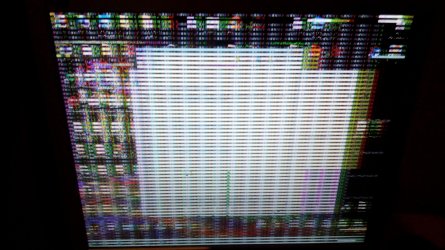
"Glitchy" display after boot.

Deleted690

New member
Local time
7:47 PM
Messages
24
My system is having issues with display. After win7 begin booted, my system is fine but after minutes, screen started glithing (look at attachment)and everything is locked up until auto-reboot. Then i booted win7 safe mode with internet drivers and display didn't glitch, i rollback'd video drivers and glitchy display appears again even if i boot from usb stick. My integrated video is gma 3100. Motherboard is 2820h.Thanks in advance.
 

Attachments
  • IMG_20181022_110639.jpg
    IMG_20181022_110639.jpg
    891.4 KB · Views: 2

My Computer

Computer type
PC/Desktop
OS
Windows 7 Professional x86
Hello Blokk888,

go into control panel > device manager, and open all device folders. Do you see any yellow triangle with exclamation mark, besides any devices?

Alternatively, boot with base video. Base video uses a more basic video driver than the one you have installed. See if more glitches occur. Open msconfig > select boot tab > click on base video check box. The click OK and Re-boot computer.
 
Last edited:

My Computer

Computer type
PC/Desktop
OS
Windows 7 x64, Vista x64, 8.1 smartphone
CPU
Intel E8400 65W 64-bit
Motherboard
Gigabyte EP45-UD3LR
Memory
DDR2 2 x 2GB, 1GB x 2
Graphics Card(s)
XFX Radeon HD5750
Sound Card
AMD High Definition Audio; Realtek High Definition Audio
Monitor(s) Displays
iiyama prolite X2377HDS
Screen Resolution
1920 x 1080
Hard Drives
500GB 7200 rpm Seagate ST3500413AS 16MB, 500GB 5400 rpm Toshiba MQ02ABF050H 32MB, 200GB 7200 rpm Seagate ST3200820AS 8MB, 2TB 7200 rpm Western Digital WD20EZRX 64MB
PSU
Enermax Liberty Modular
Case
Antec P193 Midi Tower
Keyboard
Mionix ZIBAL 60
Mouse
Razer USB 2.0 Diamondback Mouse or Huion Graphics Tablet
Browser
Internet Explorer, Lunascape, Firefox, Opera, Avast Safezone
Back
Top