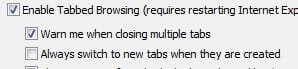
A number of weeks ago I asked a question about why I have to set IE10 to go to new tab when created every time I open IE10. I did whatever was recommended but the problem persisted. Before going to another browser I thought I would give my IE one more shot at it: I downgraded to IE9 and what do you know? I still have to "tick the box" every time I start IE9 because the next time I start IE9 the box is unticked again.
I wonder if anyone can come up with a solution to this annoyance, please? Tick the box once and make it stick. Thanks in advance.
I have just discovered that the same problem occurs with IE11. "Go to new tab" must be selected every time the computer is turned on or IE9, 10, or 11 is opened. Every time! The command simply will not stick.
You might try this,
Click Start and All programs,
Internet explorer listing Right click it and click on Run as administrator,
Then go to Internet options from the Gear symbol.
What type of environment single user on this machine ?
Personal or assigned work machine ?
Make sure your using Okay and Apply and Okay before exiting.
Plus the settings do not apply until you close and reopen.
My Computer
Computer type
PC/Desktop
Computer Manufacturer/Model Number
Custom assembled by me :}
OS
Win-7-Pro64bit 7-H-Prem-64bit
CPU
i7-5930K 2nd i9-9940x both water blocked VRM's too
2nd ASUS X299 Apex/Intel i9-9940x with Custom water loop/7H-Prem-x64/Corsair 450D case/Ram Trident-z 3600C16 4x8gb / Samsung970Evo plus 500gb SSD/Dual ssd EZ swap evo/PSU EVGA SuperNova 1200w-P2 80+Platinum/GPU Titan Xp /8-ML-140 on push-pull on 2-280GTX rads