

- Local time
- 2:31 AM
- Messages
- 139
Hi, i tested out outlook 2010 and had been using 2007. so 2010 was using the settings for my email account and .ost file created when using 2007.
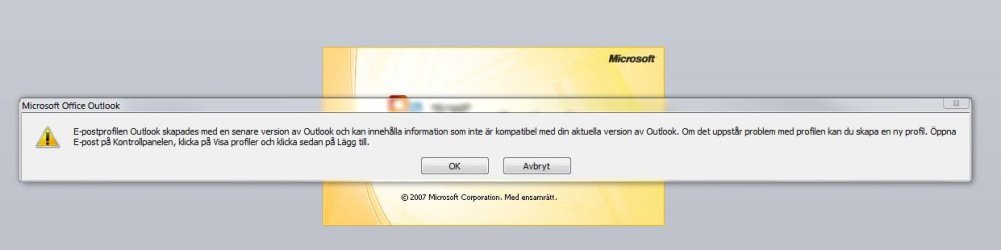
So i tested 2010 and when the 1 month trial was over i uninstalled office 2010 and went back to 2007 and now everytime i start outlook i get a message telling me,
In case you dont read swedish here is the translation:
The e-mail profile, Outlook created with a newer version of outlook and may contain information that is not compatible with your current version of Outlook. if there are any problems with the profile, you can create a new profile. open email control panel, click Show Profiles and then click Add.
So, can i simply supress this message since as long as i click the ok it proceeds to load outlook just like normal and everything is working just fine.
So i tested 2010 and when the 1 month trial was over i uninstalled office 2010 and went back to 2007 and now everytime i start outlook i get a message telling me,
In case you dont read swedish here is the translation:
The e-mail profile, Outlook created with a newer version of outlook and may contain information that is not compatible with your current version of Outlook. if there are any problems with the profile, you can create a new profile. open email control panel, click Show Profiles and then click Add.
So, can i simply supress this message since as long as i click the ok it proceeds to load outlook just like normal and everything is working just fine.
Attachments
My Computer
- Computer Manufacturer/Model Number
- White Box
- OS
- Windows 7 RTM x64
- CPU
- Core 2 Quad 2.6GHz
- Motherboard
- Gigabyte Ga-x48-ds5
- Memory
- 4GB Ram
- Graphics Card(s)
- Asus nvidia 260
- Sound Card
- Built in, Using Optical Out with Logitech Z-5500 5.1
- Monitor(s) Displays
- Acer T230H & Samsung LCD TV FULL HD "LE46B530"
- Screen Resolution
- 1920x1080 + 1920x1080
- Hard Drives
- 8 of them, about 6.5TB
- PSU
- 750 watt
- Case
- Antec P180
- Cooling
- Default Intel stock
- Keyboard
- Logitech Dinovo edge
- Mouse
- wireless laser mouse
- Internet Speed
- 15mbit Cable
- Other Info
- Primary monitor is multitouch (yay)


