
Goofy Folder Structure...?

rcanino

New member
Member
VIP
Local time
4:05 PM
Messages
123
Location
Wash Heights, NYC
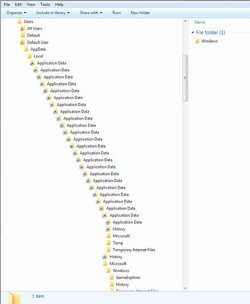
I'm wondering if anyone has the same structure I've got in their Users directory. I can't think of any reason why I'd have so many Application Data folders. Even if they're not directories - if they're actually junction points - why so many?

Thanks for any thoughts you can share.

Here's a screen shot:
MS_AppData_01.jpg
 

My Computer

Computer type
PC/Desktop
OS
Win7 Pro 64-bit sp1
CPU
core i7 980X
Motherboard
MSI Big-Bang XPower X58
Memory
G.Skill 4Gx3 F3-10666CL9T-12GBRL (x2)
Graphics Card(s)
EVGA 06G-P4-3787-KR
Monitor(s) Displays
HP LP2475w (x2)
Screen Resolution
3840x1200
Hard Drives
Crucial RealSSD CTFDDAC128MAG-1G1 (boot drive);
Crucial m4 128GB;
Samsung 1TB HD103SJ 32M 7200rpm (x2);
WD Black WD2002FAEX 2TB (x2)
PSU
Corsair CMPSU-850HX
Case
HAF X
Cooling
Intel DBX-B (stock)
I'm wondering if anyone has the same structure I've got in their Users directory. I can't think of any reason why I'd have so many Application Data folders. Even if they're not directories - if they're actually junction points - why so many?

Thanks for any thoughts you can share.

Here's a screen shot:

View attachment 133683

Not usual, but I have seen it when a shortcut to a folder is accidentally dragged into the folder above or below. Self replicating


Ken J
 

My Computer

Computer Manufacturer/Model Number
HP Pavillion dv-7 1005 Tx
OS
Win 8 Release candidate 8400
CPU
[email protected]
Memory
4 gigs
Graphics Card(s)
Nvidia 9600M
Sound Card
HD built-in
Monitor(s) Displays
17" Wxga
Screen Resolution
1440x900
Cooling
none
Internet Speed
45Mb down 5Mb up
I assume I can safely delete all them right?
 

My Computer

Computer type
PC/Desktop
OS
Win7 Pro 64-bit sp1
CPU
core i7 980X
Motherboard
MSI Big-Bang XPower X58
Memory
G.Skill 4Gx3 F3-10666CL9T-12GBRL (x2)
Graphics Card(s)
EVGA 06G-P4-3787-KR
Monitor(s) Displays
HP LP2475w (x2)
Screen Resolution
3840x1200
Hard Drives
Crucial RealSSD CTFDDAC128MAG-1G1 (boot drive);
Crucial m4 128GB;
Samsung 1TB HD103SJ 32M 7200rpm (x2);
WD Black WD2002FAEX 2TB (x2)
PSU
Corsair CMPSU-850HX
Case
HAF X
Cooling
Intel DBX-B (stock)
I had that happen to me during the Win 7 Beta period when I got a little carried away with the takeown tool. :o

I assume I can safely delete all them right?
I made a current image of my C: drive and tried it, fully prepared for the possibility that I'd be reinstalling everything. It worked for me, but you will have to decide on taking the risk for yourself. For what it's worth, I saw no difference in how my computer ran either way.
 

My Computer

Computer Manufacturer/Model Number
Self
OS
Main - Windows 7 Pro SP1 64-Bit; 2nd - Windows Server 2008 R2
CPU
Main - Core i7 2600K; 2nd - Core i7 920
Motherboard
Main - Asus P8Z68-V Pro/Gen3; 2nd - Gigabyte GA-EX58-UDR3
Memory
Main - 16GB Corsair Vengeance; 2nd - 12GB Corsair Vengeance
Graphics Card(s)
Main - XFX Radeon 6870 1GB; 2nd - XFX Radeon 4870 1GB
Sound Card
Both: Onboard Realtek Azalia
Monitor(s) Displays
Main - Hann 25" + I-INC 25" + Acer 23"; 2nd - Upgrading Soon
Screen Resolution
Main - 1920x1080 (All Three Monitors); 2nd - Upgrading Soon
Hard Drives
Main - (1) Crucial M4 128GB (Boot)
Main - (1) Seagate 2TB 64MB Cache (Data)
Main - (1) Seagate 2TB 64MB Cache (Data Backup)
2nd - (1) Intel X25-M SSD 80GB (Boot)
2nd - (3) Seagate 1TB 32MB Cache (Data Backup)
2nd - (1) Seagate 320GB (Because)
PSU
Main - OCZ 600W Modular; 2nd - OCZ 600W
Case
Main - Thermaltake Element G; 2nd - NZXT something or other
Cooling
Main - Corsair H80; 2nd - Prolimatech Megahalems
Keyboard
Main - Razer Reclusa; 2nd - Old MS Keyboard
Mouse
Main - Logitech MX Revolution; 2nd - Old MS Mouse
Internet Speed
20Mbps Time-Warner Cable
Haha, thanks prof I guess that explains it. I did the same thing - went a little overboard on the "take_ownership" changes I guess.

Still - why should there be a relationship between the directory structure and the permissions...? Does taking ownership add a shortcut to the original "locked" directory maybe?

I deleted some of them but was unable (error) to restore them back. I rebooted and the system is fine but I still have all those shortcuts.

I guess I can just ignore the directory tree. I rarely use it anyway on Win 7 since its default behavior is so annoying. I'll explain:

In the directory tree on the left pane of an explorer window, if you highlight a folder first before you click its Expand arrow Windows sends that folder down to the bottom of the tree when you expand it - very annoying. The obvious workaround - don't highlight the folder, click it's expand arrow first - works fine but it took some getting used to.

Is it the same on your system? It doesn't feel like a bug but I can't think of any reason why that behavior would be desirable.

On a related note, suddenly last week I couldn't access my S: partition, which resides on a USB HDD. All the other partitions on that HDD were fine. I finally checked the permissions under S:\ properties and sure enough they were gone. I added the appropriate user name and the Admin account, gave them full control and then I was able to access the partition again. But I have no idea how the permissions changed on their own.

I really haven't done much tinkering with this system but something wiped out the permissions. I just wish I knew what it was...

Thanks for your help!
 

My Computer

Computer type
PC/Desktop
OS
Win7 Pro 64-bit sp1
CPU
core i7 980X
Motherboard
MSI Big-Bang XPower X58
Memory
G.Skill 4Gx3 F3-10666CL9T-12GBRL (x2)
Graphics Card(s)
EVGA 06G-P4-3787-KR
Monitor(s) Displays
HP LP2475w (x2)
Screen Resolution
3840x1200
Hard Drives
Crucial RealSSD CTFDDAC128MAG-1G1 (boot drive);
Crucial m4 128GB;
Samsung 1TB HD103SJ 32M 7200rpm (x2);
WD Black WD2002FAEX 2TB (x2)
PSU
Corsair CMPSU-850HX
Case
HAF X
Cooling
Intel DBX-B (stock)
I'm not sure about the jumping directories - mine don't do that. :huh:

As for the Application Data folder(s), my understanding is that they are there for compatibility with older programs and actually do nothing more than keep those programs from thinking that they didn't or couldn't install right. I now keep the OS files and folders hidden and never see them anymore. Out of sight, out of mind. :geek:
 

My Computer

Computer Manufacturer/Model Number
Self
OS
Main - Windows 7 Pro SP1 64-Bit; 2nd - Windows Server 2008 R2
CPU
Main - Core i7 2600K; 2nd - Core i7 920
Motherboard
Main - Asus P8Z68-V Pro/Gen3; 2nd - Gigabyte GA-EX58-UDR3
Memory
Main - 16GB Corsair Vengeance; 2nd - 12GB Corsair Vengeance
Graphics Card(s)
Main - XFX Radeon 6870 1GB; 2nd - XFX Radeon 4870 1GB
Sound Card
Both: Onboard Realtek Azalia
Monitor(s) Displays
Main - Hann 25" + I-INC 25" + Acer 23"; 2nd - Upgrading Soon
Screen Resolution
Main - 1920x1080 (All Three Monitors); 2nd - Upgrading Soon
Hard Drives
Main - (1) Crucial M4 128GB (Boot)
Main - (1) Seagate 2TB 64MB Cache (Data)
Main - (1) Seagate 2TB 64MB Cache (Data Backup)
2nd - (1) Intel X25-M SSD 80GB (Boot)
2nd - (3) Seagate 1TB 32MB Cache (Data Backup)
2nd - (1) Seagate 320GB (Because)
PSU
Main - OCZ 600W Modular; 2nd - OCZ 600W
Case
Main - Thermaltake Element G; 2nd - NZXT something or other
Cooling
Main - Corsair H80; 2nd - Prolimatech Megahalems
Keyboard
Main - Razer Reclusa; 2nd - Old MS Keyboard
Mouse
Main - Logitech MX Revolution; 2nd - Old MS Mouse
Internet Speed
20Mbps Time-Warner Cable
I'm wondering if anyone has the same structure I've got in their Users directory. I can't think of any reason why I'd have so many Application Data folders. Even if they're not directories - if they're actually junction points - why so many?

Thanks for any thoughts you can share.

Here's a screen shot:

View attachment 133683


You tried to change permissions on one of the junction points, didn't you? That's what causes this.

You have two choices. System Restore to before you started fiddling, or completely reinstall. You CANNOT get the permissions back like they were any other way. It's too complex.
 

My Computer

Computer Manufacturer/Model Number
Custom
OS
Windows 7 Ultimate RTM (Technet)
CPU
3.00 gigahertz Intel Core2 Duo E8400
Motherboard
ASUSTeK Computer INC. P5K/EPU Rev 1.xx
Memory
4GB
Graphics Card(s)
ATI Radeon X1950 Pro
Sound Card
Built in HD Audio
Monitor(s) Displays
22" Gateway LCD
Screen Resolution
1920 x 1200
Hard Drives
ST3160023A [Hard drive] (160.04 GB) -- drive 0, rev 8.01, ST3500630AS [Hard drive] (500.11 GB) -- drive 2, rev 3.AAK
ST3500630AS [Hard drive] (500.11 GB) -- drive 1, rev 3.AAK
Keyboard
Logitech G11
Mouse
Microsoft Wireless Laser Mouse 5000
Internet Speed
13.44 Mbps
As MacGyvr said. See the links in my signature for more information.
 

My Computer

Computer type
PC/Desktop
Computer Manufacturer/Model Number
Alienware Aurora ALX R4
OS
Windows 10 Pro (x64)
CPU
Intel Core i7-3930K (3.2GHz - 4.5GHz)
Motherboard
Alienware Aurora-R4 x79
Memory
4x Samsung 4GB PC3-12800 DDR3 (16GB 1600MHz)
Graphics Card(s)
Nvidia Geforce GTX 690
Sound Card
SteelSeries Siberia Elite
Monitor(s) Displays
Dell UltraSharp U3011
Screen Resolution
2560x1600
Hard Drives
Samsung 850 Pro 256 GB, Seagate 1TB Desktop Hybrid HDD, 2x Western Digital 4TB Green HDD
PSU
875W Some Dell PSU <.<
Case
Alienware Aurora ALX
Cooling
Custom Liquid Cooling (EK CPU & GPU blocks) dual EK 480RAD
Keyboard
Logitech G710+ Mechanical
Mouse
Logitech G700s
Internet Speed
Verizon Fios (50 mbps average)
Other Info
Server: Intel NUC D54250WYK: i5-4250U, 16GB, 256 GB mSATA, Windows Server 2012 R2
Thanks you guys - they don't really bother me much - I'll do a reinstall when SP1 is released. Till then I'll just ignore them.
 

My Computer

Computer type
PC/Desktop
OS
Win7 Pro 64-bit sp1
CPU
core i7 980X
Motherboard
MSI Big-Bang XPower X58
Memory
G.Skill 4Gx3 F3-10666CL9T-12GBRL (x2)
Graphics Card(s)
EVGA 06G-P4-3787-KR
Monitor(s) Displays
HP LP2475w (x2)
Screen Resolution
3840x1200
Hard Drives
Crucial RealSSD CTFDDAC128MAG-1G1 (boot drive);
Crucial m4 128GB;
Samsung 1TB HD103SJ 32M 7200rpm (x2);
WD Black WD2002FAEX 2TB (x2)
PSU
Corsair CMPSU-850HX
Case
HAF X
Cooling
Intel DBX-B (stock)
Back
Top