Google chrome again....

Emforcer46

New member
Local time
7:44 AM
Messages
34
its the 2nd time this happens and im out of it , flash player doesnt work says i need to install it , but i cant since its "integrated" and thats just googles way of telling you to go **** urself if u have problems with it , also pages show up like this:

http://gyazo.com/2b19ab0750fcb62cb50dc1113ed66c9e.png

http://gyazo.com/7ba3049b4bbd2fdb3bcdbdb20744917f.png (see the adobe warning down there)

this time i click it

http://gyazo.com/b758316dfa2e9fa2bcf916fc2f2a1006.png


how can i save my bookmarks ? and then i need to reinstall.
 

My Computer

OS
Windows 7 Ultimate 64x
I'm not a Google Chrome user so this is an educated guess.

Click the wrench icon on the browser toolbar.
Select Bookmark manager.
Click the Organize menu in the manager.
Select Export bookmarks.
Choose a location where you want your exported file to be saved, then click Save.
Google Chrome should export your bookmarks as a HTML file. (Note: a good place to save is your desktop.)

Now uninstall Google Chrome. (You should be able to do this from Control Panel > Programs and Features.) After reinstalling you should be able to click the wrench icon, follow above steps, but this time select Import bookmarks and browse to your desktop.
 

My Computer

Computer type
Laptop
Computer Manufacturer/Model Number
Sony Vaio VPCEB47GM Laptop
OS
Win 7 Pro 64-bit
CPU
Intel i5 2.4 Ghz
Memory
8GB DDR3
Graphics Card(s)
Intel HD 3000
Sound Card
IDT High Definition
Monitor(s) Displays
15.6 WGXA Anti-Glare LED
Screen Resolution
1280x800
Hard Drives
640Gb 7200rpm
Antivirus
MSE
Browser
Opera (primary) with IE9 backup
could be that but still doesnt fix the issue
 

My Computer

OS
Windows 7 Ultimate 64x
its the 2nd time this happens and im out of it , flash player doesnt work says i need to install it , but i cant since its "integrated" and thats just googles way of telling you to go **** urself if u have problems with it , also pages show up like this:

http://gyazo.com/2b19ab0750fcb62cb50dc1113ed66c9e.png

http://gyazo.com/7ba3049b4bbd2fdb3bcdbdb20744917f.png (see the adobe warning down there)

this time i click it

http://gyazo.com/b758316dfa2e9fa2bcf916fc2f2a1006.png


how can i save my bookmarks ? and then i need to reinstall.

Not sure what your problem is as you really don't state it.

I didn't like Chrome at first, about a year ago, but then I gave it another try and it has become my default browser on all my PCs. Whether they are running Win 7 or XP. Never had a problem with Flash player. About the only problem I have had is with my main bank web access (and not really with the access).
When I want to view/download my statements they open in a sub Chrome window in Acrobat and then get resized to the size of a PEA. So I use IE 8 to go to that bank.

I would look at the rest of your system as the real cause of the problems you are having. Maybe some of the junk software you have installed is causing all these problems with Chrome.
 

My Computer

Computer Manufacturer/Model Number
Built be Me
OS
Windows 7 Pro x64
CPU
i5 760
Motherboard
Asus P7P55D-E Pro
Memory
16GB
Graphics Card(s)
Nvidia GTS450
Sound Card
On board
Monitor(s) Displays
Dell 2007WFP Dell 1800FP
Screen Resolution
1680x1050 1280x1024
Hard Drives
Seagate 250GB & 750GB
WD 1TB
PSU
Antec 750
Case
In Win
Cooling
Cooler Master Hyper 212+
Keyboard
IBM
Mouse
MS
i recently installed IObit software , asc4 and gamebooster to be more precise
 

My Computer

OS
Windows 7 Ultimate 64x
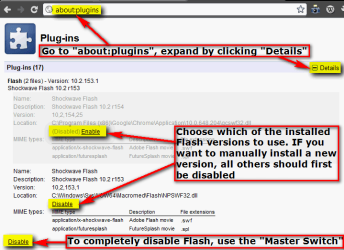
You can bypass Chrome's built-in Flash and manually install any version you want to.

Type about:plugins to Chrome address bar, hit Enter. Expand plugins by clicking Details. Enable / Disable the Flash version you want to, disable all installed versions if you want to manually install a new one. See the image below for more information.

Chrome_Flash.png

Kari
 

My Computer

Computer type
Laptop
Computer Manufacturer/Model Number
HP ENVY 17-1150eg
OS
Windows 10 Pro x64 EN-GB
CPU
1.6 GHz Intel Core i7-720QM Processor
Memory
6 GB
Graphics Card(s)
ATI Mobility Radeon HD 5850 Graphics
Sound Card
Beats sound system with integrated subwoofer
Monitor(s) Displays
17" laptop display, 22" LED and 32" Full HD TV through HDMI
Screen Resolution
1600*900 (1), 1920*1080 (2&3)
Hard Drives
Internal: 2 x 500 GB SATA Hard Disk Drive 7200 rpm
External: 2TB for backups, 3TB USB3 network drive for media
Cooling
As Envy runs a bit warm, I have it on a Cooler Master pad
Keyboard
Logitech diNovo Media Desktop Laser (bluetooth)
Mouse
Logitech Performance Mouse MX
Internet Speed
50/10 Mbps VDSL
Antivirus
Windows Defender 4.3.9431.0
Browser
Maxthon 3.5.2., IE11
Back
Top