

One of the advantages of the web is that it allows developers to create any type of experience they can imagine, which has led to the rich diversity of content available on the web today. While most content producers are interested in providing excellent experiences for their users, we've found that a small number use the flexibility and power of the web to take advantage of users and redirect them to unintended destinations. 1 out of every 5 feedback reports from Chrome users on desktop mention encountering some type of unwanted content, and we take this feedback seriously when considering how to improve Chrome. Following on from features like Chrome's pop-up blocker and autoplay protections, over the next few releases we'll be rolling out three new protections designed to give users all the web has to offer, but without many of these types of unwanted behaviors.
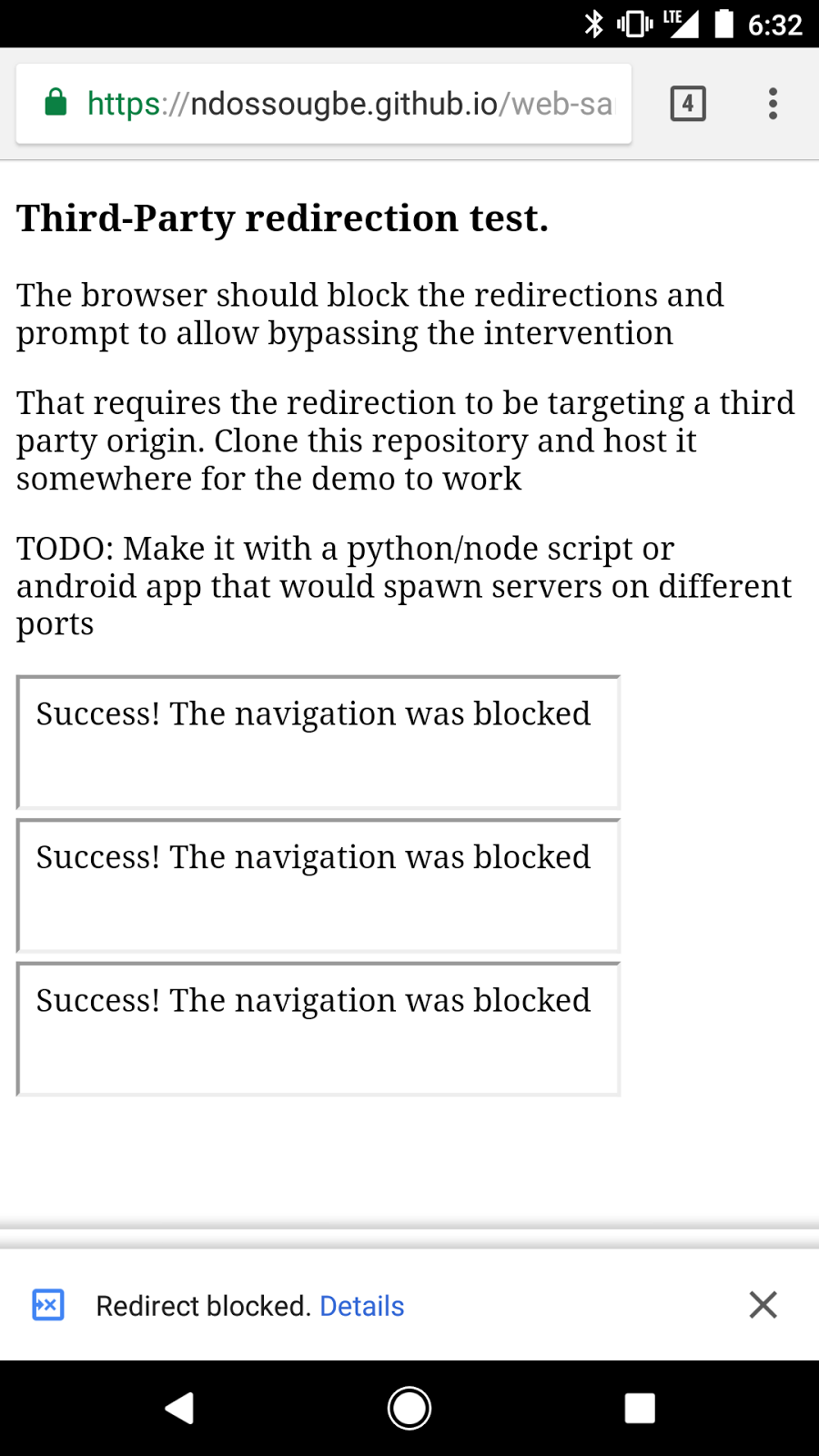
One piece of feedback we regularly hear from users is that a page will unexpectedly navigate to a new page, for seemingly no reason. We've found that this redirect often comes from third-party content embedded in the page, and the page author didn't intend the redirect to happen at all. To address this, in Chrome 64 all redirects originating from third-party iframes will show an infobar instead of redirecting, unless the user had been interacting with that frame. This will keep the user on the page they were reading, and prevent those surprising redirects.
An example of a redirect being blocked on a test site. The iframes embedded in the site are attempting to navigate the page to an unintended destination, but Chrome prevents the redirect and shows an infobar.
When the user interacts with content, things can also go wrong. One example that causes user frustration is when clicking a link opens the desired destination in a new tab, while the main window navigates to a different, unwanted page. This is effectively a circumvention of Chrome's pop-up blocker, one of users' favorite features. Starting in Chrome 65 we'll also detect this behavior, trigger an infobar, and prevent the main tab from being redirected. This allows the user to continue directly to their intended destination, while also preserving the context of the page they came from.
Finally, there are several other types of abusive experiences that send users to unintended destinations but are hard to automatically detect. These include links to third-party websites disguised as play buttons or other site controls, or transparent overlays on websites that capture all clicks and open new tabs or windows.

Two types of abusive experiences where a deceptive site control appears to do one thing, but has a different behavior when clicked. One looks like a play button on a video but sends the user to an unwanted download when clicked (left), and the other looks like a close button but instead opens unwanted pop-up windows (right).
Similar to how Google Safe Browsing protects users from malicious content, starting in early January Chrome's pop-up blocker will prevent sites with these types of abusive experiences from opening new windows or tabs. To help site owners prepare for this change, today we're also launching the Abusive Experiences Report alongside other similar reports in the Google Search Console. Site owners can use the report to see if any of these abusive experiences have been found on their site and improve their user experience. Otherwise, abusive experiences left unaddressed for 30 days will trigger the prevention of new windows and tabs.
Together, these protections will dramatically improve users' web browsing experiences while still allowing them access to all that the web has to offer.
Posted by Ryan Schoen, Product Manager


Source: Chromium Blog: Expanding user protections on the web
My Computer
At a glance
64-bit Windows 11 Pro for WorkstationsIntel i7-8700K OC'd to 5 GHz64 GB (4x16GB) G.SKILL TridentZ RGB DDR4 3600...ASUS ROG-STRIX-GTX1080TI-O11G-GAMING
- Computer type
- PC/Desktop
- Computer Manufacturer/Model Number
- Self built custom
- OS
- 64-bit Windows 11 Pro for Workstations
- CPU
- Intel i7-8700K OC'd to 5 GHz
- Motherboard
- ASUS ROG Maximus XI Formula Z390
- Memory
- 64 GB (4x16GB) G.SKILL TridentZ RGB DDR4 3600 MHz
- Graphics Card(s)
- ASUS ROG-STRIX-GTX1080TI-O11G-GAMING
- Sound Card
- Integrated
- Monitor(s) Displays
- 2 x Samsung Odyssey G7 27"
- Screen Resolution
- 2560x1440
- Hard Drives
- 1TB Samsung 990 PRO M.2,
4TB Samsung 990 PRO PRO M.2,
TerraMaster F8 SSD Plus NAS
- PSU
- Seasonic Prime Titanium 850W
- Case
- Thermaltake Core P3
- Cooling
- Corsair Hydro H115i
- Keyboard
- Logitech wireless K800
- Mouse
- Logitech MX Master 4
- Internet Speed
- 2 Gb/s Download and 100 Mb/s Upload
- Antivirus
- Malwarebyte Anti-Malware Premium
- Browser
- Google Chrome
- Other Info
- Logitech Z625 speaker system,
Logitech BRIO 4K Pro webcam,
HP Color LaserJet Pro MFP M477fdn,
APC SMART-UPS RT 1000 XL - SURT1000XLI,
Galaxy S23 Plus phone

