Google Chrome Lag on certain websites

cruisecontrol

New member
Local time
1:22 PM
Messages
19
I have the latest version of Chrome installed on my Win 7, 32 bit.

On websites like Facebook, Google, Google Image I have been experiencing heavy lags after a few seconds of browsing. Scrolling, typing, moving to other pages... all of these get slow!

I've tried reducing the number of extensions, deleted cache/cookies, updated Flash player. Still the problem persists.

Any help would be great!
 

My Computer My Computer

OS
Windows 7 Ultimate x86
I'm sorry but I don't have that problem. Have you got any of the experimental flags enabled (about:flags). They can sometimes cause problems.
 

My Computer My Computer

Computer type
Laptop
Computer Manufacturer/Model Number
Hewlett-Packard/G62-107SA Notebook
OS
Microsoft Windows 7 Home Premium 64-bit Service Pack 1
CPU
Intel(R) Core(TM) i3 CPU M 330 @ 2.13GHz
Motherboard
Hewlett-Packard 1425
Memory
8 GB DDR3
Graphics Card(s)
Intel(R) HD Graphics
Sound Card
Realtek High Definition Audio
Monitor(s) Displays
Builtin
Screen Resolution
1366 x 768 x 32 bits (4294967296 colors) @ 60 Hz
Hard Drives
250 GB SATA Hard Disk Drive 7200 rpm
2TB Seagate GoFlex USB 2 Drive
1TB Iomega Prestige USB 2 Drive
1.5TB Iomega Prestige USB 2 Drive (Samsung)
2TB WD MyBook Live NAS.
Mouse
Logitech Anywhere MX
Internet Speed
152 Mbs download 10 Mbs upload
Antivirus
Norton 360
Browser
Chrome
I'm not sure either, is your graphics driver recent?
 

My Computer My Computer

Computer Manufacturer/Model Number
Custom
OS
7 ultimate x64
CPU
i7 920 @ 3.5ghz
Motherboard
P6t Deluxe
Memory
6gb corsair dominator
Graphics Card(s)
Gigabyte Geforce GTX 460 1GB SLI
Sound Card
onboard
Monitor(s) Displays
samsung BX2450
Screen Resolution
1920x1080
Hard Drives
Seagate 7200.11 1Tb; WD green EADS 1TB
PSU
corsair tx750
Case
CM HAF 922
Cooling
coolermaster V8 + standard case fans
Keyboard
Logitech Classic Keyboard
Mouse
Logitech G500
Internet Speed
256k :P
It wouldn't matter if you had the latest video card drivers, Chrome doesn't even take advantage of the GPU. Which is what I'm guessing is the problem...if you have a single or dual core it might become a bit to much for it sometimes.
 

My Computer My Computer

Computer type
PC/Desktop
OS
10 Home x64
CPU
Intel Core i5 4670K
Motherboard
Gigabyte GA-Z87-D3HP
Memory
Corsair XMS3 8GB DDr3 1600MHz
Graphics Card(s)
Sapphire NITRO Radeon R9 Fury
Sound Card
Asus Xonar DX
Monitor(s) Displays
Acer H236HLbmjd
Screen Resolution
1920x1080
Hard Drives
Force GS 128GB - Seagate 320GB - WD Caviar Black 1TB - WD Caviar Blue 500GB
PSU
EVGA SuperNOVA 650 P2
Case
Silverstone Raven 3 RV03B-W
Keyboard
Topre Realforce 104UG-HiPro
Mouse
Mionix Naos 7000
Internet Speed
76/4 On a good day
Antivirus
SmartScreen
Browser
Internet Explorer 11
It wouldn't matter if you had the latest video card drivers, Chrome doesn't even take advantage of the GPU. Which is what I'm guessing is the problem...if you have a single or dual core it might become a bit to much for it sometimes.

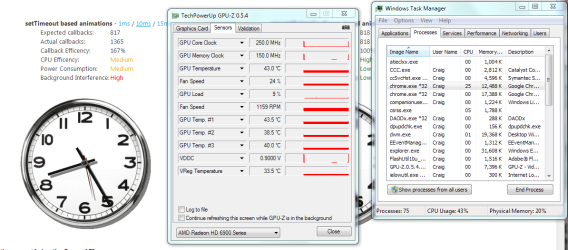
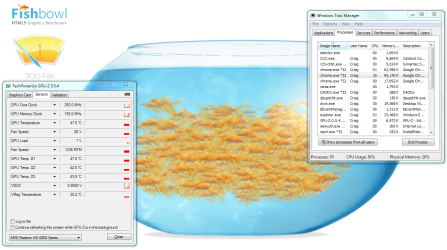
Yes it does.

Capture.JPG
 

My Computer My Computer

Computer type
Laptop
Computer Manufacturer/Model Number
Hewlett-Packard/G62-107SA Notebook
OS
Microsoft Windows 7 Home Premium 64-bit Service Pack 1
CPU
Intel(R) Core(TM) i3 CPU M 330 @ 2.13GHz
Motherboard
Hewlett-Packard 1425
Memory
8 GB DDR3
Graphics Card(s)
Intel(R) HD Graphics
Sound Card
Realtek High Definition Audio
Monitor(s) Displays
Builtin
Screen Resolution
1366 x 768 x 32 bits (4294967296 colors) @ 60 Hz
Hard Drives
250 GB SATA Hard Disk Drive 7200 rpm
2TB Seagate GoFlex USB 2 Drive
1TB Iomega Prestige USB 2 Drive
1.5TB Iomega Prestige USB 2 Drive (Samsung)
2TB WD MyBook Live NAS.
Mouse
Logitech Anywhere MX
Internet Speed
152 Mbs download 10 Mbs upload
Antivirus
Norton 360
Browser
Chrome

My Computer My Computer

Computer type
PC/Desktop
OS
10 Home x64
CPU
Intel Core i5 4670K
Motherboard
Gigabyte GA-Z87-D3HP
Memory
Corsair XMS3 8GB DDr3 1600MHz
Graphics Card(s)
Sapphire NITRO Radeon R9 Fury
Sound Card
Asus Xonar DX
Monitor(s) Displays
Acer H236HLbmjd
Screen Resolution
1920x1080
Hard Drives
Force GS 128GB - Seagate 320GB - WD Caviar Black 1TB - WD Caviar Blue 500GB
PSU
EVGA SuperNOVA 650 P2
Case
Silverstone Raven 3 RV03B-W
Keyboard
Topre Realforce 104UG-HiPro
Mouse
Mionix Naos 7000
Internet Speed
76/4 On a good day
Antivirus
SmartScreen
Browser
Internet Explorer 11
I suppose it depends which version you are on. 13.0.782.41 beta-m is mine and if you have the 2d rendering flag set.
 

My Computer My Computer

Computer type
Laptop
Computer Manufacturer/Model Number
Hewlett-Packard/G62-107SA Notebook
OS
Microsoft Windows 7 Home Premium 64-bit Service Pack 1
CPU
Intel(R) Core(TM) i3 CPU M 330 @ 2.13GHz
Motherboard
Hewlett-Packard 1425
Memory
8 GB DDR3
Graphics Card(s)
Intel(R) HD Graphics
Sound Card
Realtek High Definition Audio
Monitor(s) Displays
Builtin
Screen Resolution
1366 x 768 x 32 bits (4294967296 colors) @ 60 Hz
Hard Drives
250 GB SATA Hard Disk Drive 7200 rpm
2TB Seagate GoFlex USB 2 Drive
1TB Iomega Prestige USB 2 Drive
1.5TB Iomega Prestige USB 2 Drive (Samsung)
2TB WD MyBook Live NAS.
Mouse
Logitech Anywhere MX
Internet Speed
152 Mbs download 10 Mbs upload
Antivirus
Norton 360
Browser
Chrome
I suppose it depends which version you are on. 13.0.782.41 beta-m is mine and if you have the 2d rendering flag set.
It was the latest stable version.
 

My Computer My Computer

Computer type
PC/Desktop
OS
10 Home x64
CPU
Intel Core i5 4670K
Motherboard
Gigabyte GA-Z87-D3HP
Memory
Corsair XMS3 8GB DDr3 1600MHz
Graphics Card(s)
Sapphire NITRO Radeon R9 Fury
Sound Card
Asus Xonar DX
Monitor(s) Displays
Acer H236HLbmjd
Screen Resolution
1920x1080
Hard Drives
Force GS 128GB - Seagate 320GB - WD Caviar Black 1TB - WD Caviar Blue 500GB
PSU
EVGA SuperNOVA 650 P2
Case
Silverstone Raven 3 RV03B-W
Keyboard
Topre Realforce 104UG-HiPro
Mouse
Mionix Naos 7000
Internet Speed
76/4 On a good day
Antivirus
SmartScreen
Browser
Internet Explorer 11
I think you can set flags on that. about:flags. I seem to remember they were available on 12...
 

My Computer My Computer

Computer type
Laptop
Computer Manufacturer/Model Number
Hewlett-Packard/G62-107SA Notebook
OS
Microsoft Windows 7 Home Premium 64-bit Service Pack 1
CPU
Intel(R) Core(TM) i3 CPU M 330 @ 2.13GHz
Motherboard
Hewlett-Packard 1425
Memory
8 GB DDR3
Graphics Card(s)
Intel(R) HD Graphics
Sound Card
Realtek High Definition Audio
Monitor(s) Displays
Builtin
Screen Resolution
1366 x 768 x 32 bits (4294967296 colors) @ 60 Hz
Hard Drives
250 GB SATA Hard Disk Drive 7200 rpm
2TB Seagate GoFlex USB 2 Drive
1TB Iomega Prestige USB 2 Drive
1.5TB Iomega Prestige USB 2 Drive (Samsung)
2TB WD MyBook Live NAS.
Mouse
Logitech Anywhere MX
Internet Speed
152 Mbs download 10 Mbs upload
Antivirus
Norton 360
Browser
Chrome
Experimental features do not count as actual browser features, therefore Chrome doesn't support GPU usage, at least not by default.

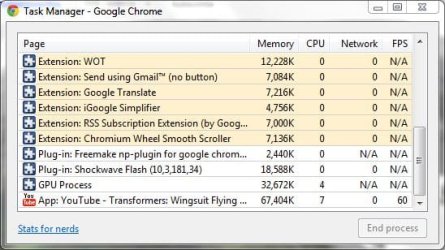
My main problem with Chrome is that, upon enabling these features, certain extensions like Smooth Scroll will produce lag and glitching when browsing pages that include Flash; best example being YouTube and FOG.com

IE9 has no such problems, FF4/5 also glitches a bit, but at least it doesn't provide as much lag as Opera does for me.
 

My Computer My Computer

Computer type
Laptop
Computer Manufacturer/Model Number
Custom
OS
Windows 7 Home Premium x64
CPU
Intel Core i5 2500K
Motherboard
MSI MS-7750
Memory
8GB DDR3
Graphics Card(s)
nVidia GeForce GTX650 Ti BOOST
Sound Card
Realtek
Monitor(s) Displays
21' Philips
Screen Resolution
Full HD
Hard Drives
1TB
PSU
500W
I tried Firefox and Safari... Facebook works great on both those browsers. Reinstalled Chrome again and tried FB and it worked fine the first couple of minutes. Now the lag is back again.
 

My Computer My Computer

OS
Windows 7 Ultimate x86
I am having this problem, sort of.

I use Google Chrome Stable, and when I use Google News, it lags a lot (the website, scrolling ect.). I have been having this issue for a while now. I tried browsing Google News with IE9 and I get NO problems what-so-ever. :(. Help would be appreciated.

Slasher
 

My Computer My Computer

Computer Manufacturer/Model Number
HP Pavilion dv6-2020ev
OS
Ubuntu 12.10
CPU
Intel Core i7 720QM
Motherboard
Its a HP secret...
Memory
4GB RAM
Graphics Card(s)
NVIDIA GeForce 230M
Sound Card
IDT
Screen Resolution
1366x768
Hard Drives
500 GB
Mouse
HP
Internet Speed
4 Mbps
You might want to try a Chromium snapshot:
Index of /f/chromium/snapshots/Win

Every extension for Chrome I've tried works in Chromium.
Download the Win32 zip file rather than the installer and unzip
it to an empty folder. (If updating a previous portable snapshot, delete everything in the exe folder except the Dictionaries and extensions folders, then unzip into it.)

I usually look at the change log for each build until I find one that's nearly empty.
I use Chromium snapshot as my main browser. If I get a buggy one I just delete the folder.

I save a copy of my settings folder and the previous portable folder that had the exe that worked right. It only takes about a minute to copy the folders back to back it off if it's buggy.

Needless to say, the snapshots have the most advanced whatevers in the code. :)

Right now I'm using Chromium snapshot
14.0.832.0
Build 93800
 

My Computer My Computer

Computer Manufacturer/Model Number
HP Media Center
OS
Windows 7 32 bit
CPU
AMD 5200+ dual core
Memory
2 GB
Graphics Card(s)
NVidia GeForce 6150SE 128 MB
Monitor(s) Displays
CRT
Screen Resolution
1280x1024
Hard Drives
500 GB Sata internal :

SIIG USB 3.0 docking stations w/WD Caviar Black 6 Gb/s drives
Keyboard
PS/2
Mouse
PS/2 Wheel Mouse
Other Info
SIIG USB 3.0 PCIexpress card.
I guess I'll just wait for Stable to get update :). Its not a huge annoyance, just a small one. :).
 

My Computer My Computer

Computer Manufacturer/Model Number
HP Pavilion dv6-2020ev
OS
Ubuntu 12.10
CPU
Intel Core i7 720QM
Motherboard
Its a HP secret...
Memory
4GB RAM
Graphics Card(s)
NVIDIA GeForce 230M
Sound Card
IDT
Screen Resolution
1366x768
Hard Drives
500 GB
Mouse
HP
Internet Speed
4 Mbps
I guess I'll just wait for Stable to get update :). Its not a huge annoyance, just a small one. :).

I don't think there's anything stopping you from keeping what you have now and Chromium portable. It's just a matter of setting one browser as default. I know I didn't like being in chrome "channels" or slots or whatever those tracks are that keep you locked in stable, beta or development. I'd rather update when I feel the urge. If I wanted to try a beta then I had to go into the beta channel. Gimme' a break!! Sheesh!!


Also eliminates the need to run auto updater unless you have other googlisms on your machine.
 

My Computer My Computer

Computer Manufacturer/Model Number
HP Media Center
OS
Windows 7 32 bit
CPU
AMD 5200+ dual core
Memory
2 GB
Graphics Card(s)
NVidia GeForce 6150SE 128 MB
Monitor(s) Displays
CRT
Screen Resolution
1280x1024
Hard Drives
500 GB Sata internal :

SIIG USB 3.0 docking stations w/WD Caviar Black 6 Gb/s drives
Keyboard
PS/2
Mouse
PS/2 Wheel Mouse
Other Info
SIIG USB 3.0 PCIexpress card.
Back
Top