Google Chrome not recognizing certificates?

Rurik

New member
Member
Local time
6:33 PM
Messages
29
Hey guys,

Just a small problem, just started happening today that i can recall but my chrome has stopped finding certificates and encrypting my internet use.

It has a little black and white globe in the address bar, before the url, and I can no longer access the page menu on the right, it has disappeared and I am left with the spanner menu. Also where my buttons were a bright blue earlier, they are now white.

Any help is appreciated,

Rurik

szbyo6.jpg
 

My Computer

Computer Manufacturer/Model Number
Acer Aspire Timeline X 5820TG
OS
Windows 7 home Premium x64
CPU
Intel Core i5 480M 2.66Ghz with Turbo Boost up to 2.93Ghz
Memory
4.00GB
Graphics Card(s)
AMD Radeon HD 6550M 2651MB HyperMemory/Intel HD Graphics
Sound Card
Conexant High Definition SmartAudio 221
Monitor(s) Displays
15.6" HD LCD
Screen Resolution
1366x768
Hard Drives
750GB HDD
Mouse
Verbatim Rapier V1
Hello Rurik.
Don't worry there are no problems with your browser.

As far as I can see, Sevenforums does not use SSL (https).

Regarding your buttons and globe. google Chrome has been updated to version 6.0, and therefore there were some minor GUI changes.

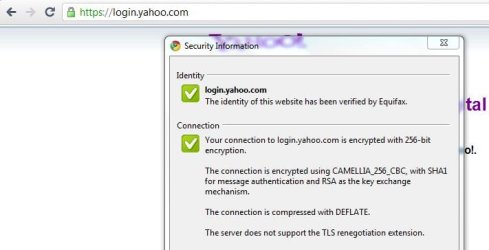
For example try going to this site and check certificate:
https://login.yahoo.com
 

Attachments

  • Capture.JPG
    Capture.JPG
    33.3 KB · Views: 22

My Computer

OS
Windows 7 Ultimate x86 SP1
Have the buttons changed only for sites requiring certificates?
To obtain a certificate you can do the following: click on the warning bar, click certificate Information -> Details Tab -> Copy to file
 

My Computer

Computer Manufacturer/Model Number
Dell and Custom
OS
Systems 1 and 2: Windows 7 Enterprise x64, Win 8 Developer
CPU
System 1: i7 [email protected], System 2: AMD FX-4100 Zambezi 3.6G
Motherboard
System 1:Dell 06NWYK System 2: ASUS M5A97 AM3+
Memory
System 1: 8GB System 2: 8GB
Graphics Card(s)
System 1: ATI FirePro V4800 System 2: Radeon HD 6850
Sound Card
System 1: onboard System 2: onboard
Monitor(s) Displays
System1: Viewsonic HDMI 24"
Screen Resolution
System 1: 1920x1080 System 2: 1920x1080
Hard Drives
System 1: Mirrored .5B drives System 2: Seagate Barracuda ST1000DM003 1TB 7200 RPM 64MB Cache SATA 6.0Gb/s
Case
System 1: Dell System 2: Cooler Master
Internet Speed
10 MBPS
You can also apply a google chrome theme, if you don't like the buttons.
 

My Computer

Computer Manufacturer/Model Number
Dell and Custom
OS
Systems 1 and 2: Windows 7 Enterprise x64, Win 8 Developer
CPU
System 1: i7 [email protected], System 2: AMD FX-4100 Zambezi 3.6G
Motherboard
System 1:Dell 06NWYK System 2: ASUS M5A97 AM3+
Memory
System 1: 8GB System 2: 8GB
Graphics Card(s)
System 1: ATI FirePro V4800 System 2: Radeon HD 6850
Sound Card
System 1: onboard System 2: onboard
Monitor(s) Displays
System1: Viewsonic HDMI 24"
Screen Resolution
System 1: 1920x1080 System 2: 1920x1080
Hard Drives
System 1: Mirrored .5B drives System 2: Seagate Barracuda ST1000DM003 1TB 7200 RPM 64MB Cache SATA 6.0Gb/s
Case
System 1: Dell System 2: Cooler Master
Internet Speed
10 MBPS
Hey guys thanks for the replies. It isnt just sevenforums with the problem, but all sites are coming up as not certified and unencrypted. I am using a theme, thats why i noticed the change, and as for chrome updating, i havnt actively updated it, but it may have by itself, i am not sure on that.

Any other ideas?
 

My Computer

Computer Manufacturer/Model Number
Acer Aspire Timeline X 5820TG
OS
Windows 7 home Premium x64
CPU
Intel Core i5 480M 2.66Ghz with Turbo Boost up to 2.93Ghz
Memory
4.00GB
Graphics Card(s)
AMD Radeon HD 6550M 2651MB HyperMemory/Intel HD Graphics
Sound Card
Conexant High Definition SmartAudio 221
Monitor(s) Displays
15.6" HD LCD
Screen Resolution
1366x768
Hard Drives
750GB HDD
Mouse
Verbatim Rapier V1
Can you disable theme for a moment and try again?
 

My Computer

OS
Windows 7 Ultimate x86 SP1
Nope. changed nothing but the theme :(
 

My Computer

Computer Manufacturer/Model Number
Acer Aspire Timeline X 5820TG
OS
Windows 7 home Premium x64
CPU
Intel Core i5 480M 2.66Ghz with Turbo Boost up to 2.93Ghz
Memory
4.00GB
Graphics Card(s)
AMD Radeon HD 6550M 2651MB HyperMemory/Intel HD Graphics
Sound Card
Conexant High Definition SmartAudio 221
Monitor(s) Displays
15.6" HD LCD
Screen Resolution
1366x768
Hard Drives
750GB HDD
Mouse
Verbatim Rapier V1
Hey Rurik,

Just as the others have said there is nothing wrong with your browser.

1. Chrome automatically updates itself to the latest version.

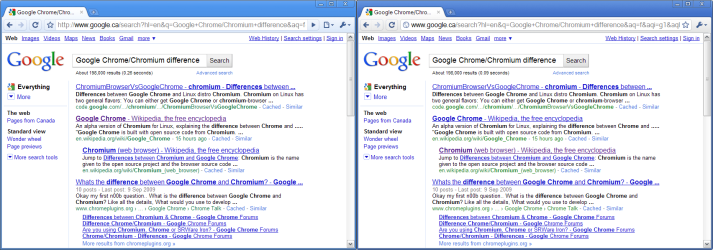
2. Google decided in version 6 to remove the http from all URL's in the Omnibar (Chrome's address box).

3. If you visit a secure webpage, it will show you the https in green with a lock icon beside it any other time it will not be present & show the Black & Grey globe instead.

Check here & you'll see what we mean - https://www.google.com/accounts/Ser...https://www.google.com/accounts/ManageAccount

4. Google updated the UI & consolodated everything from the Page menu into the Wrench menu you now see.

Here a comparison image of Google Chrome V5 (Left) & Google Chrome V6 (Right)
 

Attachments

  • Google_Chrome_and_Chromium.png
    Google_Chrome_and_Chromium.png
    53.6 KB · Views: 53

My Computer

Computer Manufacturer/Model Number
Acer Aspire 5742
OS
Windows 7 Ultimate x64 SP1
CPU
Intel Core i3-370M @ 2.4GHz
Motherboard
Mobile Intel HM55 Express Chipset
Memory
6GB 1333MHz DDR3
Graphics Card(s)
Intel GMA HD
Monitor(s) Displays
15.6" HD Acer CineCrystal LED LCD
Screen Resolution
1366×768
Hard Drives
320GB (5400 RPM) SATA
PSU
65W
Mouse
Microsoft Wireless Optical Mouse 3000
Internet Speed
6Mbps
Other Info
WEI Score: 4.6
Yeah thanks Gilly, i just realised before i came here that that was the case as my uni's site was correctly recognised. Makes you wonder why google doesnt have a certificate and isnt encrypted at all.

Thanks again though
 

My Computer

Computer Manufacturer/Model Number
Acer Aspire Timeline X 5820TG
OS
Windows 7 home Premium x64
CPU
Intel Core i5 480M 2.66Ghz with Turbo Boost up to 2.93Ghz
Memory
4.00GB
Graphics Card(s)
AMD Radeon HD 6550M 2651MB HyperMemory/Intel HD Graphics
Sound Card
Conexant High Definition SmartAudio 221
Monitor(s) Displays
15.6" HD LCD
Screen Resolution
1366x768
Hard Drives
750GB HDD
Mouse
Verbatim Rapier V1
Yeah thanks Gilly, i just realised before i came here that that was the case as my uni's site was correctly recognised. Makes you wonder why google doesnt have a certificate and isnt encrypted at all.

Thanks again though

Do you mean google as goole's search engine?

If, so they actually have encrypted version of it:
https://www.google.com/

notice: httpS
 

My Computer

OS
Windows 7 Ultimate x86 SP1
Back
Top