Google chrome running any hidden process ?

techiesan778

New member
Local time
2:42 AM
Messages
22
Hello Folks,
I came across an issue which is affecting the performance of my system.
After i close chrome, it closes but it is running an undected process in the background
in the form of a service maybe, which does not stop after chrome has stopped.
I have stopped the google update service. I actually come to know about the
hidden process in "TuneUp Program deactivator module" which is a part of the tuneup
utilities (Now AVG Tuneup). I am using Win 7 64 bit.
Please let me know how to disable the hidden process run by chrome.

Regards
 
Last edited:

My Computer

Computer type
PC/Desktop
OS
Windows 7 64-Bit
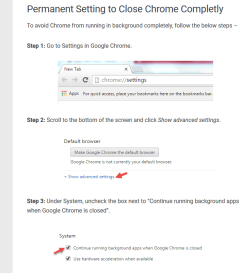
Did you in your system tray on the bottom while chrome is running right click it and uncheck let chrome run in the background? Same setting as settings/system then option "Continue running background apps when Google Chrome is closed"
 

My Computer

Computer type
PC/Desktop
Computer Manufacturer/Model Number
Custom
OS
10 Pro x64
CPU
Ryzen 9 3900X
Motherboard
Asrock x370 Tachi
Memory
64GB(4x16GB) DDR4
Graphics Card(s)
EVGA 1080ti FTW3
Sound Card
ASUS Xonar Essence STX (V4 Bursons), ODAC rev B, NFB-11, O2
Monitor(s) Displays
3xASUS PB278Q/R, Optoma HD142X
Screen Resolution
3x1440p, 1080p
Hard Drives
512GB 850 EVO(OS, Programs)
4TB (Movies)
3TB (Downloads)
3TB (Programs)
1TB HDD (Games)
2x6TB R1 (videos)
PSU
AX760
Case
Fractal Define R5
Cooling
NH-D15S
Keyboard
Massdrop Ctrl with Box Navy's
Mouse
G903, Alioth XXL Mat
Internet Speed
280/40
Antivirus
MBAM, ESET
Browser
Canary 64 Bit
Other Info
I also own a Thinkpad P50 Xeon 4K, X220T, X1C5
Thanks rvcjew, that option which you have suggested is already off in chrome settings.
I have still not been able to locate which is that hidden process.
 

My Computer

Computer type
PC/Desktop
OS
Windows 7 64-Bit
Hi everyone, I do not use Chrome but just read about the settings on a site, do not know if this helps or not.
 

Attachments

  • Capture.PNG
    Capture.PNG
    28.5 KB · Views: 2

My Computer

Computer type
PC/Desktop
Computer Manufacturer/Model Number
ASUS A85XM-A custom build
OS
Windows 10 Pro 64 bit
CPU
AMD A4-5300 APU with Radeon(tm) HD Graphics
Motherboard
ASUSTeK COMPUTER INC. A85XM-A
Memory
8.00 GB
Graphics Card(s)
AMD Radeon HD 7480D
Sound Card
(1) High Definition Audio Device (2) Realtek High Definiti
Monitor(s) Displays
HP W2072a 20 inch Led Backlit Monitor
Screen Resolution
1600 x 900 x 32 bits (4294967296 colors) @ 60 Hz
Hard Drives
TOSHIBA DT01ACA100 SATA Disk Device
Keyboard
Acer
Mouse
Acer
Internet Speed
varies
Antivirus
Windows Defender Antivirus
Browser
Waterfox, Edge
Hi everyone, I do not use Chrome but just read about the settings on a site, do not know if this helps or not.
That is what I just asked them lol, thanks for the help though.
Thanks rvcjew, that option which you have suggested is already off in chrome settings.
I have still not been able to locate which is that hidden process.

You can use Process Explorer to see all the process's on the machine and get a better overview of perhaps what you're trying to nail down.

Process Explorer - Windows Sysinternals | Microsoft Docs
 

My Computer

Computer type
PC/Desktop
Computer Manufacturer/Model Number
Custom
OS
10 Pro x64
CPU
Ryzen 9 3900X
Motherboard
Asrock x370 Tachi
Memory
64GB(4x16GB) DDR4
Graphics Card(s)
EVGA 1080ti FTW3
Sound Card
ASUS Xonar Essence STX (V4 Bursons), ODAC rev B, NFB-11, O2
Monitor(s) Displays
3xASUS PB278Q/R, Optoma HD142X
Screen Resolution
3x1440p, 1080p
Hard Drives
512GB 850 EVO(OS, Programs)
4TB (Movies)
3TB (Downloads)
3TB (Programs)
1TB HDD (Games)
2x6TB R1 (videos)
PSU
AX760
Case
Fractal Define R5
Cooling
NH-D15S
Keyboard
Massdrop Ctrl with Box Navy's
Mouse
G903, Alioth XXL Mat
Internet Speed
280/40
Antivirus
MBAM, ESET
Browser
Canary 64 Bit
Other Info
I also own a Thinkpad P50 Xeon 4K, X220T, X1C5
Hi rvcjew, Sorry about that one, I have not read it through properly, silly me.:D
 

My Computer

Computer type
PC/Desktop
Computer Manufacturer/Model Number
ASUS A85XM-A custom build
OS
Windows 10 Pro 64 bit
CPU
AMD A4-5300 APU with Radeon(tm) HD Graphics
Motherboard
ASUSTeK COMPUTER INC. A85XM-A
Memory
8.00 GB
Graphics Card(s)
AMD Radeon HD 7480D
Sound Card
(1) High Definition Audio Device (2) Realtek High Definiti
Monitor(s) Displays
HP W2072a 20 inch Led Backlit Monitor
Screen Resolution
1600 x 900 x 32 bits (4294967296 colors) @ 60 Hz
Hard Drives
TOSHIBA DT01ACA100 SATA Disk Device
Keyboard
Acer
Mouse
Acer
Internet Speed
varies
Antivirus
Windows Defender Antivirus
Browser
Waterfox, Edge

My Computer

Computer type
PC/Desktop
Computer Manufacturer/Model Number
Custom
OS
10 Pro x64
CPU
Ryzen 9 3900X
Motherboard
Asrock x370 Tachi
Memory
64GB(4x16GB) DDR4
Graphics Card(s)
EVGA 1080ti FTW3
Sound Card
ASUS Xonar Essence STX (V4 Bursons), ODAC rev B, NFB-11, O2
Monitor(s) Displays
3xASUS PB278Q/R, Optoma HD142X
Screen Resolution
3x1440p, 1080p
Hard Drives
512GB 850 EVO(OS, Programs)
4TB (Movies)
3TB (Downloads)
3TB (Programs)
1TB HDD (Games)
2x6TB R1 (videos)
PSU
AX760
Case
Fractal Define R5
Cooling
NH-D15S
Keyboard
Massdrop Ctrl with Box Navy's
Mouse
G903, Alioth XXL Mat
Internet Speed
280/40
Antivirus
MBAM, ESET
Browser
Canary 64 Bit
Other Info
I also own a Thinkpad P50 Xeon 4K, X220T, X1C5
Sorry for this late response as i was busy in other stuff. First, the option suggested by ethel is already
turned off.
The one thing that makes me sure that there is some hidden process is that in TuneUp Program deactivator
chrome is said to be "Enabled" even though i have closed chrome. Process Explorer too unable to see any
chrome process after chrome is closed but Tuneup, i know reports correctly.
 

My Computer

Computer type
PC/Desktop
OS
Windows 7 64-Bit
There are many "hidden allways-on processes" the majors being services that PERMENANTLY look for updates
AV's/Browsers/Search Engines/Email accounts/Add ons(Adobe Flash etc)

not sure about Google/Chrome but within my browser Palemoon via options i can set them to my choice
LET ME CHOOSE


Roy
 

My Computer

Computer type
PC/Desktop
Computer Manufacturer/Model Number
medionl/Aspire 6930G/acer x55a
OS
W7 home premium 32bit/W7HP 64bit/w10 tp insider ring
CPU
E5300 dual core
Motherboard
medion MS7366
Memory
3gb
Graphics Card(s)
Nvidia Geforce 7100 Nforce 630i
Monitor(s) Displays
avixc
Internet Speed
n (isp resticted to 72)
Antivirus
mse/pands
Browser
palemoon
Other Info
Belkin Fd7050 n USB using Railink RT2870 drivers, more upto date
Yes the update service had to be disabled. Thanks guys
 

My Computer

Computer type
PC/Desktop
OS
Windows 7 64-Bit
Back
Top