Google Chrome style speed dial for Firefox

A Guy

Righteous Dude
Guru
VIP
SF Team
Local time
2:55 AM
Messages
33,044
Location
Bay Area
Sugestron Speed Dial allows you to access the 8 websites you have most visited recently right from a new tab page.

Features:
Automatically filled based on your navigation

Open one of the websites using Ctrl + [number of slot position] shortcut.

Websites can be fixed to a position using the green pin button in the speed dial interface, or by clicking with your mouse right button when visiting a website and choosing "Add to speed dial..." to select a slot where it should be fixed.

Remove a website from speed dial by clicking the red button.


Developer Comments

This add-on won't work correctly if you are using any other add-on that uses the new tab page.

https://addons.mozilla.org/en-US/firefox/addon/sugestron-speed-dial/

A Guy
 

My Computer My Computer

Computer type
PC/Desktop
OS
Windows 10 Home x64
CPU
INTEL Core i5-750 Quad-Core 3.37GHz
Motherboard
ASUS P7P55D
Memory
HyperX Fury Black Series 8GB (2 x 4GB) 1866Mhz
Graphics Card(s)
EVGA GeForce GTX 750 Superclocked 1GB 128-Bit GDDR5
Monitor(s) Displays
LG 32MA68HY 32" IPS
Screen Resolution
1920 x 1080
Hard Drives
Samsung 840 Evo 120GB, SEAGATE 500GB Barracuda® 7200.12, SATA 3 Gb/s, 7200 RPM, 16MB cache
PSU
ANTEC TruePower New TP-550, 80 PLUS, 550W
Case
ANTEC Three Hundred Illusion
Cooling
COOLER MASTER Hyper 212 Plus, 4 x 120mm 1 x 140mm Noctua's
Internet Speed
85 + Mbps
Antivirus
Avast
Browser
Vivaldi
I currently have Foxtab and forget about using it all the time - I just use my bookmark bar for the most part

does this have any functions that improve on foxtabs offerings?
 

My Computer My Computer

OS
Windows 7
I'm a Opera user, and it has it built in for a long time, so I can't say, sorry :)

A Guy
 

My Computer My Computer

Computer type
PC/Desktop
OS
Windows 10 Home x64
CPU
INTEL Core i5-750 Quad-Core 3.37GHz
Motherboard
ASUS P7P55D
Memory
HyperX Fury Black Series 8GB (2 x 4GB) 1866Mhz
Graphics Card(s)
EVGA GeForce GTX 750 Superclocked 1GB 128-Bit GDDR5
Monitor(s) Displays
LG 32MA68HY 32" IPS
Screen Resolution
1920 x 1080
Hard Drives
Samsung 840 Evo 120GB, SEAGATE 500GB Barracuda® 7200.12, SATA 3 Gb/s, 7200 RPM, 16MB cache
PSU
ANTEC TruePower New TP-550, 80 PLUS, 550W
Case
ANTEC Three Hundred Illusion
Cooling
COOLER MASTER Hyper 212 Plus, 4 x 120mm 1 x 140mm Noctua's
Internet Speed
85 + Mbps
Antivirus
Avast
Browser
Vivaldi
yeah Opera's speed dial is nice - simple and user friendly, foxtab has a bit too much going on in it's configuration and chrome's is bleh

so, speaking of Opera - why does it seem to be the little known browser with the biggest influence?
 

My Computer My Computer

OS
Windows 7
Hard to say, but I think people are enamored of plugins. Many things plugins allow are already built in to Opera, but many other things are not, and people want that. I personally have been using Opera since it became a free browser, and have tried all the others, and stuck with Opera. I have never had it crash, it's fast, and it does everything I want. To each his own. A Guy
 

My Computer My Computer

Computer type
PC/Desktop
OS
Windows 10 Home x64
CPU
INTEL Core i5-750 Quad-Core 3.37GHz
Motherboard
ASUS P7P55D
Memory
HyperX Fury Black Series 8GB (2 x 4GB) 1866Mhz
Graphics Card(s)
EVGA GeForce GTX 750 Superclocked 1GB 128-Bit GDDR5
Monitor(s) Displays
LG 32MA68HY 32" IPS
Screen Resolution
1920 x 1080
Hard Drives
Samsung 840 Evo 120GB, SEAGATE 500GB Barracuda® 7200.12, SATA 3 Gb/s, 7200 RPM, 16MB cache
PSU
ANTEC TruePower New TP-550, 80 PLUS, 550W
Case
ANTEC Three Hundred Illusion
Cooling
COOLER MASTER Hyper 212 Plus, 4 x 120mm 1 x 140mm Noctua's
Internet Speed
85 + Mbps
Antivirus
Avast
Browser
Vivaldi
yeah Opera's speed dial is nice - simple and user friendly, foxtab has a bit too much going on in it's configuration and chrome's is bleh

so, speaking of Opera - why does it seem to be the little known browser with the biggest influence?

I started using Opera once it became free. One reason I don't use it more often is lack of an AutoCopy. I can't see quadruple clicking to copy stuff to the clipboard. It's asking for CTS. The other is the insistence that the Wand Tool keep the info in an .ini file in clear text. I even wrote a little AutoIt3 hack to encrypt the Wand info when not in use, decrypt it and launch Opera, then encrypt again after Opera closes.

Chromium seems a good compromise. You can use extensions for stuff like AutoCopy while most things you need like Bookmark Sync are built in. With LastPass I don't miss Opera's Wand tool. Plus Chromium is lightning fast getting off the dime.
 

My Computer My Computer

Computer Manufacturer/Model Number
HP Media Center
OS
Windows 7 32 bit
CPU
AMD 5200+ dual core
Memory
2 GB
Graphics Card(s)
NVidia GeForce 6150SE 128 MB
Monitor(s) Displays
CRT
Screen Resolution
1280x1024
Hard Drives
500 GB Sata internal :

SIIG USB 3.0 docking stations w/WD Caviar Black 6 Gb/s drives
Keyboard
PS/2
Mouse
PS/2 Wheel Mouse
Other Info
SIIG USB 3.0 PCIexpress card.
Thanks for posting this :D!
It looks alot better than Chrome to be honest
-Shaun
 

My Computer My Computer

Computer Manufacturer/Model Number
HP
OS
Windows 7 Premium 64bit
Monitor(s) Displays
AOC Display
Screen Resolution
22'inch
Keyboard
HP
Mouse
HP
Internet Speed
Very Fast
When Opera came out with Speed Dial I disabled it. Didn't like the idea of most frequently visited sites just being pasted there. I prefer the Speed Dial for Firefox/Chromium where you pick the icons you want. It only takes a few minutes to set up. Once I have one set up for Chromium I just copy the settings to my other machine since both have the OS on C:

My Bookmarks Bar is all folders with categories of bookmarks. For stuff I just can't remember I have a bookmark that goes to the exported bookmarks.html file so I can search it in the browser. I rarely use the Other Bookmarks folder.
 

My Computer My Computer

Computer Manufacturer/Model Number
HP Media Center
OS
Windows 7 32 bit
CPU
AMD 5200+ dual core
Memory
2 GB
Graphics Card(s)
NVidia GeForce 6150SE 128 MB
Monitor(s) Displays
CRT
Screen Resolution
1280x1024
Hard Drives
500 GB Sata internal :

SIIG USB 3.0 docking stations w/WD Caviar Black 6 Gb/s drives
Keyboard
PS/2
Mouse
PS/2 Wheel Mouse
Other Info
SIIG USB 3.0 PCIexpress card.
?? In Opera you decide which, if any sites go there? It doesn't put your most frequent sites there, at least mine doesn't. FF just copied the idea, it works the same in Opera. A Guy
 

My Computer My Computer

Computer type
PC/Desktop
OS
Windows 10 Home x64
CPU
INTEL Core i5-750 Quad-Core 3.37GHz
Motherboard
ASUS P7P55D
Memory
HyperX Fury Black Series 8GB (2 x 4GB) 1866Mhz
Graphics Card(s)
EVGA GeForce GTX 750 Superclocked 1GB 128-Bit GDDR5
Monitor(s) Displays
LG 32MA68HY 32" IPS
Screen Resolution
1920 x 1080
Hard Drives
Samsung 840 Evo 120GB, SEAGATE 500GB Barracuda® 7200.12, SATA 3 Gb/s, 7200 RPM, 16MB cache
PSU
ANTEC TruePower New TP-550, 80 PLUS, 550W
Case
ANTEC Three Hundred Illusion
Cooling
COOLER MASTER Hyper 212 Plus, 4 x 120mm 1 x 140mm Noctua's
Internet Speed
85 + Mbps
Antivirus
Avast
Browser
Vivaldi
?? In Opera you decide which, if any sites go there? It doesn't put your most frequent sites there, at least mine doesn't. FF just copied the idea, it works the same in Opera. A Guy

I believe that was the default behavior when it was introduced. It filled in automatically. There was a setting to disable most often visited and set the sites manually.

edit: I distinctly remember the automatic behavior was what put me off of it at the beginning.

edit2: Looks like it was something in between. I found an article discussing it. Apparently when you clicked a blank entry it popped up a list of most frequently visited for selection. Oh well, often I don't like something when it's new that I like later. I still use a wired PS/2 wheel mouse. :)

http://cybernetnews.com/opera-reveals-new-speed-dial-featurei-like-it/
 
Last edited:

My Computer My Computer

Computer Manufacturer/Model Number
HP Media Center
OS
Windows 7 32 bit
CPU
AMD 5200+ dual core
Memory
2 GB
Graphics Card(s)
NVidia GeForce 6150SE 128 MB
Monitor(s) Displays
CRT
Screen Resolution
1280x1024
Hard Drives
500 GB Sata internal :

SIIG USB 3.0 docking stations w/WD Caviar Black 6 Gb/s drives
Keyboard
PS/2
Mouse
PS/2 Wheel Mouse
Other Info
SIIG USB 3.0 PCIexpress card.
I believe that was the default behavior when it was introduced. It filled in automatically. There was a setting to disable most often visited and set the sites manually.
edit: I distinctly remember the automatic behavior was what put me off of it at the beginning.
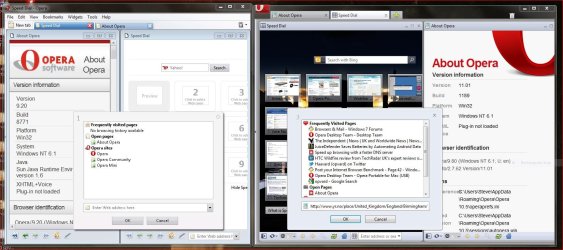
Its pretty much the same now as when it was introduced in April 2007.
You can configure the speedial now to have a pretty background & change the number of speedials up to 25.
You could change the number of speedials in Opera 9.2 by editing the speedial .ini
 

Attachments

  • op9.2 speedial.JPG
    op9.2 speedial.JPG
    175.3 KB · Views: 28

My Computer My Computer

Computer type
PC/Desktop
Computer Manufacturer/Model Number
self build
OS
Windows 7 Ultimate 64 bit
CPU
Intel Core i7 4770K overclocked to 4.7GHz Quad Core Haswell
Motherboard
Asus Z87 Pro (Socket 1150) ATX Motherboard
Memory
16GB Team Group Vulcan Gold 2133MHz
Graphics Card(s)
ATI Radeon HD 7880 Series Display adapter
Monitor(s) Displays
NEC LCD2690WUXi2
Screen Resolution
26" 1920 x 1200
Hard Drives
Samsung 500GB SSD 840 EVO SATA 6Gb/s
Samsung 250GB SSD 840 EVO SATA 6Gb/s
PSU
Corsair AX760 Platinum
Case
Cooler Master HAF X Gaming Tower
Cooling
XSPC RayStorm 750 RS360 Water cooling
Mouse
Razer Death Adder left handed
Internet Speed
126Mb download 11.5Mb up
Antivirus
Avast free
Browser
Opera
Other Info
Main Browser is Opera
Favorite software Adobe Lightroom & Photoshop
best plugins Nik software
Firewall : Private firewall 7
I believe that was the default behavior when it was introduced. It filled in automatically. There was a setting to disable most often visited and set the sites manually.
edit: I distinctly remember the automatic behavior was what put me off of it at the beginning.
Its pretty much the same now as when it was introduced in April 2007.
You can configure the speedial now to have a pretty background & change the number of speedials up to 25.
You could change the number of speedials in Opera 9.2 by editing the speedial .ini

Yeah, but I didn't like the idea it was gathering stats. Esp. something that normally sends out on the network. It's a pita to sniff packets just to see what goes out. Kind of like how they found for awhile chromium was sending UIDs out when it wasn't supposed to. Somehow the code from Chrome back migrated into the Chromium source. Some guy with a packet sniffer, er, sniffed it out.
 

My Computer My Computer

Computer Manufacturer/Model Number
HP Media Center
OS
Windows 7 32 bit
CPU
AMD 5200+ dual core
Memory
2 GB
Graphics Card(s)
NVidia GeForce 6150SE 128 MB
Monitor(s) Displays
CRT
Screen Resolution
1280x1024
Hard Drives
500 GB Sata internal :

SIIG USB 3.0 docking stations w/WD Caviar Black 6 Gb/s drives
Keyboard
PS/2
Mouse
PS/2 Wheel Mouse
Other Info
SIIG USB 3.0 PCIexpress card.
Back
Top