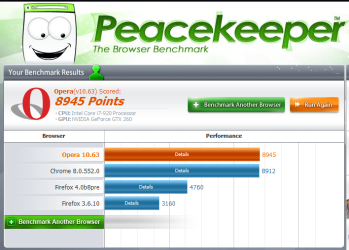
The latest developer preview of Google Chrome 8 has been released through the Chromium Dev channel, giving users a taste of the browser's improved GPU acceleration feature, better stability, and a handful of new labs including Google Instant in the browser's omnibar/omnibox search fields.
Many of the interesting features in this build are deactivated by default, so users must go to About : Labs to switch them on. This includes the GPU Accelerated HTML5 Canvas 2D option, and the Google Instant in Omnibar feature.
Though the feature doesn't do anything yet, "Cloud Print" is now included in the settings menu. This feature was first unveiled last April to answer lingering questions about how the browser-based Chrome OS would handle print jobs.
"Rather than rely on the local operating system (or drivers) to print, apps can use Google Cloud Print to submit and manage print jobs. Google Cloud Print will then be responsible for sending the print job to the appropriate printer with the particular options the user selected, and returning the job status to the app," Google Chrome product manager Mike Jazayeri said at the time.
more
My Computer
At a glance
Windows 7 Professional 64-bitIntel E8400 3GHzKingston PC3-10700H 4GbXFX Radeon HD 5850 BlackEd.
- Computer Manufacturer/Model Number
- self built
- OS
- Windows 7 Professional 64-bit
- CPU
- Intel E8400 3GHz
- Motherboard
- Intel DX48BT2
- Memory
- Kingston PC3-10700H 4Gb
- Graphics Card(s)
- XFX Radeon HD 5850 BlackEd.
- Sound Card
- Asus Xonar DG
- Monitor(s) Displays
- 2x Samsung SM-T220HD 22"
- Screen Resolution
- 1680x1050 on two monitors
- Hard Drives
- OCZ Vertex 2 120gb 3.5" (OS)
Seagate Momentus XT 500gb
Samsung F3 1Tb (games)
2x Samsung F1 1Tb
- PSU
- Thermaltake ToughPower 850w
- Case
- Thermaltake Armor
- Cooling
- Scythe Mugen II
- Keyboard
- Microsoft Comfort Curve USB
- Mouse
- Razer Diamondback 3G
- Internet Speed
- 8128/443