
Google Chrome = Virus?

EchoX860

Super Senior Member
Pro User
VIP
Local time
2:49 PM
Messages
563
Today I installed the latest version of Chrome and within 10 minutes of going surfing with it. Kaspersky tells me I have a Trojan!

rotator.adjuggler

GRRR....

There goes my track record of NO Viruses
 

My Computer

Computer Manufacturer/Model Number
HP p6270z
OS
Windows 7 Home Premium x64
CPU
AMD Athlon II X4 620
Motherboard
Foxconn ALOE (CPU 1)
Memory
4.00GB Dual Channel DDR3 @ 666Mhz (9-9-9-24)
Graphics Card(s)
HD Radeon 4200 (Integrated)
Sound Card
Realtek High Definition Audio
Monitor(s) Displays
HP 2311 (1920x1080) @ 60Hz
Screen Resolution
1920x1080
Hard Drives
488GB Seagate ST3500418AS SCSI Disk Device (RAID)
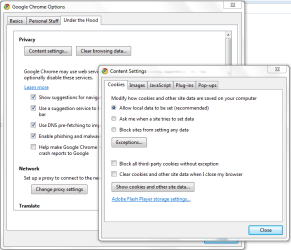
It depends on what sites you visited using Chrome. Also let us know, from where you d/l Chrome application. Is it from Google or any other source or mirror sites.
 

My Computer

Computer Manufacturer/Model Number
MacBook Pro
OS
Lion
CPU
i5
Memory
4GB
Graphics Card(s)
Intel
Screen Resolution
1200x800
Hard Drives
Seagate FreeAgent GO 250GB Ext. HDD
It was from the latest dev thread on here.

I don't recall the website but it was a website I normally visit. I only usually go on 10 websites and none of them gave me an issue with FF.
 

My Computer

Computer Manufacturer/Model Number
HP p6270z
OS
Windows 7 Home Premium x64
CPU
AMD Athlon II X4 620
Motherboard
Foxconn ALOE (CPU 1)
Memory
4.00GB Dual Channel DDR3 @ 666Mhz (9-9-9-24)
Graphics Card(s)
HD Radeon 4200 (Integrated)
Sound Card
Realtek High Definition Audio
Monitor(s) Displays
HP 2311 (1920x1080) @ 60Hz
Screen Resolution
1920x1080
Hard Drives
488GB Seagate ST3500418AS SCSI Disk Device (RAID)
This is what I can say,
Rotator.Adjuggler is a malicious tracking cookie that installs on your computer when you visit certain websites. These are mostly advertisement websites or malicious sites (e.g., Keygen and Warez sites). It secretly installs using pop-up advertisements on these sites and makes its way to your system folders. It may also secretly install through files downloaded and installed from the Internet. Once it has been installed, it launches automatically at computer and browser startup.

So, it is a cookie installed by the website you have visited.

As a precaution, you can deny installing any 3rd party cookie in Chrome.

Go to options, under the hood tab, content settings and check mark block all thrid party cookies without any exceptions. This way, chrome will deny any 3p cookie installing. Once done, click close and clear all browsing data.

Run a full virus scan and keep your computer safe.
 

Attachments

  • chrome.PNG
    chrome.PNG
    23.6 KB · Views: 123

My Computer

Computer Manufacturer/Model Number
MacBook Pro
OS
Lion
CPU
i5
Memory
4GB
Graphics Card(s)
Intel
Screen Resolution
1200x800
Hard Drives
Seagate FreeAgent GO 250GB Ext. HDD
It was from the latest dev thread on here.

I don't recall the website but it was a website I normally visit. I only usually go on 10 websites and none of them gave me an issue with FF.

Could always have been coincidental. I've used Google Chrome since its first public release.

I suggest just getting rid of it with Kaspersky and be weary of that site you got it from when visiting.
 

My Computer

Computer Manufacturer/Model Number
Custom | Whitebox
OS
Windows 7 Ultimate, OS X 10.7, Ubuntu 11.04
CPU
Intel E6750 @ 3.80GHz
Motherboard
Gigabyte GA-EP45-UD3L (Revision 1.1)
Memory
2x2GB & 2x1GB (6GB) OCZ Reaper 1066MHz @ 1080MHz
Graphics Card(s)
EVGA nVidia GTX 260 896mb (216 Core) FTW Edition
Sound Card
Realtek ALC888
Monitor(s) Displays
21" VIZIO TV
Screen Resolution
1680x1050 @ 60Hz
Hard Drives
Western Digital WD6401AALS - 640GB
Hitachi HDP725016GLA380 - 160GB
PSU
Corsair 750W
Case
NZXT Nemesis Elite
Cooling
Thermaltake SpinQ
Keyboard
Logitech Wireless S520
Mouse
Logitech Wireless S520 - Microsoft Wireless Arc Mouse
Internet Speed
Download: 20mbps, Upload: 3mbps

My Computer

Computer Manufacturer/Model Number
self built
OS
Windows 7 Professional 64-bit
CPU
Intel E8400 3GHz
Motherboard
Intel DX48BT2
Memory
Kingston PC3-10700H 4Gb
Graphics Card(s)
XFX Radeon HD 5850 BlackEd.
Sound Card
Asus Xonar DG
Monitor(s) Displays
2x Samsung SM-T220HD 22"
Screen Resolution
1680x1050 on two monitors
Hard Drives
OCZ Vertex 2 120gb 3.5" (OS)
Seagate Momentus XT 500gb
Samsung F3 1Tb (games)
2x Samsung F1 1Tb
PSU
Thermaltake ToughPower 850w
Case
Thermaltake Armor
Cooling
Scythe Mugen II
Keyboard
Microsoft Comfort Curve USB
Mouse
Razer Diamondback 3G
Internet Speed
8128/443
Back
Top