Google Chrome will not open at all

BreanneS

New member
Local time
4:10 PM
Messages
35
Hello. Just today I have encountered a problem with Chrome. Whenever I attempt to run it, it will not open. I looked in task manager and the application is not running nor are its processes. Then some minutes later, Chrome disappeared from my task bar even though I had it pinned. I can still find it in the start menu so I have a shortcut of it on my desktop. The shortcut also doesn't open it. Today Windows did do some updates, but I believe I had this problem before it did the updates. Restarting the computer doesn't resolve the issue. I use Windows 7 Home Premium 64bit and the laptop model is a Dell N7110

I looked in Event Viewer and it did give an application error and appcrash event:

Code:
Event ID 1000 Source: Application Error Level:Error
 
"Faulting application name: chrome.exe, version: 34.0.1847.116, time stamp: 0x533b63bd
Faulting module name: chrome.dll, version: 34.0.1847.116, time stamp: 0x533b5e41
Exception code: 0x80000003
Fault offset: 0x0042860b
Faulting process id: 0x2e24
Faulting application start time: 0x01cf74ff0fc8607f
Faulting application path: C:\Users\Breanne\AppData\Local\Google\Chrome\Application\chrome.exe
Faulting module path: C:\Users\Breanne\AppData\Local\Google\Chrome\Application\34.0.1847.116\chrome.dll
Report Id: 4e4d8899-e0f2-11e3-83f0-4c80932e782b"
 
Under details:
 
 
"chrome.exe34.0.1847.116533b63bdchrome.dll34.0.1847.116533b5e41800000030042860b2e2401cf74ff0fc8607fC:\Users\Breanne\AppData\Local\Google\Chrome\Application\chrome.exeC:\Users\Breanne\AppData\Local\Google\Chrome\Application\34.0.1847.116\chrome.dll4e4d8899-e0f2-11e3-83f0-4c80932e782b"
 
Event ID 1001 Source: Windows Error Reporting Level: Information
 
"Cab Id: 0
Problem signature:
P1: chrome.exe
P2: 34.0.1847.116
P3: 533b63bd
P4: chrome.dll
P5: 34.0.1847.116
P6: 533b5e41
P7: 80000003
P8: 0042860b
P9: 
P10: 
Attached files:
C:\Users\Breanne\AppData\Local\Temp\WER46FF.tmp.WERInternalMetadata.xml
These files may be available here:
C:\Users\Breanne\AppData\Local\Microsoft\Windows\WER\ReportArchive\AppCrash_chrome.exe_1f17bf2b3ba15adc70bded1a6812d4161d2fb0_2edb5199
Analysis symbol: 
Rechecking for solution: 0
Report Id: 4e4d8899-e0f2-11e3-83f0-4c80932e782b
Report Status: 0"
 
Under details:
 
"16626835717APPCRASHNot available0chrome.exe34.0.1847.116533b63bdchrome.dll34.0.1847.116533b5e41800000030042860bC:\Users\Breanne\AppData\Local\Temp\WERB26E.tmp.WERInternalMetadata.xmlC:\Users\Breanne\AppData\Local\Microsoft\Windows\WER\ReportArchive\AppCrash_chrome.exe_1f17bf2b3ba15adc70bded1a6812d4161d2fb0_28bfe7ff0337e401b-e0f4-11e3-83f0-4c80932e782b0"


I also opened the file location: User>AppData>Local>Google>Chrome>Application
and found the debug.log which read:
 
"[1109/092714:WARNING:app_command.cc(47)] Error reading SendsPings value from registry: 2
[1123/093201:ERROR:client_util.cc(307)] Could not find exported function RelaunchChromeBrowserWithNewCommandLineIfNeeded"
 
The other thing I tried, was I copied and pasted the chrome.exe into the latest folder: 34.0.1847.137 to see if that would solve the problem. Then when I try to open Chrome it shows a physical popup error, which warned me about Side by Side:
 
"C:\Users\Breanne\AppData\local\Google\Chrome\Application\34.0.1847.137\Chrome.exe
 
This application has failed to start because its side-by-side configuration is incorrect. Please see the application event log or use the command-line sxstrace.exe tool for more detail."
 
In Event Viewer:
 
Event ID 33 Source: Side by Side Level: Error
 
"Activation context generation failed for "C:\Users\Breanne\AppData\Local\Google\Chrome\Application\34.0.1847.137\chrome.exe". Dependent Assembly 34.0.1847.116,language="*",type="win32",version="34.0.1847.116" could not be found. Please use sxstrace.exe for detailed diagnosis."
 
Under details:
 
"34.0.1847.116,language="*",type="win32",version="34.0.1847.116"C:\Users\Breanne\AppData\Local\Google\Chrome\Application\34.0.1847.137\chrome.exe"

Sorry for the long post. I'm not sure what to make of this.
 
Last edited by a moderator:

My Computer

Computer type
Laptop
Computer Manufacturer/Model Number
Dell INSPIRION N7110
OS
Windows 7 Home Premium 64bit
CPU
Intel Core i7-2670QM CPU@ 2.20GHz 2.20GHz
Memory
6.00GB
Graphics Card(s)
Intel HD Graphics 3000
Antivirus
Trend Micro Titanium Internet Security
Hi and welcome to Sevenforums,
After a brief search how long have you had Trend Micro installed ?
https://support.google.com/chrome/answer/142061?hl=en
Which might be missing from this list but you never know it is a Mcafee knock off ;)
I'd use system restore or undo what ever you did testing,
Clean boot,
http://www.sevenforums.com/tutorials/179159-troubleshoot-application-conflicts-performing-clean-startup.html
Click Start and type in the search box,
msconfig
Click on the suggestion on top or hit the Enter key,
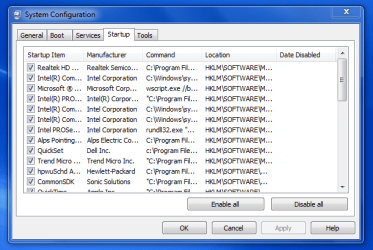
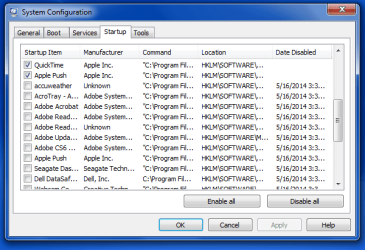
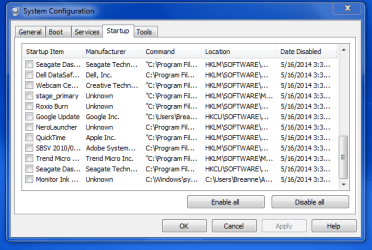
Go to the Startup section and take some screen shots for a complete list,
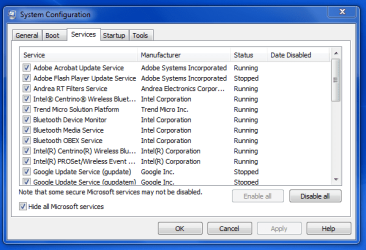
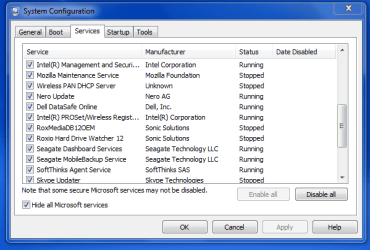
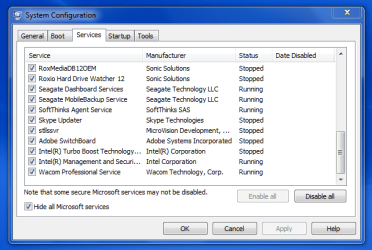
Go to the Services section and on the bottom left Check the box to Hide All Microsoft services,
Repeat the screen shots,
See the links above my signature on how to take and upload screen shots here,
Cheers.

If you want to copy and paste code please use the "#" symbol in your replies it makes for a easier to read reply.
Otherwise paste it into Notepad and upload it as a text attachment ;)
 

My Computer

Computer type
PC/Desktop
Computer Manufacturer/Model Number
Custom assembled by me :}
OS
Win-7-Pro64bit 7-H-Prem-64bit
CPU
i7-5930K 2nd i9-9940x both water blocked VRM's too
Motherboard
ASUS SABERTOOTH X99 2nd ASUS x299 Apex
Memory
Trident-z 3200C14 2nd Trident-z 3600C16
Graphics Card(s)
EVGA 1080ti ftw3 2nd Titan Xp both water blocked
Sound Card
Built-in Realtek
Monitor(s) Displays
1-AOC G2460PG 24"G-Sync 144Hz/ 2nd 1-ASUS VG248QE 24" 144Hz
Screen Resolution
1920 x 1080 144Hz
Hard Drives
2-Samsung M.2 Evo & Evo Plus
2-Samsung 850 EVO 500GB SSD's/ 3-2.5 W.D. Black 1tb-&3-1tb/3-3.5 WD Black 1tb hdd's
PSU
EVGA SuperNOVA 1000-P2 2nd 1200-P2
Case
2-Corsair Obsidian Series 450D Black ATX Mid Tower
Cooling
Custom water loops
Keyboard
Logitech G710+/ 2nd Logitech G910
Mouse
2-RedDragon M901 Perdition 16400 dpi Gaming mouse = wired
Internet Speed
Comcast Ping 19ms 89.31mbps download speed 6.12mbps upload
Antivirus
Malwarebytes Pro/ Superantispyware Pro
Browser
FireFox & Pale moon
Other Info
2nd ASUS X299 Apex/Intel i9-9940x with Custom water loop/7H-Prem-x64/Corsair 450D case/Ram Trident-z 3600C16 4x8gb / Samsung970Evo plus 500gb SSD/Dual ssd EZ swap evo/PSU EVGA SuperNova 1200w-P2 80+Platinum/GPU Titan Xp /8-ML-140 on push-pull on 2-280GTX rads
I've had Trend installed ever since I've had this computer, so it's been a few years. It's never been a problem. Actually, I just did a system restore and for some reason Chrome is fine now, and it's also up to date. It wasn't when it got messed up.

1-3 are the startup items
4-6 are services
 

Attachments

  • Capture.PNG
    Capture.PNG
    20.3 KB · Views: 13
  • Capture2.PNG
    Capture2.PNG
    18.2 KB · Views: 13
  • Capture3.PNG
    Capture3.PNG
    19 KB · Views: 13
  • Capture4.PNG
    Capture4.PNG
    19.3 KB · Views: 13
  • Capture5.PNG
    Capture5.PNG
    19.8 KB · Views: 13
  • Capture6.PNG
    Capture6.PNG
    21.4 KB · Views: 13

My Computer

Computer type
Laptop
Computer Manufacturer/Model Number
Dell INSPIRION N7110
OS
Windows 7 Home Premium 64bit
CPU
Intel Core i7-2670QM CPU@ 2.20GHz 2.20GHz
Memory
6.00GB
Graphics Card(s)
Intel HD Graphics 3000
Antivirus
Trend Micro Titanium Internet Security
Hi thanks good news about system restore :D
I don't see anything but the extra trend micro listing unchecked on startup ?
Cheers.
 

My Computer

Computer type
PC/Desktop
Computer Manufacturer/Model Number
Custom assembled by me :}
OS
Win-7-Pro64bit 7-H-Prem-64bit
CPU
i7-5930K 2nd i9-9940x both water blocked VRM's too
Motherboard
ASUS SABERTOOTH X99 2nd ASUS x299 Apex
Memory
Trident-z 3200C14 2nd Trident-z 3600C16
Graphics Card(s)
EVGA 1080ti ftw3 2nd Titan Xp both water blocked
Sound Card
Built-in Realtek
Monitor(s) Displays
1-AOC G2460PG 24"G-Sync 144Hz/ 2nd 1-ASUS VG248QE 24" 144Hz
Screen Resolution
1920 x 1080 144Hz
Hard Drives
2-Samsung M.2 Evo & Evo Plus
2-Samsung 850 EVO 500GB SSD's/ 3-2.5 W.D. Black 1tb-&3-1tb/3-3.5 WD Black 1tb hdd's
PSU
EVGA SuperNOVA 1000-P2 2nd 1200-P2
Case
2-Corsair Obsidian Series 450D Black ATX Mid Tower
Cooling
Custom water loops
Keyboard
Logitech G710+/ 2nd Logitech G910
Mouse
2-RedDragon M901 Perdition 16400 dpi Gaming mouse = wired
Internet Speed
Comcast Ping 19ms 89.31mbps download speed 6.12mbps upload
Antivirus
Malwarebytes Pro/ Superantispyware Pro
Browser
FireFox & Pale moon
Other Info
2nd ASUS X299 Apex/Intel i9-9940x with Custom water loop/7H-Prem-x64/Corsair 450D case/Ram Trident-z 3600C16 4x8gb / Samsung970Evo plus 500gb SSD/Dual ssd EZ swap evo/PSU EVGA SuperNova 1200w-P2 80+Platinum/GPU Titan Xp /8-ML-140 on push-pull on 2-280GTX rads
Back
Top