Google Drive or Skydrive.

Course there is also Google's TOS to consider... :)

They WILL read and scan everything you put up there... (Maybe skydrive too but with Google you can be sure)

I'm betting that the no trash can thing is merely an extension of the thinking about how Windows networking works in general. There are no trash cans on network drives either. I HAVE accidentally deleted things off a network drive that I didn't want to and had to go to backups to restore. But it's rare. And anything I put on skydrive will not be for backup purposes, it'll be for wide acess so it won;t be possible to "lose" anything with an accidental deletion.

Leave it to MS for consciously crippling the use of their product though... not working on XP etc. that kind of thing will constantly cause them to lose in the long run. Surely SOMEONE there sees that???
 

My Computer

Computer Manufacturer/Model Number
Scratch built
OS
Windows 7 x64 Ultimate
CPU
i7 960
Motherboard
Asus P6X58D
Memory
12 Gig Corsair Dominator
Graphics Card(s)
Nvidia 480
Sound Card
Maudio Delta 44 + breakout box
Monitor(s) Displays
Dell UltraSharp U2410 24in and Samsung 21 dual monitors
Screen Resolution
1920x1200 and 1280x1024
Hard Drives
Primary: Intel X-25M G2 160G SSD
Secondary: Segate baracuda 1.0 TB
HDs in AHCI mode.
PSU
Corasair TX850
Case
Cooler Master HAF
Cooling
Corsair H50
Keyboard
Logitech G15 + N52 game pad
Mouse
Logitech MX518
Internet Speed
15kbs down 4.5kbps up
Other Info
WEI 7.6
CPU & RAM 7.6
Graphics 7.9
Hard disk 7.7
That's Why I never store anything with personal info on any cloud service. I'm not really happy about Google Sync storing my phone contacts on Google Servers but it is very handy if my phone ever breaks or is stolen.
 

My Computer

Computer type
PC/Desktop
Computer Manufacturer/Model Number
Custom Build
OS
Win 7 Ultimate, Win 8.1 Pro, Linux Mint 19 Cinnamon (All 64-Bit)
CPU
Intel i5 4690K
Motherboard
Gigabyte Z97X-UD3H
Memory
Corsair Vengeance LP 32GB DDR3
Graphics Card(s)
MSI GTX 1060 GAMING X 6GB
Sound Card
Onboard
Hard Drives
Samsung 850 EVO 250GB SSD (x2)
Samsung 860 EVO 1TB SSD (x2)
Crucial MX300 525GB SSD
WD Blue 2TB 5400rpm Intellipark Disabled (x2)
PSU
Corsair HX750i
Case
Phanteks Enthoo Pro
Cooling
CM Hyper 212 EVO on CPU, Noctua Redux NF-P14S 1500rpm (x6)
Keyboard
Corsair K70 RGB LUX
Mouse
Corsair Sabre RGB
Antivirus
Avast Free, MalwareBytes, SAS & CryptoPrevent
Browser
Chrome
Other Info
StarTech PEXESAT322I 2 Port PCI-E SATA Card
ASUS PCE-AC56 Dual-band AC1300 Wireless Card
Akasa FC.Six Manual Fan Controller
And a Partridge in a Pear Tree!
Course there is also Google's TOS to consider... :)

They WILL read and scan everything you put up there... (Maybe skydrive too but with Google you can be sure)

I'm betting that the no trash can thing is merely an extension of the thinking about how Windows networking works in general. There are no trash cans on network drives either. I HAVE accidentally deleted things off a network drive that I didn't want to and had to go to backups to restore. But it's rare. And anything I put on skydrive will not be for backup purposes, it'll be for wide acess so it won;t be possible to "lose" anything with an accidental deletion.

Leave it to MS for consciously crippling the use of their product though... not working on XP etc. that kind of thing will constantly cause them to lose in the long run. Surely SOMEONE there sees that???

I read this yesterday on a blog entry I was astonished at what rights Google is asking for. I just can not digest that Google can read, scan, republish, reproduce, edit and can also send the information to anyone they want. I just can not.

YBL
 

My Computer

Computer Manufacturer/Model Number
AMD _(Assembled)_
OS
Dual Booting Windows 7 64-Bit Ultimate Edition and Fedora 16.
CPU
AMD Phenom X4 925
Motherboard
MSI 785g-E53
Memory
4gb DDR3 G.skill RipJaws
Graphics Card(s)
ATI Radeon HD 6770
Sound Card
Realtek
Monitor(s) Displays
Dell IN2020M LED
Screen Resolution
1600*900 20"
Hard Drives
Seagate 500 Gibs
External 320 Gb Western Digital(Got Glitchy)
PSU
Cooler Master
Case
Cooler Master
Cooling
Cooler Master
Keyboard
Logitech K100
Mouse
Razor Death Adder v2 3500 dPi (Razer Goliathus Pad)
Internet Speed
Back to college Internet with Cyberroam X|
SkyDrive will permanently delete the file is deleted from the skydrive(that's online) but when you delete a file from your PC it will sync it to the skydrive rendering it unrecoverable. This seems to me a good feature to fight useless outdated data, on the other side, you may feel a "risk" of losing your data.
Assume you use SkyDrive as a backup. You place all of your digital pictures in your skydrive folder. You get a virus/malware/corruption that damages or deletes the files in this folder. In just a few seconds/minutes, it's replicated to Skydrive. Oopsie.


But what I cannot understand is why and how could anyone accidently(accidentally?) delete an important file. If a multiple users have access to your data then I think its not important enough.
Again, assume it's your digital pictures. It wouldn't be outlandish for you and your spouse and potentially your kids to have access to them. There are many ways a file could be accidentally deleted.
 

My Computer

Computer Manufacturer/Model Number
Self-Built in July 2009
OS
Windows 7 Ultimate x64
CPU
Intel Q9550 2.83Ghz OC'd to 3.40Ghz
Motherboard
Gigabyte GA-EP45-UD3R rev. 1.1, F12 BIOS
Memory
8GB G.Skill PI DDR2-800, 4-4-4-12 timings
Graphics Card(s)
EVGA 1280MB Nvidia GeForce GTX570
Sound Card
Realtek ALC899A 8 channel onboard audio
Monitor(s) Displays
23" Acer x233H
Screen Resolution
1920x1080
Hard Drives
Intel X25-M 80GB Gen 2 SSD
Western Digital 1TB Caviar Black, 32MB cache. WD1001FALS
PSU
Corsair 620HX modular
Case
Antec P182
Cooling
stock
Keyboard
ABS M1 Mechanical
Mouse
Logitech G9 Laser Mouse
Internet Speed
15/2 cable modem
Other Info
Windows and Linux enthusiast. Logitech G35 Headset.

My Computer

Computer type
Laptop
Computer Manufacturer/Model Number
Hewlett-Packard/G62-107SA Notebook
OS
Microsoft Windows 7 Home Premium 64-bit Service Pack 1
CPU
Intel(R) Core(TM) i3 CPU M 330 @ 2.13GHz
Motherboard
Hewlett-Packard 1425
Memory
8 GB DDR3
Graphics Card(s)
Intel(R) HD Graphics
Sound Card
Realtek High Definition Audio
Monitor(s) Displays
Builtin
Screen Resolution
1366 x 768 x 32 bits (4294967296 colors) @ 60 Hz
Hard Drives
250 GB SATA Hard Disk Drive 7200 rpm
2TB Seagate GoFlex USB 2 Drive
1TB Iomega Prestige USB 2 Drive
1.5TB Iomega Prestige USB 2 Drive (Samsung)
2TB WD MyBook Live NAS.
Mouse
Logitech Anywhere MX
Internet Speed
152 Mbs download 10 Mbs upload
Antivirus
Norton 360
Browser
Chrome
SkyDrive will permanently delete the file is deleted from the skydrive(that's online) but when you delete a file from your PC it will sync it to the skydrive rendering it unrecoverable. This seems to me a good feature to fight useless outdated data, on the other side, you may feel a "risk" of losing your data.
Assume you use SkyDrive as a backup. You place all of your digital pictures in your skydrive folder. You get a virus/malware/corruption that damages or deletes the files in this folder. In just a few seconds/minutes, it's replicated to Skydrive. Oopsie.


You certainly have a point, and it is worth considering. (I did not think about viruses as they are not so common to me, I download heavily but I didnt have any virus issues since a year.)They should add a recycle bin.
But lets just say, wouldn't this risk be inevitable in every cloud storage which syncs your files from your machine ? Moreover, you still haven't considered the benefits of the syncing feature. It would certainly help fight you have the newest version of a file/folder, otherwise if you modify it often you may have multiple versions of the same folder in your cloud eating space that you never wanted to(in the recycle bin).
If they add something that sandboxes your files and also a virus scan while uploading then it becomes more safe.

I think most of the people provide a different user accounts for kids/spouse/guests ?

P.S. Also, Google's policy is creepy.
YBL.
 

My Computer

Computer Manufacturer/Model Number
AMD _(Assembled)_
OS
Dual Booting Windows 7 64-Bit Ultimate Edition and Fedora 16.
CPU
AMD Phenom X4 925
Motherboard
MSI 785g-E53
Memory
4gb DDR3 G.skill RipJaws
Graphics Card(s)
ATI Radeon HD 6770
Sound Card
Realtek
Monitor(s) Displays
Dell IN2020M LED
Screen Resolution
1600*900 20"
Hard Drives
Seagate 500 Gibs
External 320 Gb Western Digital(Got Glitchy)
PSU
Cooler Master
Case
Cooler Master
Cooling
Cooler Master
Keyboard
Logitech K100
Mouse
Razor Death Adder v2 3500 dPi (Razer Goliathus Pad)
Internet Speed
Back to college Internet with Cyberroam X|
You certainly have a point, and it is worth considering. (I did not think about viruses as they are not so common to me, I download heavily but I didnt have any virus issues since a year.)
I don't think I have personally had a virus or malware on a personal machine of my own in over 5 years now.

They should add a recycle bin.
But lets just say, wouldn't this risk be inevitable in every cloud storage which syncs your files from your machine ?
Yes, you have that risk. But with a recycle bin or better yet, a previous versions tab, you can recover from a prior point before the problem occurred.

Moreover, you still haven't considered the benefits of the syncing feature. It would certainly help fight you have the newest version of a file/folder, otherwise if you modify it often you may have multiple versions of the same folder in your cloud eating space that you never wanted to(in the recycle bin).
I'm not failing to consider that benefit. I use robocopy with the /MIR switch which mirrors the source to the destination. So, if I delete files from the source, it removes it from the destination. But robocoopy I either run manually or scheduled and control when it fires off. This way, if I made a mistake, it doens't get automatically duplicated.


I think most of the people provide a different user accounts for kids/spouse/guests ?
Yes, my wife has her own account. But it has read/write access to the picture folder. This way, when she takes pictures with the digital camera, she can copy them up to the file server where they belong.
 

My Computer

Computer Manufacturer/Model Number
Self-Built in July 2009
OS
Windows 7 Ultimate x64
CPU
Intel Q9550 2.83Ghz OC'd to 3.40Ghz
Motherboard
Gigabyte GA-EP45-UD3R rev. 1.1, F12 BIOS
Memory
8GB G.Skill PI DDR2-800, 4-4-4-12 timings
Graphics Card(s)
EVGA 1280MB Nvidia GeForce GTX570
Sound Card
Realtek ALC899A 8 channel onboard audio
Monitor(s) Displays
23" Acer x233H
Screen Resolution
1920x1080
Hard Drives
Intel X25-M 80GB Gen 2 SSD
Western Digital 1TB Caviar Black, 32MB cache. WD1001FALS
PSU
Corsair 620HX modular
Case
Antec P182
Cooling
stock
Keyboard
ABS M1 Mechanical
Mouse
Logitech G9 Laser Mouse
Internet Speed
15/2 cable modem
Other Info
Windows and Linux enthusiast. Logitech G35 Headset.
I have system images of my disc but what I want to know is. What happens to your information on skydrive if you have to do a system recovery without a back up.

Can Google or Skydrive read a truecrypt container?
 

My Computer

Computer Manufacturer/Model Number
Samsung rv520
OS
Windows Seven, Ubuntu
CPU
Intel
Graphics Card(s)
Intel
I have system images of my disc but what I want to know is. What happens to your information on skydrive if you have to do a system recovery without a back up.
If you reformat or reimage your machine and reinstall skydrive or google drive, it will see your empty local folder and will copy down the stuff from the cloud to that folder.

Can Google or Skydrive read a truecrypt container?
Well, you can put a truecrypt container into a Google Drive or SkyDrive folder. Then you can mount it when you need it. If you are asking whether Google or MS can see inside of your truecrypt, the answer is NO.
 

My Computer

Computer Manufacturer/Model Number
Self-Built in July 2009
OS
Windows 7 Ultimate x64
CPU
Intel Q9550 2.83Ghz OC'd to 3.40Ghz
Motherboard
Gigabyte GA-EP45-UD3R rev. 1.1, F12 BIOS
Memory
8GB G.Skill PI DDR2-800, 4-4-4-12 timings
Graphics Card(s)
EVGA 1280MB Nvidia GeForce GTX570
Sound Card
Realtek ALC899A 8 channel onboard audio
Monitor(s) Displays
23" Acer x233H
Screen Resolution
1920x1080
Hard Drives
Intel X25-M 80GB Gen 2 SSD
Western Digital 1TB Caviar Black, 32MB cache. WD1001FALS
PSU
Corsair 620HX modular
Case
Antec P182
Cooling
stock
Keyboard
ABS M1 Mechanical
Mouse
Logitech G9 Laser Mouse
Internet Speed
15/2 cable modem
Other Info
Windows and Linux enthusiast. Logitech G35 Headset.
How about the Amazon Cloud Drive ? ;)

YBL.
 

My Computer

Computer Manufacturer/Model Number
AMD _(Assembled)_
OS
Dual Booting Windows 7 64-Bit Ultimate Edition and Fedora 16.
CPU
AMD Phenom X4 925
Motherboard
MSI 785g-E53
Memory
4gb DDR3 G.skill RipJaws
Graphics Card(s)
ATI Radeon HD 6770
Sound Card
Realtek
Monitor(s) Displays
Dell IN2020M LED
Screen Resolution
1600*900 20"
Hard Drives
Seagate 500 Gibs
External 320 Gb Western Digital(Got Glitchy)
PSU
Cooler Master
Case
Cooler Master
Cooling
Cooler Master
Keyboard
Logitech K100
Mouse
Razor Death Adder v2 3500 dPi (Razer Goliathus Pad)
Internet Speed
Back to college Internet with Cyberroam X|
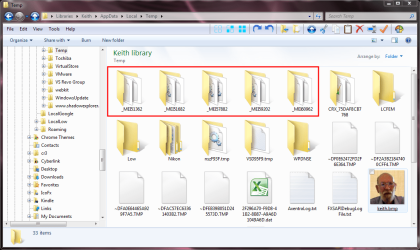
Hows this for poor programming practice. Google drive creates a temporary folder with a random name containing around 20MB off data each time it starts and doesn't delete it. These are the folders on my system created by my starts today. Regular use of CCleaner is indicated.

screenshot170_2012-05-24.png
 

My Computer

Computer type
Laptop
Computer Manufacturer/Model Number
Hewlett-Packard/G62-107SA Notebook
OS
Microsoft Windows 7 Home Premium 64-bit Service Pack 1
CPU
Intel(R) Core(TM) i3 CPU M 330 @ 2.13GHz
Motherboard
Hewlett-Packard 1425
Memory
8 GB DDR3
Graphics Card(s)
Intel(R) HD Graphics
Sound Card
Realtek High Definition Audio
Monitor(s) Displays
Builtin
Screen Resolution
1366 x 768 x 32 bits (4294967296 colors) @ 60 Hz
Hard Drives
250 GB SATA Hard Disk Drive 7200 rpm
2TB Seagate GoFlex USB 2 Drive
1TB Iomega Prestige USB 2 Drive
1.5TB Iomega Prestige USB 2 Drive (Samsung)
2TB WD MyBook Live NAS.
Mouse
Logitech Anywhere MX
Internet Speed
152 Mbs download 10 Mbs upload
Antivirus
Norton 360
Browser
Chrome
I'm actually finding myself liking the feature set of Sugar Sync the best right now. It would be a bit better if they had a linux client, but I can get to the files via the website from Linux, so it's not a complete bust.
 

My Computer

Computer Manufacturer/Model Number
Self-Built in July 2009
OS
Windows 7 Ultimate x64
CPU
Intel Q9550 2.83Ghz OC'd to 3.40Ghz
Motherboard
Gigabyte GA-EP45-UD3R rev. 1.1, F12 BIOS
Memory
8GB G.Skill PI DDR2-800, 4-4-4-12 timings
Graphics Card(s)
EVGA 1280MB Nvidia GeForce GTX570
Sound Card
Realtek ALC899A 8 channel onboard audio
Monitor(s) Displays
23" Acer x233H
Screen Resolution
1920x1080
Hard Drives
Intel X25-M 80GB Gen 2 SSD
Western Digital 1TB Caviar Black, 32MB cache. WD1001FALS
PSU
Corsair 620HX modular
Case
Antec P182
Cooling
stock
Keyboard
ABS M1 Mechanical
Mouse
Logitech G9 Laser Mouse
Internet Speed
15/2 cable modem
Other Info
Windows and Linux enthusiast. Logitech G35 Headset.
I find Skydrive to be very disappointing Microsoft has to come up with something better.
- you cannot upload an actual folder which may contains sub-folders via the web
- the file size limit needs to be increased, 100Mb isn't really usable for video

I'm currently using dropbox and skydrive , haven't tried google drive yet.
Also knowing that all of these are syncing solutions for sure if you delete one folder on one machine it would disappear. Alaways have a decent backup service there's alot that back up to the cloud crashplan, carbonit, mozy, zoolz, blackblaze and many more. All of those services keeps versions to avoid any (accidents).
 

My Computer

OS
Windows 7 Ultimate x32
I used both of them before. Skydrive was for all my office documents and google drive for backup.
 

My Computer

OS
Windows 7 Ultimate x64
Back
Top