Google Earth

BluePeter

Banned
Local time
2:03 PM
Messages
42
Location
Dublin, Ireland
Hi Forum,

Could anyone help me ?
This programme is putting my PC into instability every time I try to access the
street view aspect of same. It produces a "Google Earth has stopped working"
notification every time I try.
I am seriously considering uninstalling it though I would miss it's facilities. I believe there is an Open GL mode now available. Would this be preferable ?
Please help. I have installed the very latest edition of this programme.
 

My Computer

Computer Manufacturer/Model Number
HP Pavilion HDX 18 - 1005EA
OS
Windows 7 Home Premium 64 bit SP1
CPU
Intel(R) Core(TM)2 Duo P8400 @ 2.26GHz 2.27 GHz
Motherboard
?
Memory
4 gb
Graphics Card(s)
NVIDIA GeForce 9600M GT
Sound Card
NVIDIA HDMI Audio
Monitor(s) Displays
NVIDIA Generic PnP 1920 by 1080
Hard Drives
ST 9250827AS (Microsoft) Driver 6.0.6002. 18005
WDC WD 2500BEVT-00SCST0 (Microsoft) " " "
PSU
?
Case
Laptop
Cooling
?
When this message comes up, is there an option to view details of the crash? The crash report should look something like the following:

Code:
  Problem Event Name:    APPCRASH
  Application Name:    googleearth.exe
  Application Version: *.*.****.****
  Application Timestamp:    ********
  Fault Module Name:    googleearth.exe
  Fault Module Version: *.*.****.****
  Fault Module Timestamp:    ********
  Exception Code:    ********
  Exception Offset:    ********
  OS Version: *.*.****.*.*.*.***.**
  Locale ID:    ****
  Additional Information 1: ***************
  Additional Information 2: ***************
  Additional Information 3: ***************
  Additional Information 4: ***************
Google also has a helpful page on Google Earth crashes.
Resolving Crashing and Graphics Issues on Windows Machines - Google Earth Help

You can also try uninstalling the program using CCleaner...
CCleaner - Optimization and Cleaning - Free Download

...and then installing a fresh copy from the link below.
Google Earth
 

My Computer

Computer Manufacturer/Model Number
Custom Build
OS
Windows 7 Ultimate x64/Windows 8 Consumer Preview x64/Ubuntu 11.04
CPU
Intel Pentium Dual Core E6700 3.2GHz
Motherboard
ASUS P5G41T-M LX
Memory
Strontium 8192MB DDR3 1333Mhz
Graphics Card(s)
msi GeForce N560GTX-M2D1GD5 1GB
Sound Card
Realtek HD Audio
Monitor(s) Displays
CHIMEI CMV 221D 22"
Screen Resolution
1680x1050
Hard Drives
Seagate Barracuda LP Green 3.5'' 2TB Internal HDD 5900RPM + WD Elements Desktop 1TB External HDD 7200RPM
PSU
SHAW Viper-1500w Gaming PSU
Case
Black eMaxx ATX Mini Tower Case
Keyboard
Microsoft Wireless Keyboard 1000
Mouse
Microsoft Wireless Optical Mouse 2000
Internet Speed
100GB @ 4.76Mbps
Hello JaidynM,
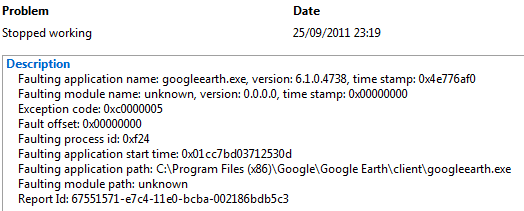
This is the notification I am getting:
 

Attachments

  • Google Earth.PNG
    Google Earth.PNG
    5.8 KB · Views: 17

My Computer

Computer Manufacturer/Model Number
HP Pavilion HDX 18 - 1005EA
OS
Windows 7 Home Premium 64 bit SP1
CPU
Intel(R) Core(TM)2 Duo P8400 @ 2.26GHz 2.27 GHz
Motherboard
?
Memory
4 gb
Graphics Card(s)
NVIDIA GeForce 9600M GT
Sound Card
NVIDIA HDMI Audio
Monitor(s) Displays
NVIDIA Generic PnP 1920 by 1080
Hard Drives
ST 9250827AS (Microsoft) Driver 6.0.6002. 18005
WDC WD 2500BEVT-00SCST0 (Microsoft) " " "
PSU
?
Case
Laptop
Cooling
?

My Computer

Computer Manufacturer/Model Number
HP Pavillion dv5t (generation 1)
OS
Vista 64 bit and 32 bit (SP2)
CPU
Intel(R) Core(TM)2 Duo Processor T9400 (2.53 GHz
Memory
4GB DDR2 System Memory (2 Dimm)
Graphics Card(s)
512 MB NVIDIA GeForce 9600M GT
Monitor(s) Displays
15.4" diagonal WSXGA+ High-Definition HP BrightView Widescre
Screen Resolution
1680 x 1050
Hard Drives
320GB 5400RPM SATA Hard Drive with HP ProtectSmart Hard Drive Protection
Keyboard
Built-in HP
Mouse
Built in - Synaptics TouchPad V6.5 on PS/2 Port
Internet Speed
Max
Other Info
~ Intel Next-Gen Wireless-N Mini-card w/Bluetooth ~ Blu-Ray ROM DVD+/-R/RW ~ Integ. HDTV Hybrid Tuner ~ 12 Cell Battery ~ MS Office (Home Premium) 2007 ~

My Computer

Computer Manufacturer/Model Number
Custom Build
OS
Windows 7 Ultimate x64/Windows 8 Consumer Preview x64/Ubuntu 11.04
CPU
Intel Pentium Dual Core E6700 3.2GHz
Motherboard
ASUS P5G41T-M LX
Memory
Strontium 8192MB DDR3 1333Mhz
Graphics Card(s)
msi GeForce N560GTX-M2D1GD5 1GB
Sound Card
Realtek HD Audio
Monitor(s) Displays
CHIMEI CMV 221D 22"
Screen Resolution
1680x1050
Hard Drives
Seagate Barracuda LP Green 3.5'' 2TB Internal HDD 5900RPM + WD Elements Desktop 1TB External HDD 7200RPM
PSU
SHAW Viper-1500w Gaming PSU
Case
Black eMaxx ATX Mini Tower Case
Keyboard
Microsoft Wireless Keyboard 1000
Mouse
Microsoft Wireless Optical Mouse 2000
Internet Speed
100GB @ 4.76Mbps
You could try posting on the Google Earth forums as Sue has said above. They should have more of an idea of what they're talking about.
Google Earth Help

Before you do this though, could you try downloading an older version of Google Earth? I've linked version 5.2.1.1588 below. See if it crashes in the older version too.
Old Version of Google Earth 5.2.1.1588 Download - OldApps.com
That worked for me on my old computer. I didn't have enough RAM and I don't think my video card was big enough, so installing an older version did it. ;)
 

My Computer

Computer Manufacturer/Model Number
DELLXPS 8300
OS
WIN7 x64 Home Premium SP1
CPU
Intel Core i5-2400 processor(6MB Cache, 3.1GHz)
Memory
8 GB RAM
Hard Drives
1.5TB C Drive
Back
Top