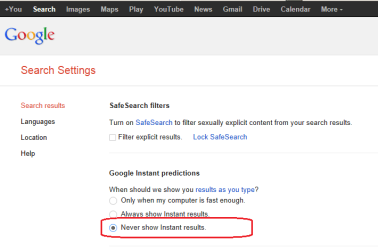
Most browsers allow you to search from the address field (the place where you type the web address). Google does not do instant returns when that field is used (at least not for me).
As far as getting the Google search preferences to stick - I understand that you have tried lots of suggestions, but since I don't know what you have tried, my suggestions might be redundant: Clear out cookies and temp files (uncheck the option to save stuff for bookmarked sites)... then set your Google search preferences again.
What browser are you using?
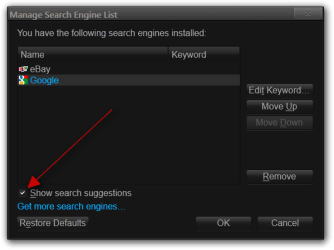
You should have some kind of option to stop search suggestions, I am using Firefox and here's a screenshot of the search engine manager.
Jerry
My Computer
Computer type
Laptop
Computer Manufacturer/Model Number
Sager NP9170
OS
Win 7 Pro x64 / Win 10 Pro
CPU
Intel(R) Core(TM) i7-3630QM CPU @ 2.40GHz
Motherboard
CLEVO P170EM
Memory
12 GB
Graphics Card(s)
(1) Intel(R) HD Graphics 4000 (2) NVIDIA GeForce GTX 675M
Sound Card
(1) Realtek High Definition Audio (2) Intel(R) Display Aud
Monitor(s) Displays
17.3
Screen Resolution
1920x1080
Hard Drives
(1) Samsung 860 EVO 500GB(OS) (1) Samsung 860 EVO 500GB(Data)
Keyboard
Backlite
Antivirus
MSE, Malwarebytes Pro
Browser
Firefox
Other Info
DESKTOP: Custom-built.
OS: Win 10 Pro x64.
CASE: Rosewill R5.
CPU: Intel I5 4670K CPU @ 3.40GHz.
CPU COOLER: Cool Master Hyper 212 EVO.
MOTHERBOARD: Asus Z87-A.
MEMORY: Kingston HyperX 2x4 GB.
GPU: Nvidia Geforce 650 TI.
PSU: Corsair TX750.
DRIVES: (1) Samsung 840 120 GB SSD (2) Western Digital blue 500 GB 7200 RPM.
@Bongo - that would turn off search suggestions - the OP (and I) don't like Google's instant search returns. These happen when using the search field inside Google's web page. e.g. you type insta and you might see returns for instagram:
These are the settings that are not sticking for the OP - it might be a bad cookie thing.