

In 2005, we set out to map the world. Since then we’ve pushed the limits of what a map can do: from helping you easily navigate from point A to B, to helping you explore and get things done in the world. With more than 1 billion people turning to Google Maps to see and explore the world, we're celebrating our 15th birthday with a new look and product updates based on feedback from you.
A fresh look from the inside out
Starting today, you'll see an updated Google Maps app for Android and iOS that gives you everything you need at your fingertips with five easy-to-access tabs: Explore, Commute, Saved, Contribute and Updates.
- Explore: Looking for a place nearby to grab lunch, enjoy live music or play arcade games? In the Explore tab, you’ll find information, ratings, reviews and more for about 200 million places around the world, including local restaurants, nearby attractions and city landmarks.
- Commute: Whether you’re traveling by car or public transit, the Commute tab is there to make sure you’re on the most efficient route. Set up your daily commute to get real-time traffic updates, travel times and suggestions for alternative routes.
- Saved: People have saved more than 6.5 billion places on Google Maps—from the new bakery across town to the famous restaurant on your upcoming vacation. Now you can view all of these spots in one convenient place, as well as find and organize plans for an upcoming trip and share recommendations based on places you've been.
- Contribute: Hundreds of millions of people each year contribute information that helps keep Google Maps up to date. With the new Contribute tab, you can easily share local knowledge, such as details about roads and addresses, missing places, business reviews and photos. Each contribution goes a long way in helping others learn about new places and decide what to do.
- Updates: The new Updates tab provides you with a feed of trending, must-see spots from local experts and publishers, like The Infatuation. In addition to discovering, saving and sharing recommendations with your network, you can also directly chat with businesses to get questions answered.
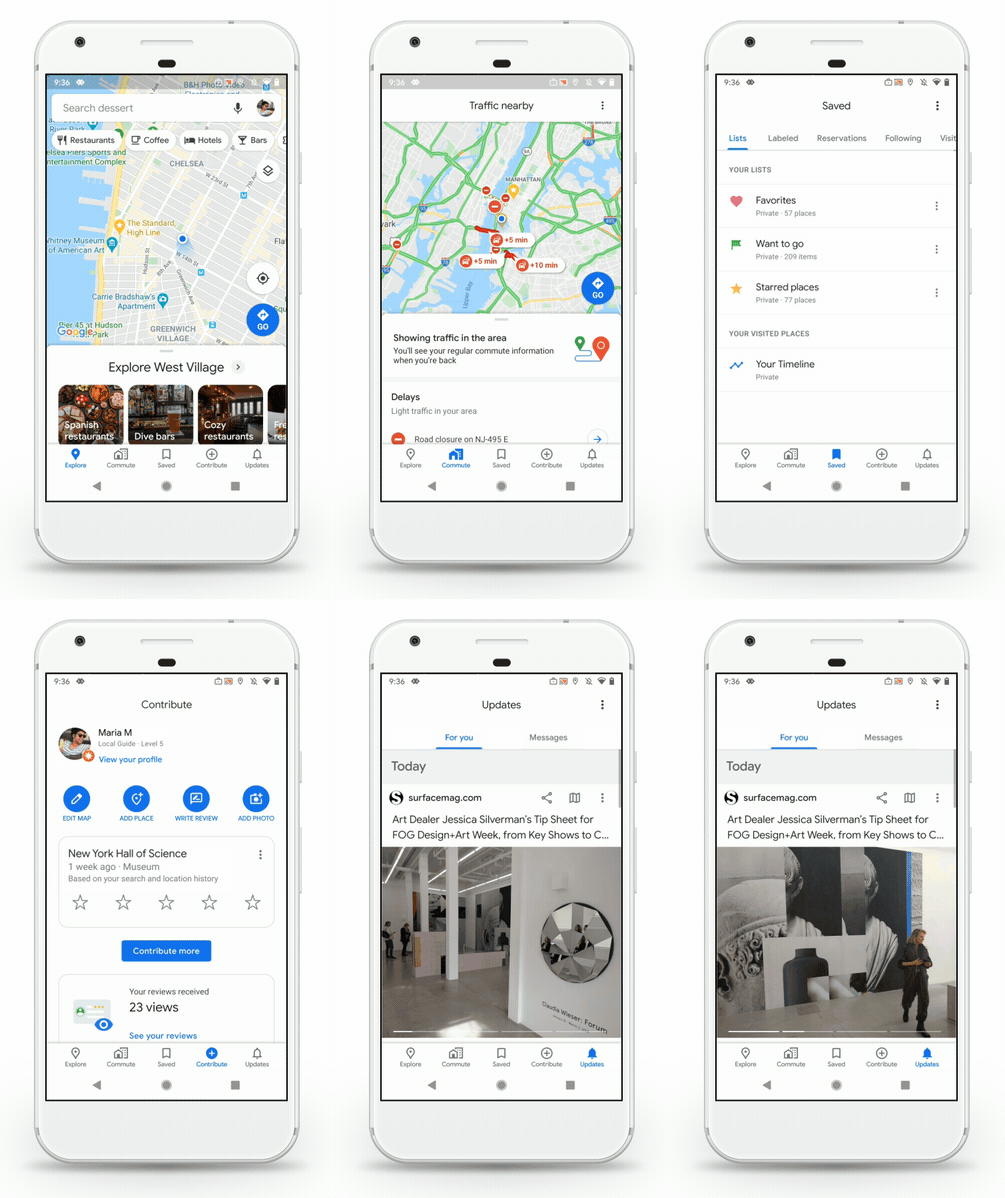
Our five tabs provide easier access to everything you need in Google Maps.
We’re also updating our look with a new Google Maps icon that reflects the evolution we’ve made mapping the world. It’s based on a key part of Google Maps since the very beginning—the pin— and represents the shift we’ve made from getting you to your destination to also helping you discover new places and experiences.
And because we can’t resist a good birthday celebration, keep an eye out for our celebratory party-themed car icon, available for a limited time when you navigate with Google Maps.
Made for you, on the go
We’re constantly evolving to help you get around—no matter how you choose to travel. Our new transit features in the Google Maps app help you stay informed when you’re taking public transportation.
Last year, we introduced crowdedness predictions to help you see how crowded your bus, train or subway is likely to be based on past rides. To help you plan your travels, we’re adding new insights about your route from past riders, so you’ll be able to see important details, such as:
These useful bits of information come from past riders who've shared their experiences and will appear alongside public transit routes when available. To help future riders, you can answer a short survey within Google Maps about your experience on recent trips. We’ll start rolling this out globally in March, with availability varying by region and municipal transportation agency.
- Temperature: For a more comfortable ride, check in advance if the temperature is considered by past riders as on the colder or warmer side.
- Accessibility: If you have special needs or require additional support, you can identify public transit lines with staffed assistance, accessible entrance and seating, accessible stop-button or hi-visible LED.
- Women’s Section: In regions where transit systems have designated women's sections or carriages, we'll help surface this information along with whether other passengers abide by it.
- Security Onboard: Feel safer knowing if security monitoring is on board—whether that’s with a security guard present, installed security cameras or an available helpline.
- Number of carriages available: In Japan only, you can pick a route based on the number of carriages so that it increases your chances of getting a seat.
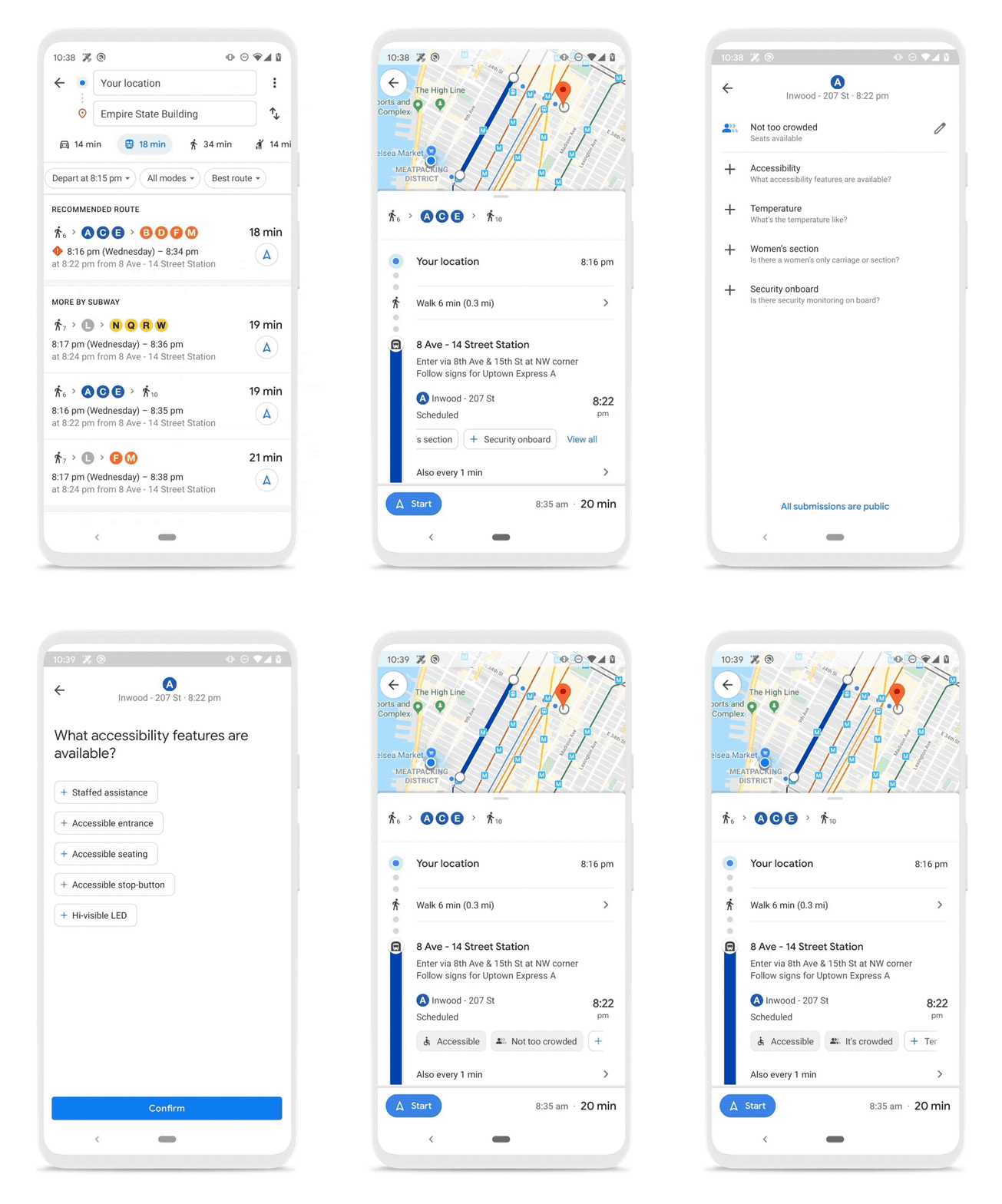
New trip attributes help you make informed decisions about your travel plans.
A sense of direction
Last year, we introduced Live View to help you quickly decide which way to go when you start a walking route with Google Maps. By combining Street View’s real-world imagery, machine learning and smartphone sensors, Live View in Google Maps shows you your surroundings with the directions overlaid in augmented reality.
Over the coming months, we’ll be expanding Live View and testing new capabilities, starting with better assistance whenever you’re searching for a place. You’ll be able to quickly see how far away and in which direction a place is.
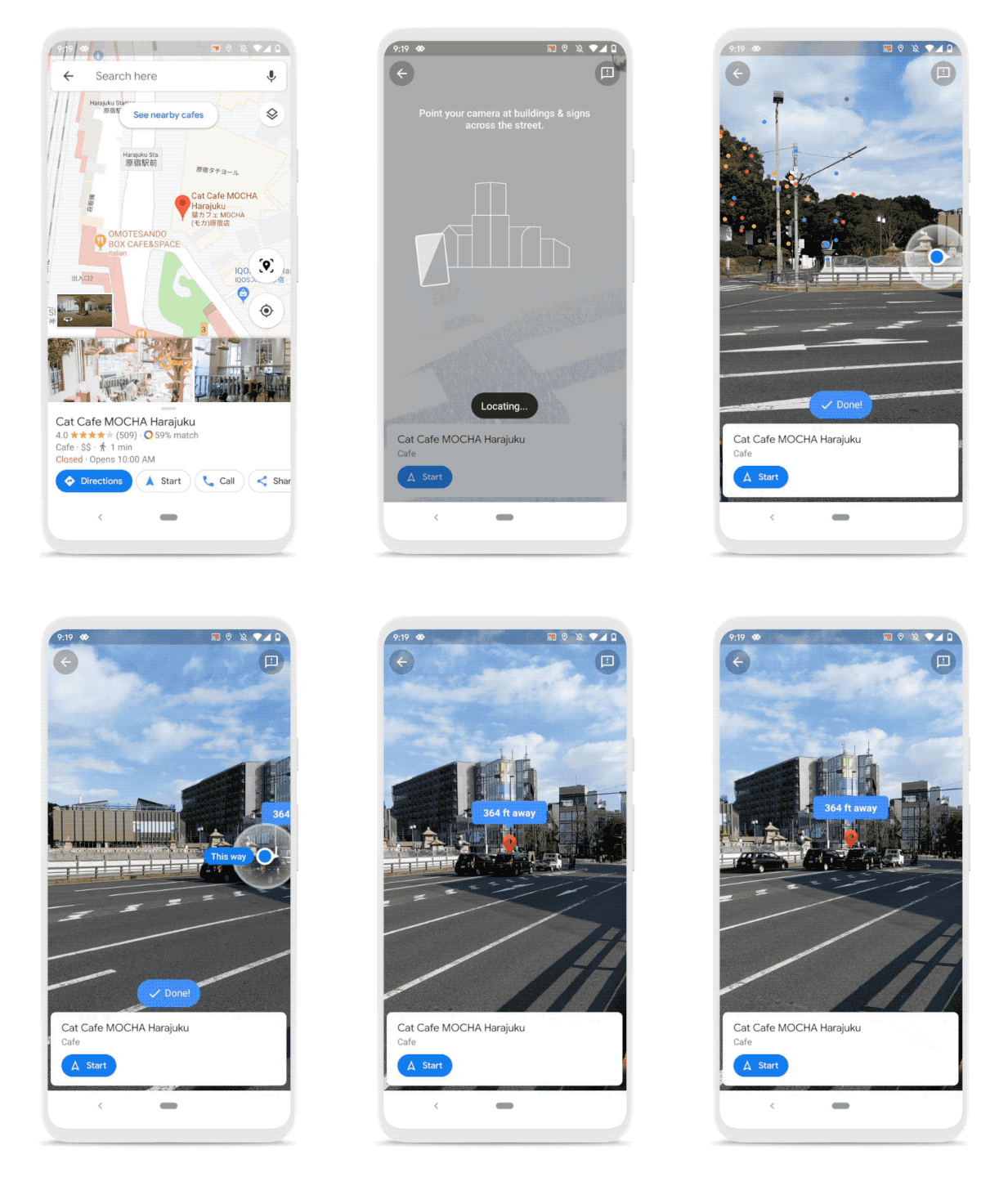
Live View will soon help you get oriented in the right direction in new ways.
A big thank you to everyone for placing your trust in us and for being with us on this wild ride over the last 15 years. See you out there on the journey!
Source: Google Maps is turning 15! Celebrate with a new look and features
My Computer
At a glance
64-bit Windows 11 Pro for WorkstationsIntel i7-8700K OC'd to 5 GHz64 GB (4x16GB) G.SKILL TridentZ RGB DDR4 3600...ASUS ROG-STRIX-GTX1080TI-O11G-GAMING
- Computer type
- PC/Desktop
- Computer Manufacturer/Model Number
- Self built custom
- OS
- 64-bit Windows 11 Pro for Workstations
- CPU
- Intel i7-8700K OC'd to 5 GHz
- Motherboard
- ASUS ROG Maximus XI Formula Z390
- Memory
- 64 GB (4x16GB) G.SKILL TridentZ RGB DDR4 3600 MHz
- Graphics Card(s)
- ASUS ROG-STRIX-GTX1080TI-O11G-GAMING
- Sound Card
- Integrated
- Monitor(s) Displays
- 2 x Samsung Odyssey G7 27"
- Screen Resolution
- 2560x1440
- Hard Drives
- 1TB Samsung 990 PRO M.2,
4TB Samsung 990 PRO PRO M.2,
TerraMaster F8 SSD Plus NAS
- PSU
- Seasonic Prime Titanium 850W
- Case
- Thermaltake Core P3
- Cooling
- Corsair Hydro H115i
- Keyboard
- Logitech wireless K800
- Mouse
- Logitech MX Master 4
- Internet Speed
- 2 Gb/s Download and 100 Mb/s Upload
- Antivirus
- Malwarebyte Anti-Malware Premium
- Browser
- Google Chrome
- Other Info
- Logitech Z625 speaker system,
Logitech BRIO 4K Pro webcam,
HP Color LaserJet Pro MFP M477fdn,
APC SMART-UPS RT 1000 XL - SURT1000XLI,
Galaxy S23 Plus phone


