
Google "More" and "Search Tools" buttons no longer working...
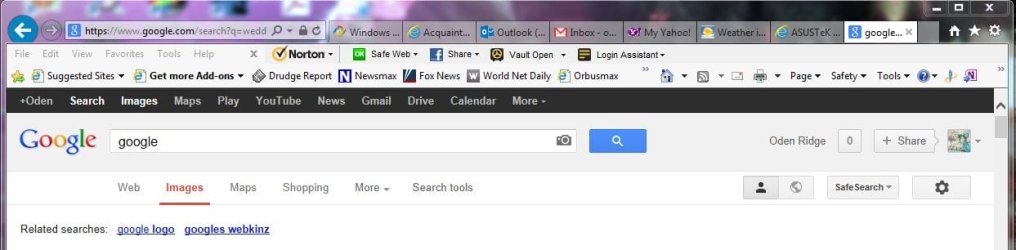
Sometime over the last few weeks Google's "More" drop-down and its "Search Tools" menu items have quit working in IE10. The other buttons that let you select web, images, shopping, etc. still work properly.
The "More" and "Search Tools" buttons get focus when the mouse is over them and they animate when clicked but nothing happens. I have Google Chrome and Apple's Safari installed and the buttons work properly on these browsers.
I've googled it but most of the posts found are about a not-quite-the-same problem of the buttons just working momentarily. At any rate, I tried the fix [clearing cache and cookies] that some of the posters said worked but it didn't make any difference.
I've disabled all of the ad-ons and the problem is still there. I re-enabled each add-on one at a time and tried it but none of them had any effect.
I've disabled my Norton Security Suite and the problem still exists.
I've reset IE and, other than losing all of my saved passwords, it too made no difference.
I think this might be a useful clue.
I noticed that for all of the buttons that are working, when I pass the mouse pointer over them it displays a URL down in the status bar. However, for the two that are not working nothing is displayed. It appears that the controls associated with these buttons either don't exist or are being blocked.
Does anyone have the solution for this, or at least and idea of what the problem is?
Thanks in advance for your help,
Howard
Redmond, WA
Sometime over the last few weeks Google's "More" drop-down and its "Search Tools" menu items have quit working in IE10. The other buttons that let you select web, images, shopping, etc. still work properly.
The "More" and "Search Tools" buttons get focus when the mouse is over them and they animate when clicked but nothing happens. I have Google Chrome and Apple's Safari installed and the buttons work properly on these browsers.
I've googled it but most of the posts found are about a not-quite-the-same problem of the buttons just working momentarily. At any rate, I tried the fix [clearing cache and cookies] that some of the posters said worked but it didn't make any difference.
I've disabled all of the ad-ons and the problem is still there. I re-enabled each add-on one at a time and tried it but none of them had any effect.
I've disabled my Norton Security Suite and the problem still exists.
I've reset IE and, other than losing all of my saved passwords, it too made no difference.
I think this might be a useful clue.
I noticed that for all of the buttons that are working, when I pass the mouse pointer over them it displays a URL down in the status bar. However, for the two that are not working nothing is displayed. It appears that the controls associated with these buttons either don't exist or are being blocked.
Does anyone have the solution for this, or at least and idea of what the problem is?
Thanks in advance for your help,
Howard
Redmond, WA
Attachments
Last edited:
My Computer
At a glance
Windows 7 Professional 64 bitIntel Core Quad Q9550 @ 2.83GHz8 GB Corsair PC-6400Asus Radeon HD 4870
- Computer type
- PC/Desktop
- Computer Manufacturer/Model Number
- Custom built
- OS
- Windows 7 Professional 64 bit
- CPU
- Intel Core Quad Q9550 @ 2.83GHz
- Motherboard
- Asus P5Q-Pro
- Memory
- 8 GB Corsair PC-6400
- Graphics Card(s)
- Asus Radeon HD 4870
- Sound Card
- Integrated
- Monitor(s) Displays
- Dual HP w2007
- Screen Resolution
- 1680 x 1050
- Hard Drives
- 4 x Seagate 2TB
- PSU
- Ultra 650 W Modular
- Case
- ATX Tower
- Cooling
- 4x120 MM Vantec Stealth -- one front, 1 rear & 2 side
- Keyboard
- Microsoft Desktop 3000 wireless
- Mouse
- Microsoft Desktop 3000 wireless
- Internet Speed
- Cable - 25 MB download, 5 MB upload
- Antivirus
- Norton Security Suite (N360 provided by Comcast)
- Browser
- IE 11


